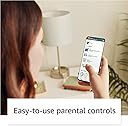
🔥 The ultimate tablet for big kids who want it all — power, safety, and endless fun! 📚
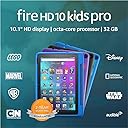
The Amazon Fire HD 10 Kids Pro tablet (2021) is a robust 10.1-inch Full HD device designed for kids aged 6-12, featuring an octa-core 2.0 GHz processor, 3GB RAM, and 32GB internal storage expandable up to 1TB. It includes a kid-friendly case, 1 year of Amazon Kids+ subscription with thousands of ad-free educational and entertainment content, advanced parental controls, safe web browsing, and a 2-year worry-free guarantee, making it the top choice for families seeking a durable, high-performance tablet tailored for growing kids.
| Display | Brilliant 10.1” 1080p display (1920 x 1200) with over 2 million pixels (224 ppi), for bright, vivid image quality. Screen strengthened with aluminosilicate glass. |
| Size | 7.4” x 10.1” x 0.7” (190 mm X 256 mm X 17 mm) |
| Weight | 25.3 ounces (718 grams) |
| CPU & RAM | Octa-core 2.0 GHz with 3 GB of RAM |
| Storage | 32 GB (24.2 GB available to user) of internal storage. Add microSD card for up to 1 TB of additional storage. Some apps may require that they are installed on internal storage. App or feature updates may impact available storage. |
| Battery life | Up to 12 hours of reading, browsing the web, watching video, and listening to music. Battery life will vary based on device settings, usage, and other factors such as web browsing and downloading content. Certain software features or apps may reduce battery life. |
| Charge time | Fully charged from 0 to 100% in approximately 4 hours while connected to the provided (9W) adapter, while device is in standby. |
| Wifi connectivity | Dual-band wifi. Supports public and private wifi networks or hotspots that use the dual-band 802.11a/b/g/n/ac standards with support for WEP, WPA, and WPA2 security using password authentication; does not support connecting to ad-hoc (or peer-to-peer) wifi networks. Wifi 6 (802.11 ax) is not currently supported. Supports 2.4 GHz and 5.0 GHz networks. |
| 4G connectivity | N/A |
| Ports | USB-C (2.0) connector for charging; microSD slot for external storage. |
| Audio | 3.5 mm stereo jack and dual integrated speakers; external volume controls. |
| Sensors | Accelerometer, ambient light sensors |
| Camera specs | 2 MP front-facing and 5MP rear-facing cameras with 720p HD video recording |
| Location services | Location-based services via wifi |
| Available colors | Black, Sky Blue, Doodle, and Intergalactic |
| Microphones | 2 built in microphones |
| Accessibility features | VoiceView screen reader enables access to the vast majority of Fire tablet features for users who are blind or visually impaired using text-to-speech or a connected refreshable braille display. Screen magnifier enables viewers to zoom in and out, and pan around the screen. Fire tablets also include accessibility settings for Closed Captioning, Font Size, High Contrast Text, Color Inversion, Color Correction, and Convert Stereo to Mono audio. (Captions are not available for all content). Learn more about these accessibility features. |
| Subscription | Includes 1 year of Amazon Kids+ for new subscribers. Learn more about this here. |
| Warranty and service | 2-year worry-free guarantee. See more details about this coverage. Use of Fire Kids Pro tablet is subject to Amazon's Conditions of Use and these terms. |
| Included in the box | Fire HD 10 tablet (11th Gen), Amazon Kid-Friendly Case with stand/handle, Amazon power adapter, USB-C (2.0) charging cable, built-in rechargeable battery, and 1-year Amazon Kids+ subscription (auto-renews at applicable rate). |
| Age range | Ages 6+. WARNING: CHOKING HAZARD – Small parts. Not for children under 3 years. |
| Generation | 11th generation, 2021 release |
| Software Security Updates | Learn more about these software security updates. If you already own a Fire tablet, visit Manage Your Content and Devices for information specific to your device. |
L**H
Buy this for your kid instead of the iPad, seriously
This is everything I’ve wanted in a tablet for my child. He has an iPad, but has literally not used it since he got the fire. It’s perfect, here’s why. - The battery life is great. - The fact that it only displays downloads when we are somewhere with no wifi, saves me one million questions. (Amazon should honestly market that in the blurb.) - The parental controls are easy and I can pick and choose which ones he can use. - The expandable storage is so easy. He can take all the photos and videos that he wants and I won’t have to clear them out every couple of weeks to make more room. - We did not download the YouTube Kids app and it’s life changing. No more bizarrely sexist videos of grown woman playing with dolls. However, we still have Blippi. - Love having access to Kids+ - Love all of the traditional Kindle/Prime features (books, music, educational games, non-educational games) - The kickstand is amazing and does not fall over of my child breathes on it. It’s also a great handle. Things to note - My child is 4 1/2 - He’s had an iPad for an embarrassing long time, so he is super comfortable using a tablet. - We had gotten him a kindle fire 7 and just put a kids profile on it a couple years ago and this upgrade makes all the difference in the world. - We are a kindle family, so the interface is not new or foreign to us. Honestly, I love this over the iPad for my kid, because the iPad is not made for children. It is durable, absolutely. However, the fire is made for him and it’s laid out in a way that I know what he is watching and when he goes to download games and videos, they are appropriate.
J**A
Worry free.
This is the 3rd version of the Amazon kid tablets we have bought for our kids. We started a few years ago when we were planning a family trip and taking our then 4 and 2 year old out on a cruise and taking them on a plane ride to get there. We knew we need a kid safe trust worthy device to take. We researched a few and thought about iPad mini but when we seen how in tune and for kids these were made, we were sold. We started with the 7", then upgraded to the 8" and this year we upgraded them to the 10" Pro. It feels great to know they only have access to kid friendly apps and shows. Amazon also links the tablets to your account and sends notification anytime they want to download a new game. You can set the parental control to your liking and the navigation is super simple. These offer anything a kid need ages 2-12 for entertainment and learning for a very affordable price. The build quality, great screen and sound all combine for a awesome gift anytime of the year. You can also log on a set your own profile access and use it your self when needed and completely satisfied with it. The battery life lasts forever and it has a decent camera. I highly recommend for any one looking for a great deal on a fast, well built, all day battery tablet.
P**Y
Absolutely the BEST iPad for CHILDREN!!!
Honestly wanted to write a review for the parents- this is hands down the best tablet-iPad device for kids! MUCH better than an apple iPad! These tablets are specifically designed for kids with GUARDRAILS!!! There’s two options 1 for younger kids and then 1 for kids 6-12 which is what we got. Meaning it’s specifically tailored for a child!!! They put ALL the safety guardrails built into this tablet, so if they listen to music- it’s ONLY the family station- it doesn’t allow EXPLICT language or mature adult content to be streamed to this device. ONLY age approriate games, music, movies. Etc- Also the web- urgh. I do not allow my child to use the internet but for those that do this tablet is amazing becuz it has a web safety built in where it will NOT allow mature adult websites to be accessed etc or show up when browsing. Again ONLY the age appropriate content ( you can even set the age of ur child so it’s even more specific) honestly it’s MUCH better than an iPad where’s there’s absolutely no safety net built in AT ALL expect parental controls- THIS is actually built specifically for the child’s age group your buying it for. THANK YOU Amazon for making an iPad / tablet that’s specifically built for kids!!! And it’s beautiful. Big screen. Beautifully vivid colors, really awesome home screen. awesome case, has a cute keyboard you can purchase separately along with wireless headphones etc! It’s AWESOME. Might get rid of my kids apple iPad all together. THIS is so much safer!!! Battery lasts forever. However as with ALL electronic devices you should still CHECK and monitor EVERYTHING even on this. Just in case. ( you do have option of parental controls if you wanted to custom set everything including time limits, goals. Etc) PS set up was literally a BREEZE!!!! GET THIS and get rid of the aweful IPAD!
C**Y
Affordable, With Drawbacks
This was our 2nd Fire for Kids (and we started with a Nabi way back). I was attracted to it because of the kid-friendly offerings built into it, the parental control, and my existing familiarity with Fire devices. It was affordable and the bumper has kept it safe for over a year. The tablet itself works great, but the Amazon Appstore didn't impress me. We already had Fire TVs and love our Prime membership, but I should have done more research about the specific apps available. There are several apps I let my child use (like a digital drawing app) that Amazon doesn't support even in parent mode. I wish I had purchased a tablet from another platform and just used Google's parental control like we have on their phone because she rarely uses this. Having said that, if you don't have specifics in mind, it is a great tablet with lots of options with the free Kids membership. I liked being able to purchase books from my Prime account and assigning them to her device.
C**A
Perfect for my almost 5 year old!
I have given my daughter Ipads in the past however they weren't kid friendly at all unless she was the only one using it. After buying this Kids tablet, I realized that there are already pre loaded games on it which were perfect and I love seeing my daughter play the variety of kid friendly games. You can have a kids profile, and an adult one. With the adult profile there is a pin so that the kids can't switch over and get into anything they aren't supposed to. The Case is super durable and stands up well on its own which is a big plus because I like for her to work on her ABC Mouse and watch other educational videos. The screen is the perfect size and when people ask me if its an ipad and I tell them that it is a kindle they are shocked and I show them this listing and rave about how good this tablet is. You can manage screen time as well, and you can delete and add which apps will be on the kids profile. I believe you can even do so through an app, which I have not had the time to use yet but I love that considering how busy life gets and how convenient that option is. If you're thinking about getting this tablet, I HIGHLY suggest doing so!
R**N
Like the tablets. Dislike the lack of Setup info for Parental Controls from Amazon.
TL;DR --- The tablets are good. Amazon's interface for setup and for parental controls has not improved since our last experience. I'm a week in to having these in my home and SO irked that the experience hasn't gotten better in the 4 years since our last Kids+ tablet purchase. This is our second experience purchasing the Amazon Fire Kids+ Tablets. We had a previous generation for ~4 years and they were fine for our kiddos at the time. As the kids are now 5 and 7 years old (and the other tablets were sllllowwwwwww), it was time to upgrade! They did some chores to 'earn' them. It was all very cute. I compared and strongly considered going with iPads for ease of use, but the cost savings with Amazon Fire Tablets was substantia due to the trade-in value of the old tablets, the promo they were running for trade-in's and some Amazon credit we had saved up. The screens are a far improvement. The larger size is wonderful, and the kids are enjoying their cool new cases which they got to pick out AND have the stand/handle feature. (My oldest went with the black case and immediately decorated it to make it her own with her sticker collection. Our youngest went with the doodle case and its cute.) I like that you can choose the 'younger' Kids+ interface OR the 'older' Kids+ interface. (That is not mentioned in features on the shopping site here. But, I found it buried in the parental controls as an option yesterday and I'm so glad! My 5 year old is already benefitting from that, as she has not yet started reading, so it's easier for her.) THE GOOD: The screens are good. They actually charge and hold a longer charge than the previous ones. Cool cases. Fun games. In the end, my kids don't care what I do with setup, as long as they get to play a few games they like and get their screentime. They do not know the difference between this and any other brand of tablet. Because, they are 5 and 7. And while they literally have opinions about everything. They do not understand that Amazon is a commercially driven giant who just wants their parents money and mine our family's data as best they can. (I get that I still bought the darn tablets. Life is about balance.) ISSUES WITH AMAZON'S SETUP AND PARENT CONTROLS/DASHBOARD: - Ok... the booklet that comes in the box is a useless waste of glossy paper. It basically says 'hello. turn on tablet. follow setup instructions on screen.' SAVE THE PAPER, AMAZON. It's 2022. At least make it more recyclable so I don't feel bad immediately throwing it in the trash. It makes the 'Climate Pledge Friendly' icon look even more like pedantic greenwashing. Your consumers are smart, Amazon. Get it together. - Setup instructions are SO basic once you open it up on screen. - There is seemingly a 'parental controls' option you can access from the Amazon Fire Tablet that is NOT the same as the Parent Dashboard for Kids+. This is confusing and frustrating. My husband and I are both very 'with it' Millenial types who understand technology. And we were both just getting mad at these cheap tablets. We were very close to sending them back and biting the bullet on the price tag of two iPads... just for our own mental health. - Parental controls are most easily accessed online from a computer. I couldn't access all the options from the tablet or even my phone. - Once you get into the parental controls, there were no explanations of what the info really means. And there were lots of options buried that were just frustrating to find. The 'call' feature all of a sudden DISAPPEARED from my 5 year old's tablet. I searched in all the places, tried 'sharing' the Alexa app from the parent profile to the kid+ profile... nada. I had to get onto Amazon chat to manage getting that found and even that person didn't quite know where to find it at first. They sent me 4 different things to try and I was thissssss close to doing a factory reset mere days after getting the tablet. I found the unchecked box eventually, but good grief. (This is merely ONE of MANY examples of my annoyances with this system interface.) - Speaking of the "CALL" feature... some notes: the video/call quality is roughly ~80% there. It'll do. But, the call features are NOT available if my kids are playing certain games. So, I cannot drop in, announce, or call them from another room to blissfully say, 'hey sweetie... 5 more minutes until dinner.' It constantly tells me they are unavailable. And then when they call anyone else, it drops calls pretty easily. Real life with these tablets is apparently not like the commercials. (Our family has really amazing fiber internet, so it is absolutely the tablet's fault here.) - I had --- of course! --- checked out the FAQ/Help sections on the website first. None of them were helpful. All were basic, generic, etc. Here's what I think Amazon should do: - Add some printing to the box insert that says 'hello. turn on tablet. follow setup instructions on screen.' and cut the useless waste of glossy paper. - Significantly improve the usability of the setup screen and instructions! Parents are busy and do not inherently speak your in-house 'Amazon' language; some of which has changed since the last time we had to truly setup one of these things. Create a setup that literally walks parents through a 'yes/no' of features that they want to set up for their child right then and there with the option to find it EASILY later. Again... It's 2022! Use pictures. Give me info on what you're even talking about; maybe even some 'best practices' of what you intended it to be used like, what other parents might use it like, etc. Just ask me one screen at a time what I want my kids screen-time to be like, if I want them to be able to Call people and who, then tell me HOW to setup that call system (not everyone has or wants an Alexa device in their home - so you have to actually tell us how to set it up if someone doesn't have a device)... like, just do the whole 'explain it to me like I'm five' but respect me like I'm paying for your CEO's space bill thing. Ok? Thanks. - Work on that "call" app in the Kids+ side of things. It's a really cool option for us to give our kids, but it is lacking in interface design and ease. (Why can't I update the robot icon to a picture of the person they are trying to call? Wouldn't that be gosh darn cute and easier for a kid who wants to call that person I've approved for them?!) And it should have the capacity to override - at least as a banner notification - when my kids are in whatever app they're in. Like any other 'phone' call type of thing would be. I'm a busy parent and just want this thing to work long enough so that my kids can stare at it, maybe learn some things, let them call my sister while she's attempting to work from home, and then get dinner started without them asking me for snacks every few minutes. The hardware is there. The software is not. Vent over. I hope this helps at least one person make the best decision for their family. And I hope Amazon hears my pleas before I have to buy another tablet for the kiddos. Be well, all.
J**Y
Worth it! minor issues, definitely recommend
Bought this tablet for my kids, kind of skeptical at first due to a few of the bad reviews about it cracking easily or being really slow. But after 4 months of being used by a 3yr old and a 4 year old, I’d have to say I’m pretty impressed with how much it withstands! they’ve dropped it getting out the car, they’ve dropped it from the table and they’ve even thrown in and not even so much a chip in the screen. As far as speed goes it seems to be fast compared to earlier models, no lagging in the screens during videos or games or learning apps. It definitely operates very smoothly. I would say the only complaints I have is that the volume can get VERY loud and even the volume on the last setting is pretty loud so there’s no real way to have the sound low which as a parent of kids who watch annoying videos sometimes, It can be frustrating. Also it tends to get stuck on an Alexa mode somehow and it’s very very frustrating to get back to the main Home Screen with the apps. It kind of traps you on an Alexa screen until you restart it.
M**Y
Durable, premium quality and literally my son’s favorite thing in the world…..next to me, his mom 🤣
I purchased this last Prime Day (2021). I was not originally going to get the 10 Pro, I was all set to get the 8. However, at the last minute and after comparing the reviews of the two, it was a no brainer. And one year later I am SO pleased with this purchase! The screen quality is beautiful and the durability is much MUCH better than expected - I mean this thing has taken multiple lickins’ and is still kicking’ LOL But the best thing about it is how much enjoyment my son gets. He absolutely loves all the things he can do on it - especially being able to play Roblox. If I had to pick a downside I would say the camera quality isn’t the best and I have found it difficult to navigate. You see the toggling of the profiles is great in theory. But when you have to make changes on the parent profile then toggle to the kid profile to see if you did it properly then toggle back to the parent profile because you didn’t, it really becomes cumbersome and quite frankly irritating. But all in all it’s a great device for school aged kids and I’d recommend everyone who is in the market to definitely buy it over ANY of the competitors, including APPLE and that’s saying a lot because I’m an iPhone girl!
Trustpilot
1 week ago
1 month ago