


Desertcart purchases this item on your behalf and handles shipping, customs, and support to Slovakia.
🚀 Unlock 4K AR brilliance anywhere, anytime!
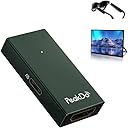
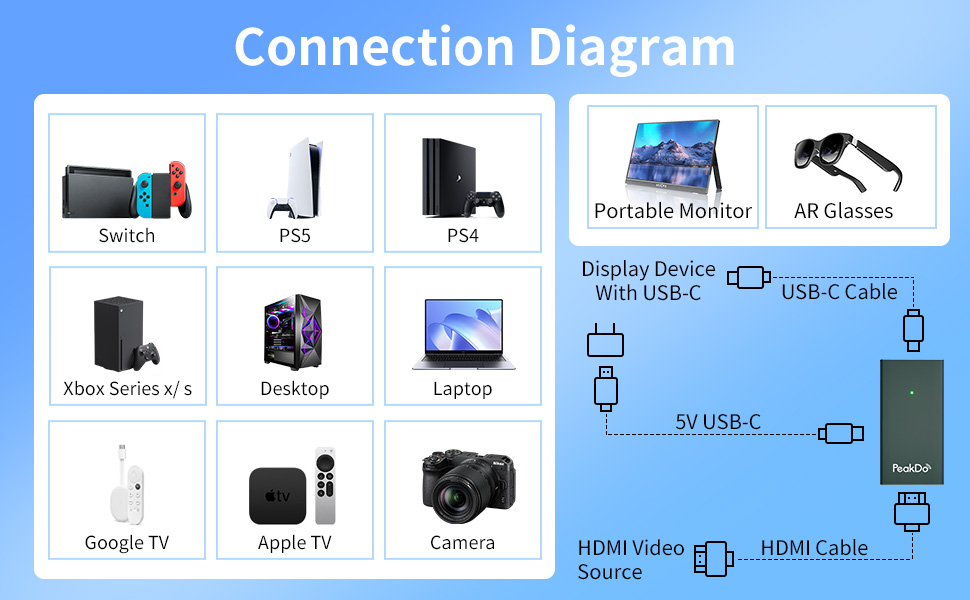
The PeakDo HDMI to USB-C Adapter delivers pristine 4K@60Hz video output with zero latency, designed specifically for AR glasses and portable monitors. Compatible with leading AR brands and major HDMI sources like PS5, Xbox, and PCs, it offers a sleek, lightweight aluminum design for ultimate portability. Plug-and-play functionality ensures hassle-free setup, making it the must-have accessory for immersive, on-the-go augmented reality experiences.




| ASIN | B0C854HLRM |
| Best Sellers Rank | #444 in Audio & Video Connectors & Adapters |
| Brand | PeakDo |
| Color | Dark Green |
| Compatible Devices | Gaming Console |
| Connector Type | HDMI |
| Customer Reviews | 4.2 out of 5 stars 244 Reviews |
| Finish | Hdmi |
| Finish Type | Hdmi |
| Input Voltage | 5 volts |
| Item Weight | 18.14 g |
| Manufacturer | PeakDo |
| Number of Items | 1 |
| Number of Ports | 1 |
| Package Quantity | 1 |
| Power Plug Type | Type B - 3 pin (North American) |
| Unit Count | 1 Count |
| Warranty Description | 1 year |
M**C
Great product, it got a little warm but not hot, great video quality
I thought this product was going to be bulkier, but it is small indeed. People said it gets hot, but in my experience it just got slightly warm. I also read people complained about video quality, but it works great with my XReal One AR glasses (which are 1080p, so the fact that it does not supports 4K does not affect me). I tested it with my XBox Series X and played a 4K game, of course my XReal One glasses do not support 4K (nor this HDMI to USB-C adapter) but the video was as gorgeous as it could be on 1080p. I cannot speak to longevity, I just got it a few days ago, but so far I am very happy with this product. And thanks to its small size, I can even carry it in my AR glasses case along with the cables (see picture, the PeakDo can be seen in the small cables pocket of the glasses case). NOTE: If you are using this with XReal One glasses, make sure to properly configure the audio protocol on the XReal One, otherwise you get video but not audio.
R**N
Perfect companion for Xreal Glasses
I bought this adapter to connect my XReal Glasses to my gaming consoles and streaming sticks. It was difficult finding a compatible HDMI adapter for my AR glasses, but this Peakdo finally settles it. Power- It’s powered by USB-C (5V) and also provides power to my XReal Glasses. I prefer this adapter over the official XReal HDMI adapter because that one is battery powered and only gets 2-3 hours. This Peakdo adapter, I can simply plug into the spare usb port on my Xbox or phone charger. Audio - Passthrough does work using the latest XReal firmware. I can hear the audio directly through the XReals. Tested on Xbox X, Chromecast, Firestick. Video - I haven’t had any display issues. Works perfect and seamlessly. It uses a full-sized female HDMI port, so you can directly connect your chromecast/firestick or use a regular HDMI cable to plug in your gaming console. If you’re using an XReal (or something similar with USB-C Video) and want to hookup your HDMI devices, this adapter is the one to get.
E**E
The PeakDo adapter works but requires a lot of unplugging and replugging
The PeakDo HDMI to USB C Adapter works with my Rayneo Air 3S glasses, but I frequently have to unplug the glasses and replug the glasses to make the display work. The display synchronization seems to get lost during screen resolution changes. When my GMKtec EVO-X2 computer boots up, I see the GRUB boot loader, and then the screen becomes blank. I have to unplug and then replug the Rayneo Air 3S glasses from the PeakDo adapter to see the login screen in Debian Trixie Linux. The PeakDo and Rayneo Air 3S glasses combination also works with the PlayStation 4, but I also have to occasionally unplug and replug the Rayneo Air 3S glasses if I get a blank display. Sometimes I have to unplug the glasses, wait 5 seconds, and then replug the glasses to get the display to work.
T**E
Works with xreal air, with minor caveat
I'll get straight to the point most are looking for: Yes, it fully works with the xreal air. However, there is one caveat to this I encountered. If you get the latest firmware update through official channels, you will be unable to get audio. It's supposed to allow you to hold the brightness down button for 3 seconds to switch into HDMI audio mode, which is what's needed to get audio from this adapter. However, on the latest firmwares, this feature is not working. Unsure if they intentionally broke it to try to get you to use their official adapter or if they are just incompetent at writing firmware. In any case, if you search for "xreal air unofficial firmware changer" on google, you can find a third party site that lets you change to other older firmwares. And sure enough, the one labeled "Windows Beta" works flawlessly with HDMI audio. TL;DR for those using this with xreal air, to get audio working: 1. Search "xreal air unofficial firmware changer" on google, you'll find a site to change firmware. Use "Windows Beta" as your choice during the process 2. Once that firmware is flashed, connect this adapter, get a video signal 3. Hold Brightness Down button for 3 seconds until you hear the beep to switch to HDMI audio mode 4. To change volume, hold the display on/off button for 3 seconds. Do the same to switch back to brightness controls. Once I figured out the workarounds and how it works, it's been a great addition to my xreal to connect PCs and consoles.
F**O
Works with Luma Ultra, but no Spacewalker support
It does give display to my Viture Luma Ultras, but the Spacewalker app (Used for floating stationary display that does not follow head, as well as the 2D to 3D) does not pick up that the glasses are connected to PC. I ultimately got these glasses to play my PC with, and have yet to find a way to get Spacewalker to recognize them without a Native Display Alt Mode Type C Port....Was hoping this was the solution, it was not.
A**S
Works at first but is cheap and will die on you with little use
Works great, at first. Bought these so I could use my ar glasses with my switch 2 and ps5. It worked great the couple weeks that I used it and then it went in the drawer once I got home from a work trip/hotel life which is why I needed it. Fast forward to this week when im out of town for work again and it will not work at all with any outputs or devices. Used for 2 weeks Put away for a while Doesn't work when I tried to use it months later
D**N
Useful
Works perfect with any xr glasses
D**S
Works good
Works great. Convenient size too.
أ**د
انه منتج مضلل وبائع غير فاهم في التقنيه لا انصح بالتعامل معه
جالي منتج اخر غير هذا المنتج الذي طلبته واشتريت غيره من امزون اول امس واستلمته امس
M**D
Highly recommended
Highly recommended
R**Y
Don’t bother if using glasses on PS5
Didn’t work. Used it for my PS5 to attach my rayneo glasses to, screen went blank every few seconds interrupting gameplay.
E**K
Funktioniert gut
Funktioniert gut
P**R
Totally Not What is said
The product is a tiny box which acts as a connector and has no 4k capability. My Xreal glasses show poor video quality with this . Wouldn't recommend
Trustpilot
3 weeks ago
1 month ago