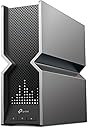
🚀 Elevate your home network to warp speed with Archer BE800!
The TP-Link Archer BE800 is a cutting-edge WiFi 7 tri-band router delivering up to 19 Gbps speeds with 8 high-performance antennas and multi-gigabit wired ports. Featuring an intuitive LED screen, EasyMesh compatibility, advanced security with HomeShield, and VPN support, it’s designed for professionals demanding ultra-reliable, future-proof home networking.


| ASIN | B0C4VZWTM7 |
| Antenna Location | Gaming, Home |
| Antenna Type | Internal |
| Best Sellers Rank | #17,213 in Computers ( See Top 100 in Computers ) #313 in Routers |
| Brand | TP-Link |
| Built-In Media | Power Adapter, Quick Installation Guide, RJ45 Ethernet Cable, Wi-Fi 7 Router Archer BE800 |
| Color | Black/Gray |
| Compatible Devices | Gaming Console, Personal Computer, Smart Television, Smartphone, Tablet |
| Compatible devices | Gaming Console, Personal Computer, Smart Television, Smartphone, Tablet |
| Connectivity Protocol | Wi-Fi, Ethernet, USB |
| Connectivity Technology | Ethernet, USB, Wi-Fi |
| Control Method | Voice |
| Controller Type | App Control |
| Coverage | Whole Home Network |
| Customer Reviews | 4.0 out of 5 stars 510 Reviews |
| Data Transfer Rate | 19 Gigabits Per Second |
| Frequency | 6 GHz |
| Frequency Band Class | Tri-Band |
| Frequency band class | Tri-Band |
| Global Trade Identification Number | 00840030706974 |
| Has Internet Connectivity | Yes |
| Has Security Updates | Yes |
| Is Modem Compatible | Yes |
| Item Dimensions L x W x H | 30.1L x 26.2W x 9.6H centimeters |
| Item Type Name | Router |
| Item Weight | 2.17 kg |
| LAN Port Bandwidth | 2500 Mbps |
| Manufacturer | TP-Link |
| Maximum Upstream Data Transfer Rate | 10000 Megabits Per Second |
| Mfr Part Number | Archer BE800 |
| Model Name | Archer BE800 |
| Model Number | Archer BE800 |
| Model name | Archer BE800 |
| Number of Antennas | 8 |
| Number of Items | 1 |
| Number of Packs | 1 |
| Number of Ports | 7 |
| Operating System | RouterOS |
| Other Special Features of the Product | Access Point Mode, Guest Mode, QoS, WPS |
| RAM Memory Installed | 64 MB |
| Router Firewall Security Level | Advanced |
| Router Network Type | Hybrid |
| Security Protocol | WPA3, WPA2-Enterprise, WPA3-Enterprise |
| Special features | Access Point Mode, Guest Mode, QoS, WPS |
| UPC | 840030706974 |
| Unit Count | 1 Count |
| Wi-Fi Generation | Wi-Fi 7 |
| Wireless Compability | 802.11.be, 802.11ac, 802.11ax, 802.11g, 802.11n |
| Wireless communication standard | 802.11.be, 802.11ac, 802.11ax, 802.11g, 802.11n |
S**N
Speed Monster - Highly Recommended
Were using standard Du's Linksys Modem and reaching 600 mbps, now with TP, i can get 950 mbps. Huge speed gain for me However interface is a bit basic, for flagship model i woud expect more functionality
B**R
Amazing speed and performance.
One of the best wifi 7 routers in the market hands down. Amazing performance, fast speed and strong connection.
N**A
Amazing speed and coverage
My children do not even know that I can't pay rent after buying this because we're outside enjoying our high speed wifi
H**I
راوتر قوي جدا
نعم راوتر يدعم واي فاي 7
B**O
Excelente
Es una excelente marca para router para transmisión a altísima velocidad, es el mejor hoy en el mercado en Enero del 2024.
A**I
اقوي جهاز راوتر جربته الي الان
اقوي جهاز راوتر جربته الي الان بدون مشاكل
G**S
Performance improved after updates and fast.
Updates I changed all my cat 7/8 cables and also call my service provider to check the landline outside. It turned out that the land line was bad so it is not Tp-link devices after all. Also there is also issue with the coaxial cable so it was replaced too. After I updated the firmware everything runs smoothly. I guess the combinations of different issues is making it so hard to diagnose. Worst of all is the main line outside the house which was bad. The only downside is Tp-link vpn feature is not not good compare to some other routers inluding mini and travel routers I purchased before. That is one thing that need to add. Old review Not sure what is going on but it seems like Tp-link routers are getting worst. I have the old tp-link 1800 and later Deco 60x3 (my house). I also bought Deco 50 (on another parent's house) The first old tp-link has a limited bandwidth and needs constant reset once the ram is full due to activity and the Deco 60 has a constant disconnect which is bad for vpn. At first my pfsense is running good as a main router with Deco 60 as a secondary. Not sure what is going on suddenly both routers when acting as main routers are having issues. The pfsense I believe it is due to some addon security which I need to check again. The Deco 60 (3 devices) constant connection drop is bad for my vpn which I am using for work. So, I am trying this BE 800 bust not even 10 minutes later I am having even a worst issue. It couldn't be my cable modem because the Internet is on and this Be800 is not getting the dynamic ip of all sudden. I have to reboot both devices several times to get my connection back. The plus side is it has extra ports in contrast to the Mesh routers Deco 60 but my connection couldn't go beyond 700 Mbps which is original 1 gbps before using this new router. For Deco 50 I don't have any issue with it. I haven't buy a 10gbps switch but I do have server with multiple 10 gbps ports. I was thinking create a virtual pfsense server from it. I replaced all my cables with new cat 8 and few cat 7. Cat 8 is very cheap and on sale, so why no but it doesn't resolve the issue. I will keep it for a week and if the connection is dropping still, I will ask for a replacement. If that doesn't work I will simply refund it. cable modem -> 1st map -> Be800 ->direct connection desktops, laptops and phones -> Slow and Internet drop. When the first map failed or having issue, this second one is obviously having the same issue. 2nd Map -> Be800 -> Deco 60 -> Tp-ink 1800 -> devices -> Be800 -> pfsense -> devices -> Be800 -> switch -> tplink gb switch switch -> router switch -> desktops, laptops
M**I
قوة الاشارة
من افضل الراوترات التي عرفت فقط السعر شوي غالي بس يستاهل وخاصة أهل الاعاب إلكترونية سريع جداً وممتع لمشاهدي الأفلام
P**H
Best MESH I've Run Across in terms of Speed and Stability!
First step is I updated each of the two BE800's firmware. Setup with the phone app was easy. No teachiness really need than the basics in the software walkthrough. Results: I have 2 BE800's set up in a mesh. One on each floor of my house. I can get 1.1Gps (1.3Gbps Comcast line) standing on my deck through several walls & stucco (1.3Gbps inside of my house) where the router is on the other side of the house. In comparison, the Costco Deco 11000, with all 3 in a mesh, only gives me 400-500 Mbps on my deck, with the 3rd node right next to my sliding door. There's a guy on YT that compared the range and speed of the TPLinks (BE, GE lines) and the $650 ginormous "King of Kings" $600+ Asus ROG external antenna router and the BE800 was nearly as good (I got my BE800 on discount for $258/each...VERY happy with their speed and stability.....I just wish the software was deeper for my nerdiness). BTW, there's no "variant" of equipment mix that has allowed me to get consistently above 1Gbps anywhere inside my house aside of 2 BE800's in a mesh. I've tried the Deco 11000 of course, but also 2 BE 550's, and 1 BE550 with a monster GE800. It seems that having the SAME software and EXACTLY SAME(!) equipment offers the best stability and speeds to communicate with each other efficiently in Mesh. The BE800 is larger than the BE550 and thus larger antennas, and I think that it makes a BIG(!) difference. I finally feel I'm getting the internet speed I'm paying for with the two BE800's. So I'm thoroughly pleased. I'll update the review if ANYTHING other than great performance changes. (BTW, I'm not impressed with Mesh tech, per say, when you have 3 or more units. If you're walking around, you're inevitably connected waaaay too long to the weaker node before jumping to the next. That jump will likely result in your VOIP phone call dropping/stalling. It's a PITA. I literally have to turn the device WiFi off and on again so I get the strongest node. In comparison, with the two BE800s and its giant internal antennas, the strong range cuts a huuuge swath and thus no bouncing from node to node...it acts more like an access point for the 2nd floor, without having to manually switch WifI names...which is the whole point of Mesh....the "auto" thing. Also, having 3+ nodes in a chain (i.e. node 3 to 2, 2 to 1 Primary router) causes more lag as the signal speed echoes getting to the main router. A simple test was watching Youtube TV on my deck. When hitting the 10 second backwards button 3 or more times on my Macbook, the stream would lag and wheel starts spinning waaay too long, almost to the point where I have to close the browser. With the 2 BE800's I can quickly hit the backwards button countless times and acts PERFECTLY/SNAPPILY! Again, less "node lag" (and much more speed!) as I have two same model, super powerful units doing the communication! )
Trustpilot
1 month ago
1 month ago