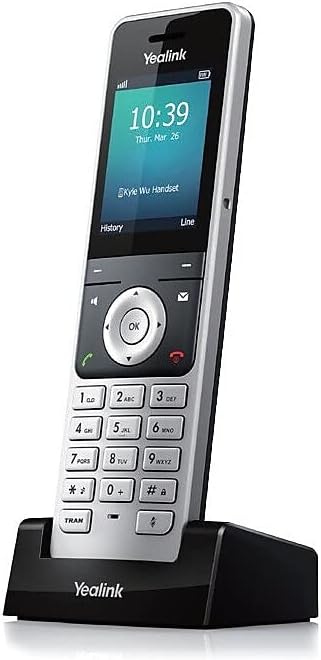
📞 Stay connected, stay ahead — the W56H means business.
The W56H Wireless IP DECT Handset combines a vibrant 2.4" color display with multi-line SIP support, enabling up to 4 simultaneous external calls. Designed for professional environments, it offers robust indoor and outdoor wireless range, full duplex speakerphone, and extended battery life of 30 hours talk time and 400 hours standby. With advanced codecs and security protocols, it ensures crystal-clear, secure communication tailored for the modern manager.


| ASIN | B01FD4YDFU |
| Best Sellers Rank | 5,332 in Electronics & Photo ( See Top 100 in Electronics & Photo ) 3 in VoIP & Skype Phones |
| Guaranteed software updates until | unknown |
| Item model number | YEA-W56H |
| Language | English |
| Manufacturer | Yealink |
| Product Dimensions | 5.59 x 2.03 x 15.24 cm; 272.16 g |
T**R
ring ring ring ring ring (no banana)
Seems a lot of reviews are from people who didn't get the right plug attachment in the box, but they should really mention whom they bought it from so they can name-and-shame! Having bought the separate phone (W56H) and in a bundle with a W60B (H for Handset, B for base), I would recommend NetXL and LiGO to be sure of a UK plug. (This phone is now a little older than newer models, but in terms of functionality, I don't think it's missing anything important. It feels mid-high range in quality and it still gets sold with newer base stations e.g. W70B and hence still continues (at this time) to get firmware updates to work with those. When I recently purchased this phone, this one was up-to-date already :) ) It's got a few wallpapers, ways to display the time, few ringtones to choose from, looks nice and modern. Button tone and backlight are configurable etc. It's quite expensive as handhelds go, but hopefully means it will last a LONG time. It does seem to have decent battery life when it's taken off its charger stand for a couple of weeks. The phone's charger stand can also go in a USB slot. I have to say, for the average person, setting up these phones PROPERLY may be a bit difficult. I'm a linux veteran of 15 years, 25 years of Windows and there are many settings on the server for the base station that I would just never use or aren't fully sure what they do. It's also a VERY GOOD thing that they offer so much customisation and access to settings in a modern age where everything is dumbed down and totally unhelpful to troubleshoot. Short of a massive writeup in an amazon review, I would give my recommendations for a standard UK household who's interested in switching to a VOIP phone. We have two of these phones (one upstairs, one down) and a W60B base station, and linked them to the one VOIP account to ring at the same time. * We currently have a subscription with YAY. They only offer a couple of tiers, but their basic one gives you 100 minutes free to landline and mobiles and you can top credit up. They also have encryption to and from them (not the rest of the way obviously), so you can select TLS-SIP etc but you must set it up yourself with the instructions on their site. Call rates are always better than landline but there may be more appropriate providers for your usecase. Look around. * We have all devices in the house set to fixed LAN IPs. At the very least, you should have your voip's base station fixed (so it doesn't change if anything gets rebooted). That chosen IP in a web browser will give you access to change settings. I think you can make most necessary changes using the phone itself (especially if your setup has an ATA "adapter"), but firmware updates and making house-wide (multiple phones at once) changes would be terribly boring going phone to phone without a centralised management you get in the base station. *For updates, I think the only way is to download the rom from Yealink's site, upload the rom to the base station and then selecti Firmware Update with the phone - I would always recommend updating internet-facing devices or devices that might get important fixes. I was looking for an alternative for this phone, I might go something with a camera/viewscreen to make video calls, but then that's VERY gimmicky when you've got your mobile (which could use a related app), or your desktop/laptop etc with a separate (turnoffable) webcam which will also have a better quality fps and resolution, letting you sit comfortably in your chair rather than straining over a phone lol
S**E
Great Handset
Bought this to supplement an existing installation. Easy to register with the base and worked perfectly first time. Good battery capacity during calls. Can now make a call out while an incoming call is present on the other handset (BT network) or receive two calls on the same line and answer on one handset by toggling calls (Call waiting) or answer on the second handset. Good bright display.
A**N
Doesn’t work without additional purchase of a base unit
Probably a great phone but doesn’t work without a base which you have to get in addition to this phone. Nowhere does it say that on this advert and the returns process is a pain. Avoid.
M**T
works perfect
Works perfect
T**Y
Nice handset, syncs up no problem with the W60B base station
I purchased this as a second handset for my BT Yealink W60B base station. I had to get the base station password from BT, but once I had that it was easy to set up and sync to the base station. Works as a second phone / line or as a 2nd handset on the main line.
E**S
Superb product
Arrived the next day and was in superb condition. Unfortunately, we were not able to configure to our telephone system. As we are in a contract with BT, they have to programe the handset prior to installation, therefore unable to source products elsewhere!!
D**E
Buyer beware
Having purchased the Yealink phones, I thought it would be straight forward installation, connect the line to the router plug in the mains. However the instruction booklet is worse then useless, resulting in having to watch YouTube videos. Three hours latter still unable to find the IP address and other internet functions I gave up. Tried to contact Yealink UK technical help, phone number on a Google search, not recognised, then tried their web page, navigating this site, is impossible, then I found the main agent for Yealink, company called Nimans. Contacting them, I was told unless you’re a business user, we are unable to help, get in touch with the supplier, GREAT CUSTOMER SERVICE. Contacting Amazon they were great, John took ownership of the problem, contacted the supplier of the phones, transferred the call to them, and waited to see if the technical person was able to set up the phone. Within 5 minutes of speaking to the technical person, John entered the conversation, and arrange the item be sent back, he was fantastic. If you buy these phone be aware, you will have to change the IP address, along with other changes to the phone settings on your PC, and it will take at least three hours if you are lucky, if you are technically minded and a computer genius you may be able to connect the phones. Don’t think you will get any technical help from Yealink or the main supplier Nimans, you will not. My advice, if you don’t wont to get stressed out ,waist hours on YouTube and on your PC DON’T BUY
J**N
Great extra handset. Very fast delivery.
Bought as an additional handset for our talk over fibre. Linked within 2 mins - so simple to set up!
J**D
Great product.. sadly was sent from europe with non australian wall plug..
J**C
Excelent Product and service
P**E
Répond parfaitement au besoin
M**L
téléphone IP parfait pour compléter mon kit W60H. Facile à appairer avec la base. Son puissant et de qualité. Je l'ai complété par un casque avec prise jack 3.5 pour les longues conversations.
R**Y
These phones are great. Use them at work
Trustpilot
1 week ago
2 weeks ago