
DOWNLOAD THE APP


Customer Services
Copyright © 2025 Desertcart Holdings Limited
DOWNLOAD THE APP


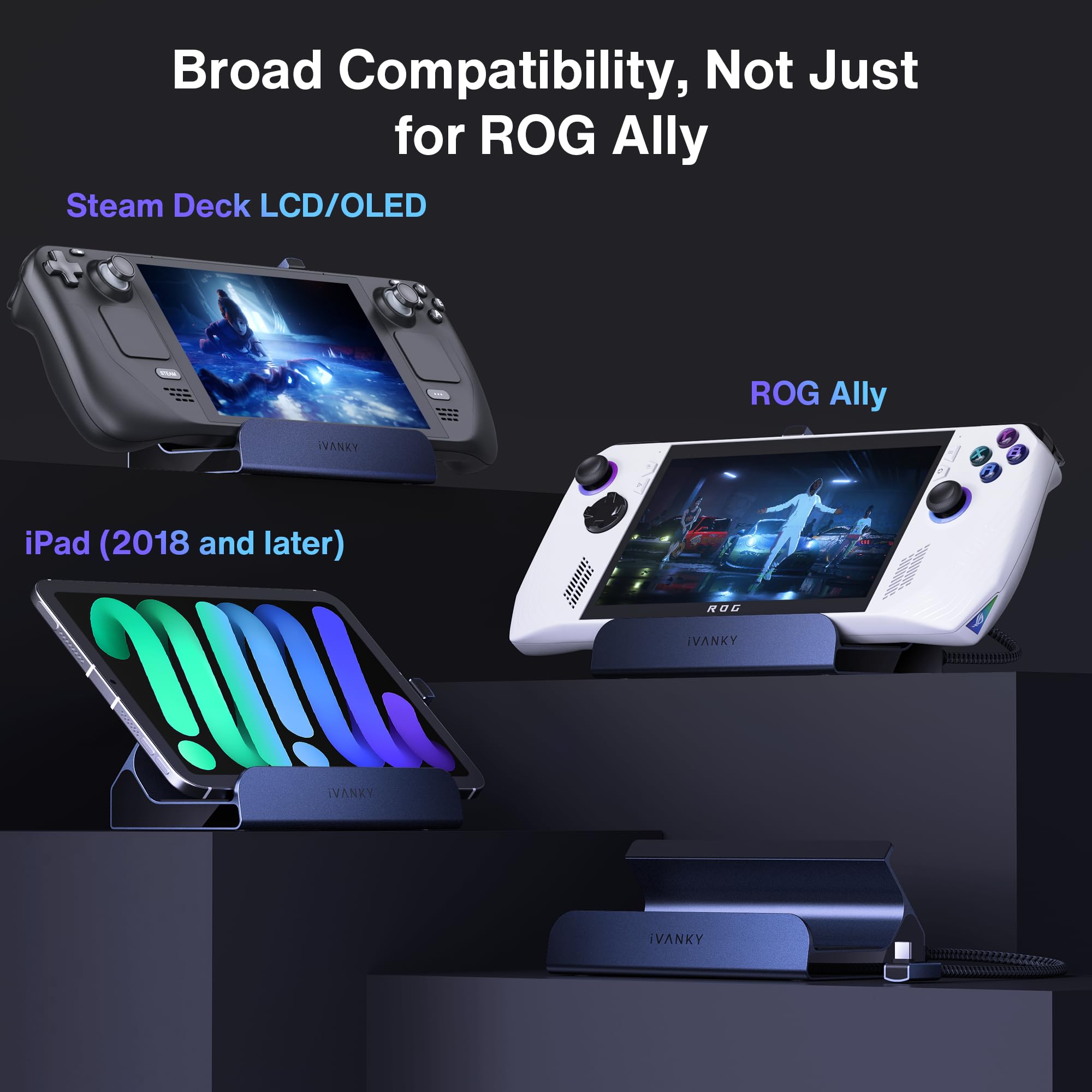


🎮 Elevate your gaming desk: dock smarter, play harder.
The iVANKY 8-in-1 Docking Station is engineered for next-level gaming with 4K@144Hz HDMI 2.1 output, 100W power delivery, and gigabit Ethernet. Compatible with ROG Ally, Steam Deck, Legion Go, and more, it supports 30W Turbo Mode for enhanced performance. This compact hub consolidates multiple USB 3.0 ports and rapid charging into one sleek device, designed to keep your gaming setup powerful, connected, and clutter-free.


| ASIN | B0CKR4K5Y4 |
| Best Sellers Rank | 4,076 in Computers & Accessories ( See Top 100 in Computers & Accessories ) 34 in Docking Stations |
| Guaranteed software updates until | unknown |
| Item model number | VCA23 |
| Manufacturer | iVANKY |
| Package Dimensions | 16.1 x 13.1 x 6.6 cm; 320 g |
S**M
Some USB-PD related issues, but overall functional with the right supply. A good purchase.
This dock is pretty plug and play and feels well made with plenty of IO ports, but there are some important caveats when I tried it with an ROG Ally: When used with a Dell Laptop 130W USB-C supply, it charges the battery, allowing for 30W Turbo mode. When used with the OEM ROG Ally 65W supply, it charges the battery, allowing for 30W Turbo mode. When used with an Anker A1383 65W Power Bank, it charges the battery, allowing for 30W Turbo mode. When used with an Anker 317 100W USB-C supply, it seems to succeed but slowly discharges the battery, while still allowing 30W Turbo mode for some reason. It gives no warning like you see when you use an inadequate supply (the i over the battery indicator in Armory Crate). I'm unsure of why the USB-PD arbitration results in some chargers failing to deliver the required power, but it seems to be an issue of compatibility between the firmware of the supply and the dock itself, as the Anker 317 is capable of charging an ROG Ally directly without issue when there's no dock in the middle. It's also not a matter of overall power, as the 65W capable power bank was able to run the Ally in 30W Turbo while also charging through the dock. This product works, provided you have the right charger (it does work with the stock ROG Ally 65W supply).
A**A
Love the dock
It works well with my Lenovo Legion Go S (the new Legon Go) and it fits well with my busy desk. The setup was easy, too. The ports are great
G**V
Ok for price
Works ok, had a couple of random disconnects
R**R
Brilliant gadget
This docking station works perfectly with the new ROG xbox ally, the ally is a bit taller than the dock so you have to place something under the dock to elevate if you're using it for my purpose it but I don't mind. It has been amazing being able to play it on my tv screen.
M**S
Human review for gamers who travel
This item works very very well with the Rog Ally X. I take both with me when travelling for work. I play alot in hotels. It runs smoothly and fits very comfortably. Buy this for American destinations or if you have a 65w output EU or UK use at home. Fantastic product. Would recommend for gaming away from home.
S**5
Great for the price
The quality of the dock is really impressive for the price and I found set up really easy too. If you’re looking for a cheep rock for your gaming handheld then I recommend this.
K**G
Perfect for Legion Go S.
I bought this dock to use with my Lenovo Legion Go S Z2E and straight out of the box it works perfectly. I use the 65 watt charger that came with my Legion to plug into the dock and the dock itself then allows my Legion to sit nicely in position while its being charged or used. Apart from the port to plug your charger into, there are an additional 3 USB type A ports to plug in peripherals and also an HDMI 2.1 port for monitor connection and an ethernet port should you want to connect to your network wired. I currently use two of the USB ports for a mouse and keyboard and I have also used the HDMI port to hook up to my monitor. In use, the streamlined nature of the Steam OS on the Legion make this a very easy plug-and-play solution. As soon as I power up my device, it connects straight away to my monitor. Things are even better when you go into desktop mode as the OS knows that you are docked and it immediately treats the screen of the Legion as an extended desktop screen! The only thing that I have had to set up 'manually' was the audio output as in docked mode the audio defaulted to the Legions speakers rather than the HDMI audio from my monitor. Overall a highly recommended solution for docking your Legion Go S, especially if you wish to take full advantage of the desktop mode offered by Steam OS.
A**R
Works well, good port selection
Works great for hooking up to a TV over HDMI, network and power at the same time, easily, with just one cable to plug into the steam deck.
A**K
The docking station type C connector to the handheld sometimes stuck and the angle is very annoying when you try to connect or disconnect the station.
J**.
The iVANKY 8-in-1 Docking Station for the ASUS ROG Ally is nothing short of a game-changer. As someone who demands top-notch quality and seamless functionality from my tech accessories, this docking station exceeds expectations on all fronts. Right out of the box, it's clear that iVANKY has put a lot of thought into the design. The sleek and sturdy build is a perfect match for the ROG Ally, complementing its aesthetic while providing a robust and reliable connection. The materials feel premium, and the compact design ensures it doesn’t clutter your workspace—ideal for both gaming and professional setups. Setting it up is a breeze. The plug-and-play functionality ensures that even those who aren't tech-savvy can get it up and running in no time. Simply connect your ROG Ally, and you're ready to go. The docking station instantly expands your device's capabilities with its impressive 8-in-1 features, including HDMI, USB-C, USB-A, SD/TF card readers, and more. Whether you’re connecting to an external monitor, transferring files, or charging multiple devices simultaneously, this dock handles it all with ease. The quality of the connections is impeccable. I experienced zero lag when connecting to my 4K monitor, and data transfer speeds were lightning-fast. The USB-C Power Delivery ensures my devices stay charged without any hiccups, even during intense gaming sessions. Overall, the iVANKY 8-in-1 Docking Station is a must-have accessory for any ASUS ROG Ally owner. It’s a perfect blend of quality, functionality, and ease of use, making it an investment you won’t regret. Highly recommended!
P**A
This dock is simply perfect for my Steam Deck, and based on the description, should support a few other mainstream handheld devices as well. It's just plug-and-play. I plugged the usb-C from the dock to my Steam Deck, plugged in my Steam Deck charger to the dock, plugged the HDMI from my 1440p monitor, and it just worked. One small step I had to do specific for the Steam Deck was to go to the Advanced Display settings and allow Max resolution to whatever your display allows. In my case it was 1440p, but it also showed 4k since my monitor supports 4k even though the true resolution is only 1440p. That's it! Just like that, your handheld device is now essentially a PC.
A**O
Perfecto para convertir a tu Rog Ally en un PC de escritorio súper funcional
N**R
¡¡Hola Amazónic@s!! Estaba buscando un deck para mi futura Steamdeck con , mínimo salida de HDMI, Ethernet y un par de puertos USB tipo A 3.1 ó 3.2, y entrada para cargar por USB C la consola. Y, casualidades de la vida, en Vine me encontré con esta preciosidad de una marca que no conocía, pero que parece que han venido para hacerse un hueco en el mercado por su buen hacer con el producto (siento hacer spoiler, pero al César lo que es del César). He tardado en hacer la review porque quería probarlo bien y, porque, además, la Steamdeck me ha tardado bastante en llegar. Al final, la consola se la he regalado a mi sobrino, que le va a sacar más partido que yo; pero el deck me lo he quedado yo porque es un accesorio imprescindible para mi Mipad 6 y mi Thinkpad Yoga. CONTEXTO DE USO Es un deck que lo he usado y sigo usando con mi Poco F3, Mipad 6 y El Thinkpad Yoga. Con la Steamdeck apenas lo probé, por lo que os he comentado más arriba. Por lo tanto, la experiencia de uso va relacionada con estos dispositivos. He de comentar, antes de seguir con la revisión, que funciona de 10 en la Steam pero el cable le queda justo, apenas tiene margen para moverla, pero creo que le da una estabilidad perfecta a la consola. Probado con: Internet de 1GB de velocidad, usbs 3.1, 3.2, NVME en caja de 10 Gbps con cable USB C a USB C. Cargador hasta 65W de power delivery, teclado, ratón por usb A. PROS: 🟢 Construcción sólida, buena calidad de ajustes y materiales. 🟢 Puerto Ethernet a 1Gbps. Velocidades de Internet a 950 mbps en subida y bajada con mi conexión a internet en el Mipad 6 y en el Yoga. 🟢 Salida HDMI Máxima a 4K 60hz anunciada: en mi Yoga no he conseguido sacar imagen a través del HDMI, con otros dock sí que puedo. Con el Mipad sin problema a 2K 60Hz, lo máximo que da la Tablet. 🟢 La Steamdeck se mantiene firme y sujeta. 🟢 Velocidad esperada en los USB. Hasta máximo de 5 gbps 🟢 La goma que lleva en donde apoya no se ensucia como en otros modelos del mercado. El tiempo dirá si se conserva a sí o empieza a desmoronarse como en otros acabados gomosos, aunque no tiene pinta de que pase. 🟢 Los cuatro pads de goma que lleva en su base, hace que no se deslice en un uso normal (si lo fuerzas, es obvio que sí). 🟢 PWD de 65W máximo que es lo que me da mi cargador: genial. 🟢 No se calienta prácticamente nada. 🟢 4Pads de repuesto para los sticks de la consola. Gran detalle. 🟢 Instrucciones claras, aunque en inglés. 🟢 Cable de conexión Trenzado con cabezal en aleación metálica. CONTRAS: 🔴 No he logrado sacar Imagen a través del HDMI desde Mi Thinkpad Yoga. En resumen, este Ivanky dock para la Steam y consolas parecidas como la ROG Ally y para Pcs o tablets con USB C es un gran accesorio para ampliar las opciones de conexión de tus equipos. Juega en tu TV, añade un mando compatible, un ratón y un teclado y la experiencia aumenta. No se calienta apenas, la construcción es buena y sólida, las conexiones van a las velocidades anunciadas, la construcción del cable trenado es muy buena y agradable al tacto, las gomas de apoyo son de calidad… Un producto de 5 estrellas para mí. Súper contento con el producto. Ivanky ha llegado para quedarse. Espero que os haya sido útil esta revisión. Un abrazo musical!!
Trustpilot
5 days ago
2 days ago