Desertcart purchases this item on your behalf and handles shipping, customs, and support to Slovakia.
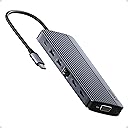
🚀 Elevate your workstation game with the ultimate 14-in-1 power hub!
The Anker 14-in-1 USB-C Docking Station transforms any laptop into a powerhouse workstation with triple display support (two 4K HDMI + 1080p VGA), 14 versatile ports including USB-C, USB-A, Ethernet, SD card slots, and 80W pass-through charging. Designed for professionals craving seamless multitasking and fast data transfer, it supports Mac, Windows, and ChromeOS devices with plug-and-play ease, making it the perfect all-in-one hub to declutter your desk and supercharge productivity.


| ASIN | B0CF52HF6D |
| Best Sellers Rank | #849 in Computers & Accessories ( See Top 100 in Computers & Accessories ) #78 in Laptop Docking Stations |
| Brand | Anker |
| Color | Grey |
| Compatible Devices | Laptops |
| Customer Reviews | 4.2 out of 5 stars 1,381 Reviews |
| Global Trade Identification Number | 00194644155513 |
| Hardware Interface | USB 3.0 Type C |
| Item Highlight | Dual 4K HDMI USB C Docking Station, VGA, 80W Max PD, USBA and USBC Data Ports, for Dell XPS and More (Charger Not Included) |
| Item Weight | 0.13 kg |
| Manufacturer | Anker |
| Mfr Part Number | A83890A1 |
| Minimum Required Operating System Version | Windows 10 |
| Model Number | A8389 |
| Number of Items | 1 |
| Number of Packs | 1 |
| Number of Ports | 14 |
| Total Number of HDMI Ports | 2 |
| Total USB Ports | 6 |
| Total Usb Ports | 6 |
| UPC | 194644155513 |
V**T
Excellent Dock for a Clean, Powerful Workstation Setup
The main reason I purchased the Anker 14-in-1 USB-C Docking Station was to create a single workstation where I can easily swap between my home and work laptops while using the same peripherals—two monitors, keyboard and mouse, audio headset, and several external storage devices. It met all my needs and has exceeded my expectations. It instantly transformed my laptop into a full desktop workstation with just one cable. Setup was completely plug-and-play—no drivers needed—and everything worked right out of the box. Power delivery has been excellent. It charges my laptop while driving all connected accessories without any problems. The build quality is exactly what I expect from Anker—solid, well-designed, and premium-feeling—and it remains stable even under heavy use. That said, there are a few important things to note. Without a power input connected to the hub, only one HDMI output can be used for an external monitor, and the second display must remain on the laptop. I also use a Logitech USB-A Unifying receiver through the hub, and occasionally the keyboard and mouse performance is not as responsive as when plugged directly into the laptop. The dock can also get warm to the touch, which is expected with higher workloads, current, and power draw. Since the beginning of the pandemic, I’ve been working from home and do everything I can to preserve the life of my equipment, including running a small USB-A fan 24/7 to keep things cool—and I’ve had no issues so far. This dock has been a huge productivity boost and keeps my desk clean and organized with a simple single-cable connection. For the price, it offers excellent value compared to many other docks that cost much more and offer less.
M**E
Exactly what I hoped for
Anker products always work out for me. I wanted a small hub since my new laptop doesn't have many ports. This is great. It takes up very little space and accommodates what I use.
J**N
Updated Review
I will leave my original review at the bottom. After I posted my original review Anker reached out and offered me a refund or a replacement. I opted to take the replacement and give them another chance to see if maybe the first one was just a bad unit. I'm an glad that I did. I have put the replacement in place exactly as I had the original and have been running it for a day now. It is driving two 1080p monitors and so far has not had a single issue. I have a 100w Anker USB C charger going into the hub and it is supplying power to my laptop. The hub does get warm to the touch, but that is expected and clearly noted as normal in the documentation. So I can give this a thumbs up and also have to give Anker a big thumbs up for standing by their products and having great customer support. Old Review: I guess I should have looked at the reviews a bit closer. I got this to drive 2 monitors. Something my machine is more than capable of doing with a RTX3070 in it. Hooking it all up the two monitors will come on and work but then randomly drop out. Sometimes it is just one sometimes it is both. They go black and stay blank. Sometimes they come back after a second. Sometimes they stay gone till I unplug the hub and plug it back in. The device is getting plenty of power as it is connected to an Anker 100w usb c power supply. In addition to the going blank, I have also noticed watching videos that now the video will get out of sync with the video on the monitors. This is very disappointing.
T**R
Gets really hot when charging
Worked great for a few months - then all my screens shut off and it no longer works. Would get really hot with the USB-C pass-through power (or Power Delivery) so I think that finally killed it. Update - Reached out to Anker and they replaced it under warranty. Great customer service. Love Anker
I**E
Defective
I just got a brand-new Asus Vivobook S14 with Intel Core Ultra 7, 32 GB of memory, 1 TB storage. I have two (an Asus and a Samsung) 1920 x 1080 displays and an older Dell (1280 x 1024) display using VGA or DVI-HDMI cable. I used to connect the Asus laptop to the Asus display and the old Dell display using another Anker USB C hub with one ethernet port and one 1 HDMI port for the Dell display. The Asus display connected to the laptop using a built-in HDMI port. This old three-display setup worked well. When I received this new Anker four-display device, I first connected the Dell (via DVI-HDMI cable) to one HDMI port and the Asus display to the other HDMI port. After a short moment, the Dell display started going off and on. The interval was around 15 - 20 seconds. Windows still showed the laptop connected to two external display. I thought the DVI-HDMI cable may be incompatible with this new hub, so I used a VGA-VGA cable to connect to the VGA port on the hub. I then connected two other displays to the two HDMI ports. I only got visual on the laptop, the Asus, and the Dell displays. The Samsung display was dark. When I selected the option to extend the laptop display to the 4th display (Samsung), the Samsung display showed the visual, but the laptop display went dark. In other words, I only got three displays at once, not four. I checked the photos on the product page again and confirmed that the unit should have shown different visuals on all four (laptop, Dell, Asus, and Samsung) displays. By the way, I was unable to screw the two VGA cable thumbscrews to the device. It appears the holes were too deep inside the unit so the screws could not reach them. I have been using a bunch of Anker products. This one damaged Anker's reputation for sure.
E**G
Works perfectly, reasonable price AND IT'S AN ANKER PRODUCT
Before I retired I had a company high-end business Windows laptop with a physical docking station which made life much easier. Recently I bought a mid-range Windows laptop for which there is no physical docking station marketed; after doing some research I found that the Anker 14-in-1 hub meets my needs. I paired the hub with an Anker 100W charger (https://www.amazon.com/gp/product/B0C1FZWT8M/ref=ppx_yo_dt_b_asin_title_o03_s00?ie=UTF8&th=1) and found that the hub + charger do the job perfectly. No more monitor flickering off and on like my previous cheap hub, Anker has a well-deserved reputation for quality products. Comments: 1) The hub runs a little warm, but never too hot to touch, apparantly the metal enclosure acts a heat sink. 2) One minor con: the USB C cable to the computer is very short, it may not reach if you want to hang the computer on the wall or even under the table. 3) Don't be put off by the name of the wall charger "Mac Book Pro Charger", it works fine with Windows machines. 4) I am running 2 monitors at 1920x1080 with no probelms at all but I haven't tried 4K yet.
P**3
Works but having issues with powering a laptop
Bought this to setup a new laptop for my sister. The plan was to keep the laptop lid closed as she has a small space to setup the laptop in an amoire with an external monitor in another section. So happy that it had a VGA connector as she had a older monitor that was connected to her previous machine with VGA. All her peripherals worked great in including her mouse, keyboard, printer, external HD, and speakers. Unfortunately, when first booting up the laptop with the laptop power supply plugged into the PD USB C port on the dock, the computer will say that there isn't enough wattage and to use a higher wattage power supply. Not sure why it is saying that as the product description says it will pass through 100W and the laptop power supply is 65Wa. To be fair, in the product description they do say, "elect a wall charger that is at least 20W more powerful than your device's original charger." Now being that is a brand new laptop, I just used the power supply that came with the laptop. Be forewarned. Most users are not looking to purchase another power supply if they already have the one that came with their laptop. This is a show stopper because if my sister needs to reboot the machine because of an update which did happened yesterday, she will just get a black screen. She has to undock the machine, hit ESC to get past the message, log into the machine, then close the lid and redock to get her display to come up on the external monitor. It will wake up from sleep just fine but if she turns off or reboots the laptop, she has to do the whole disconnect, open the lid, get into the machine and then redock. She is not very technical so don't want to put her through this. I'm sure if we are able to leave the laptop open or was using a small desktop machine, the dock will work fine. We use OWC powered docks at work and they work fine so will probably swap out the Anker dock with a spare Lenovo dock I have that supplies up to 135W of power. So for our particular needs, the dock will not work for us but should work for most folks.
S**A
FANTASTIC for using multiple VGA displays with PC that doesn't support VGA
I have DUAL VGA monitor setup that I could no longer use when a bought a new laptop with HDMI ports only. The hub was a perfect solution plus providing several handy additional USB ports for earbuds, phones etc. I never turn my new laptop off because its cooling fans never run when I am not using it . . . so the laptop has no moving parts when not in use. I had to replace my older Thinkpads that were running for several years without turning them off because they couldn't be upgraded to the current version of Windows 11 so NO MORE UPDATES from Microsoft. My only concern with the Anker docking station is that it runs fairly warm when the computer is ON but not in use. Wondering if it will last for several years at its elevated temperature. OVERALL, THIS ANKER PRODUCT IS FANTASTIC.
M**R
Anker USB C Hub
It is an excellent product and works very well.
D**E
ok
En temps et en heure, Ok.
M**G
Great connectivity
As the title says, great connection. I connect my laptop to this which charges quickly. Also connected are two screens, a mouse speakers and internet. Had for over a year now and still working.
C**H
Good but connecting cable is poor
Support wise it is good, all ports works no lag used 2 display at a time. Connecting cable is weak, within 6 months outer layer is started coming out. Getting too hot sometimes
E**H
Gute Qualität und Verarbeitung
Gute Qualität, aber der Hub wird etwas warm und für Chrome OS nicht zu 100% kompatibel. Chromebook plus meldet trotzdem nicht unterstütztes Gerät angeschlossen. ABer funktioniert bisher ganz okay
Trustpilot
1 month ago
1 month ago