โจ Illuminate Your Build with Style!
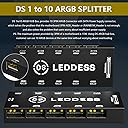
The DS leddess Connector 11 Port ARGB Splitter Hub is designed for enthusiasts who want to elevate their PC aesthetics. It supports up to 10 ARGB devices with a compact design that ensures a tidy setup. With SATA power support and compatibility with major ARGB software, this hub is a must-have for any gamer or professional looking to enhance their rig.
| ASIN | B07KY5KQWD |
| Brand | DS leddess |
| Brand Name | DS leddess |
| Cable Type | Controller |
| Cable type | Controller |
| Color | Black |
| Compatible Devices | Personal Computer |
| Compatible devices | Personal Computer |
| Connectivity Technology | SA |
| Connector Gender | Male-to-Female |
| Connector Type | 3pin, Sata Power |
| Connector type | 3pin, Sata Power |
| Customer Package Type | Carton |
| Customer Reviews | 3.2 out of 5 stars 22 Reviews |
| Item Shape | Round |
| Manufacturer | DS leddess |
| Model | DS-SX03 |
| Other Special Features of the Product | Compact |
| Part Number | DS037 |
| Recommended Uses For Product | Organizing and syncing ARGB fans and lights in a computer system |
| Recommended uses for product | Organizing and syncing ARGB fans and lights in a computer system |
| Special features | Compact |
| UPC | 723990147936 |
| Unit Count | 1.0 Count |
| Wattage | 15 watts |
A**.
perfect
awesome
A**R
It technically works, but you'll never figure it out since no instructions are included.
Like many of the other reviewers, I received a model that does not have an ARGB input, instead it has a 2-pin JST connector (along with an ARGB to JST cable). There are no provided instructions, but it's actually designed to work with an LED case button and has built-in RGB configurations that can be cycled using the button (the button is not provided since it would come with the case). To make the controller use the setting from the motherboard you have to connect the two pins I show in the provided image together for about 3 seconds. You can do this with any piece of metal. Once you do that it acts like the regular version of this controller, and as far as I can tell it remembers the setting after power-off (so you don't need to go dig into your case every time it turns off). I'm still giving one star because it's not the pictured item _and_ there's no instructions on how to use this version of it. Unless you already know what this is intended for you'll never figure it out.
B**.
Hub
A o.k. hub not special.
M**S
How to make this work!!!
It's nowhere in the documentation but connect your RGB devices to the hub connect the two pin cable that goes from hub to the motherboard argb connector power everything on then jump the two pwm pins for 2 or 3 seconds it takes the controller out of remote mode and makes it function like any other argb controller. If you have a case with a front panel LED or RGB button like the montec 95 you can plug the LED negative and positive to the pwm pins and you can then either hold the LED button down for 2 seconds to force the controller into hub mode or you can click cycle and go through all the pre-programmed patterns that are on the controller when you're in hub mode the controller remembers the settings that you leave them in hope this is helpful for all people that say that this thing is s***
A**E
Does not work
I tried multiple solutions to get this to work, but it only displays fans in their default colors. Does not work when connected to the argb controller on the lancool 11 and does not work when using the argb header on the motherboard. The simple $2.00 argb splitter works so I know it's not the controller or the fans.
Trustpilot
1 month ago
2 weeks ago