Buy anything from 5,000+ international stores. One checkout price. No surprise fees. Join 2M+ shoppers on Desertcart.
Desertcart purchases this item on your behalf and handles shipping, customs, and support to Slovakia.
๐ผ Elevate your data game with speed, capacity, and smart cooling โ donโt get left behind!
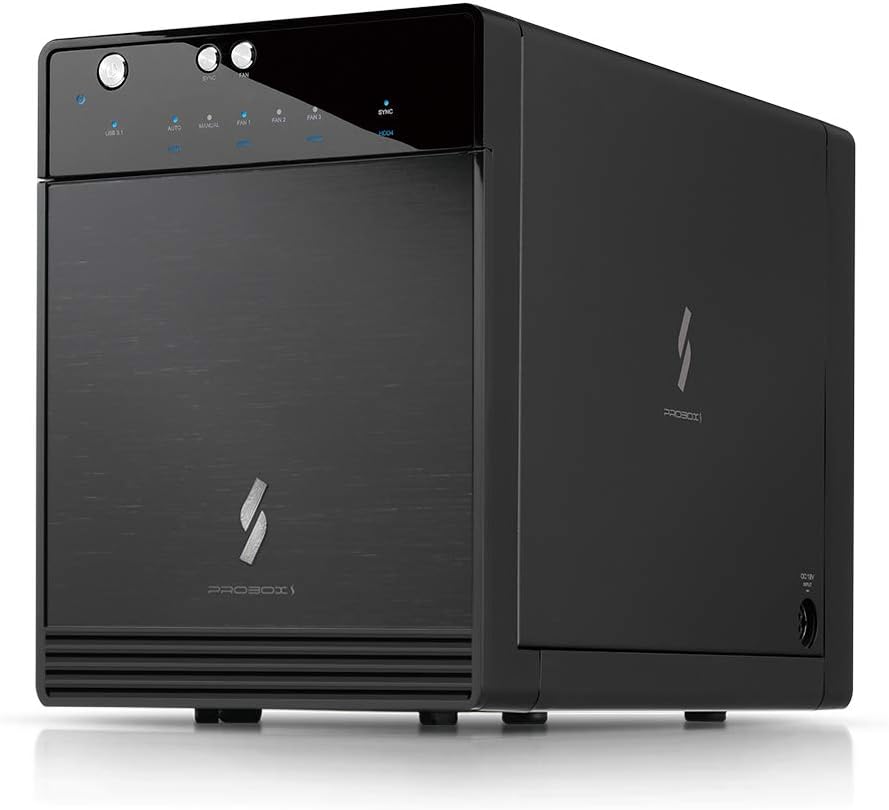
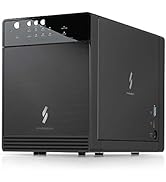
The Mediasonic USB 3.2 4 Bay 3.5โ SATA Hard Drive Enclosure (HF7-SU31C) is a high-performance DAS device supporting up to four 3.5โ SATA drives with a combined capacity of 120TB. Featuring USB 3.2 Gen 2 Type-C connectivity, it delivers blazing 10Gbps transfer speeds. Its smart fan with thermal sensor ensures optimal drive temperatures, while broad OS compatibility (Windows, Mac, Linux) makes it ideal for professional users seeking reliable, scalable external storage in a sleek metal enclosure.


| ASIN | B078YQHWYW |
| Best Sellers Rank | #75 in Enclosures |
| Brand | Mediasonic |
| Built-In Media | Main Unit + Accessory |
| Color | Black |
| Compatible Devices | Desktop, Laptop |
| Connectivity Technology | SATA |
| Customer Reviews | 3.8 out of 5 stars 476 Reviews |
| Data Transfer Rate | 10 Gigabits Per Second |
| Enclosure Material | Metal |
| Hard Disk Form Factor | 3.5 Inches |
| Hardware Interface | USB 3.2 Gen 2, USB Type C |
| Hardware Platform | Linux, Mac, PC |
| Item Dimensions L x W x H | 6.8"L x 4.9"W x 9"H |
| Item Weight | 4 Pounds |
| Manufacturer | Mediasonic |
| Material | Metal |
| Memory Storage Capacity | 30 TB |
| Mfr Part Number | HF7-SU31C |
| Model Number | HF7-SU31C |
| Product Dimensions | 6.8"L x 4.9"W x 9"H |
| Supported Devices Quantity | 4 |
| UPC | 629329001965 |
| Warranty Description | 1 Year Warranty from Mediasonic Store |
G**S
A Fantastic Upgrade! Mediasonic Continues to Impress!
I've been a loyal Mediasonic customer for years, having owned an older version of their 4-bay hard drive enclosure, which I absolutely loved. It was a workhorse, reliable, and served my storage needs perfectly. When I saw the Mediasonic USB 3.2 4 Bay 3.5โ SATA Hard Drive Enclosure DAS (HF7-SU31C) with USB 3.2 Gen 2 10Gbps Type C, I knew it was time for an upgrade, and I'm so glad I did! This new enclosure takes everything I appreciated about the older model and elevates it. The USB 3.2 Gen 2 10Gbps Type C connection is a game-changer. Data transfer speeds are incredibly fast, making backups and large file transfers feel instantaneous. I'm currently using it with 24TB HDDs, and it handles them flawlessly. Setup was a breeze, just like with my previous Mediasonic enclosure. The build quality is solid, and the design is sleek and efficient. It runs quietly, and the drives stay cool even under heavy use. If you're looking for a reliable, high-speed, and well-built external hard drive enclosure, look no further. Whether you're upgrading like me or buying your first, the Mediasonic HF7-SU31C is an outstanding choice. Highly recommend!
J**E
Either break off the front door or keep it open to prevent drive overheating.
Good: * This unit does work on USB 3.1 and has really fantastic transfer rates. * The case is beautiful and looks very modern * The drive trays fit snugly enough where there is not any noticeable rattle or noise from the hard disks Bad: * The makers clearly told the engineers to get lost and opted to make this pretty over functional. There is a fan and an air outlet in the back, but there is NO venting at all in the front to let air in to flow over the drives. I mean, come on Mediasonic!. Radiant cooling only works when air can get in, pass over the drives, and the exit the case. That process cannot occur when there is no air inlet. * Two drives quickly overheated in this case with the fan set to "Auto". The case was in an air-conditioned room at about 75 F. The drives both reached over 110F and trigged SMART monitoring failures. * The only solution to the airflow issue is to open the front door or break it off. In fact, I have popped my door open with a CD jewel case. * With the front door open and the fan turned up manually, it does a great job of cooling the drives. Unfortunately, the front door open also makes the drives and fan noise pretty loud. In summary, it works great and does everything it promises, but only when the front door is kept open. I plan to take the door off and cut space for a screw-on fan grill and screen. Though, if I need any more of these, I will spend more and get a better designed product, such as the ORICO Aluminum 4 Bay that is not that much more. Alternatively, the older Mediasonic design is much better because it actually has air flow inlets in the front. Update: After use for a while of use, I can say it does a good job of keeping the drives cool with the door open. Most critically, the USB 3.1 controller seems stable and works well in Linux. I tested both kernels 4.9.x (Debian Stretch) and 4.16.x (Debian Buster) on an AMD X470 chipset. So, I am raising my rating to 4 stars, since it is functional, even if they screwed up by not putting a vent in the door.
D**T
Cools just fine
I read through a lot of reviews about this enclosure, and there were a solid number of them that had negative experiences with the cooling aspects of this device. Reading deeper, I discovered a couple of things that stood out in some of the negative reviews; 1) not all of the drives that were being used were of solid quality, not saying thatโs the entire issue they were having, but SMART failures on cheaper less reliable HDDs are not uncommon and may not have had anything to do with the drive itself and 2) the temperatures people were reporting as high wereโฆ.well within normal operating temps for drives. In fact, HDDs prefer to be on the warm size, 40-42c is totally fine. Cold drives can actually end up with critical failures with the bearings and other parts. During heavy operations, drive temps climb, and itโs not uncommon to see 52 or so C (about 125f). The key is watching for sudden inconsistent spikes in the temps. If the temperatures are a steady flat line, and the fans are spinning, youโre doing fine. I gave the enclosure a thorough inspection before actually plugging it in for use; the ventilation is more than adequate. The vents along the bottom of the door and the rear fan are plenty. Iโm using this enclosure as expanded storage for my server. Currently itโs just housing a single WD Blue 12tb. I moved several TBs of files onto the drive and during all of that writing, the auto fan never went above the first fan speed setting, the drive temps were stable and well within operating norms, and in fact, the enclosure itself never even got warm. Itโs certainly possible that people got faulty units, or maybe there wasnโt the added vents on the front door early on, not sure. What I can say is that the INITIAL operation and inspection of this enclosure is fine. Time will tell if it holds up, though for me the drive and the enclosure are merely serving media and not doing constant heavy read/writes. But as of now, I think it will suit my needs just fine.
A**X
Worked for a week
This is the last mediasonic product I'll buy. I have two 2 bay enclosures that I've had for years that work great, but this 4 bay unit was complete junk. Built a software raid array and in the first week it suddenly failed and had to rebuild. Then it kept failing randomly over the next several weeks. At 4x14 tb bays, it takes a loooong time to rebuild and puts a lot of unnecessary stress on the drives. All SMART tests confirmed the drives were healthy and it was a connection issue. I contacted the warranty service. They were responsive, but instead of sending a whole new unit, they just sent the rear board in a soft mailer. The board to board connector ribbon wires that came with the replacement were heavily bent and even ripped in a spot so I would have to use the original which is annoying because it's possible it's the culprit in the connection problems I was having. Then it came with no installation instructions. The replacement (rear) board needs to connect to the front board that has the buttons and status lights. You can't remove the front plate and board and you can't remove the metal tray insert (without damaging the enclosure) so it's essentially impossible to connect due to the obstructions through the length of the enclosure. Even if I can manage to get this connected, I'm not going to subject my drives to possibly more problems. I'll follow up with my credit card company now to get this refunded. I replaced this unit with a Terramaster D4-320. It's noisier and the build quality seems poorer than this mediasonic unit, but it has worked reliably with no connection issues which is the most important part.
C**T
great enclosure, fast throughput, perfect for building a SAN with an Intel NUC
A nice compact enclosure, it's *very* quiet and solidly built and as fast as the drives you put inside this. This is not a hardware RAID system (Mediasonic will come out with this soon.) But I knew that going in, I'm using an Intel NUC with Linux to make a SAN. Comes out to about the same cost as hardware RAID solutions--but uses open source and the NUC can handle other duties. I have my NUC talk USB 3.1 to this array and use networking over Thunderbolt 3 for 40GBPS to my Macbook Pro (yes 40x the speed of gigabit ethernet!!! Required for 4K video editing.) If you are using Linux, beware of UAS. Some drives (like my 8TB Seagate drives) work fine for a bit but then fail. This is an incompatibility between Linux and the Seagate drives, not the fault of Seagate or Mediasonic. Search the net for "UAS disable storage quirks" to find how to make your drive work with Linux. This does slightly reduce your performance, but it has to be done, until UAS supports your drive properly. Make sure you use the included handles and the drives will sit snugly in the unit when you lock in the front frame. Some design quibbles, which Mediasonic might consider for later generations: It would be nicer to not require the handles or frame but these are easy to install and make removing drives a breeze (easier than my Drobo that this is replacing.) LED's next to each drive (for easier identification, the drive activity LEDs are on the horizontal on the top of the unit and the drives stack vertically.) The power connector is fairly proprietary and connects on the side of the unit--would be nice to have a standard connector and have it plug in the back. The buttons on the front are small and non-descript, larger LED-lit buttons would make operating them easier. I'll be buying a second unit (to replace my second Drobo) and it would be nice to have a way to attach the two units mechanically; bonus if they could chain power and double bonus if they could daisy-chain USB or eSATA.
J**R
So Disappointing
I really wanted to like this product. Recently upgraded to an iMac Pro from a tower that had plenty of internal drive slots so I needed to find a quick solution to move my internal drives. I wasn't expecting the top of the line quality but the reviews seemed encouraging and I was initially very happy. I put 3 Samsung SSDs that used to be in my other computer into the enclosure along with a new 4TB WD Black, and at first, everything worked flawlessly. I barely heard the fan noise like some people said, and the sync function seemed to work as intended, and I noticed no heat buildup. All four of my drives that I run constantly for my work worked without an issue, which was important because I had just started a big project with deadlines coming up right away. But 3 days later, after I noticed that my iMac Pro wouldn't completely shut down (happened a few times), I powered the unit down and disconnected it just to see if that was culprit. That part was ultimately inconclusive but when I went to reconnect the drive after a little while, I noticed that the power was on and it was running even though the Thunderbolt 3 cable was disconnected. And ever since, whether I connect it to the mac or not, the drive would constantly start up, lighting up the individual drive lights as if it were starting up, but then suddenly lose power completely for a few seconds, then turn back on, and just repeat. And while that was happening, the Mac would tell my the drive wasn't ejected properly (1 warning per drive), mount the drives, and then get them ejected improperly over and over. I don't want to damage the drives more, especially the 4TB spinner, but I'm afraid the damage may already be done. I may have just had bad luck with it and gotten a lemon, and I actually thought about returning it for a replacement hoping to get the performance from the first 3 days back, but as it is, I may have lost a lot of data and I've lost more time, so I can't afford to give it another chance. I'm sure this isn't the case with all of them and things do fail sometimes, but 3 days before breaking down into such unreliable and destructive performance was too much. I hope they address this in future products because drive failure and loss of data is not a small matter.
S**Y
Supports latest Seagate Exos M 32 terabyte drives
I purchased this unit as a DAS for my old drives Pro: cheap unit which supports both ultrastar and exos line of products, I have tested 24 TB ultrastar and 32 tb exos M drives and they load up without any issues Cons : I donโt like to be nitpicky but fans at max speed is very loud and airflow is not very good in the unit, if you are going to use this for expensive drives then make sure you are in well ventilated cool place. Direct data transfer if not used along with NAS is at very low speed
S**T
It does work with Ubuntu 22.04.2 but some transfer errors
I have my media on a server, and was looking for a relatively inexpensive backup. I use linux (Ubuntu 22.04.2) with a robust system: AMD Ryzen 9 3900x 12 core CPU with 64GB DD4 memory on a 1TB Samsung SSD. The unit holds 4 8TB HGST drives. I didn't realize the unit had a USB-C connecter but on inspecting my motherboard, it had a USB-C input! Who knew? I have about 17TB of data to transfer from my server which runs TrueNAS. I set mine up as a ZFS RAIDZ1 which is like RAID5. Ubuntu Recognized the device and drives and the RAID set up easily. I used Chat GPT to help me import the zfs drive into my home folder and created the dataset. I use Rslsync to sync data between my machines. A little tricky for setting the dataset permissions but again Chat GPT to the rescue. Rslsync shows about 100mbps transfer speed, but the drives (all of them) began showing 'Too many errors, resilvering.' The odds that all 4 drives have read/write errors and failed is statistically unlikely. I think this is a Hardware issue, but it is above my pay-grade. It also shut itself down a couple of times, requiring system reboot. I slowed the data transfer to 1 folder at a time which it seemed to handle better. I did not check my motherboard Bios before I started this process to see if it had an update, otherwise, I have no idea what is going on here. Once up and running, it has been fine, and handles small data sets that I add to my system. I think the 17TB transfer was too much on it. Can't say from my experience that I can recommend it
L**O
Inexpensive solution for decluttering many USB drives
I got this to declutter the shelf where my home media server lives. Instead of having 4 USB drives sitting on the shelf I now have this one box connected via USB-C to a mini-PC with no internal storage beyond an NVMe SSD. It's very quick and works perfectly well but does NOT support hardware RAID. One could make a software RAID using Windows 10/11 Professional, note that the specs state this enclosure does not work with Linux. I have not tested it with Linux. The sync button is interesting. With sync turned on the enclosure powers up and down with the computer to which it is attached but will not recover from a power failure, that requires a human intervention to push the power button on the front. I cannot really fault this enclosure, for the price it is a great deal.
J**M
Does what its supposed to do ...would have preferred more bays
Good for the price...I suppose
C**R
Does what is claims no complaints
Very easy to install, works well and reliable as well as very quiet
L**R
Seems very good - so far!
Only had it 2 days but so far very good! I bought this to replace an Orico 5 bay box which had several faults and was returned for refund and that was actually bought to replace my QNAP 4 bay NAS which has failed after 4 years. Decided I did not really need a NAS as only used it for backups and local storage not as a server. This one seems to work as it should and has the added advantage of the "sync" function to turn on and off with your PC which seems to work OK and I like the provision of being able to control the fan speeds - either auto or manually - which I have tested and with reasonably heavy use I have found that speed 2 seems to keep the drives under 45C and is virtually silent - speed 3 will lower the temps quite a bit but is audible - not a nasty noise so quite usable unless the box is right next to you. Disk installation is not tool-less as you have to fit plastic handles to one end of each disk and then clip a metal retaining plate over all the bays which lightly clamps against the rubber buffers on the handles - seemed a bit of a fuss but it definitely keeps the drives securely in place and is easy once you have fitted it a couple of times. The only slight annoyance is you cannot "safely remove" all the drives in one go like I could on the Orico? Each is listed as a USB 3.1 SATA bridge and "safely removed" individually in my Win 10? It also does not seem to spin down any of the drives whilst it is connected to the PC? Main concern - it only came with a US style mains lead! For the moment I have used the one from my redundant QNAP NAS for now but come on Amazon - I know it came from Amazon US via an Amazon UK order so why is it not supplied with the correct mains lead for the destination market? Many well known suppliers in China and Singapore can get it right! Update: I have been through a very involved and time consuming process of trying to get Amazon to send me a complimentary UK mains lead so I can keep the product and make it actually conform to the market they have sold it in. After all it's basically only a fiver or so! "Chat" was useless so got them to telephone me - not able to replace parts only the whole item or a refund! When I explained I was already returning the Orico as faulty and this Mediasonic actually works but it was sold with the wrong mains lead - surely it would be far more cost effective for Amazon just to send me a suitable mains lead, FOC, rather than having the cost of the return carriage and them sorting and putting it in their "used but no cables" type warehouse deals? Obviously a replacement would have the same problem! I was told they would "escalate" to a higher level and if I would like to add a suitable lead to my basket they would sort it out. I added the cable to my basket - it is still sitting there. The result I got several confusing help emails from CS throughout the evening plus an SMS then a phone call just before midnight! The caller had a very heavy non English accent and talked so fast I could barely understand anything - he sent me a code which I read back and then he wanted another confirmation to another email - at this point I started to be suspicious so I ended the call. Very disappointing and just confirms that like many others, Amazon has joined the ranks of not really caring about their customers or any problems that their mistakes have caused. We have your money, don't bother us, return it if their is a problem seems to be their answer to everything! "Customer centric" - hardly!
M**N
Usb c connection is fine, no disconnects unlike other reviews
Like others, I removed the front case for better air flow. A star is taken off for the super flimsy front cover. But the enclosure works flawlessly so far, no disconnecting with my pc at all. Great speeds. Update on 30/1/2021, after 4 months of use. Enclosure has failed. Bays 2/3 stopped working, leaving 1 and 4. 4 slowly went away as well. Gave me the impression that my drives were failing
Trustpilot
1 week ago
1 month ago