๐จ๏ธ Print smarter, save bigger, live better.
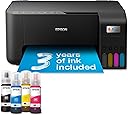
The Epson EcoTank ET-2860 is a wireless all-in-one inkjet printer designed for busy home use, featuring ultra-high capacity refillable ink tanks that deliver up to 3 years of ink, print speeds up to 33 ppm in black and white, and a maximum resolution of 5760 x 1440 dpi. It supports mobile printing via the Epson Smart Panel app, offers a 100-sheet paper tray, borderless photo printing, and operates efficiently at just 12 watts, making it an economical and eco-friendly choice for professionals seeking hassle-free, high-quality printing.


| ASIN | B0CPYQKRX5 |
| Additional Printer Functions | All In One |
| B&W Pages per Minute | 33 ppm |
| Best Sellers Rank | 1,858 in Computers & Accessories ( See Top 100 in Computers & Accessories ) 6 in Ink Tank Printers |
| Box Contents | 4 x 65ml individual ink bottles (Bk, C,Y,M), Main unit, Power cable, Setup guide, Warranty document |
| Brand | Epson |
| Brand Name | Epson |
| Color Depth | 24 bits_per_pixel |
| Color Pages per Minute | 15 ppm |
| Colour | Black |
| Compatible Cartridge | 104 Ink Bottles |
| Compatible Devices | PC, Smartphones, Tablets |
| Connectivity technology | USB |
| Control Method | App, Touch |
| Controller Type | Android |
| Customer Reviews | 4.0 out of 5 stars 949 Reviews |
| Dual-sided printing | No |
| Duplex | simplex |
| Global Trade Identification Number | 08715946725918 |
| Hardware Interface | USB |
| Ink Colour | Black, Cyan, Magenta, Yellow |
| Item Dimensions D x W x H | 34.7D x 37.5W x 17.9H centimetres |
| Item Type Name | Inkjet Printer |
| Item Weight | 3.9 Kilograms |
| Manufacturer | Epson |
| Maximum Copy Resolution Black and White | 5760 x 1440 dpi |
| Maximum Copy Resolution Color | 5760 x 1440 |
| Maximum Copy Speed Black and White | 33 ppm |
| Maximum Print Resolution Black and White | 1200 dpi |
| Maximum Sheet Capacity | 100 |
| Maximum Supported Paper Size | A4 |
| Maximum print Resolution Color | 5,760 x 1,440 dpi |
| Model Name | ET-2860 |
| Model Number | ET-2860 |
| Model Series | EcoTank |
| Model name | ET-2860 |
| Network Connectivity Technology | USB |
| Number of Trays | 1 |
| Other Special Features of the Product | Borderless Printing |
| Output sheet capacity | 100 |
| Paper Size | 21 centimeters |
| Power Consumption Size | 12 Watts |
| Print media | Paper (plain) |
| Printer Output Type | Colour |
| Printer Resolution Vertical Max in Color | 1440 Centimeters |
| Printer Resolution Vertical in Black and White | 567 Centimeters |
| Printer Type | Inkjet |
| Printing technology | Inkjet |
| Product Warranty | 1 year manufacturer |
| Resolution | 5760 x 1440 |
| Scanner Type | Flatbed |
| Special feature | Borderless Printing |
| Specific Uses For Product | Home, School |
| Total USB Ports | 1 |
| Unit Count | 1.0 count |
| Warranty Type | Limited |
| Wattage | 12 watts |
B**N
Pretty good all round printer with unkown extras on the Epson site.
We decided to buy an ink tank printer as we'd already wasted far too much money on cartridges. This one was replacing a HP Envy 6032e. I didn't really consider going for a HP ink tank printer as I've had 4 HP WiFi printers over the years and all of them have suffered with WiFi issues (occasionally just refuse to print over WiFi and require driver re-installs and other time wasting fixes (which my HP accredited tech support Son has had to deal with). My Granddaughter has an Epson WF printer she uses for working from home and she told me it's been faultless and advised me to go with Epson. At the time of purchase the ET-2860 was ยฃ180 (annoyingly, 2 days after delivery there was a voucher for ยฃ10 off that price). Installation via USB is very easy, pretty much plug and play. Installation over WiFi on a Windows PC was a little bit of a faff but nothing majorly difficult. The PC was connected to the router via a physical network cable, while trying to install the printer the software kept saying it couldn't detect the printer. The suggestions to fix it were a bit sparse. As the PC also has WiFi, I decided to disconnect the network cable and try again with the PC connected via WiFi. Problem fixed, the software now detected the printer and installed it without any other issues. Once done, changing all the printer settings etc was no different to pretty much all other printers. Filling the ink tanks is quick and simple. The one thing to watch out for is the fact the attachments on all the bottles is the same so you can accidentally put the wrong colour inks in the tanks, just make sure you double check you're putting it in the right tank and you'll be fine. Print quality is pretty good, text and diagrams etc are sharp. Photo's are pretty good but it wouldn't match up to a printer aimed at high quality photo printing. I printed a photo on some 240gsm semi-glossy paper, the printer had no trouble with the papers weight (it's rated for up to 300gsm) and the printed image was rather good. Colours weren't quite a match for what was on the screen (not as vibrant) but that was more likely to do with my monitors colour settings. Even so, the photo still looked quite nice. I've no doubt some image editing would improve the colours of the printed photo. The only part of the photo that didn't look very good were scenes with blocks of dark gradients (like a large body of water on a dull day). It's didn't look bad and from from more than a foot away you probably wouldn't even notice. The scanner is OK, much like the scanner on any other printer these days. Easily good enough for copying documents and photo's with good accuracy. Like other scanners, set the dpi to the higher settings and it will take a quite while. After the printer was installed I was looking at the features etc, Epson have 2 different sections on their site for templates. I was surpised at how many they had and how varied they were. All sorts of craft projects, birthday/etc cards, photo frames, wrapping papers (obviously for small items with this printer seeing as it's A4). I'm going to have lots of fun with that as I do like making my own cards and things. If HP have anything like that they don't go out of their way to make it easy to find. Overall I'm very happy with the printer. The only things it lacks which you would expect on printers in this price range is a paper tray (which I prefer to rear tray feeding) and automatic duplex. I'm not taking away any stars for those as I knew that before buying. I did consider the ET-2850 as it does have auto-duplex but it was ยฃ70 more and I don't need it enough to warrant the the extra cost (the 2850 also still has rear loading paper, if it also had a proper tray I may have bought it - hope you're listening Epson, many people prefer a tray). My ยฃ70 HP 6032e that this replaced had both auto-duplex and a proper paper tray, the only other real different between the HP and this Epson is the ink takes so it is a large expense for a printer that effectively has less features. Over time the Epson will of course cost less as replacing the inks is massively cheaper (I did have a HP Instant Ink subsription but paying per page rather than how much ink you use only works out worthwhile if you're covering the pages in ink, which I don't often do - especially as we print a lot of A6 postage labels). Knowing the future ink cost savings I think this is a worthwhile investment. My Son wants to do sublimation printer and apparenty Epson EcoTank printers are the best value for that too.
M**N
Amazing value and quality
I don't do reviews often but this printer is so good I wanted to share. I had a HP inkjet printer for years and was constantly buying expensive cartridges for it. We don't print that often so the cartridges would dry out and would have to buy new ones. I researched a lot before buying this Epson ecotank printer and have been very impressed! It comes with 3 years of ink which is very easy to fill. No more expensive cartridges! It takes a little while to set up but once up and running it's so easy to use, really quick printing, and quality is exceptional. Just remember to print at least one page a week to keep printer heads from drying out. Best printer I've ever owned and amazing value!
J**B
Good printer, set up a bit of a pain!
OK for a start I read reviews on here and elsewhere, so many really good but quite a few negative about the problems setting up. As I had two older epson xp printers and one of them died completely I looked at the new eco tanks thinking this would be the answer, no more cartridges that don't last very long. I didn't want it to connect to a smartphone, just my Chromebook. I spent a few hours when it was delivered just trying to connect to the wifi, so I just connected via a USB cable and it worked. Not ideal but it worked. So scouring youtube I finally found a tutorial on how to connect my Chromebook to the wifi. A few minutes later it was done :) I am really pleased with the quality of the print outs, I did have a problem with blank pages but as it was an instruction manual I was printing, in advanced settings ticking the option 'print as image ' sorted it. The great thing now is that I don't have to restrict what I'm printing as I know the ink will last. Plus I don't mind paying the cost of the genuine ink bottles as they are quite reasonable? I really wish Epson would do similar youtube videos to help with set up. It would make it so much easier?
M**E
Fine as a basic printer, but a nightmare for networking / AirPrint โ worst setup experience Iโve had
I work in IT and have been dealing with all kinds of printers for years. I can honestly say Iโve never spent so much time fighting a printer as I have with the Epson ET-2860. As a printer, itโs OK. Print quality is fine and the ink tank concept is good. As a networked printer, itโs extremely frustrating. Key issues: โ No native AirPrint support (in 2025โฆ seriously) โ Incomplete / inconsistent IPP implementation โ Requires Epson-specific drivers for reliable operation โ Unreliable discovery on phones and tablets Because it doesnโt support AirPrint, I tried setting it up properly using a Raspberry Pi as a print server (CUPS + Avahi), which is a very common and well-documented solution for non-AirPrint printers. What followed was hours of troubleshooting: IPP advertised but missing required attributes โDriverlessโ printing no longer working on modern systems Android sometimes seeing the printer, sometimes not iPhone often seeing nothing at all Constant conflicts between direct printer discovery and the print server Behaviour changing depending on cache, Wi-Fi state, or reboot order At one point the printer was technically advertising everything correctly on the network โ and phones still refused to show it. Thatโs not a home-user problem, thatโs poor standards support. Bottom line: If you only ever print from a Windows PC using Epsonโs software, youโll probably be fine. If you want AirPrint, clean IPP, or reliable mobile printing, avoid this model. I would not buy this again, and I wouldnโt recommend it to anyone who expects modern, standards-based network printing to โjust workโ.
F**D
Great
The printer works well enough. Sometimes it loses connection mid printing which wastes ink and paper but that may be down to the internet reliability rather than the printer. I have also found that sometimes the print head snags the paper causing black ink splodges across the images and curled corners. I use this for sublimation and 99% of the time it works perfectly.
M**N
Excellent ink tank printer, scanner, copier.
The Epson ET-2860 is an excellent ink tank printer, scanner and copier and, at the time of purchase, the cheapest ink tank unit available on Amazon. I have purchased two (one for a relative). Setting up was very easy - connected to an iPhone via wifi and to a MacBook Air via both cable and router wifi. Ink tank filling was simple and straight forward. Printing speed is good, although not the fastest. It is not a duplex (double-sided) printer, although printing odd number pages and then re-feeding to print even number pages is no hardship. (Reading reviews of duplex printers, it would appear that they just have more to go wrong with paper jamming.) My previous printer was a very reliable Epson Stylus SX200 inkjet cartridge printer, now obsolete due to the current macOS. I am a fan of Epson; I have refused for years to purchase any HP products after purchasing an HP Pavilion TX1020ea laptop which rapidly became a brick due to a known video chip problem and HP told me to take a long walk off a short pierโฆ
F**S
Built-in obsolescence
This replaced an Epson EcoTank ET-2500 that was (and still is working). Unfortunately when the internal ink pad reached saturation after 6 years of use, the printer no longer played ball and effectively means EOL (end of life) or at best, the part they don't tell you about, an uneconomical replacement by Epson of the pad and a WIC reset (waste ink counter) in software. This was not an option for me as the printer has been discontinued. Although loathed to simply throw away the printer I needed a replacement fast and so purchased this one. In that interim six year period this one is decidedly flimsier than the ET-2500 with incredibly thin panels. I am no stranger to Macs but this ET-2860 took an age to finally get my network to recognise having followed the procedure religiously after filling. Multiple transitioning between the ink and paper alert lights despite both being loaded with ink and paper until... it finally played ball, settled down and connected to the network and the iPhone. Suffice it to say the setup is a logistical nightmare and needs to be streamlined as there are too many unresolved variables if things don't go right. A thing like a printer should take minutes to get up and running but this one was a big pain. Although another reviewer said this is not an AirPrint compatible printer it doesn't really need to be, as you can download Epsons free Smart Panel app for printing and scanning from the iPhone. It's all working fine now as it should, so whether this one lasts as long as six years remains to be seen but slapped wrists for Epson for not making my 'old' printer economical to replace a simple part and so prolonging the life of a perfectly good product.
V**Y
Great printer - very cheap to run with excellent prints
I bought this when on offer. Epson honoured the 5 year warranty and the ยฃ30 cashback which was on offer at the time. Since buying this I printed all my homemade Christmas cards on 250gsm card (using Epson print profile, high quality, standard paper setting). The colours were vibrant and no smudges or strange marks. I have printed labels, documents and many other items since and the ink quantity has hardly moved. It is not a duplex printer but it is easy to manually do this. Not tried printing on photo paper yet, so can't comment on that. It was a faff to set up the network, but I found a video on YouTube which helped a lot. I also connected via usb for the first initial driver set up and downloaded the drivers etc from Epson. Setting up on the phone was easy, though. To keep the printheads clean and the ink flowing you can also assign an email address to it so if on holiday for over a week, you can send a print to it whilst away (either directly or set up a timed email) without having to connect to your phone. I really like this printer and seems to cost pretty much nothing in ink for good quality prints. I would recommend
S**R
Best for Value, and certainly a great product to use
Do not hesitate to get this. So far, I have had it for about 6 months, and it scans well and prints much better than the HP. Yes, certainly happy with this product. Main reason I bought it: the Canon was costing me around 90 Euros a Year, and that was just the Ink. I do not print that much; I mean, very little compared to most. So my daughter recommended this, and this review confirms what she said: best Value for money at the time of buying. I will never change brands again.
K**A
Top
Prodotto eccellente
B**N
Excellent product
Excellent product. Easy to set up and the app makes it easy to use
L**.
๐ฅฐ
Highly recommended. This printer is the business. Very easy set up within the app. Comes with the ink so thatโs a bonus. Have loaded it with paper and is printing perfect. Iโm going to buy another one to use as a sublimation on machine. Really happy with purchase.
J**H
Not recommended
Most of the time it's showing not connecting to wifi. It's very difficult to print if there is any urgent need. Not at all recommended.
Trustpilot
1 month ago
1 month ago