Desertcart purchases this item on your behalf and handles shipping, customs, and support to Slovakia.
🚀 Elevate your workspace with 8K clarity and seamless control!
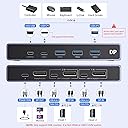
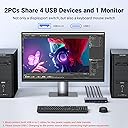
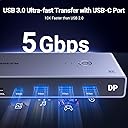
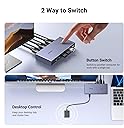
The UGREEN DisplayPort KVM Switch lets professionals effortlessly share one 8K@60Hz monitor, keyboard, mouse, and up to 4 USB 3.0 devices between two computers. Featuring a durable aluminum build, dual switching methods, and broad OS compatibility, it’s designed to boost productivity and streamline multi-device workflows without driver hassles.


| ASIN | B0CFFFHFJT |
| Best Sellers Rank | #97 in KVM Switches |
| Brand | UGREEN |
| Cable Type | DisplayPort |
| Color | black |
| Compatible Devices | Monitor |
| Connector Type | DisplayPort |
| Connector Type Used on Cable | DisplayPort |
| Customer Reviews | 3.9 out of 5 stars 856 Reviews |
| Item Highlight | 4K@240Hz, Sharing 1 Monitor Keyboard Mouse U-Disk Printer Webcam, with 2 DP Cables, 2 USB A to C Cables, no EDID Emulation |
| Manufacturer | UGREEN GROUP LIMITED |
| Mfr Part Number | 25962 |
| Model Number | 25962 |
| Number of Items | 1 |
| Number of Packs | 1 |
| Number of Ports | 5 |
| Power Source | USB |
| Unit Count | 1 Count |
C**N
A great KVM at a great price
I've tried several KVMs with my ultra wide monitor. None of them have worked correctly. I plugged this thing in and it's working perfectly. I'm getting full 3820x1200 @144Hz refresh rate HDR and full color! Also, there's no emulation so it doesn't create any latency. A few things to note - This is obviously a display port KVM. On most modern laptops you'll only have thunderbolt ports. This means you'll need to buy thunderbolt to display port cables for each laptop. You'll also need a 2 thunderbolt ports on each machine (one for the display cable and another for the data cable). 4 cables on the desk can create a cable cluster, so I spent a few bucks on some velcro straps to help keep it all organized. The unit itself is heavier than I expected, very well made, doesn't shift around when my standing desk is lifted up/down, and switches instantly between computers. It a great value for the money! Does the job at a fraction of the cost of a pure thunderbolt kvm setup. Even the cheapest pure thunderbolt setup will cost $300 with pricier units being sold at $700+. For that level of savings, I can deal with a little cable clutter.
W**C
Capable little KVM
Can confirm that this KVM works with the following setup: M1 Max MacBook Pro and Lenovo laptop both running usbc to dp 1.4 (ugreen) to the KVM. Mac is connected via an anker thunderbolt 4 cable to the KVM while the Lenovo is using the included usb a to c cable. Juicing it with 18w is sufficient it seems since I get picture and surprisingly, the usb a ports output enough power that my MX Master 3S detects a charge! KVM is connected using a standard DP 1.4 cable to the monitor. I didn’t use the included one because it’s way too short and too thick. The KVM is metal, is surprisingly small compared to my 4 in 1 out HDMI 2.1 switch but is comparable in weight. Looks and feels well made but only time will tell. My monitor is a Lenovo curved ultrawide with 3440 x 1440 pixels and both machines are able to hit the max 144hz via this KVM with DP 1.4 cables. The wired remote is a single button with no indicator so you have to look at the dock itself to see which device you have switched to. The indicator lights on the decide itself is very small and too close together which might be an issue for some. Very pleased with the product so far. Will update if anything else changes. Update: the KVM pulls around 0.027A from the outlet and I was not able to get it to pull anymore by loading up the USB ports with peripherals. It also seems to work just fine with it unplugged. The KVM does get its power from the connected laptops because if I dont connect it to the laptop via USB C, the KVM will not charge my mouse, even if I connect it to the outlet. Since my setup only needs it to drive a 3440 x 1440 @ 144hz monitor, I suspect that higher definition/ refresh rate might result in power draw from the outlet. The product can certainly do with more detailed documentation.
K**R
A Disastrous Investment - Avoid at All Costs!
I had high hopes for the UGREEN 8K Displayport KVM Switch, but it has been one of the most frustrating gadgets I’ve ever purchased. This device is marketed as a cutting-edge solution for those seeking to switch between multiple computers while using a single monitor, keyboard, and mouse, but in reality, it falls tragically short of its promises. First and foremost, the installation was an absolute nightmare. The cables provided were poorly labeled, and the instructions were next to useless. After wasting hours trying to set everything up, I was greeted with a complete lack of functionality. The switch would arbitrarily fail to recognize my devices, and when it did, the outputs were consistently glitchy and unstable. As for the promised support for 8K@60Hz and 4K@240Hz, it was a complete letdown. I connected everything according to specifications, only to find that my monitor displayed an error message, and the expected resolution never materialized. Instead, I was stuck with lower resolutions that were not only disappointing but also rendered my high-definition investments pointless. The USB ports were another disaster. The KVM switch boasted four USB 3.0 ports, which I assumed would allow me to connect all of my peripherals seamlessly. Instead, I experienced constant connectivity drops and lag when attempting to use my keyboard or hard drive. I could hardly make it through typing a simple document without the keyboard freezing or the printer failing to respond. Additionally, the overall build quality felt cheap and flimsy. I expected a product at this price point to be durable; instead, it felt like I was handling a toy. After only a few uses, I noticed that the HDMI and USB ports were already showing signs of wear. Customer service was no help, either. My emails went unanswered for days, and when I finally received a response, it was generic and lacked any real solutions. It seems they are more interested in making sales than supporting customers with defective products. In conclusion, the UGREEN 8K Displayport KVM Switch is a dismal failure. If you value your time, money, and sanity, look for an alternative that actually works. Save yourself the headache and avoid this product at all costs. One star, and that’s being generous!
H**.
Works as advertised, haven't been able to test longevity yet
Extremely happy with this purchase as I am able to connect both my gaming PC and Intel based Mac to this and output to a single screen using the same mouse and keyboard. The KVM switch takes a few seconds to process, but it's worked reliably so far. I tested the framerate output using the available output settings on the software side and confirmed the framerates on the monitor side using the OSD; the monitor's OSD matches the framerates shown on the computer, and variable refresh rate works as well. The downside is that this thing requires so many cables to work! Two cables (1 DP, 1 USB-C) for each computer you wish to connect, and the switch itself requires power via USB-C. Unfortunately, the packages does not come with a USB-C to USB-C cable (it only provides two UBS-C to USB-A cables), so you'll need to provide if your own if 1) your computer only has USB-C ports or 2) if your power brick to power this device only has a USB-C port. All in all, good, reliable product (over the course of two weeks of ownership) that works as promised, though it increases cable clutter and I wish it came with a couple of USB-C cables.
D**D
Very happy with this purchase
I have two pc’s, 1 keyboard& mouse, and one monitor. One pc is for gaming and the other is for video editing. This dock worked great! I set it up and tested both pcs. Perfection. No software needed. I didn’t notice any loss of quality or additional latency from my monitor. Very happy with this purchase!
M**L
Works great with some minor troubleshooting required for users switching between iMac and PC.
Overall, a great product with a minor caveat. The KVM switch can switch between my PC and iMac and supports all my peripherals (Keyboard, Mouse, Macropad, USB-C Speaker), allowing them to be shared between the two computers. The only issue I ran across was when switching from PC to iMac. The display would not recognize the KVM being connected. I had to unplug and replug the usb-c/display port cable from my Mac to regain a picture. Eventually, I solved this by connecting the iMac to a powered hub (the Ugreen Revodok Max, to be exact) and then connecting the hub to the KVM. Now the switch from PC to iMac works seamlessly. Despite a very minimal delay. Otherwise, switching from my iMac to PC is flawless. Just keep this in mind if you're an iMac user and don't want to reach behind your iMac to unplug and replug your cable for every switch back to iMac. Besides that, it's very responsive on both computers, and the video output on my display is exactly as advertised.
M**N
Good when it works, but too unreliable to count on.
For starters, I bought this used from Ugreen's own seller group, Ugreen Group Limited, and it didn't come with either of the USB cables. That's unacceptable. The KVM switch is really solid. It feels substantial. I've tried a few KVM switches and they've all felt like they were barely there, but this is heavy. It feels dense. Maybe you get what you pay for, it is significantly more expensive than the others I've bought. The change is fast, but not instant. Faster than I can change by navigating the menu on my monitor. From pressing the button to the display coming up, it takes about 3.4 seconds, whereas my monitor takes more like 4 seconds, and it's not even a fair comparison, because this takes a single press whereas my monitor takes 6 (good lord, Asus). Although it's not instant, there's still value in that your USB devices come with it, and you only have to use a single displayport cable to the monitor. USB devices plugged into it feel responsive, with little to no latency added, and I'm able to get both HDR and G-Sync out of it. No issues with HDCP. I've had issues with the USB not switching as elegantly as it should, requiring me to unplug and replug my mouse before it will work properly. I also run into issues with the display switch. I have my computer outputting hdmi and displayport, with the screen duplicated across both, and often I'll switch to that computer and find that it's no longer duplicating across both, but now only displays on the screen that remained plugged in, and it's not even easy to fix. Trying to manually get it to display on both again just doesn't work and would probably require a restart, but I don't bother. When I switch away from my computer, my primary display as reported in Home Assistant becomes WinDisc (not sure what that is), but this means the switch is easily detectable in Home Assistant, which is nice for automations. I would really have preferred an IR remote rather than the button it comes with, because that's easier to integrate into Home Assistant, but you could probably switch it automatically with a Switchbot. I would be returning this either way, due to the lack of included usb cables, but I don't think I'll be buying a new one. Maybe you'd have better luck with it, but I really think EDID emulation is needed for a KVM to be reliable.
M**K
Works Perfectly!
First Day of Use: This little guy is so far perfect for my setup! Extremely easy install for connecting my iMac and MacBook Pro to a LG Ultragear 38" monitor, along with an apple keyboard (wired via USB-C), a G502 gaming mouse, and a Wacom Intuos Pro tablet. Now I can use all my best/fav peripherals seamlessly between both computers. As a bonus, the LG monitor has a built-in USB hub, so I was able to plug that into the KVM switch via USB-A and have my desktop speakers plugged into the back of the monitor, and now I can play music from either computer thru the speakers via the switch/monitor hookup. I did go ahead and get a USB-C cable and wall plug to power the switch as it does not come with its own power cable, and some reviews mentioned that it didn't get enough juice from just the two computers to power it properly. I also had to get an extra USB-C to Displayport cable because the MacBook doesn't have a standard Displayport plug. In total I spent $90 for the switch and 2 extra cables, totally worth it and way less than a lot of KVM switches out there. I'm able to get full resolution at 144Hz on both machines with no issues (so far). As long as the switch continues to work as well as it has out of the box, this thing is a huge time and headache saver. No more multiple keyboards or mice, and no more unplugging/plugging cables!*
A**D
Quality product
Compact, takes less space, easy to use. One push and it switches from one pc to another. High resolution
D**R
2台のPCを1台のディスプレイで。
二台のPCを1つのディスプレイで運用するために購入しました。設置も簡単でしたし、問題なく使えています!!
G**A
great switch, works as expected on 144hz 5120x1440 HDR display
I used this switch to connect both my work laptop and my gaming pc to my 47" Samsung 5120x1440 monitor. It works great! The max 144Hz of the monitor is reached as expected and the HDR works fine. No fus, no hassle, it just works.
G**A
KVM de buena calidad
La calidad de construcción del KVM es muy buena, con buenos terminados. Es muy fácil de instalar, y el producto incluye todos los cables necesarios para realizar la conexión de dos computadoras a un mismo monitor con DisplayPort. Todos los cables son de buena calidad, aunque los DisplayPort pueden ser algo cortos (alrededor de 1m) si tus computadoras están lejos de tu monitor (algún standing desk con computadora de escritorio en el piso, por ejemplo). El cambio entre dispositivos funciona muy bien y es rápido. Muy contento con la compra, Ugreen no decepciona.
A**C
good quality for the money paid
Works well enough, even for G-Sync. The one annoying bit that makes me deduct stars is this: I have a Macbook and a PC connected; when I power up the PC, I have image until I get to the Windows logon screen, when the monitor doesn't detect a signal. IF I cycle between the two systems (PC > Mac > PC), the image comes back fine. Most intriguing is, if the Macbook ain't plugged in, the whole annoyance I described above does not happen; this leads me to assume that signal separation ain't that clean. Anyway, for the money paid it's a good deal, perhaps if not using a Macbook it doesn't even manifest the problem, but for me... I cannot give it 5 stars when I have to cycle daily. EDIT: Finally found a cable that fixes the behaviour. I'm going to assume the others were bad, so switching to 5-stars.
Trustpilot
3 weeks ago
3 weeks ago