


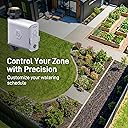


B-hyve Hose Faucet Timer
Product ID: 60382679
Details
- BrandOrbit
- ColorGray
- Item Weight1 pounds
- Materialplastic or
- Product Dimensions7.89"D x x
⏰Adjustable watering schedule
💧Drought-responsive watering
📱Wi-Fi app control
🌿 Stay ahead of the drought—smart watering that works while you don’t!
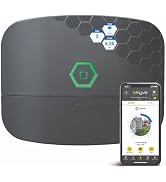
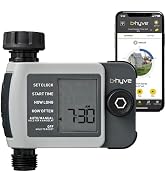
The Orbit B-hyve Smart Hose Watering Timer with Wi-Fi Hub offers professional-grade, app-controlled irrigation with drought-responsive technology. Designed for easy installation and remote management, it ensures efficient, precise watering schedules that conserve water and keep your garden flourishing. Backed by a 2-year warranty, this durable timer is the ultimate tool for modern, eco-conscious homeowners seeking hassle-free lawn and garden care.










| ASIN | B0758NR8DJ |
| Battery Life | 5 hour |
| Best Sellers Rank | #179,188 in Patio, Lawn & Garden ( See Top 100 in Patio, Lawn & Garden ) #233 in Watering Timers |
| Brand | Orbit |
| Brand Name | Orbit |
| Color | Gray |
| Customer Reviews | 3.9 out of 5 stars 7,998 Reviews |
| Global Trade Identification Number | 00046878210042 |
| Included Components | timer, hub |
| Item Dimensions D x W x H | 7.89"D x 7.48"W x 9.23"H |
| Item Highlight | One Outlet Timer for Lawn & Garden, App Controlled Wi-Fi System with Adjustable Watering Schedule & Control |
| Item Type Name | Smart Hose Faucet Timer |
| Item Weight | 1 pounds |
| Manufacturer | ORBIT IRRIGATION |
| Manufacturer Part Number | 21004 |
| Manufacturer Warranty Description | 2 years. |
| Material | plastic or rubber |
| Material Type | plastic or rubber |
| Model Number | 21004 |
| Number of Items | 2 |
| Number of Packs | 1 |
| Number of settings | 5 |
| Product Dimensions | 7.89"D x 7.48"W x 9.23"H |
| UPC | 046878210042 |
D**Y
Good value, difficult to configure
The B-Hyve will not be easier to configure than a regular digital timer with buttons. If you want to buy this because you think it will be easier to use an app on your phone than press buttons on a timer, do not buy this timer. The UI is not great, the setup has bugs, and the instructions are sparse. If you want a timer which will apply water (semi) according to the weather and (sort of) according to soil moisture without spending money on sensors, this is a decent timer. These are the steps that worked for me in July 2020: * Plug in the hub * Put batteries in the hose timer * Attach the timer to the spigot, turn the spigot on. * Download the app (I used Android) * Make an account * Choose the hub to setup first. Don't choose "hub and timer." This may be fixed with an update, but hub and timer did not work for me after trying several times. As well, hose timer first then hub does not work for smart watering. * Enter your zip code for the hub. * Choose the hose timer for setup. * Allow firmware to install. * Zip code should be populated on timer. * Use the hub group for the timer. * Run the calibration. * Set up smart watering. Go to zones, smart details to tweak all of the smart watering settings. If you want to increase watering time more than 50%, open it up more than once. To change the rain/wind/freeze delay settings, go to devices, timer, weather adjustments. I have mine hooked to drip line for flowers, herbs, and berries. With all the settings tweaked correctly, it has watered very well so far. It will skip fewer days if is sunny and more if it is not. Despite the software being not great, this is the best timer I've had at this price. And, even though I wanted to return this after the first two hours of trying to get it to work, I will probably buy more to replace my other timers. Update: the smart watering corrected the schedule to accommodate the latest couple days of extreme heat. I have been temporarily watering manually on my other garden areas with "dumb" timers going by soil moisture, but when I logged into the B-Hyve app I saw that the schedule had adjusted itself. I checked the moisture in the B-Hyve watered soil and it was fine. Update July 2021: I've moved my review up to 5 stars since the Android app was updated and works much better now... or at least acceptably well for what it does. Smart watering is, for example, much easier to set up correctly than it was before. I've expanded to four timers to cover all of my landscaping, setting each for a different type of planting. I also have added inline fertilzer injectors so that I don't have to introduce a manual rain delay to timers after applying liquid fertilizer.
A**S
Update - 2023 B Hyve Smart Hose Timer turns Dumb
Orbit has done lot of work on their app and addressed many problems. My system is now working fine. I have a large yard and low water pressure so I have 15 hose end timers on two hubs. They were all stable last summer and worked as they should. Also, they all made it through the last power outage and reconnected to the wifi as soon as the power was turned back on. Hose End Faucet Timer using WiFi Update - May 15, 2022 It has now been close to six weeks since my review and things are going from bad to worse. The App is buggy and with each update (many in the last 6 weeks) things get worse. Last night I "turned off" a timed program using the "On/Off" button in the App and sure enough the water came on this morning. Had to run out and turn off the faucet since the App indicated it was not scheduled to run. So many updates in the past 6 weeks with little to no progress. They somehow managed to change the colors of the buttons!, but that does little when the settings are ignored by their server. I have already done a complete reset of one timer and now I will try that with this second errant timer. They need new coders but more importantly they need real time field testing to see what actually happens. And I think part of the problem is trying to run two totally different systems within one App. There is the "sprinkler" system timer that waters zones in your yard, and the individual faucet timer, each of which is a separate zone. The two do not play well together. And still no response from Orbit. Original Review - April 6, 2022 I have used the B-hyve Smart Hose Timer (15 in total) since 2020 and found it to be a reliable product until the company started doing software "updates" a few months ago. I can only say it is a mess. The first hint was when "Notifications" stopped coming. Unless I go through the entire list, one by one I can't tell if the watering was done. And even going through the list I found some devices that while they did water, were not recorded has having watered. I am now having to visually inspect my whole yard to make sure the plants are watered - the Smart Hose Timer has now turned "DUMB". I tried to provide feedback to Orbit, but even that is difficult. Definitely not recommended at this time
S**E
Horrible, I own multiples of these and they all break at some point
I first will say I own their B-Hyve 6 zone timer and love it. It waters my yard and I have no problems (other than when they broke it with software updates but have since been resolved). After thoroughly enjoying the multi zone timer, I was looking to water other parts of my house (plants in pots, separate planter beds, etc.) by utilizing my hose spigots around my house. When I found these timers I was super happy. That's the last bit of happiness I had is when I purchased them. When I say nothing but problems, I literally mean it. Not one has just worked without an enormous amount of work on my part. I'm an IT/Smart Home Installer, this is my job playing with smart devices. I can tell you head others people's warnings in the 1 star reviews, these are horrible. Yeah, you'll get it setup eventually, it's not going to last. You'll notice plants are starting to get dry, you'll check the battery level, hmm 40% and you just put fresh batteries in that's odd. They will lose connection with the hub constantly, you'll have to reset device connection in the app. Did that fix it great, wait, hold on it's only showing a bluetooth connection now. I hope you get the idea, when they stay connected, which is rare, it'll work. You'll manually start them and the app which is total hot garbage because their programmers keep adding cool features like shop because who doesn't want to shop for more devices while they're watering their grass am I right? Back to the point, you'll manually start watering and it will tell you it timed out after 30 secs but wait, it's watering currently. You'll have to force close the app and go back in, go to the device, "start" a manual watering cycle and hey, it's now showing you how much you have left on the watering cycle even though it told you it failed to connect. I've done this too many times to count, reset, set it up again, yeah it works, and then it doesn't. I have 3 hubs on my property to try to alleviate the issues, one literally 1.5' inside a window from where I had 3 of these timers. All 3 wouldn't work, not a one. I swapped hubs, updated networks, etc, nothing stayed working longer than a day or two, sometimes moments after you set it up did it just not work. So I gave up and tried another brand Rain Point. I'm impressed, not only did they set up immediately but guess what? 3 weeks and counting and I can use each and every one of them without issue. Installed exactly where the 3 of these timers were installed and their hub is sitting exactly in the same outlet and still working. It's been a massive waste of money with these and I'm sorry I ever found them because their integration into the B-Hyve App is horrendous vs. the multi-zone systems. I manage 4 households that utilize the multi-zone systems and zero problems. I don't update the app anymore as their programmers are horrible. I've emailed them and they're useless, I even offered to beta test the software for them as it kept getting worse by the update. Stay away from these and go with another brand. Read the reviews, don't pick the glowing ones because I can tell you from real world experience, someone is lying and it isn't those of us that have the same issues repeatedly. Go look at the b-hyve app reviews and you'll see these issues also brought up.
T**K
Orbit needs to improve instructions and user interface! Otherwise a pretty good product
These devices work pretty good ONCE you figure them out for yourself as the Orbit instructions are almost non-existent. Needed to set up a number of sprinklers to run at regular intervals to establish newly seeded grass over a wide area. Also wanted to be able to monitor the timers remotely. Instructions and other comments indicated you only need one hub to control a whole bunch of timers, but could not get delivery of the timer only packaging in time for what I needed to get going, so I ordered a bunch of the timer/hub packages. Amazon pricing for the pair better than I could find elsewhere for just the timer alone, so that was kind of okay. Had some issues with timers losing connection as I initially deployed them. This was a pain, as I had to disconnect the timer, remove it from the app, bring it back in the house and go through the pairing exercise again because I could not get them to pair in their installed location outside. Turns out, after reading more about how these work and create a mesh network amongst the devices, I found that programming all the hubs that I had received and placing them in outlets around the perimeter of the house (inside only!) and then pairing each of the timers to one of the closest hubs helped to strengthen that wireless mesh network. Once the hubs and timers were installed in the app, it still took me some time to figure out that you have to establish a series of watering programs for EACH timer separately, and then you can select three of these (linked to program cycle A B and C) to operate on a repeating schedule. Orbit needs to significantly improve the user interface. It is far from intuitive and instructions that come with the device are limited only to pairing the hub to WIFI and the timers to either Bluetooth or WIFI. Don't know why anyone would want to use Bluetooth, since if you are close enough to use the app with the timer under Bluetooth, you are close enough to control the timer yourself - and your ability to monitor the timers is severely limited because of the Bluetooth range issue. Still have not figured out how the smart watering feature. Through the WIFI, the timers link to the internet for both time/date and weather data, but have found that between the limited "rain delay" options (deferring a watering cycle - the A B or C noted earlier by either 12hr 24hr or 2+ days), and constantly changing weather forecasts made accepting the suggested rain delays a big mistake. Before I forget, the rain delay only applies to the next of the three ABC cycles to be run that the forecast says will be affected by rain. In my case, The expected rain didn't come, and then you had the delayed cycle running close to one of the other two cycles that had not been delayed) and then everything becomes a soggy mess. So, I quickly learned not to take the rain delay advise and leave the cycles run as planned. If the rain actually DID come, I could manually stop the timer cycles individually. A bit of a pain, but doable. I would like to be able to rearrange how the devices appear in the app, and they appear to move around on their own... I'd like to organize the timers together in the sequence I want, and the hubs likewise, but this is not an option. Also, each Timer has an associated Zone... The default is Zone 1, but the Zone name or number can be user modified. But, it did have me stymied for a while until I figured this out as I was scratching my head saying, I don't want all the timers in one Zone... I want to create multiple Zones! Well, they are separate since each Zone is essentially linked to a timer and a program cycle, but the default naming everything Zone 1 is another unexplained detail of the app. After creating my programming for each timer, and renaming the Zones (BTW rename the timer devices too as you install them - they default to the product name, and like the Zone 1 problem, you have everything LOOKING the same and hard to figure out unless you have meticulously documented the MAC address for each timer as you put them in location (the app does display this unique address to help id the timer). Having stumbled through the setup, the timers have been working great, and gives me a phone notice when each cycle completes. The only wild card now, is my well pump. I had issue with the well pump switch sticking and the sprinklers draining the house of water without the pump reengaging, when that happened, the timers still went through their routine like a ballet without music... never laid out a drop of water, but its cycle completed. As noted, Orbit needs to improve the user app, and the instructions provided with the device and online. Their online guidance is also sketchy and it took a lot of searches in their support forum, general searches, a few videos, as well as a lot of trial and error to really begin to figure these timers out. After that, they have worked great.
A**G
Instructions for getting through a poorly designed app and getting a pretty cool product
I love having these faucet timers for my yard. I have 3 now (one purchased with this hub and 2 additional 21005 units). The majority of the negative reviews are due to frustrations working with the poorly designed app from Orbit. The documentation is not very clear either, so hopefully the following explains how it works. The Orbit B-hyve smart device app is used to control multiple devices. You can purchase this item which includes a WiFi hub, the model without that is Bluetooth only (but which can be upgraded to use WiFi with this included hub), another timer that will control other Orbit B-hyve products, etc. While using the same app for multiple devices in theory shouldn't be an issue, in this case it can be confusing because some options are not relevant for the product you may have purchased, but are still visible even if you don't want to or can't use the feature. Things to note: Each device is separate from the other. You control and schedule them separately. Programs - This is where you "program" the faucet timers. You can create multiple sets of schedules for each device. You can have a device come on each day of the week (you can select the days individually), at an interval (every 1, 2, 3 etc days), even or odd days. You can specify multiple start times throughout the day (come on at 8am, 12pm, 3pm). You will pick the default zone and select for how long the faucet will remain open for the days/times you picked. You can also specify a watering budget (which admittedly i have no clue what that does because i couldn't find documentation on it, it may not even be relevant to this device...so i left it alone at 100%) Zones - Although completely irrelevant and not meaningful for these devices, a Zone is the area that the device will water. They each only control 1 zone, but despite that possibly obvious fact, you still have to select that 1 zone when setting up the schedule. You will see prompts and warnings that you haven't configured a schedule for the zones on the device. From reading others complaints, I think a lot of the struggles would be eliminated if they just defaulted to the only zone available, but once you realize that they sell other devices that control 6 or 12 zones and they happen to use the same interface for our single zone devices, it makes a little more sense. So how do you actually program these timers? 1. Once you download the app on your phone/tablet, you will need to create a Orbit B-hyve account. 2. The app will attempt to enable Bluetooth on your phone for the initial pairing of the devices. 3. You should then plugin the hub (choose an inside wall that is closet to where your faucet timers will be installed and where you have a WiFi signal). This device will connect on a 2.4GHz signal only. The signal doesn't need to be very strong from my experience (mine is pretty far from my WiFi router). 4. You will then add the hub to your account via the app (it should default to pairing mode). 5. Next you install 2 double A batteries in the faucet timer (you will hear it click twice as it opens and shuts the valve to confirm it is functioning correctly). 6. You will add a new device in the app and you should see the icon that looks like the timer with the MAC of device. You will need to tell it the location (which is annoying because you do it for each device you add...or it seems like you do. It remembers what you previously provided, but seems to keep prompted on each new device. I assume this is for people who will use the same account to control devices in multiple zip codes, but why that would be on for most people i can't understand). 7. You should get prompted to update the device (one of the 3 I installed did not prompt me at first so i went into Settings - Devices - select the device - scroll down to Update Firmware). This took about 2 to 3 minutes for me. 8. Here is where the fun / confusion / frustration begins.. 9. You should be prompted to program a schedule for the new device now. You have the option of using their smart watering or to do a manual schedule. Regardless of which you want to do, it tells you that it wants to test the water flow. For me i wanted to do the manual schedule so that honestly threw me off because I was doing this on my couch and I also didn't want to use the smart watering option so I didn't know if I needed to do that to proceed...you don't need to by the way :) 10. If you go through the wizard and do manual setup it will walk you through the options I listed above regarding the "programming" 11. Once you save it, you are all set. Hook it up to your faucet and click the icon that looks like a remote and test it out. Once you have it programmed it seems reasonably straight forward to use. Providing the zip code means that if it rains, it will / can automatically set a rain delay on (it happened to be raining when i was setting it up and it applied a rain delay automatically). But of course, you can always clear that or adjust it as you see fit which I think is pretty cool. There are more features and options but this should be enough to get someone started. The app does suck, but the product is totally worth it form what i can tell so far.
R**S
LOVE IT
We bought a new house and the backyard sprinkler system was broken beyond repair. Even with professional help, I was unable to locate the sprinkler valves for the back yard. So instead I set out to research and install my own drip irrigation to automate the watering process, mostly because I am way too lazy to water my backyard every other day. I chose the rainbird family of products because of the positive reviews and the plethora of options. I chose drip emitters for the trees and shrubs in my yard. I chose 1/2 in tubing for the systems backbone. Then 1/4 in tubing to run out to the individual plants, flowers, trees, shrubs... There are two ways you can install them. You can install them straight into the 1/2 in tubing, like I did. The other way is to install a 1/4 in coupler into the 1/2 in tubing, then run a 1/4 tube to the plant. Then connect the drip emitter at that end. I chose this configuration because some people complain about the water pressure pushing the emitter off the end of the tubing. I bought this times to control the overall system and I love that its WiFi enabled and Alexa enabled as well. I wanted to be able to automate the watering and this device allowed me to do that. + I love that its Wifi and Alexa enabled. + Was pretty easy to setup and configure. Setting up the automated watering wasn't very intuitive, but a rock like me got it done. + Good price. + Very happy with the performance so far. + Alerts me when the watering begins and ends. + Gives me the flow rate and how many gallons were used in the watering. Information I probably don't "need" but I geek out on having. + The device and the app look good. - The user interface is lacking. I see reviews complaining that the App is terrible. I think they must have updated the app since then because I didn't feel it was very bad. - The smart watering feature isn't very good. I also feel like there is a ton of irrelevant stuff in the app. I am very happy with the performance of this timer so far. Ill update this review as necessary. *** Update 7/3/20: I have noticed that there has been a couple times that the device has become unresponsive... i had to go remove the battery pack tray to reset the device. It turns out that these errors were solved by putting in fresh batteries. Hope that helps someone.
S**A
Well justified 5 stars
I've been waiting for a wifi controlled sprinkler timer for years. This is the first that sells at a reasonable price and from a very trusted company (i've used orbit timers for a very long time), so I finally pulled the trigger on this. I have a self installed rainbird DIY underground sprinkler system (which I also highly recommend) which hooks up to the hose connection. My system is split between two zones, so I have two b-hyve timers hooked up to a splitter at the hose connection. Long-story made short, this whole set-up works just as well as I need it to, and all in all for a couple hundred bucks (sprinkler system plus these timers), I have a system that is much more intelligent than the systems my neighbors spent thousands of dollars on. Pairing the hub to your phone and the timers to the hub is very straight-forward...anyone who's capable enough to pair their own bluetooth devices should be able to set this up. Once everything is paired, it's really up to you how deep into the customization/automation you want to go. If you want static schedules, then you can very easily set those via the app. If you want to add automatic weather delays based on rain forecasts, you can set the parameter in which a delay should be added, and you're good to go. If you want to use the full-on smart watering which decides when and how long to water based on weather forecasts, water-flow rate, soil type, etc then you'll have to feed the app a bit more information. The jury is still out for me in terms of how accurate the smart watering feature is...particularly since I'm running a two zone sprinkler system with a total of 6 heads that overlap in terms of coverage. You do have the ability to make adjustments to the smart watering decisions made by the software (i.e. decrease the duration of watering sessions), and can manually start watering as needed if you're not getting as much rain as forecasted. Either way its nice to have a system that automatically accounts for the weather so you're not over-watering...or in the case of the brutal summers in the south...ensuring that you're watering enough when the temps get high. All in all, I'm impressed with the system. I suspect that the automation will not be perfect and some tweaking will be needed, but even having the ability to trigger my sprinklers on and off without having to step outside is enough reason for me to pick these up.
B**S
Good; could be better
I’ve been using this for about 4 months and I like it but don’t love it. Overall this timer works ok for my drip irrigation system in my raised bed garden. It allows me to manage watering when I’m away (as long as it stays connected… more on that later), and I don’t have to remember to go outside to turn on or off the system. However, it’s not really that smart and there are a few ways it could be improved. First, I’m not able to use the smart watering at all because I have a vegetable garden with raised bed, and this is not an option for the type of plant or soil! It is more geared toward landscaping. I tried setting it for annual flowers thinking that would be the closest, but the watering schedule was all wrong and would’ve been massively underwatering my plants. Because my plants are not in ground, they require more frequent watering. So many people use drip irrigation for vegetable gardens in raised beds and containers. It is a major oversight to omit this for a smart watering system. Vegetables should really be an option for plant types, and there should be the options to indicate container or raised beds, as raised beds require slightly more watering than in ground, and containers require much more. Second, the way the weather delays work is frustrating. It delays based on the forecast only—not actual rain. This is so silly! One night we got a flash thunderstorm with about an inch of rain at about 4 am. My timer still watered my plants at 7 am. And yet it will turn on a delay when there’s a small chance of rain. The default I think is 30 percent? Again… that’s crazy. That’s a less than 50 percent change so it’s more likely than not it will NOT rain and the default is to delay my timer? Makes no sense. I bumped that up manually so that’s fine, but the fact it doesn’t automatically adjust for actual rain remains mind boggling. I live in the coastal south and we’re constantly getting predicted rain and it doesn’t, then surprise rain with none predicted. The weather information also doesn’t seem to be localized enough. In the settings I see it’s using a news station. That station is an hour away… they get totally different rain. It needs to be based on zip code. Finally, the timer is a bit glitchy and doesn’t always stay connected. I have gone in and seen that it is disconnected from Wi-Fi. I can go out and stand by the device and still have Wi-Fi on my phone. I’m able to connect through Bluetooth when this happens, but that doesn’t help when I’m out of town. This is the primary reason I bought this timer, so I need it to reliably stay connected to Wi-Fi. This has only happened a few times, but it did happen end of my last trip. Fortunately it rained so it was not that big of an issue, but I didn’t notice until I got back. (There is also no alert your timer is disconnected. This should be a push alert to your phone!) So overall it’s good but not great.
A**D
This model is unreliable
The connection to the hub is unstable and drops off from time to rime. It can only be reset in person. Hopeless for a holiday house. Had to do a 6 hour round trip to reset during a drought.
M**A
Great product
Very simple to setup it works perfectly
D**P
Aussi difficile que possible
Juillet 2024: Plus de 4h pour le brancher et le configurer. Comme le disent les autres commentaires: - conçu pour fuir, plusieurs problèmes différents à plusieurs endroits variés qui causent des fuites; faut se casser la tête pour avoir un truc correcte. - chargeur en prise US, donc, j'ai utilisé un autre chargeur en stock perso - ENORMES difficultés pour détecter, connecter, synchroniser, mettre à jour, reconnecter les deux appareils. Après plus de 4h de guerre, ça fait semblant de marcher. Reste à voir la fiabilité dans le temps. Au final, j'ai enfin réussi: - branchement sans fuite d'eau - alimentation du hub - implantation à des endroits ou ça capte - calibrage du débit - configuration des zones - configuration des programmes - configuration des calendriers Quand vous n'arrivez pas à connecter au début, n'hésitez pas à faire un réset usine, ou, power cycle. Après la mise à jour firmware, il faut aussi faire un power cycle. Le programme SMART fait l'arrosage à 6AM, ce que je trouve étrange, car les plantes préfèrent un arrosage le soir que le matin. C'est la nuit que les plantes pompent dans le sol et grandissent. C'est la nuit que les plantes vivent. Quand tout fonctionne en wifi, et que vous n'êtes pas chez vous, l'appli se plaindra que le bluetooth ne fonctionne pas; faites annuler le message, et ça marchera par internet. Et la grosse inconnue: est-ce qu'il sera capable de se couper quand il détecte une fuite, ou casse de tuyau ??? il est censé le faire d'après le site du constructeur. J'aurais aimé une sonde qui mesure la sécheresse du sol, à plusieurs profondeur (tous les 5 cm sur 30 de profond). Un machin qui se rentre dans le sol à 30cm, sur piles ... c'était pas compliqué à concevoir. Avec une mesure 4 ou 6 fois par jour, la consommation serait microscopique, les piles pourraient durer des années. Nombreux bugs et erreurs de traduction dans l'application. Aout 2025: finalement, je baisse la note, j'en ai marre: - indicateur de niveau batterie non fiable - nombreuses erreurs de traductions - de nombreux écrans ne sont pas clairs, mal traduits, sans unité, ou mal pensé, avec des informations incomplètes - interface globalement complexe - mais surtout, j'ai eu deux fuites (tuyau cassé), et je truc ne m'a pas averti de la fuite. C'est pourtant une promesse du produit, de pouvoir au moins avertir qu'il y a un problème, ou idéalement couper l'eau quand il y a un problème. J'ai bien trouvé une option pour fournir un message quand il détecte un problème, mais rien pour configurer la détection de problème. Donc, jamais de mesage d'erreur relatif à l'arrosage, ni quand le débit est trop faible, ni quand il est trop fort. Donc, quand mon tuyau casse, et que ça arrose 270L au lieu de 56 sur une cession, RAS. Quand le tuyau s'use, et passe sous 20L par cession au lieu de 56 ... RAS. Donc, j'ai eu des fuites, avec des innondations sans que ça arrose mes plantes, et sans message. Et avec l'usure du tuyau , mes plantes ont eu soif sans aucun message non plus. - impossible de raccorder une sonde de mesure d'humidité du sol du jardin. Je n'ai pas trouvé l'accessoire. Bref, considérez ce truc comme une vulgaire minuterie. C'est pareil qu'une électro vanne branchée sur une minuterie basique. Le seul avantage, c'est que c'est pilotable par internet. Mais y a aucun retour, aucun feedback, aucune intelligence. C'est une minuterie avec internet, comme on en trouve à 15€ chez Aldi, ou moins chère sur Ali.
G**Y
Great control system for remote watering.
I purchased this to replace the Orbit 58911 Complete Yard Watering Kits I was using at the time. I was going on an extended vacation and wanted to reduce the workload for my house sitter and control and monitor watering remotely. I started out with one unit for testing and quickly realized this was an ideal solution. Make sure you update all your devices to the most current software version. The hub which connects your Bluetooth valves to your wifi needs to be in relative proximity on the inside of your house to the exterior location of your valves. Signal connection between the two had no issues even through 2’ stone walls. The valves communicate with each other creating a mesh which increases stability. Figure out where your valves will be to calculate how many hubs you need for larger systems. I needed 8 more valves and 2 more hubs so I purchased 2 Orbit 21044 b-hyve Smart Hose Watering Timer 4-Packs each included a hub and a 4 way Hose Manifold. There are different b-hyve packages on Amazon so figure out the most economical way to get what you need. Although the b-hyve software isn’t great, (at times it can be downright frustrating) setup is easy. Download the app, add your hubs and valves (this part is a little frustrating as there are redundancies that could be avoided even with having an auto fill option). Regardless setup process is worth it, as this system gives you great flexibility and functionality with your watering schedules. I set up multiple watering schedules for each zone each day in order to supply water to each plant when they need it most while maintaining water pressure to the house for high usage times. You can setup your own watering schedules or use the WeatherSense® feature for watering based on live weather feeds through wifi connection. I was hesitant to try the smart watering feature while I was away but upon my return I found it was very useful and reliable. Overview I like being able to easily change schedules remotely especially useful when you are figuring out the water requirements for new situations. The app lets you attach a photo of the actual zone for easy reference of each zone. Smart watering saves water, as well as adjusting watering to specific soil and seasonal weather conditions preventing overwatering and allowing you to fine tune each zone to its specific needs. Overall this is by far the best system I have used.
G**Y
Perfect!
Best tap timer on the market - cheers guys!
Trustpilot
2 months ago
2 weeks ago