Desertcart purchases this item on your behalf and handles shipping, customs, and support to Slovakia.
🚀 Elevate your display game with flawless 4K clarity and sleek portability!
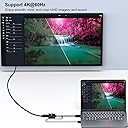
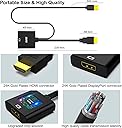
The BENFEI HDMI to DisplayPort adapter is a compact, uni-directional converter supporting up to 4K@60Hz resolution. It features an advanced IC chip for stable HDMI to DisplayPort signal conversion, compatible with a wide range of devices including laptops, gaming consoles, and media players. Designed for professionals and gamers seeking high-quality visuals on DisplayPort monitors, it offers plug-and-play ease and portability, backed by an 18-month warranty.


| ASIN | B0752D33PJ |
| Best Sellers Rank | #318 in HDMI Cables |
| Brand | BENFEI |
| Color | Black |
| Compatible Devices | Laptop |
| Connector Type | HDMI |
| Current Rating | 1.2 A |
| Customer Reviews | 4.2 out of 5 stars 4,959 Reviews |
| External Testing Certification | Não aplicável |
| Finish | Hdmi,Projector |
| Item Dimensions | 0.79 x 1.18 x 0.79 inches |
| Item Weight | 1 ounces |
| Item dimensions L x W x H | 0.79 x 1.18 x 0.79 inches |
| Manufacturer | BENFEI |
| Mfr Part Number | 000152black |
| Model Number | 000152black |
| Number of Items | 1 |
| Number of Ports | 1 |
| Package Quantity | 1 |
| Power Plug Type | No Plug |
| Specific Uses For Product | Monitor,Projector,Tv |
| UPC | 606682478641 |
| Unit Count | 1 Count |
| Warranty Type | Limited |
L**A
Great buy
Is working exactly how we needed it to. Was very easy to use, the video and picture quality was definitely enhanced on the monitor that we are using with our PS5. Great value for your money and is definitely durable as it is holding up to our cats.
B**N
Works extremely well :)
Works extremely well :) It successfully is converting an HDMI output from a laptop to be DP output, to plug into a KVM switch. I didn't realize I needed a powered active adapter to do this, but I'm glad this compact product works. Very weirdly, probably because I don't quite understand how this device works, but this still converts the signal to DP even when the USB cable isn't plugged into anything.....I just happened to unplug the USB cable to try to rearrange my setup and plug something else into the USB port I had this adapter plugged into....then realized the signal on the monitor was still being displayed. I guess the internals in this adapter are somehow still converting the signal? But yeah......it works with the USB cable plugged in or not. I did try a passive HDMI to DP adapter before trying this product, with the passive adapter not having a USB cable at all. That adapter wasn't able to convert the signal, so I did need a product like this to do what I wanted.
T**D
Quality and Functionality
I too, also have a monitor that will only allow up to 144hz via display port. After trying other adapters, I received this one today and I was able to connect my Xbox Series S to my Benq Xl2411p and the image produced instantly. I then proceeded to go to the settings on my Xbox (Tv and Display Options) selected 120hz on the drop-down menu (previously locked at 60hz) asked to keep refresh rate and I selected confirm. Highly impressed with this product, does exactly what it was supposed to do with 0 issues. Also, I am very appreciative of the fact that the power supply cord on this device actually has some length to it.
T**N
Good for entertainment system options!
Easy to install. Signal strength is good, no delay. If you are looking for something that can be used to hook a 120Hz gaming console (PS/Xbox series X/S) up to a high Hz PC monitor that is not built for a gaming a console, this will not work, it will be capped at 60Hz as it would be if you plugged the console into the HDMI port of some PC monitors. An HDMI gaming console will depend on the monitor build to get the full 120Hz, not the HDMI to DPI cable. We tried. All and all this cable will work great if you are trying to connect an HDMI device to a DPI only PC monitor.
B**N
Waste of money
This doesn't work lol. Don't waste your time or money trying this. Didn't even display output at all on my brand new series x console. However, it did work using my elgato as a middle point, which did not work with 1440p 120hz. My monitor is 165hz -_- 4k. Don't buy this trash device
J**B
Works well with Raspberry Pi 1, 3, or 4
First of all, let me make it clear that I am reviewing the HDMI to DisplayPort adapter. The Raspberry Pi has an HDMI display connector, and I am using the Benfei to see the Pi's video on a monitor that has a Displayport connector. To get HDMI video to appear on a DisplayPort monitor, you need more than just a connector. The Benfei actively converts the video from HDMI to DisplayPort. It has a USB power connector to power the electronics that do the conversion. My Asus monitor has HDMI and DisplayPort connections. My regular home computer uses the monitor's HDMI port, and the Benfei lets me connect the Raspberry Pi's HDMI connector to the monitor's DisplayPort. It works fine. The Raspberry Pi 4 can drive the display at its 2560x1440 max resolution. (Sorry, I don't remember whether the Pi 3 video supports that resolution.) The Benfei has a USB cable that must be connected to 5 volts. That can be done with one of the Pi's USB ports or with any regular 5 volt supply. The Benfei draws 120 milliamps from its USB connection. To use the Benfei with a Raspberry Pi 3, the connections are Raspberry Pi HDMI port Benfei device DisplayPort to DisplayPort cable Monitor DisplayPort connector The Raspberry Pi 4 has Micro HDMI, so I had to also buy a Micro HDMI to HDMI adapter cable. To use the Benfei with a Raspberry Pi 4, the connections are Raspberry Pi Micro HDMI port Micro HDMI to HDMI adapter cable Benfei device DisplayPort to DisplayPort cable Monitor DisplayPort connector UPDATE March 17, 2023 I tried the device with a Raspberry Pi 4, and it plays a 1080P youtube video smoothly without dropping frames.
D**A
The only HDMI to DP adapter that worked for me
I work from home and use a 27-inch 2K monitor and a 32-inch 4K monitor with a Dell WD19S USB Type-C dock and a 4K dual DP KVM connecting my work laptop and my home desktop to both monitors. I tried to go cheap with two other HDMI to DP adapters but none of those could be detected through my Dell dock or my KVM. This is the only one that worked for me, but there are probably other options as well. Both monitors are running at their native resolution and max refresh rate of 60 Hz (I'm not a gamer and don't have gaming hardware). I'm happy that this adapter works, but one of the factors for choosing this style of adapter is that the jacks into my video and USB port don't protrude out an obscene distance, making it less likely to be bumped or damaged when reaching behind my CPU tower. The length of cable between the jacks and the adapter also take some of the stress of the ports and allow for some flexibility in CPU case access and placement.
A**R
Does Not Work for the 30" Apple Cinema Display
Unfortunately, adapting HDMI 2.0 to DisplayPort does not magically unlock multi-link streams. While this will allow a single stream up to 4K60 to work and resolutions like 2560x1600 at 60Hz to pass, displays that require a DUAL LINK DVI connection like the 30" Apple Cinema Display requires a port from your GPU to be either DisplayPort or DVI. HDMI unfortunately cannot adapt - not even HDMI 2.1. It's not that HDMI 2.0 or 2.1 can't handle the bandwidth (either has plenty to spare for 2560x1600 at 60Hz). It's the way the signal is handled. Besides Dual Link DVI itself, only a DisplayPort connection can allow a dual link stream to pass. Since a dual link stream cannot pass over HDMI, adapters like this either won't work at all with the 30" Apple Cinema Display (and other displays that were designed to only work at full resolution via Dual Link DVI) or will work at a max resolution of 1920x1080. The 30" Apple Cinema display uses two 1280x800 links to reach 2560x1600, so on a single link connection you max out at 1280x800 with this adapter. Too bad there isn't a good solution to deal with this. My advice - ensure you have enough compatible ports on your GPU (Dual Link DVI and DisplayPort) to run the quantity of any dual link DVI displays you wish to utilize.
甲**隆
ディスプレイポートからHDMIはたくさん売ってるけど、HDMIからディスプレイポートは売っていません
私の悩みを解決してくれました。大手家電量販店3店舗回りましたが、このHDMIからディスポートケーブルに接続する製品は販売されていませんでした。唯一Amazonで見つけて購入しました。HDMI出力端子しかない。デスクトップのパソコンからディスポートplay端子しかないモニターとの接続ができました。
F**M
Asus monitorum için aldım, hdmi 120 hertz ile sınırlıydı bu adaptör sayesinde 165 hertz alabildim
Oldukça işime yaradı. Kaliteli, Teşekkürler
R**E
Perfect. Some monitors will need extra steps if you cannot select 120hz.
Works flawlessly with the xbox series s. Hook your monitor up though this cable. (You need a display port cable, not a hdmi) Go to Settings, General, TV & display options, Video fidelity & over scan, and then under Display, set the overrides to hdmi. Go back to the 'TV & display options' and here you can set your 1080p 120hz. I don't have a 1440p monitor so I can't test if all the resolutions are perfect but it works amazing for me and my resolution. Very happy 🙂
L**A
Ottimo acquisto
Molto contento dell'acquisto, funziona perfettamente con la mia xbox serie x, permettendomi di godermi i 120 fps senza dover cambiare monitor. (Il mio monitor ha una presa hdmi vecchia che arriva massimo fino a 60 hz ma grazie a questo cavo posso sfruttare la presa dp) ottimo.
か**つ
問題無く使えてます
今のところ問題無く使えています。
Trustpilot
1 month ago
2 months ago