


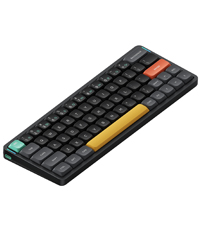
⌨️ Elevate your desk game with the Air96 V2 — where style meets speed and stamina
The nuphy Air96 V2 is a premium ultra-slim wireless mechanical keyboard featuring 100 keys with durable PBT keycaps and low-profile Gateron Red switches. It supports Bluetooth 5.1, 2.4GHz wireless, and wired USB-C connections, allowing seamless multi-device pairing and switching. With a blazing 1000Hz polling rate and a robust 4000mAh battery offering up to 220 hours of use, it delivers a responsive, comfortable typing experience ideal for professionals and gamers alike. Its customizable RGB backlighting and sleek aluminum frame make it a standout accessory for any modern workspace.




| ASIN | B0CRKQD597 |
| Additional Features | Backlit |
| Antenna Location | Gaming |
| Best Sellers Rank | #5,225 in Video Games ( See Top 100 in Video Games ) #431 in PC Gaming Keyboards |
| Brand | nuphy |
| Built-In Media | USB Cable |
| Button Quantity | 100 |
| Color | White |
| Compatible Devices | Laptop, PC, Tablet |
| Compatible Operating System Family | Windows |
| Connectivity Technology | Bluetooth、USB-C、2.4GHz |
| Customer Reviews | 4.0 out of 5 stars 341 Reviews |
| Enclosure Material | Aluminum, Polybutylene Terephthalate |
| Global Trade Identification Number | 06976604913456 |
| Hand Orientation | Ambidextrous |
| Item Dimensions L x W x H | 14.7"L x 5.22"W x 0.53"H |
| Item Weight | 663 g |
| Keyboard Backlighting Color Support | RGB |
| Keyboard Description | Support windows/mac OS/Linux system |
| Keyboard Layout | QWERTY |
| Manufacturer | nuphy |
| Mechanical Keyboard Switch Model | Gateron Red |
| Mfr Part Number | keyboard |
| Model Name | Air96 V2 |
| Model Number | nuphy Air96 |
| Number of Keys | 100 |
| Number of Sections | 5 |
| Power Source | Battery Powered |
| Recommended Uses For Product | Gaming |
| Series Number | 96 |
| Special Feature | Backlit |
| Style Name | mechanical keyboard |
| Switch Type | Gateron Red |
| Unit Count | 1 Count |
Y**I
One of the best low profile keyboards
The NuPhy Air96 is a low-profile mechanical keyboard known for its sleek design, portability, and solid performance. Here’s a detailed review based on common features users have highlighted: Design & Build Quality • Slim & Lightweight: The Air96 has an ultra-thin chassis, which makes it one of the thinnest mechanical keyboards available. Its low-profile design is appealing to those who want a modern, minimal aesthetic. • Materials: The frame is made of a combination of aluminum and plastic, offering a lightweight feel while maintaining durability. • Keycaps: The Air96 features low-profile PBT keycaps, which are known for their durability and resistance to wear over time. The keycaps have a good texture, and legends are usually sharp and clear. Switch Options • The Air96 offers low-profile Gateron mechanical switches, which come in different variants like red (linear), brown (tactile), and blue (clicky). These switches are much shorter than standard switches, offering a faster actuation, making typing or gaming feel more responsive. • Users often appreciate the smoothness of the Gateron low-profile red switches for fast and quiet typing or gaming. Typing Experience • Low Travel Distance: Being a low-profile keyboard, the Air96 has a shorter travel distance compared to traditional mechanical keyboards. This gives it a laptop-like typing experience, but with the tactility and responsiveness of mechanical switches. • Comfort: Its ergonomic design and low profile help reduce strain on the wrists, especially for extended typing sessions. Connectivity & Compatibility • The keyboard offers both wired (USB-C) and wireless (Bluetooth 5.0) options. You can easily switch between multiple devices, making it a versatile choice for users who work across different platforms. • It supports multi-device pairing, which is convenient for switching between, for instance, a PC, tablet, and phone. • Battery Life: With wireless use, the Air96 offers decent battery life, lasting up to a few weeks on a single charge, depending on the backlighting usage. Backlighting • The Air96 features RGB backlighting with various customization options. It can sync with the typing patterns, and users can adjust the brightness or choose from a variety of effects. • The backlighting on the Air96 is not as bright as some thicker mechanical keyboards due to its low-profile design, but it’s still functional in darker environments. Performance • The keyboard offers a very responsive typing experience, especially in gaming. The low-profile switches reduce the actuation force and travel distance, resulting in faster response times. • Users find the wireless connection reliable, with minimal latency during typing or casual gaming. Pros • Sleek, slim design with premium materials • Comfortable low-profile typing experience • Wireless and multi-device support • Solid battery life • Responsive low-profile mechanical switches Cons • RGB backlighting is not as bright compared to standard mechanical keyboards • Might not be ideal for users who prefer the deeper key travel of traditional mechanical keyboards • Lacks advanced features like hot-swappable switches Conclusion The NuPhy Air96 is an excellent choice for those looking for a slim, portable mechanical keyboard with a good balance of performance and aesthetics. Its combination of low-profile design and mechanical switch feel makes it suitable for both typists and casual gamers, though those looking for a more traditional mechanical experience may miss the deeper key travel.
M**D
Exceeded my expectations. I'm a little in love.
This little thing has exceeded my expectations! I did a lot of AI assisted research before buying, and expected to have to accept the default combo-key device switching. To my surprise, once I came to understand how to connect and work the VIA web app, I found the keycodes for device 1 and device 2 and simply assigned them to a couple of rarely used keys (in Windows, you do this in Layer 2. Depending on what keys you assign, you can probably give them their original assignments in Layer 3, which is the Fn layer). Presto! One press device switching. I also expected to have bluetooth connection problems and have to flash the bios to the March 2025 version. So far, this has not been necessary. It looked like a pretty complex process, so I'm hoping I continue to not need it. Most of all, though, I didn't expect to immediately love how the keys feel. I am coming from an MX Keys whose battery died finally after years and years. For a replacement, I wanted smaller footprint, keys that say "Alt" like they're supposed to in Windows, and device switching at least as good as the MX. Success on all those, and the feel is really lovely. Sound is unexpectedly satisfying as well. It just feels really high quality and my fingers land well and feel confident. I got the brown switches. I don't really need backlighting at all, so I have set to a solid gentle color, doing a slow breathe. I also assigned the battery check to Fn+B. Not hard to remember. For those lamenting the lack of an Insert key, it actually comes with an Insert key cap. You can use Via to assign Insert to something and then give it that keycap. You would have to sacrifice a key to do that, though. But, if you really need Insert, it is assigned to Fn+Delete in Via. At least mine was. But you can always set it that way if you like, or give it to Fn+Home. I should clarify that the device switching keycodes are under Custom in VIA. And the original key assignments persist. So you can assign them other keys but the original Fn+1, Fn+2, etc. are still there. These are not the F keys in the F1, F2, etc. row, by the way. They are the numbers above Q and W. As you can see from the length of this review, I'm looking for excuses to just keep typing away on this thing. I'm sure that will pass, but it really is a delight.
P**Y
Overpriced but is a good keyboard.
The keyboard itself is solid, and I really like it. But in order to remap the keys you have to update the firmware and my goodness it is difficult to figure out when you first look at everything. The good news is if you brick the thing you can lift up the CAPS key and there is a recovery button which will put it into a recovery mode so you can write a new firmware to it using QMK Toolbox. On their website make sure you are looking at the Air96 V2 firmware and not the original Air 96. There are 3 different types of firmware. At the time of writing this they are... 1. Version 2.1.5 which is the main firmware for the keyboard which is flashed using the QMK Toolbox Program for which you need to be hard wired. 2. The RF Firmware which is flashed using the nRF Connect app on your phone, you also need to connect a USB cable between the keyboard and your phone during this step and download the firmware on your phone on Android you have to unzip and then rezip the 3 files for some reason. After this you have to re-pair the Bluetooth to your device. 3. The last is the 2.4Ghz Wi-Fi Dongle which is the easiest to do. However, if you're using a laptop, it may give you a com port error, in which case I just plugged it into my desktop and ran the firmware executable and then it worked fine. After this you have to repair the keyboard to the 2.4Ghz Wi-Fi dongle. After doing all this the VIA webtool recognized the keyboard right away and I was able to change the keys very easily, just watch out what layers you're on. Layers 0-1 are for MAC and Layers 2-3 are PC and beyond that are deeper FN key presses for either. For $150 it is ridiculous that there is no easy way to update the firmware, and if you do not update it, you are not customizing your Keys. I was about to send mine back thinking I bricked it but thank God I found the recovery key which makes it almost impossible to brick, so do not worry as there is room for error, but try not to make a mistake in flashing the wrong firmware as it will write it.
P**S
Silk smooth action, full keyboard functionality and portability
Easily one of the most enjoyable mechanicals I've ever used. Pros: The low profile and moss switches are *phenomenal*. Smooth keypresses, but with enough feedback and required force to avoid a lot of miskeyed strokes. Great portability, fits comfortably in a travel bag. Bluetooth is solidly responsive, no connection issues. This is a full keyboard, with every key you're going to need (except Ctrl+Break), which is easily and acceptably dealt with by... Programability is simple and easy. Adding Ctrl +Break is mostly intuitive, the key is dependably interpreted by the o/s. Battery life is stellar. It'll last you at least a week between charges, using it as a daily driver. The variety of customization of light up for keypresses is fun, if not strictly speaking necessary. Build quality is solid-this can go in the bag of other accessories easily and without worry. Cons: It's is every key you'd ever want, and it's portable, however, I wish Nuphy had put in just a little space to separate sections. A quarter of an inch to separate F keys row (and the home/end/pgup/pgdn keys), and again with the number pad, would make this perfect without sacrificing portability. It is by no means a deal breaker, though, if you struggle to be accurate at speed without those gaps between sections of a keyboard, this might be an issue. The key covers themselves don't really shine through, and I wouldn't count of them for full night time typing if you need references.
G**G
An Almost Loved Device
I absolutely love this keyboard. The size and feel are exactly what I was looking for. I've never had an issue with the wireless connectivity either, as some reviewers have. My issue is the battery; it's absolute junk. Nine months following the purchase and it won't stay charged for more than an hour after being plugged in overnight. I, like many, bought this to be a wireless keyboard, and that functionality is virtually useless. So, in summary, fantastic keyboard, love the feel, hate the internal hardware.
M**W
Easy to love, but has an inexcusable flaw
The Nuphy Air96 v2 is a genuinely beautiful keyboard. The color scheme is fun and distinctive, and the aluminum top plate feels premium and well-finished. On a desk, it looks fantastic and absolutely nails the low-profile metal aesthetic that’s hard to find elsewhere. Unfortunately, the experience doesn’t live up to the looks. The stock switches are just okay. They’re usable, but they feel a bit cheap and hollow for a keyboard in this price range, especially compared to other mechanical switches I’ve used. That alone wasn't a dealbreaker (since you can swap out the switches) and I fully planned to keep this keyboard. What ultimately made me return it was the input lag. After about two days of regular typing, I started noticing a delay that gradually got worse the longer I used it. After typing a few paragraphs, the keyboard would develop anywhere from a 0.5–1 second delay. Even worse, it would occasionally lag so badly that it would spam a single character repeatedly; typing “hello” would turn into “helllllllllo.” This happened on multiple occasions with both the wireless dongle and wired, which makes it especially frustrating. I genuinely don’t understand how this issue isn’t more widely mentioned, because most YouTube reviews absolutely rave about this keyboard. My only guess is that many reviewers didn’t use it for extended typing sessions beyond a few hours. I attempted to update the firmware, but that experience was disappointing as well. Nuphy requires you to go to GitHub, download source code and download three separate utilities to perform the update, which feels sketchy and extremely unprofessional for a company shipping a keyboard that otherwise feels so polished. In short: this is a great-looking keyboard with nice materials, but serious input lag issues and a clumsy firmware process completely undermine the experience. If those issues were fixed, this could easily be a 4–5 star product — but as it stands, it’s hard to recommend at all.
H**E
Responsive, Satisfying, and Perfect for Work
The NuPhy Air96 V2 is one of the most satisfying keyboards I’ve used. It’s lightweight but still feels sturdy and premium. The typing experience is smooth, responsive, and honestly very ASMR-worthy. The keys react quickly and feel incredibly satisfying to use. I also love that it saves desk space while still including a number pad, which was important for my work setup. It does take a little adjustment coming from the Logitech MX Keys, but once you get used to it, it’s hard to go back. Highly recommend if you want a compact mechanical keyboard without giving up functionality.
A**R
pretty awesome for most people
I really like this keyboard a lot. A couple of things that annoyed me though: - via was super buggy on mac... also have to have the keyboard plugged in - the default layout kind of stunk imo. Needed to move the function key - battery doesn't feel like it is 48 hours to me, feels shorter? I need to tinker a bit with the rgb lighting to see if i can extend it via, when it is working is kind of great. So much to customize. folks have mentioned issues with connectivity. I have not had any issues. works great! The arrow keys have taken me awhile to get used to. If it were available I would have gone fullsize low profile I think. I had to add grip tape to the arrow keys to find them. If you are not used to this style, expect a learning curve.
H**K
Perfect
Best keyboard I've owned :)
S**D
Very retro
I love the colour and shape of the keyboard, kinda annoyed they don’t have a British / iso keyboard but you can get used to it. The colour lights are ok but gimmicky and I dont have them on anymore. Charges well and stays powered up for long.
L**O
Ottima tastiera
Ottimo, responsivo e funzionante con tutti i sistemi operativi. Connessione bluetooth, wireless con il suo apposito ricevitore e anche via cavo.
S**O
Sehr schlichte und ansprechende Tastatur mit guten Schreibverhalten.
Es wurde mal wieder Zeit für eine neue Tastatur. Da ich mich in der Vergangenheit schon mit mechanischen Tastaturen beschäftigt habe, viel meine Wahl dann auch die Nuphy Air96 V2. Die Tastatur von Nuphy kommt wie die Tastatur selbst in einem schlichten aber sehr schicken und ansprechendem Design. Wichtig ist, dass es sich hierbei um keine Tastatur im ISO-DE (deutschem) Design handelt sondern im ANSI-US Layout. Wenn man das schreiben auf einer Tastatur bereits beherrscht und bestens verinnerlicht hat, ist die Umstellung jedoch kein großes Problem. Die Tastatur wird mit einigem Zubehör geliefert. Darunter sind zusätzliche Keycaps für ein paar der Funktionstasten in verschiedenen Farben. Weiterhin werden von jedem Switch der Low-Profil-Serie ein entsprechender Switch zum Ausprobieren mitgeliefert. Im Nuphy-Store können hier entsprechende Sets nachbestellt werden und mit dem mitgelieferten Werkzeug ausgetauscht werden. Zusätzlich kommen diverse Anime Sticker und ein Poster / eine Bedienungsanleitung. Nicht zu vergessen ein entsprechendes USB Kabel zum laden und ein Wireless-Empfänger. Die Tastatur ist sehr gut verarbeitet und ist optisch sehr ansprechend. Die Farbakzente der Keycaps machen diese Tastatur zu etwas einzigartigem. Ist habe mich für die Moos Switches entschieden. Dabei handelt es sich um Tactile Switches. Das heißt, man bekommt ein leichtes Feedback vor dem Erreichen des Endpunktes. Das schreiben ist sehr angenehm damit, bei längeren texten bieten sich wahrscheinlich jedoch andere Switches an, da die Moos-Switches einen doch recht langen und "harten" Anschlag haben. Ich habe mir für die Arbeit auch eine weitere Nophy bestellt, hier jedoch mit den Cowberry-Switches. Diese sind linear und benötigen etwas weniger Kraft. Ein Test steht noch aus. Die Nuphy lässt sich easy per Kabel, Bluetooth oder per 2,4GHz Empfänger verbinden. Somit lässt sie sich mit so gut wie allen denkbaren Geräten verbinden. Die Beleuchtung der Tastatur kann mit den in der Bedienungsanleitung beschriebenen Tastenkombinationen sehr individuell eingestellt werden. Hierbei kann unter verschiedenen Farben und Effekten gewählt werden. Ich ziehe jedoch die statische Beleuchtung vor. Die Beleuchtung ist gut, die Keycaps scheinen jedoch nicht durch. Dennoch kann man die Tasten im dunkeln gut erkennen. Aufgrund des hohen Preises habe ich hier einen Stern für die Kategorie Preis-Leistung abgezogen. Einige schwören auf die Tastaturen der Fa. Lofree. Diese konnte ich noch nicht testen, sehe jedoch aufgrund der guten Qualität der Nuphy keinen wirklichen Anreiz. Schän wäre, wenn man bei Amazon das Nuphy Zubehör bestellen könnte. Leider musste ich die Handballenauflage und die Schreibtischunterlage direkt beim Hersteller bestellen. Da die Lieferung hier direkt aus China kommt, sind die Versandkosten und die Lieferzeit damit leider recht hoch.
G**O
Excelente teclado
Todo perfecto con el teclado pero el hecho de que sea ISO layout sí hace que cambie la experiencia ya que hay que estar mapeando las teclas del español ya que no trae la ñ por ejemplo. Aún así yo estoy muy contento con él y recomendaría la compra.
Trustpilot
3 weeks ago
3 days ago