Desertcart purchases this item on your behalf and handles shipping, customs, and support to Slovakia.
🖱️ Elevate your desk game with silent precision and seamless switching!
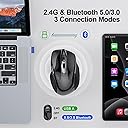
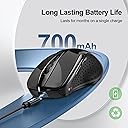
The TECKNET Wireless Mouse combines Bluetooth 5.0 and 2.4G USB connectivity to connect two devices simultaneously with a quick toggle switch. Its rechargeable battery delivers up to 3 months of use on a single 2-hour charge. Featuring 6 adjustable DPI levels up to 4800 for tailored precision, this silent, ergonomic mouse is designed for small to medium hands and offers broad OS compatibility, making it an ideal choice for professionals seeking versatile, long-lasting, and quiet wireless control.


| ASIN | B0CP3JRG7F |
| Additional Features | Ergonomic Design, Rechargeable, Soundless, Wireless |
| Antenna Location | Indoor/Outdoor, Office |
| Battery Average Life | 3 months |
| Best Sellers Rank | #47 in Computer Mice |
| Brand | TECKNET |
| Button Quantity | 6 |
| Color | Black |
| Compatible Devices | Windows/Mac/Chromebook/Linux/Notebook/Laptop/Computer |
| Connectivity Technology | Bluetooth, USB A, Wireless |
| Customer Reviews | 4.6 out of 5 stars 13,630 Reviews |
| Enclosure Material | Plastic |
| Finish | Matte |
| Hand Orientation | Right |
| Hardware Platform | Laptop, Personal Computer |
| Included Components | charging cable |
| Item Weight | 0.14 kg |
| Manufacturer | TECKNET |
| Model Name | Rechargeable 4800 DPI Silent Mouse |
| Model Number | TK-MS317 |
| Mouse Maximum Sensitivity | 4800 dots_per_inch |
| Movement Detection | Optical |
| Movement Detection Technology | Optical |
| Number of Buttons | 6 |
| Operating System | Windows, macOS, Chrome, Linux |
| Power Source | Battery Powered |
| Range | 10.0 meters |
| Special Feature | Ergonomic Design, Rechargeable, Soundless, Wireless |
| Style Name | Modern |
| Theme | Office |
| Unit Count | 1 Count |
D**D
Marvelous, Versatile Mouse
I was torn between getting a wireless or a Bluetooth mouse, but this product eliminated the dilemma altogether. It paired painlessly with my MacBook and synced seamlessly with the wireless dongle plugged into my Windows machine. No noticeable lag, but I did not test with games. The mouse feels comfortable in my hand and has just the right amount of heft so that it doesn't feel like a cheap dollar store mouse. The feel of it rivals my more expensive Logitech mouses. Buttons are extremely quiet and provide satisfying tactile feedback. But I think the clincher is all the thoughtful details. I love that I can stash the dongle inside the mouse via a slot on the bottom. The switch to toggle between Bluetooth and wireless, or to shut off the mouse in order to preserve power, is a nice touch. And the recharge capability is as advertised. So far I've been using the mouse for two weeks straight and don't foresee it dying anytime soon. And if it does, it's nice to know I don't need to worry about batteries. Overall, this is the perfect portable mouse to stash in my laptop bag and break out in just about any situation.
M**O
Excellent 👌
This wireless mouse works great and is very easy to use. The Bluetooth connection is fast and stable, and I love that it can connect to multiple devices. The clicks are quiet, the battery lasts a long time, and the Type-C rechargeable feature is very convenient. It's comfortable to hold and the adjustable DPI makes it perfect for both work and everyday use. Excellent value for the price. Highly recommended!"
S**A
Mouse in the house!
This is a great mouse. No batteries required. Has two options to connect (USB or Bluetooth). Super responsive and easy to set up. Highly recommend! Included in box is: Mouse Charging cable Instructions How the mouse can connect: 1. USB dongel (it's housed in a storage slot underneath the mouse) Or 2. Bluetooth *Underneath the mouse is a slide switch to select which option you want : USB or Bluetooth... and there is also an "off" position. *Mouse can't be used as a wired mouse and must connect via USB or Bluetooth. How the mouse is powered: It's a rechargeable wireless mouse. Doesn't use batteries (ex. A, AA). Charging cable is included. When the mouse gets low and requires charging, the battery indicator light located on left side of mouse flashes red. A full charge lasts 3 mos (when used 2 hrs a day) and takes 1.5 to 2 hrs to fully charge depleted mouse. You can use the mouse while charging (*but it still needs to be connected via USB or bluetooth to operate while charging). To verify or change the speed/sensitivity of the pointer on screen (aka DPI), you press the button just below the scroll wheel. You can tell the dpi setting by looking at the battery indicator light (located on left side) while pressing the DPI button. The light will blink 1x after the button is pushed for 800 dpi, blink 2x for 1200 dpi, 3x for 1600, etc. There are 6 DPI levels (800/1200/1600/2400/3200/4800). Size of mouse: 4.88 x 4.02 x 1.85 inches Site says : The mouse is better suited for small to medium-sized hands. However, if you have larger hands yet enjoy a smaller mouse, you might also like this one. Length of my hand is a bit over 7 inch length and it's definitely compact/small feeling. Wish it had come in a large size... But it's completely fine for average use. Definitely light weight compared to my old wireless mouse that had to carry 2 AA batteries... Lol. I also purchased the Tecknet wrist support mouse pad to help provide more comfort. Mouse has rubberized grip strips along edges. Rest of the body is hard plastic. Silent when clicking.
W**E
Solid buy.
after a couple weeks of using this mouse, i have to say, i was skeptical before but i am enjoying no longer having the issues i was having due to logitech's flawed construction where the spring wasn't always meeting the battery - goodbye to using batteries! come to think of it, i don't think i've charged this mouse for a couple of days now and it's still spot on. no lag, no acting up, no cutting out. setup was easy as heck. feels comfortable in my hand. the backbutton by the thumb takes getting used to as i've already clicked it accidentally a few times. would definitely suggest to anyone looking to ditch the battery operated wireless mouse design of yester-year. this is where it's at.
K**M
Yahoo, works better than the more expensive mouse it is replacing!
After struggling with the failure of the buttons on my 2-year old BT MX Anywhere 3 mouse (despite reprogramming to different options), I decided to buy this Tecknet product. While I wish it was a better fit for my larger hands, I am happy with the easy install (followed the instructions), shape is satisfactory, and the materials are grippy. Fully compatible with the iMac and will try later with my iPad. Came fully charged and ready to rock so I have no complaints. Though if Tecknet makes a larger version, I will surely buy that one. Nice price. I cannot comment on how long it will last, but if it lasts as long as my Logitech version), I will be way ahead. Based on size and unknown long-term performance, I give 4 stars. Time will tell. For now, I recommend.
C**Y
Works Seamlessly
RE: TECKNET Wireless Mouse (BT5.0/3.0 & 2.4G) RECHARGEABLE I have been using Tecknet computer mice for a few years now. I have a wired one and also a wireless Bluetooth one. I got tired of buying batteries so decided on this Tecknet Wireless Bluetooth Rechargeable mouse. The mouse arrived with 99% charge and charged to a full 100% in less than 5 minutes and remained at 100% for several days even with constant use. What I like: 1. It fits well in my small hand 2. It connected to my mini desktop computer within seconds - no messing. There was nothing I had to press. Nothing I had to install. Nothing I had to configure. It was ready to use in 2 seconds flat. 3. It's ergonomic, the forward and back buttons are conveniently placed 4. It's lightweight 5. The left and right buttons are nearly silent - no noticeable clicking sound. 6. The supplied USB-A to USB-C cable is a solid good quality charging cable (pity it can't dual as a data cable) 7. You CAN use the mouse while it is plugged in and charging What I don't like: 1. There is no rubber grip on the right side to facilitate a firm hold but a moist hand/finger remedies this 2. The topside of the mouse is smooth-ish so a dry hand can easily slide - would prefer a soft grip 3. The supplied cable is only a charging cable, will not work as a data transfer cable. But to be fair, it's only meant to be used to charge the mouse. Still, most cables are dual purpose these days. It's annoying when I store all my cables together that unless I mark them, I can't tell which ones don't transfer data. 4. There is no indicator to show how much battery charge is left (some mice have this) The "caveats" are minimal. I like the mouse quite a lot and I would get another one of the same if I had need for it.
H**Y
Very natural to use in hand. Easy setup.
I love this mouse! I wear a size small in women's gloves (USA). This fits perfectly in my hand. The shape is so natural and restful. The color a is a clear pastel purple, a lilac, but not too bright or overly soft. It is a little darker than my screen showed, as the picture appears to have a bright light and reflections. Connectivity has been a breeze. No issues at all connecting to a Surface Pro 11. We'll see how it goes connecting to the 12 ... Doesn't fit in the Smatree brand hard carrying case for laptops...too tall. But I am keeping it for home use anyway. Eve I though I have one of those surface pro lays flat mice coming. Only time I needed a mousepad was one time when I tried to use it outside of my picnic table and there seemed to be little grit so I had to clean that off, and just I have a really loose really thin picnic table cover for the winter that I hadn't taken off yet and it did not like that. But it went on my tablecloth and my kitchen table. It worked on my kitchen counter. It worked on my office desk and it also worked on a mouse pad. I have only used it for about 3 days. Sometimes I would remember to turn it off when I wasn't using it and overnight. Sometimes I didn't. Haven't had to recharge it yet. Update: returned the refurb 11 and bought a new 12. my surface pro mouse came in. I paired it, used it for about fifteen minutes. turned it off. and paired this one. I had to cycle it through since it had been previously paired. This was no trouble at all and only a minute to do. it's too tall for some pockets, but my hand stopped hurting, so I'm going to try to use a separate storage case for accessories. it's radius for moving across the screen is helpfully small.
P**L
Smaller, ergonomic, lightweight, VERY quiet and soft click
I'm about a month into using this mouse, and so far it checks every box besides being rechargeable. in other words, I preferred battery operated ones as I have no way to use this while its plugged in unless I reroute my whole PC setup just to be able to have access to a USB C cable. I purchased a second mouse for backup. Anyway, its a great mouse, thats extremely lightweight and responsive. the button click is EXTREMELY light, which I love, (similar to a new model macbook pro touchpad click, possibly even lighter) and the overall feel is ergonomic/small which i prefer, since I like to be able to move the mouse around with my fingers rather than my wrist. I use it for my main home PC while using my DAW for music production. The DPI feature is cool I suppose, but I don't really need a quick-access setting to change mouse responsiveness on the fly. My only gripes are two; that I wish the side thumb buttons were moved back toward the wrist a bit more. I can only effectively reach the rear button with my thumb, but the forward button requires me to shift my hand around the mouse each time to click it. Its actually easier to slide my index finger off to the side and press that button if I need to which is weird. My second gripe is the charging: I used it for the whole month (8+hours a day work) and I needed to charge it by the end of the month. Which is not bad, but nowhere near the 6+ months of battery life using a single AA. It does not have an energy saving feature similar to mice I've used in the past (click to wake up), also the little battery indicator doesn't make sense. It only goes off when theres no connection to a PC i.e the PC is turned off. It did not indicate when the battery was low, charged, or charging. I plugged the mouse in when it finally died (which was unforgiving, its not like it died, and I could pop the battery in then out to pause a game, or stop music playing, etc.) and it was underneath the clickers that illuminated red (im assuming that was charging, since instructions weren't clear) and then it was green at some point. Simple enough to figure out, but strange that the battery indicator itself didn't function that way it was supposed to. Charging was fairly quick ~an hour or so? We'll see how it fairs in the long run. Overall, Im happy with this mouse in the short term
C**U
Kleine, aber feine Computermaus
Diese Funkmaus habe ich als Reservemaus für den Fall der Fälle bestellt. Bisher ist fast jede Funkmaus auf kurz oder lang ins Computermausnirwana gewandert. Mal versagte die Mechanik, mal war der innen liegende Akku Schrott. Die recht leichte Maus ist von den Ausmaßen her etwas kleiner, liegt dennoch recht gut in meiner Männerhand, also die Ergonomie passt. Den Dongle aus der Maus herauszubekommen war etwas Fummelei. Funktion unter Linux out of the box. Die Reaktionsgeschwindigkeit geht für mich völlig in Ordnung. Insgesamt eine ordentliche Maus für kleines Geld. Als Reservemaus sicher keine schlechte Wahl.
M**A
Una piacevole sorpresa
Rispetto ai Brand più popolari e, visto il prezzo molto competitivo, consiglio questo articolo. Molto Pratico, preciso e con un ottima durata della Batteria.
O**R
mal resultado
a los dos meses de uso (con muy poco tiempo de uso además) ha dejado de funcionar.
N**U
Indispensable !
Petite et pratique. Elle fait très bien le taff, je recommande !
H**.
trådlös mus
fungerar perfekt, snabb och smidig leverans
Trustpilot
3 weeks ago
4 days ago