
Desertcart purchases this item on your behalf and handles shipping, customs, and support to Slovakia.
🚀 Elevate Your Internet Experience!
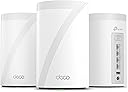
The TP-Link Tri-Band WiFi 7 BE10000 Whole Home Mesh System (Deco BE63) is a state-of-the-art networking solution designed to deliver ultra-fast speeds of up to 10 Gbps across a vast coverage area of 7,600 sq.ft. With advanced features like AI-driven roaming, robust security protocols, and extensive device compatibility, this system ensures seamless connectivity for over 200 devices, making it perfect for modern smart homes.


| ASIN | B0CN8QLS4K |
| Antenna Location | Home |
| Antenna Type | Internal |
| Best Sellers Rank | #8,553 in Computers ( See Top 100 in Computers ) #33 in Whole Home & Mesh Wi-Fi Systems |
| Brand | TP-Link |
| Built-In Media | 1 RJ45 Ethernet cable, 3 Deco BE63 units, 3 Power adapters, Quick Installation Guide |
| Color | White |
| Compatible Devices | Gaming Console, Personal Computer, Printer, Security Camera, Smart Television, Smart Thermostat, Smartphone, Tablet |
| Connectivity Protocol | Wi-Fi, Ethernet |
| Connectivity Range | 7600 Square Feet |
| Connectivity Technology | Ethernet, Wi-Fi |
| Control Method | Voice |
| Controller Type | App Control |
| Coverage | 7,600 Sq.Ft |
| Customer Reviews | 4.2 out of 5 stars 991 Reviews |
| Data Transfer Rate | 10 Gigabits Per Second |
| Frequency | 6 GHz |
| Frequency Band Class | Tri-Band |
| Frequency band class | Tri-Band |
| Has Internet Connectivity | Yes |
| Has Security Updates | Yes |
| Is Modem Compatible | No |
| Item Dimensions L x W x H | 10.7L x 10.7W x 17.6H centimeters |
| Item Weight | 2.26 kg |
| LAN Port Bandwidth | 2500 Mbps |
| Manufacturer | TP-Link |
| Maximum Upstream Data Transfer Rate | 1000 Megabits Per Second |
| Mfr Part Number | Deco BE63(3-Pack) |
| Model Name | BE63 |
| Model Number | Deco BE63(3-Pack) |
| Model name | BE63 |
| Number of Antennas | 4 |
| Number of Ports | 4 |
| Operating System | Linux |
| Other Special Features of the Product | Access Point Mode, Guest Mode, QoS, Remote Access, WPS |
| Router Firewall Security Level | Advanced |
| Router Network Type | hybrid |
| Security Protocol | WPA3 |
| Special features | Access Point Mode, Guest Mode, QoS, Remote Access, WPS |
| UPC | 840030712685 |
| Unit Count | 1 Count |
| Wi-Fi Generation | WiFi 7 |
| Wireless Compability | 802.11.be, 802.11ac, 802.11ax, 802.11g, 802.11n |
| Wireless communication standard | 802.11.be, 802.11ac, 802.11ax, 802.11g, 802.11n |
M**.
Awesome
Love these things. I set these up as a mesh system for the ground floor, which doesn't have any router signal. Just connect one of them by Ethernet, then let the rest repeat off of that. You'll get great coverage for the entire ground floor. Also, setup is super easy as TP-Link has a great app for this. Thinking of buying another pack just to extend coverage even more.
M**S
Top tier mesh system, for a reasonable price
Easy to set up, app connects quickly, and the speeds are top notch. Probably the best option for the price.
R**K
Goodbye EERO!
Goodbye EERO! We have been EERO users since 2024 when our ISP (Frontier) sent us a “free” EERO 6 PRO for a $10 shipping fee. It was easy to setup and we got good, not great, performance. About 140 Mbps down and 50 Mbps up on a 500/500 system. Compared to the router it replaced we were happy. I run a home network with android phones/apple Ipads, windows computers ( 5 on W11, 1 on W10 ) , a Linux computer and 3 TVs . The EERO was easy to set up and easy to add additional nodes. Connections were never a problem with the EERO. The TVs would often buffer when we watched YouTube-TV. The android phone app used to control the EEROs has problems. The status screen, used to show the health of your EERO nodes, is terribly unreliable. Often it will show EERO nodes that are unplugged as online. We called EERO support and spent several hours debugging this problem. I had android 11 at the time but my son had android 16 and both showed the same error. EERO support wrote a ticket on this problem but we have noticed no improvement in the app since. In Feb 26, I noticed Frontier had been charging us $7/month for the “free” EERO. We called and they took it of the account and required that we ship the “free” EERO PRO 6 back to them – which we did. We were using EERO 6 non-pro nodes on our system for some time. The EERO PRO 6 ran so hot we were a little afraid of it. In mid March 26 we noticed Amazon had a EERO 7 PRO on sale for $199. We ordered that and connected it to our system. As always, it was super easy to add a new node with the EERO app. The EERO PRO 7 was getting 370 Mbps/170Mbps which seemed like a huge upgrade! We noticed in the status it was connecting on the 6Ghz network to our intel and AMD boxes. This was great! On the Linux host, it connected and did 350/320. Wow, awesome! The joy did not last long, however. Later in the day, on the intel computer I was seeing 120 / 57 again. I found it was back on the 5 GHz band. If I disconnected and reconnected. It reconnected and we were back on the 6Ghz band with great performance. Later in the day it had gone back to the 5 Ghz band along with disappointing performance. It appears the EERO are coded to go after the strongest signal even if a good signal on a super performance band is available. I read a review online of the TP-LINK DECO B3 10000. The review indicated you could set a per-device preference of the band to use for the connection. EERO does not have this! I felt this might be just what I needed. The router arrived later in the day thanks to prime! We installed the 3 node TP-LINK DECO B3 10000 in the same locations as 3 of our existing EERO nodes. The TP-LINK app is not as easy to use to install the system as the EERO app. After a couple of failed attempts we got it to install. Yea! Once you have the first node set up it is really easy to add the additional nodes. The app does let you customize the network to use for each device. Excellent! I checked the intel windows box again. It was hitting 430/420 on WiFi. Wow! Damn! We had not seen that performance before with EERO, ever! The other WiFi devices where showing good performance too. The LG/TCL TVs are no longer buffering on YouTube-TV. All of our phones were on the 6Ghz band. There was one big exception to this joy! The UBUNTU Linux 24.04 node wold not connect to the TP-LINK DECO. I suspect it was a problem with WPA3 protocol DECO uses! We tried all sorts of things but it would never work. Edit: We were able to show that it was related to WPA3 Simultaneous Authentication of Equals (SAE) or more commonly WPA Personal. We reenabled the eero 7 which uses wpa/wpa2 protocols for all bands. It connected. The TP-LINK DECO is set to only use WPA3 SAE for the 6 Ghz band. We set the preference for the device to connect any band in the DECO app as opposed to 6 Ghz. It connected immediately on the less efficient 5 Ghz band. End Edit: Wait, there are 4 Ethernet ports on the back of each TP-LINK DECO node. There is a network node ( EERO and TP-LINK) right by the Linux computer. Let me try that. It worked! The Linux box was hitting 480/470 with the Ethernet connection. The intel box, which is right next to the Linux box, hits over 500/500 when hooked up to the Ethernet cables from TP-LINK DECO. We have let it run for a couple days to see if there are gotchas. None so far. We have the winner. We are done with EERO. We are shipping the EERO PRO 7 back to Amazon tomorrow.
A**L
Excelente tecnología
La mejor inversión que pude haber hecho solucionó todos mis problemas lo utilizo en una casa de 3 pisos y me funciona excelente
N**U
Whole Home WiFi 7 System With Outstanding Range and Flexible Network Options
⚡ Upgrade: Major upgrade in both speed and coverage. Handles a large number of devices smoothly and feels like a true next‑gen jump in performance. 📡 Connectivity: Very impressed with signal strength. Strong connection everywhere in a 2,800 square foot two story home and even across a 1.3 acre property for cameras and IoT devices. 🔐 Security: Offers great network control. Lets you create a separate 2.4GHz IoT network to isolate cameras and appliances for better performance and increased security. 📶 Signal strength: Excellent range indoors and outdoors. Devices stay connected with stable speeds even at long distances. 🔄 Compatibility: Supports separate or combined SSIDs for 2.4GHz, 5GHz, 6GHz and MLO. Works well with mixed device types including older IoT gear. 🛠️ Ease of use: Easy setup with helpful built in tools. The speed test and network optimization features are extremely useful for tuning the network. 🏁 Final Verdict: A powerful WiFi 7 system with outstanding range, flexible SSID options, strong outdoor coverage and excellent tools for managing both regular devices and IoT gear.
E**R
Si buscan estabilidad, gran rango y velocidad este es el producto indicado!!
Anteriormente tenía un sistema de 3 Decos M5 los cuales me salieron muy buenos, sin embargo, nunca logré obtener toda la velocidad contratada con mi plan de internet, ni siquiera conectado con en el Deco principal. Todas mis conexiones entre Decos han sido Wireless por lo que siempre se degrada un poco la velocidad, sobre todo con los Decos Satelites. Desde hace un tiempo quería dar un brinco a las nuevas tecnologías del mercado y despues de leer bastantes opiniones positivas me incliné por comprar este dispositivo y creanme que es excelente!!!, buen rango, velocidad igual a la contratada en la mayoría de los casos incluyendo los Decos Satélites aun cuando siguen estando conectados inalambricamente, en conclusión, es una excelente opción.
R**L
Excelente sistema Mesh
Excelente sistema de malla. Lo use para sustituir mi Deco M3 y se nota la diferencia además de que tiene mayor cobertura. Muy recomendable.
Trustpilot
3 weeks ago
4 days ago