


Desertcart purchases this item on your behalf and handles shipping, customs, and support to Slovakia.
🔒 Upgrade your door to the future of smart security—because your home deserves the smartest welcome.
The Aqara Smart Retrofit Lock U200 is a sleek, silver biometric smart lock featuring native Matter over Thread support for seamless integration with Apple Home, Alexa, Google Home, and SmartThings. It offers versatile unlocking options including fingerprint, Apple Home Key, password, NFC, and app control. Designed for quiet operation with auto-lock and door-open alerts, it runs on a rechargeable battery lasting up to 6 months, with backup power options. Easy to install without drilling, it fits Euro and select Scandi door profiles, making it a cutting-edge retrofit solution for modern smart homes.
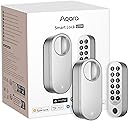
| ASIN | B0D1BZPJP1 |
| Additional Features | Fingerprint |
| Best Sellers Rank | #105,349 in Tools & Home Improvement ( See Top 100 in Tools & Home Improvement ) #353 in Deadbolts |
| Brand | Aqara |
| Brand Name | Aqara |
| Color | Silver |
| Connectivity Protocol | Matter Over Thread, Bluetooth |
| Control Method | App, Touch |
| Controller Type | Apple HomeKit |
| Customer Reviews | 2.7 out of 5 stars 2,083 Reviews |
| Finish Types | Polished |
| Included Components | Smart Door Lock |
| Item Dimensions | 2.44 x 2.36 x 5.98 inches |
| Item Highlight | Keypad Included, Rechargeable Battery, Matter over Thread, Supports Apple Home, Alexa, SmartThings, Keyless Entry Door Lock |
| Item Type Name | Smart Lock |
| Item Weight | 0.65 kg |
| Item dimensions L x W x H | 2.44 x 2.36 x 5.98 inches |
| Lock Type | Biometric |
| Manufacturer | Lumi United Technology Co., Ltd |
| Material | Polycarbonate |
| Material Type | Polycarbonate |
| Model Name | Smart Lock U200 |
| Model Number | EL-D02E |
| Number of Items | 1 |
| Number of Packs | 1 |
| Number of Pieces | 1 |
| Shape | Rectangular |
| Special Feature | Fingerprint |
| Style | Smart Lock |
| Style Name | Smart Lock |
| UPC | 192784001608 |
A**.
Basically dead in less than a year
9 Apr 2026 Edit: ok so I’ve had this since August of 2025 and today’s date is noted above. This device has been intermittently problematic and uncooperative. Sometimes it locks and sometimes it just says it’s locked. I’ve come home more times than I should have to find the door unlocked, but also with a text message telling me that the door had locked when I left. Yeah, the one thing that a door lock cannot be is unreliable. At this point I don’t trust the lock unless I have manually checked it. In fact I find myself using the key most of the time because of the next thing I’ll talk about The device now makes sounds as if it is *trying* to lock or unlock, but. It actually doing either of those actions. About half of the time the device will eventually successfully lock or unlock. The other half of the time the device will eventually give up and just send me a text that it is jammed. No, it’s not actually jammed. It does this when the door is open and there is no way it’s jammed. Also, sometimes if I just press the lock button again it will actually work this time. But really, it’s just more convenient to just use the key. This is unfortunate, since I bought the lock and the doorbell cam together as a pair. And this unit not functioning as intended has basically negated the utility of the doorbell cam as well. $400~ish that I feel like is wasted at this point. And for the record, I have removed the battery and verified that it is fully charged, so no, the problem is not a battery that needs charged. I have not tested the battery to see if it has dead cells or something unlikely like that, so I guess that is possible. But again, not very likely due to how batteries like this are constructed. I hate leaving this review and update to the review. I have a lot of other Aqara devices that work great and have been working great for years. This one device, along with the doorbell cam that was intended to compliment it, have been a pair of expensive disappointments. Original August 2025 review: ok i wont get too deep into the weeds here. let me say that the install was fairly straightforward with the exception of needing to remove and invert a little plastic fitting on the baseplate of the interior frame of the lock. once i figured that part out, installation went very quickly and easily! I also already have other Aqara devices in my house, so adding it to my existing account was fast and straightforward as well. frankly, i have devices from many manufacturers that i bring into home assistant for interoperability, and Aqara (Xiaomi in case you dont know) is one of the most polished and easy to use apps! The lock feels decently made, even though it is mostly plastic, that part is inside and not exposed to the elements, so not really a big deal. The keypad however is placed outdoors. so i suppose that we will eventually see how durable it is. i live in southern california, and the sun can be brutal. i placed the keypad in a protected location to mitigate sun exposure, but again, time will tell. i have used the numerical keypad, the fingerprint reader and nfc on my watch and phone, and all seem to work quickly and reliably. And it integrated easily into apple home and bridged into home assistant just as easily using matter over thread. HOWEVER, this device is advertised as having an internal gyroscope so that it knows when its closed. yeah, it doesnt know when its closed. all it knows is that its not moving. so when the door is open, itll lock itself and tell me that its closed and locked. thats not okay. that creates a situation which would be easy to mistakenly leave the door open thinking its closed and locked. worse yet is that i bought and installed the newest doorbell camera / hub alongside this device, which is advertised to work in concert with each other. and i suppose at the most basic level, they do. but nowhere near the level that i expected from this brand. i have other devices which have actual facial recognition, and can respond accordingly. even though i couldnt find explicit wording saying that this was a feature, i was confident that since it had been such a basic feature in much lower priced devices, that it would do so. if this isnt the reason, i dont understand why it has the ability to register my picture to the device? all of the drawbacks i found with this device can be fixed with software updates. and im hopeful that they will be. and despite the shortcomings, i would recommend the device. just know what it is that youre buying. i admit that i have higher expectations than just about anyone else will. but in todays smart home environment, i feel justified in having high standards.
C**A
Impressive Matter/Thread Retrofit Lock
(update October 2026) After over two years of use, the only major issue I have experienced with this lock is that the gears in the gearbox eventually began to fail due to the shoddy lubricant applied in the gearbox. I disassembled the lock, opened the gearbox, cleaned and relubricated the gears with fresh grease, and put it back together. Honestly, it works better than when it was new now. That said, this was a DIY solution to what should've not had to have been done in the first place. I still think this is a solid retrofit solution for a deadbolt lock. I've never once had an issue over the past two years with connectivity or software function of the product. I do, however, recommend that Aqara take into consideration the fact that most consumers will not take apart their locks, service it, pop it back onto the door, and still think it's a neat lock. Most people would tear it off, throw it in the garbage, and swear off their products for the rest of eternity. (Original Review) This lock so far has been quite an impressive piece of tech. Based in the US, I have a standard US deadbolt on the door I installed this lock on. Installation was relatively simple. Keeping the front of my deadbolt, where the key is in insterted, I was able to easily remove the back latch, screw in the mount for the Aqara lock using the existing bolts from the original lock, and then I used one of the adapters matching to my deadbolt for the turny-bit. Then I popped on and secured the Aqara lock unit itself. Once physical setup of the hardware was compete, I added my new lock to three seperate ecosystems of choice. First, I checked for firmware updates in the Aqara app. At time of writing this review, 65 is the most up to date firmware available. Then, because I was already playing with the nuanced settings within the Aqara app, I adjusted the volume of the keypad/voice/beeps/etc. I also auto-calibrated the lock within the Aqara app. Then I set up the lock for Homekit/Apple Home because HomeKey is a super cool feature to utilize. I personally had zero issues with setting up this lock in Apple Home, though I am aware some people did encounted issues. Finally I set up the lock to Home Assistant. Both Apple Home and Home Assistant were set up using Matter/Thread with my existing Thread Network. It's important to keep in mind that you're not required at all to use the Aqara app to setup/calibrate, I could have just jumped straight into using Apple Home or HA. Though it's nice to have the option to set up/change different lock settings that are not part of the Matter standard at this time, so the Aqara app works around the current limitations of Matter by being able to adjust specific settings through their app. For actual use, the lock has been fantastic for the time I've used it so far. Fingerprint reader is ~snappy~, and pretty much instantaneous to unlock the lock. The Homekey works as it should and in my observation is as instantaneous as the fingerprint. Inputting a numeric code, has a very slight delay. Though not more than a few milliseconds. When controlling via my integration with Apple Home and Home Assistant, which are using Matter/Thread, it is incredibly quick to respond as well. I was very pleased and impressed with this. And of course, I'm able to use my established key as a back up. My only current gripe with the lock is that in order to update/change settings of the lock and keypad within the Aqara app is that one must establish a phsycial Bluetooth connection to the lock AND then press a button on the keypad to confirm the connection and wake the keypad. I understand potential reasons why this may be required as the keypad likely is put in a sleep state to conserve battery while it is not in active use, however for convenience sake, I wish I could just remotely access and change settings without having to wake the keypad, especially if one already has their lock connected to an M3 hub within the Aqara ecosystem which is meant to be able to provide said remoted access. Battery life of the lock and the keypad will be seen over the course of time as I continue to use this lock in everyday use scenarios. I am not too worried about being locked out, as I am particular to keeping tabs on battery levels as I've used several smart locks over the course of many years. Overall, I'm really enjoying this Aqara U200 Smart Lock. I highly recommend it so far and look forward to further development in the firmware to make it even easier to use and implement than it already is. As the Matter standard matures over time, and if Aqara continues to support this lock during this, the U200 will easily maintain a solid success.
B**.
I CANNOT recommend anyone buy the U200.
Though I like and use other Aqara products, I cannot recommend anyone buy the U200. It has a design flaw that makes it last maybe a year before the gears inside fail and it starts to jam or just not work at all. The U200 seems like a great idea with good battery life and works well until the gears fail. The Thread radio is why I picked the U200. I tried other Wi-Fi smart locks in this location and Wi-Fi would always drop or take forever to respond, but the u200 with the Thread radio is a game changer for connectivity. Having the fingerprint reader was also a game changer. I had to have my original U200 replaced twice! I really wanted this lock to be good and hoped that it was just a bad unit, but now the 3rd one is failing again in the exact same way as the first two. I'm out of warranty now, so they are just giving me a list of things to try and ignoring that it's a flaw in the design... Seems this was just another costly experiment. Not a good value. I really wanted this lock to be the one, but with the bad gear design I’m going to have to replace it with something else. Maybe the new THOR with Thread and fingerprint will work.
P**M
Physical problems mar a solid software and integration experience
Update December 2025: After about 16 months the U200 lock just stopped working. It would no longer reliably lock even when the door was open. It became hard to turn the lock manually too - both with the key and with the knob on the inside. There were times that it would lock, but it would often take 4-6 tries and it seemed like it was grinding as it was trying to lock the door. I was under the impression that some of the gears had broken and lost their teeth. Fortunately, this didn't result in any lockouts, but it did force us to start carrying keys again, which defeated the purpose of the lock. Figuring that the lock was dead, and having contacted Aqara earlier in the year and not wanting to continue to deal with their customer service process, I took the lock apart and found what it seems thousands of other people have experienced and sometimes found - the inside of the motor housing was all gummed up. The grease used for a lubricant had gotten gummy in a number of locations. I carefully removed each of the gears and noted that they were all in good physical condition - even the plastic one. Although the presence of a plastic gear is generally a bad sign. I removed the solidified grease from all the parts and then applied some new synthetic grease to the gears and reassembled the lock. It's now quiet once again and closes my door with no problem. So, if you're fine with voiding your warranty and spending 30 minutes once a year to take apart and great your lock, this seems fine. But, if you're Aqara, this seems as though it's a design issue that affected my lock. Possibly because of infiltration of dust into the motor mechanism or because of the use of a poor grease. Original Review: I got this lock because it supports Matter and Thread. For smart home stuff Matter is the way to ensure you have a slightly future proof smart home. I wanted a thread door lock because I don't like giving all the devices access to my home network. I've had good luck with this combination and have a handful of Matter over Thread switches and outlets around the house. After some tweaking, it works well in that respect. First, out of the box the device did not work with Matter over Thread with my HomePod Mini thread border router. Even when I moved the HomePod Mini to within a few feet of the lock, all attempts at pairing would time out. I have a robust thread network in my house thanks to a number of thread outlets and switches, but this wasn't work either with QR code or the numeric code. Thankfully, a firmware update fixed this and made it so it was easily added to my HomeKit network. Next, there is a design flaw of sorts in the keypad. The tab that needs to be flipped to remove the keypad from the mount to change the batteries is on the bottom and it's quite tight against the door. This means that if you're mounting the keypad on your front door, you need to mount it quite a bit higher than your existing keyhole for the deadbolt to ensure that you can replace the batteries. Likewise, I'd have the same problem if I mounted it on my storm door or door frame because of challenges with the storm door handle or doorbell. Finally, there's a small nit about the quality of the screws included to mount the device to the metal base that is screwed into my deadbolt. Namely, they're not very good screws and start to strip easily. If you need to remove the device there's a good chance you'll start to strip the screws. You may think you'll never need to remove it, and I hope you don't, but I had to so I could better secure the door lock and do some fine adjustments. I replaced those screws with M3x14mm 316 stainless steel hex drive machine screws and I feel a lot more confidence that I'll be able to remove the door lock if I need it. After all of this and some careful tweaking, the lock is fairly reliable, but I wouldn't call it 100% as I've seen it jam a couple of times even after tweaking it. It's good enough to reasonably trust that the door will unlock automatically when I get home, but not so good that I'm going to get rid of the emergency key hidden around my house.
T**N
Great lock, if ur not handy id recommend not buying this
I’m writing this to help anyone out who may encounter issues with setup or operation. This lock is fantastic. I live in an apartment and use this daily. Tho it was very difficult to get hooked up to matter. I found an article online that suggested to remove the battery and reinsert it, press set and start the matter setup from there. And that seemed to fix the issue. I have been using this lock for about 6 months. Right at the sixth month mark, the lock started to stick and generate a lot of noise when operating. I did find an article online that showed someone else removing the gear box, cleaning it with rubbing alcohol and qtips. And re-lubricating (with superlube synthetic grease) all the gears as they r reinstalled. Taking pictures as u go to ensure it is reassembled properly. You really only need a mini screwdriver set to complete this task in about 15-20 minutes. Doing this will void your warranty. But if u are careful the lock will work better than it did when it was brand new. You can barely hear it now. The lock should be manufactured with a higher quality grease in the gear box housing. I am a high end carpenter with 20 years of experience.
A**N
a FANTASTIC lock marred by an absolutely hellish setup process
This lock is easy to install, and once set up it's easily the best smart lock that i've ever used. It has a rechargeable battery that lasts forever, it locks and unlocks far faster than the competition, the fingerprint sensor is far more reliable and much faster than waiting for some clunky auto-unlock feature, and the keypad allows you to lock your door from the outside without using your key (again, this is much faster). In fact, I haven't had to touch my key since I installed this lock months ago. So why am I giving the lock only three stars? Because getting the lock to connect to HomeKit and/or Matter took days of pure torture. I would follow the instructions to the letter and it simply wouldn't connect. I tried resetting the device a hundred times. An internet search showed many people with the same issue and just as many "solutions". I tried them all and none of them worked. Many people just gave up and also bought the Aqara Hub just to get it over with. I was too stubborn to buy something that isn't needed just to get HomeKit to work. Support was courteous but had no idea of the cause. In my case it was ironic. The reason I couldn't connect to HomeKit was because I also had a HomeKit-compatible router. Seriously! HomeKit routers add additional network security features, and these features were preventing the lock from connecting. I had to disable my router's HomeKit security features. Once I did that, the lock immediately connected. I've been a software engineer and a network engineer for over twenty years. I live and breathe this stuff. I stumbled on the solution by accident after days of frustration. There is no way a mere mortal would have had any chance. Aqara needs to get a new QA department, because they need to find and correct these kind of issues before releasing a product.
R**B
Aqara is garbage
Update: Keypad is dead after two years. I can’t get a replacement since it’s out of warranty and they don’t sell keypads separately. Customer service only offers a discount for a new one. I also bought 4 Aqara G100 cameras of which 2 are dead, I also have a G5 pro camera I can’t connect through the Aqara app, if I do, it acts as jammer for my 2.4gHz network, making the whole wifi network unusable. —— I just got the Aqara smart lock, and I’m really happy with it. Mounting it is not as hard as it seems, but it helps to watch a video on YouTube. Installing the lock in the app is straightforward, though updating the firmware takes a while. To pair it with HomeKit, I had to remove the battery and press the SET button first. Also, make sure you have IP6 enabled in your router settings. The installation is simple, but the instructions are limited and not in Dutch. The app could use some refinement. It works great with Apple HomeKit and Apple Homekey. You can choose to always be able to unlock the lock with your phone, even if it’s off. There’s also an option to require FaceID or your passcode before Homekey works. The fingerprint scanner is very fast and I use it most of the time. I also installed another cylinder with a panic function within a minute so that I can always open the door with a regular key. Note that Amazon sells the version without the NFC tag, but there are other versions available that include it, and they come with a wood-colored front plate. Once connected, the HomeKit integration is excellent, but you adjust the lock settings in the Aqara app. For instance, I set it in HomeKit so that the lock automatically locks when I leave home. Apple Homes won’t let you automatically lock the door as you leave your home, it always asks for confirmation. But I found another way to lock it automatically without any confirmation, just by making an automation that if a non used outlet turns off (this one turns off by leaving my home), the U200 has to be locked. This only works when the outlet is on, so when I arrive home, the outlet turns on again, also have an automation for this outlet to be turning on several times a day to make sure the auto locking works always without any confirmation. In the video, the lock is shown in the fast mode, but there’s also a slow, quiet mode. You can choose the modes in the app, or you can click the ✔️ button and then open or close the lock slowly. Despite many negative reviews here, I am very satisfied with it and think the lock is definitely worth the price.
D**Y
Potentially difficult to calibrate, periodic password doesn't work as intended
I live in the U.S., my lock is installed on my front door, it is running firmware 3.0.0_0065, my thread network is setup by my Apple TV. Let me start with the good: *It was easy to install the lock itself *It could have been easy to install the keypad, my trouble cannot be blamed on Aqara (more on this later) *Works great with Apple Home after a good calibration *The fingerprint reader is snappy *Apple HomeKey, particularly with my apple watch, is snappy -- Keypad installation -- I have brick all around my front door and because I would like to eventually hardwire the keypad to power like my doorbell, I did not want to mount it to the doorframe or to the door itself. The smallest masonry anchor screws I could find at Lowe's were too large for the keypad's mounting plate, so I made a wooden adapter mounting plate which I secured to the bricks, then mounted the keypad mounting plate to that. I do not fault Aqara for this, I only want others to be aware of it. -- Periodic Passwords -- The idea of the periodic password is great, I really wanted to set one up... But if you restrict the days the password can be used on, the password doesn't work. I tried this on a Friday, with the latest firmware. I set the periodic password to be valid on Tuesdays and Fridays, any time of day, any number of times on those days, forever... Like I said, I tried this on Friday, the password should have been valid on Fridays, but the password did not work. If you set up a periodic password without any restriction on which days it can be used, it does work. I did not try any of the other restrictions to see if any of them work. -- Calibration -- Aqara, your calibration and/or logic for determining locked / unlocked state need work... I should not have to "play" with the calibration procedure until I get it to work, and the lock should not (un-intentionally) get into a state where the motor is engaged and I have to force the thumb-turn to get it to disengage. Thankfully this did not happen to me while I was outside with my only way in being my key, I am not sure I would not have broken the key trying to unlock the door. -- Automatic Calibration -- This did not work for me. The lock would never register that it was actually in the locked state. I could still use the keypad or Apple Home app to operate the lock (though because Apple Home always thought the state was unlocked, I had to flip it to lock then flip it to unlock to get it to actually unlock). But using the lock this way really isn't worth it. If you are having problems with automatic calibration like I did, you will have to install the Aqara app and attempt manual calibration. -- Manual Calibration -- I managed to get this to work for me finally.... If I followed the directions and turned the thumbturn completely for the locked position and completely for the unlocked position I was having the same problems as auto calibration though not 100% of the time. I finally got this to work by "backing off" a bit from both the locked and unlocked states before continuing the manual calibration process. I still have trouble sometimes when using the thumbturn to lock the door with the lock not actually thinking the door is locked, but not the issues I had before. The keypad and using apple home to lock/unlock the door have been 100% reliable.
G**T
Fantastica
Ho avuto diverse serrature Smart, ma questa è l’unica che fa veramente il suo dovere senza mai perdere un colpo, facile da montare e configurare, ma sopratutto velocissima e compatibile con tutti gli ecosistemi.
G**A
HUB Requires minimum Aqara M2 type
Firstly HUB Requires!!!!! Only Bluetooth usage just so annoying. Connecting to Bluetooth method press the keypad any bottom what is located outside the door panel. Auto lock settings. Press the keypad, connecting Bluetooth and then setting available. Fitted the keypad and smart lock takes 5 minutes work for UK doors ( note!) lifting door handle required by human for operation the lock. Adding users finger print on the Aqara app easy and straightforward, works accurately and fast. Setting up the lock for smart home takes 2 days for me. QR code should work easy but it’s not! I thought it’s connected to the system but it’s not. So much additional settings must be done before the lock would be online. I’m using the lock with Aqara hub M2 connect the hub with wire to eero6 router making sure the connection is existing all the time to the lock. Ecosystems what I’m using with are Apple home, this was the easiest one I would say although the matter was trick me few times and needed to reset the lock several times. Alexa+ now this is the real challenge for setup but possible. Lock now works remotely, smart home integration not easy but ones is set up works shamelessly. Driving home, parking on the driveway saying to Siri I’m home, Siri opening the door while I’m get out from the car. Morning time going to work just saying Alexa open tue door lock, Alexa asking the access code ( can be avoided the access code with Alexa) and open the door. Driving to work asking Siri through CarPlay what is the front door lock status? Siri respond door lock. So yes once the lock set up properly will work shamelessly. Strong and good lock. Bit bulky inside the door but can be used to.
P**E
★★★★☆ Muy buena cerradura, especialmente para usuarios de Apple Home
Después de varios días de uso estoy muy contento con la compra. Tengo también un Nuki Ultra en la puerta principal de mi casa y un Nuki Go en la puerta del trastero, así que puedo comparar. Frente al Nuki Go, el Aqara U200 es claramente superior. Frente al Nuki Ultra, la comparación es más ajustada: el Nuki Ultra es algo más refinado, más compacto y quizá más elegante, pero el Aqara ofrece unas funciones y una integración excelentes por un precio muy competitivo. Lo que más me ha impresionado es la integración con Apple Home. Poder abrir la puerta con el Apple Watch, el iPhone, la huella dactilar o un código para invitados es simplemente fantástico. Apple Home Key funciona muy bien y convierte el acceso a la vivienda en algo muy cómodo. La calidad general también me ha sorprendido positivamente. Aunque gran parte del producto es de plástico, transmite una sensación de buena calidad. El teclado con lector de huellas tiene muy buen aspecto y aporta un toque moderno y tecnológico a la puerta. En mi caso instalé también el cilindro ajustable Aqara porque el cilindro que tenía anteriormente no disponía de doble embrague. El cilindro Aqara me ha parecido muy bueno y las llaves incluidas tienen una calidad superior a la que esperaba. La única razón por la que no le doy cinco estrellas es un pequeño problema durante el montaje. Algunos de los tornillos que fijan los módulos de extensión del cilindro no encajaban correctamente en la rosca correspondiente. Al final pude resolverlo intercambiando uno de los tornillos con otro que no necesitaba, pero no es algo que debería ocurrir en un producto de este nivel. En cualquier caso, el balance es muy positivo. Ahora tengo un Nuki Ultra en la puerta principal y un Aqara U200 en el apartamento/oficina de abajo, así que será interesante ver cómo evolucionan ambos sistemas a largo plazo. De momento, estoy muy satisfecho con el Aqara U200 y lo recomendaría sin dudar a quienes utilicen Apple Home.
F**O
Motor got damaged fairly quick
Worked for a month and now the motor failed completely
P**R
Totally unreliable, don't waste your money
Just an FYI: This is not my first smart device. I have years of experience installing and using Z Wave, zigbee, ip based and matter devices. My network has a dedicated IOT wifi with excellent strength. Below is my experience which conflicts with the youtube reviews of various popular fanboys. Problems with the Aqara U200: 1. it comes with NO instructions, refers you to online help, which is useless. 2. the lock is entirely setup with the Aqara app, basic on/off only on your platform. In order to change any settings you have to go to the door, open it, and press the outside keypad - otherwise the app does nothing. Which is a big waste of time and hassle. 3. the lock adjustment has two methods: manual & auto. I made a huge number of attempts to fix the locking problems using both methods, and the lock continued to work only when so inclined. 4. the key requirement of a smart lock is easy and reliable locking & unlocking. This lock works if it feels like it. Leaving me locked out on several occasions, or not locking on many others. The various lock after delay settings did not work at at all. 5. I wasted a lot of time installing and trying to get it to work reliably and after returning it was left with damaged paintwork at the front door, from unsticking the keypad.
Trustpilot
3 weeks ago
3 weeks ago