Desertcart purchases this item on your behalf and handles shipping, customs, and support to Slovakia.
🎨 Elevate your digital canvas—create like a pro, anywhere, anytime!
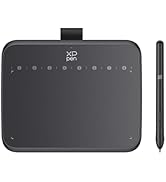
The XP-Pen StarG640 is a sleek, compact 6x4 inch graphics tablet featuring 8192 levels of pressure sensitivity and a battery-free stylus for uninterrupted, natural drawing. Compatible with Windows, Mac, Linux, and Android, it supports all major creative and writing software, making it ideal for digital artists, students, and professionals seeking precision and portability in one affordable package.


| ASIN | B078YNBFXG |
| Active Surface Area | 24 square inches |
| Best Sellers Rank | #699 in Computers & Accessories ( See Top 100 in Computers & Accessories ) #4 in Graphic Tablets |
| Box Contents | 1 Pen Tablet, 1 P01 Passive Pen, 20 x Replacement Nibs, 1 Pen -Clipper |
| Brand | XPPen |
| Brand Name | XPPen |
| Colour | Black |
| Compatible Devices | Mac OS X® 10.10, Windows® 7 (or later |
| Connectivity Technology | USB |
| Country of Origin | China |
| Customer Reviews | 4.2 out of 5 stars 6,554 Reviews |
| Importer Contact Information | M/s DNS Overseas 1003, Raheja Chambers, 213 Nariman Point, Mumbai 400021 |
| Item Dimensions L x W | 16.2L x 8W Centimeters |
| Item Type Name | Graphic Tablet |
| Item Weight Unit of Measure | 430 Grams |
| Manufacturer | Hanvon Ugee Technology Co. Ltd. Address: No. 4 Building, Fulongte Industrial Park, Huaxing Road, Dalang Street, Longhua District, Shenzhen, China 518019, XP-Pen |
| Manufacturer Contact Information | Hanvon Ugee Technology Co. Ltd. Address: No. 4 Building, Fulongte Industrial Park, Huaxing Road, Dalang Street, Longhua District, Shenzhen, China 518019 |
| Manufacturer Part Number | StarG640 |
| Model Name | Star |
| Model Number | StarG640 |
| Native Resolution | 1920 x 1080 pixels |
| Network Connectivity Technology | USB |
| Operating System | Mac OS, Windows |
| Packer Contact Information | M/s DNS Overseas: 1003, Raheja Chambers, 213 Nariman Point, Mumbai 400023 |
| Pressure Sensitivity | 8192 Levels |
| Product Features | 60° Tilt Support, 8192 Levels of Pressure Sensitivity, Android Support, Electromagnetic Resonance |
| Screen Size Unit of Measure | 7.21 Inches |
| Special Feature | 60° Tilt Support, 8192 Levels of Pressure Sensitivity, Android Support, Electromagnetic Resonance |
| Specific Uses For Product | Designing, Online Education, Teaching |
| Target Audience | Student, Teacher |
| UPC | 654913041393 761460825922 |
| Unit Count | 1 Count |
| Warranty Description | 1 year manufacturer |
A**R
Nice product for students and teachers.
Outstanding product. Very practical and value for money. Used very long time and it works excellent.
H**S
Great product
It's a Good Product helped me in my graphic design related work, it working is totally smooth Overall, the Product is worth Buying.
B**U
Satisfactory
Very useful product
S**H
XP PEN is a good and effective product.
Unboxing and Initial Impressions: Well-packaged with minimalist design. Includes tablet, USB cable, 10 pen nibs, pen clip, and a quick guide. Small size of 4 x 3 inches, ideal for digital signatures and basic graphics. Design and Stylus Features: Slim, all-black design made of lightweight 2mm thick plastic. Stylus offers battery-free experience with 5080 LPI resolution and 8192 pressure levels. Two stylus buttons for right-click and middle-click functions. Installation and Compatibility: Easy setup – connect via USB, install drivers from XPPen website. Compatible with Windows, Mac, and Linux. It has integration with popular drawing programs. User Experience and Specialized Use Cases: Low latency for gaming with both hovering and dragging methods. Effective as a digital signature pad in Adobe Acrobat and other signing applications. Practical tool for online teaching, illustrating concepts. Ideal for Creators on a budget: Assists in touching up lines, adding details, and simplifying background animations. Suits personal and travel use, not necessarily for professional graphics careers. Conclusion: Versatile and affordable graphic tablet catering to a wide range of creative needs. Small drawing area limits intricate projects but excels in various applications. Consider bigger options like G640 and Star03! Packed with features at a very reasonable price point, making it commendable for beginners and seasoned users alike.
R**U
It’s good for Windows but very slow on a Mac. It comes with a USB Type-A.
FOR MAC: You need to apply high pressure to write, which causes hand pain. You have to press and hold the pad for a few seconds for each stroke. -I recently purchased this product and tried all the pen tips included. - It comes with a USB Type-A connector. Launched on January 15, 1996. For Windows, it’s a good product drawing a reasonable speed. The size and design are also good.
D**S
Fantastic product even for a seasoned artist
I have been a professional (traditional) artist; currently experimenting with digital art (my tools are - this drawing tablet, Macbook Air 13", Autodesk Sketchbook). The drawing pad is excellent to create great paintings. The pen is quite good to hold (comfortably light). The area of the tablet is sufficient for me as a user. I have retained the thin plastic film that the tablet came with; drawing over it did not give scratches to the tablet as of yet. Very quick learning curve; I got used to it in a day. How good your painting or drawing is depends a lot on the software itself - Sketchbook works great with this tablet. There are lot of extra nibs in case you manage to break one; I would suggest to be gentle while you start, and slowly increase the pressure as you get more used to it. Do you really need the buttons that you get in higher priced tablets? - For me, its your personal choice; I am good with the options that the software anyway provides. I did not require the driver software (in fact it somehow kept crashing on my laptop when I installed). Wanted to calibrate it as suggested in one of the websites, but could not do it - in fact, I did not need to do it as of yet. It just worked!
S**I
Good Purchase 😃
I purchased this pen tablet for my sister, and she is very happy with it. The device connects easily to the PC via USB, which makes setup simple. The pen is smooth and responsive, making drawing and writing feel natural. The erasing function works well, and the overall handling is comfortable. The size is practical and affordable for the price, offering good value. Although my sister has not used it extensively yet, she enjoys the experience so far, especially for creative work. Overall, this pen tablet is a solid purchase, and we will see how well it holds up with regular use. Thanks Amazon
R**Y
Worst product
If you're buying this keep remember not to cancel it. If you will cancel the refund will be initiated after 1 month so if you access of money to leave for the person and amazon. Do it buy it It's the worst decision i ever made to buy this product
M**F
Best Gadget for Teaching
Excellent for writing and giving online lectures
E**A
Best quality
I received the best quality of item
F**Y
a short review
So I'm going to separate this review into 2 part: For Drawing and For Osu! 1) Drawing: the tablet is pretty good for beginners who want to try digital drawing. The active area may look small, but good enough for drawing. The pen is a bit slippery since it does not have any rubber band on the pen but the shape is smooth and easy to hold. The pressure sensitivity was ok and drawing on it is pretty ok. 2) Osu!: just buy this stuff if you want to go pro. For Osu!, the active area, latency, accuracy of the movement and the pen is those thing that i will review. The active area is big enough for playing with small or big area (although it's a bit uncomfortable when using small area since your hand will be at the position somewhere between your tablet and table. idk if there are any problem with big area players since i play with small area), latency and accuracy is over the top with the Hawku driver. The pen, in my point of view is a bit to small for my Osu! pen grip and just like i said earlier, a bit slippery too (this can be easily fix by just wrapped some tissues around the pen). More than that, I'm happy with it. P/s: I'm just a 4 digit noob so my Osu! review may not correct :(
ح**ر
المنيزلة
ممتاز بس الحجم صغير توقعت أكبر
R**D
Good Entry Tablet for drawing and good for Osu, but not perfect.
Pros: - Decent size active area that allows for drawing, so this tablet is perfect for someone that wants to try drawing on a tablet, but does not want to invest in a high end drawing tablet. - For the price, the build quality is decent and does not feel cheap, also it is slim, I found that great. - The new UI software driver is easy to navigate and install from their website. - Great for OSU because the available active area is big and thus you can customise it if you prefer a smaller one (do it from the driver software). Cons: - The drawing pad has more friction than your usual drawing tablet in my opinion (I only owned a few drawing tablet so I do not really know if its common), which can suprise you if you had a Huion 420 tablet for example to play OSU. That can be a pro or a con depends on you, but I saw a complain from a user for that. - The majority of the nibs provided are squeaky and thus do an incomfortable sound when you draw or play OSU on that tablet. However, a few of them are fine (out of the 20 ish that they provide , 4-5 are normal/you have to force it to make it squeak). I do not know if it is a general thing or just me being unlucky, but some users also reported that problem. The squeaking sound can be discribed as a fork rubbing against a ceramic plate, but less loud and intense, still annoying though. Apparently does two problems will solve with time by using the tablet (more use = rubbing pen against tablet and thus some kind of polishing over time).
Trustpilot
2 days ago
2 weeks ago