🚀 Unlock desktop-grade GPU power with sleek modular freedom!
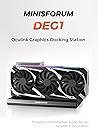
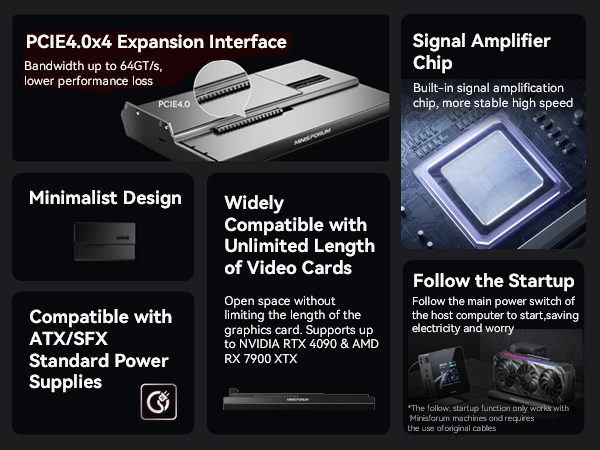
The MINISFORUM DEG1 External GPU Dock Station is a compact, high-performance eGPU enclosure designed for flagship GPUs like the RTX 4090 and AMD RX 7900 XTX. Featuring a PCIe 4.0 x4 Oculink uplink and PCIe x16 downlink, it supports ATX and SFX power supplies for versatile setups. Its secure locking interface and modular design enable easy GPU swaps and upgrades, while optimized cooling and Linux compatibility make it ideal for professionals seeking powerful, flexible graphics solutions.


| ASIN | B0DCZLPWXK |
| Best Sellers Rank | #25,242 in Electronics ( See Top 100 in Electronics ) #415 in Laptop Docking Stations |
| Customer Reviews | 4.2 4.2 out of 5 stars (72) |
| Date First Available | August 13, 2024 |
| Item Weight | 2.53 pounds |
| Item model number | Deskmini |
| Manufacturer | Micro Computer (HK) Tech Limited |
| Product Dimensions | 10.64 x 6.87 x 1.6 inches |
B**W
Works great, exactly what I was looking for in a egpu dock
Was looking for an egpu dock that would let me choose whichever gpu and power supply to add. Of all the choices on Amazon this one seemed to be the best choice at a reasonable price. I did notice in some reviews that ppl mentioned having stuttering video issues where the oculink possibly didn't provide enough bandwidth, but on my setup I had no issues whatsoever even at ultra 1440p settings. Very impressed with the simple yet intuitive design, was able to figure out how to use it w/o instructions.
C**R
What a nice simple design
When looking for an upgrade, like going from slow thunderbolt/usb 4 to much faster oculink, you'd expect to pay more. Like I think I paid 150 for my tb dock. This was less. And it was easy. And it just works. Plugged in the cable after using my sfx power supply and the little arm thing for the card stand, and blammo. I didn't even have to go into the bios. Better, it worked with Linux. And I legit didn't have to do anything but connect everything up. I'm still on that first boot. Having your card in a dock is a luxury. It runs cooler, and you can get at it if you want to swap it out, upgrade it, or it locks up. I like to run a cable for the external card, and one for the internal in the pc so I can swap between them. On Linux it means I don't have to reboot if the 7900XT has issues. I can fall back to onboard graphics, fix it, then resume. That's very convenient. It also means I can swap out my system/card at will. Oculink is awesome if you game at 60fps. You won't see much performance falloff unless you are doing insane fps 1080p gaming. Great product minisforum.
W**S
Works as intended and a must have if you have an Oculink port.
So far, this dock has been great. Simple to connect and getting the job done. I have a Thermaltake 500W power supply and PNY RTX-5060ti 16GB card mounted to it. It's connected to a GMKtec K6 mini PC.
P**Y
Works well, but total system cost and speed put the dock at a disadvantage.
I’ve had the MINISFORUM DEG1 External GPU Dock Station connected to a MINISFORUM MS-A1 Workstation (Ryzen 9 9950x) for over a month. I’m using an ASUS Tuff RTX 5070 Ti with an ASRock 1000w power supply. Setting up the dock was straightforward with no issues. The dock boots when the computer power switch is pressed, easy to live with. Is it worth it? Well-ll, probably not. The system works well, but I get faster GPU processing speeds with the 5070 Ti in a desktop case via the PCIe slot on the motherboard. Part of the problem is the MINISFORUM mini 9950x system; its lack of adequate cooling throttles the Ryzen 9950x CPU. And it’s hard to review the docking station without considering the MINISFORUM computer to go with it. The total cost for this system priced out at $2200. As a price comparison, Amazon in the last month sold an HP 45L gaming desktop with an Intel 7 265K and a Nvidia RTX 5070 for $1399. Despite having a lesser CPU and GPU, the HP handily out does the MINISFORUM computer and dock with the 5070 Ti combination. In the end, the MINISFORUM dock satisfied my nerd curiosity. Yes, it works with no problems. However, unless a person already has the MINISFORUM computer, I think one can do better for the price, then purchase the docking station and GPU and power supply.
M**.
Turn a mini PC into a Gaming PC
To start, this GPU dock station is targeted at the Minisforum mini PCs which have an optional Oculink interface. I tested it with the MINISFORUM UM890 Pro, which has 8 cores/16 threads and 64 GB of ram. I had a RTX 3090 Founder's Edition which had been replaced by newer card and was sitting on a shelf gathering dust. I bought the UM890 Pro in 2024 during the Black Friday sale. and by itself, it is a very powerful PC. The only downside is that the embedded GPU cannot produce good frame rates even on the lowest HD settings. It comes with a little board that plugs into one of the NVME slots to provide the Oculink interface, so I bought the docking station to see if it could play games with the RTX 3090. If you are looking to buy this station, be aware that it requires a separate power supply with enough wattage to run the GPU. The Oculink interface does not provide power, and the UM 890 does not draw power from the external power supply. I bought a Be Quiet 750 watt power supply because they really are the quietest supplies I have ever had. The 3090 only needs about 350-400 watts, but the 750 watt power supply was available for delivery the next day. If you have a GPU with the PCIe 5 power connector, be sure the power supply has the right cable. The Be Quiet supplies have them. Installation was a 3 minute job. The power supply mounts on its side using 2 screws. The main cable which would go to the motherboard plugs into the station. The docking station comes with a mounting bracket which screws to the power supply, and the GPU gets screwed down like it would if it were in a case. All 5 screws needed are provided. The last connection is the PCIe 5 power connector to the GPU. The docking station comes with an Oculink cable. The Minisform PC does not come with the Oculink interface installed, so you have to take off the top and insert it into the NVME slot on top of the motherboard. Minisforum mini PCs are super easy to work on, and just about anyone could do it. Once installed, you plug the Oculink cable into the PC and the docking station, and you are done. You will need to plug the GPU into a monitor. I plugged the UM 890 into a separate monitor just in case I needed to install drivers. As it turned out, Windows identified the GPU in the docking station after a couple of minutes without any input from me. I installed the latest Nvidia drivers. My test game was Fallout 76. I got 71 FPS on ultra settings, which is nearly identical what I got with the 3090 on my big tower which has 16 cores/32 threads, 192 GB of ram, and fast PCIe 5 NVME SSDs. The RTX 4080 Super in my tower gets 100-120 FPS on ultra settings for comparison. What was interesting is that even after playing for 30 minutes, none of the fans was loud enough to hear over the game. The mini PC was certainly not being thermal throttled in the least. I compared the cost of this setup to the cost of building my top end gaming rig, and leaving out the cost of the GPU, the Miniforum UM 890 Pro with the GPU docking station and an external power supply was $400+ *less* than the tower. The GPU and motherboard in the tower are higher performance than the laptop CPU used in the mini PC, but I need that for other purposes. If you can get a Minisforum mini PC with the Oculink interface on sale, you should be able to put together a gaming PC for $900-1000 plus the cost of the GPU. It's not as portable as a gaming laptop, but everything will fit in a backpack. And you'll save a lot of money plus have the ability to swap out the GPU for a newer model someday. I am seriously considering making this my new standard build in the future. Note: I have not been paid for this review. All hardware was paid for by me.
J**S
Does not work with GMKTec M7 Ryzen 7 PRO 6850H mini PC
I'm having trouble making this work. I'm using it with a GMKTec M7 Ryzen 7 PRO 6850H mini PC, NVIDIA RTX 3050 video card, and Corsair TX650W power supply. Video card and power supply were tested in a desktop computer and work fine. All cables are connected correctly and proper power on sequence is followed. When monitor is hooked to video card and everything is powered on in the proper order, the monitor receives no video signal from the video card. If I hook the monitor to the display port on the M7, I would expect to atleast see the video card on the PCIE bus after proper power up sequence, but it does not show up under Linux with lspci. Update: My GMKTec M7 and NVIDIA RTX 3050 works with a JMT ADT-F9G-BK7 OcuLink dock.
D**N
Works great and sleek
Works great with my GMKtek K8 Plus Mini PC and RTX 5080 combo.
M**A
Love this Dock. I have paired a rx 7800xt with my mini pc and it works great. With a minisforum mini pc I just turn on the pc and the dock will self start as long as your power supply is on.
Trustpilot
1 month ago
4 days ago