Buy anything from 5,000+ international stores. One checkout price. No surprise fees. Join 2M+ shoppers on Desertcart.
Desertcart purchases this item on your behalf and handles shipping, customs, and support to Slovakia.
๐ผ Elevate your data gameโsecure, speedy, and sleek storage for the modern pro.
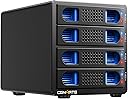
This 4-bay RAID enclosure supports both 2.5 and 3.5 inch SATA HDDs and SSDs, delivering up to 80TB total capacity. Featuring USB 3.0 and eSATA interfaces with 6Gbps transfer speeds, it offers 8 versatile RAID modes for tailored data management. Crafted from aluminum with silent cooling fans, it ensures reliable, quiet operation. Compatible with Windows, Mac, and Linux, itโs a plug-and-play powerhouse designed for professionals demanding high capacity, speed, and data security.


| ASIN | B0CXPD9J6X |
| Compatible devices | Desktop, Gaming Console, Laptop, Tablet |
| Data transfer rate | 5 Gigabits Per Second |
| Hard disk form factor | 3.5 Inches |
| Item model number | 4 Bay Raid |
| Item weight | 4.2 Pounds |
| Manufacturer | SHENZHEN SHI YING YUAN ELECTRONICS CO LTD |
| Material | Aluminum |
| Max number of supported devices | 4 |
| Memory storage capacity | 80 TB |
| Product Dimensions | 20.07 x 13.21 x 13.97 cm; 1.91 kg |
B**N
Das Festplattengehรคuse nutze ich als RAID und habe damit mein NAS erweitert. Alles wie gewรผnscht und erhofft. Lรคuft stabil und war 100% kompatibel zu meinen Festplatten und Plรคnen. Die Einrichtung war ebenfalls einfach. Klare Empfehlung.
J**N
I had a Western Digital NAS drive that was no longer supported. Removed the drives from the NAS and re-formatted them. Slid them to the Cenmate 4, and it was then simply plug and play. One thing to note, it is essentially a USB drive, so it needs to be 'ejected' to close it down correctly, before the computer is turned off. It is currently working a treat, and shows up as 1,2,3 or 4 separate internal hard drives in Windows explorer.
S**R
Easy to use, very quiet RAID enclosure. Multiple RAID options. Easy to configure. Attached via USB to my NAS as "cold" storage for backups. Obviously slower than drives in the array, but for cold storage it works great. NAS identified the drive immediately.
A**6
This is ok if you want a good amount of storage space but without a network connection. I grabbed this to review as I needed a storage solution for lots of photos and videos. It works well with four the 4TB drives I have but I will be upgrading soon. It is nice and fast connected to USB3 and data transfer seems pretty solid. I have managed to connect it to my router via the USB port and I can access it from there but the speed drops considerably. It's not a bad price for what it does but I now know I would prefer a NAS drive over this. The Raid function works well and swapping drives in and out isn't a problem. It comes supplied with the power supply, USB lead and an E-sata Lead. The dipswitches on the back change the raid mode and instructions are included with the unit.
B**G
I've ordered 4 of these now and 3 of them have been tested and here are the findings. 1.) No issues with 20TB shucked WD Easystore drives from Bestbuy. 2.) Fan is a little loud but honestly you need to keep your drives cool this is an acceptable compromise. 3.) The fan should be much larger if anything even mounted outside. Have not attempted a teardown to see if I can upgrade the fansize or change anything yet as it runs fine. 4.) Raid 5 with 4 20TB WD drives clocks at 150 MBps which is more than good enough for a media server. The RAID selection is like this: Switching between any raids and wiping out the data on the drives there is a "Normal" mode and then the other modes such as RAID 0 1 3 5... 1.) Default Normal Mode You get the box, you put the drives in and if you leave it in the default normal mode the drives will all mount normally as 4 drives. If you use ESATA you will need a port multiplier compatible card. 2.) RAID 5 You turn off the device set the dip switch to RAID 5 then hold the reset button for 10 seconds before letting go, the drives will auto be formatted to RAID 5 config and a header will be written on to the drives for this mode. 3.) Switching from RAID 5 to any other mode you need to go back to normal mode so it can erase the RAID headers on the drives. [BUG with Hard Disk Sentinel Pro] Now for the longest time I couldn't figure out why the drives won't mount properly it turns out once you've jumped to a RAID mode and go back to normal Hard Disk Sentinel Pro goes nuts and causes the drives to keep unmounting. You can manually erase each drive then all 4 will mount again. If you are just going to jump back to RAID 5 for example or another RAID level you can just ignore this weird problem and close Hard Disk Sentinel and all 4 drives should appear again in your diskpart manager. Couple of things I tested and figure I leave here so you don't have to guess: A.) If you leave the drives in while switching modes the drives will be wiped. B.) If you have two RAID sets and you wanna use the same enclosure and swap between the two sets, make sure you're already on the mode they are in before you put them in. So if you are going from normal to RAID 5 for example, LEAVE THE DRIVES OUT when switching modes or they'll get wiped. If this case is already in RAID 5 you can put in the drives before you turn them on, or push them in after you turn it on just make sure you put all drives in before it's ready. Failure to do this will cause a rebuild or a crashed RAID set. C.) The order doesn't matter. I rearranged the 4 drives so they were all in different slots, and it didn't affect the RAID working or the data on them. (WONDERFUL UPGRADE FROM PREVIOUS competitor box) So anyways yes you can buy 1 enclosure and swap multiple RAID sets of drives and leave other ones offline. Rebuild is automatic. If you have a failed drive just pop it out put another one in and the other 3 goes to work right away for RAID 5. Build quality overall is very basic, but the tool-less caddy design is a super quality of life upgrade if you plan to swap sets of disks. This case storage wise handles 20TB so far with no issues. The only remaining test I want to do since the J-Marvell controller might be compatible is try putting a RAID set of drives from my mediasonic ProRAID collection into this case and see if it mounts the datapool correctly. Haven't had a chance to do that yet and would be epic if it was compatible. Definitely recommend this just keep in mind the fan is a bit small and you may want to increase ventilation if you plan to hammer the RAID with I/O all day (get a cheap $5 fan), The case is not 100% silent but no where near the loudness some complain about. Customer service has so far been responsive hopefully never need them. Happy data hoarding!
Trustpilot
5 days ago
2 days ago