Desertcart purchases this item on your behalf and handles shipping, customs, and support to Slovakia.
๐๏ธ Work smarter, not harder โ the trackball mouse that fits your lifestyle
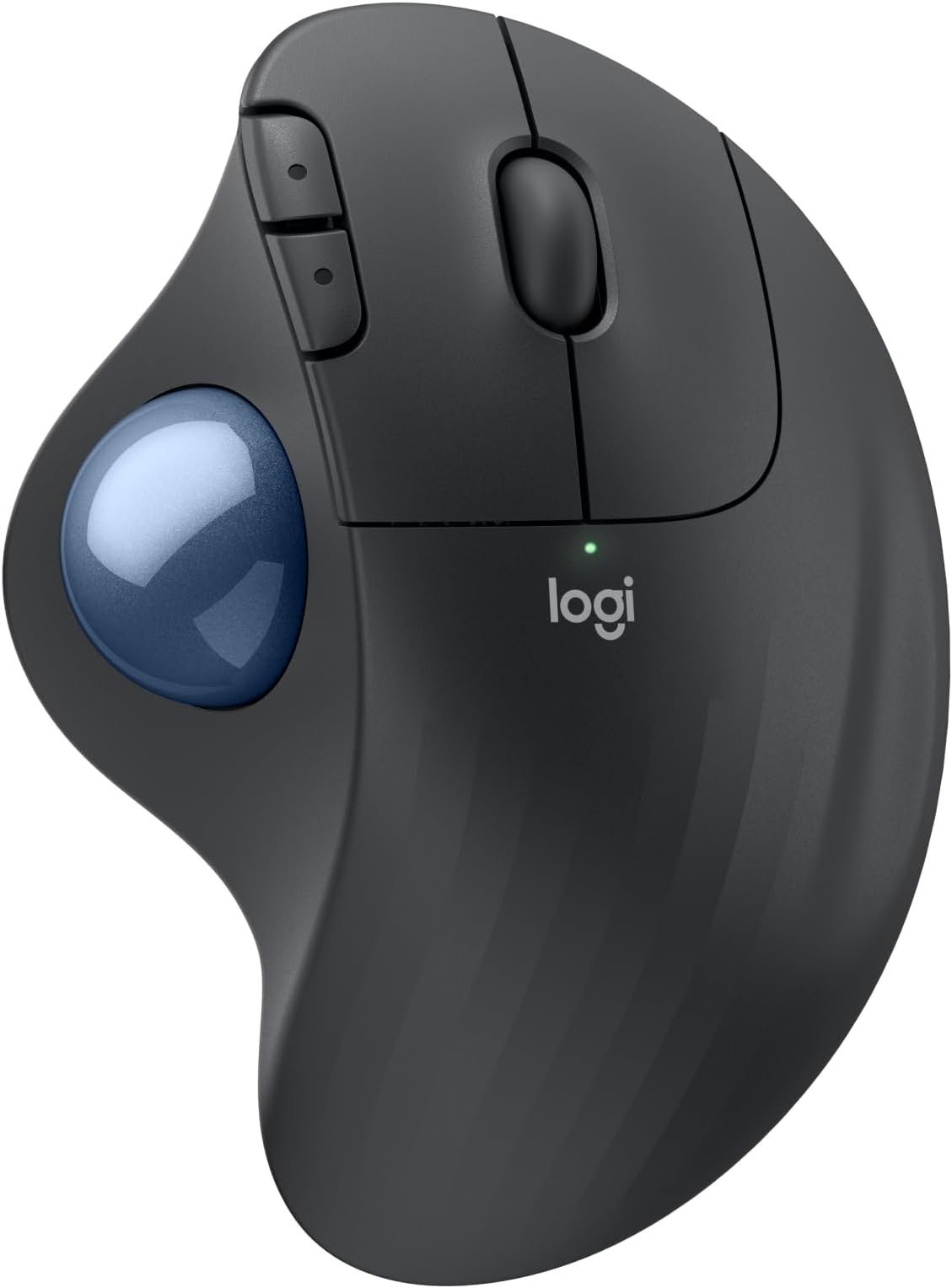
The Logitech ERGO M575S is a wireless ergonomic trackball mouse designed to reduce forearm strain by 25%, featuring a sculpted shape for natural hand posture and thumb-controlled cursor movement that saves desk space. It offers precise 2000 DPI tracking, up to 18 months of battery life, and versatile connectivity via Bluetooth or Logi Bolt USB receiver. Made with up to 52% recycled plastic, it combines sustainability with professional-grade customization through 3 programmable buttons and the Logi Options+ app, making it ideal for millennial managers seeking comfort, control, and eco-conscious tech.


| ASIN | B0BBQ3ZYNY |
| Additional Features | Lightweight, Portable, Wireless |
| Antenna Location | Gaming, Office |
| Battery Average Life | 18 months |
| Best Sellers Rank | #17 in Computer Mice |
| Brand | Logitech |
| Button Quantity | 2 |
| Color | Graphite + Blue Ball |
| Compatible Devices | Personal Computer, Tablet |
| Connectivity Technology | Bluetooth, USB |
| Customer Reviews | 4.5 out of 5 stars 2,316 Reviews |
| Enclosure Material | Plastic |
| Global Trade Identification Number | 00097855186744 |
| Hand Orientation | Right |
| Hardware Platform | PC |
| Manufacturer | Logitech |
| Mfr Part Number | 910-007027 |
| Model Name | ERGO M575s |
| Model Number | 910-007027 |
| Mouse Maximum Sensitivity | 2000 dots_per_inch |
| Movement Detection | Trackball |
| Movement Detection Technology | Trackball |
| Number of Batteries | 1 AA batteries required. (included) |
| Number of Buttons | 2 |
| Operating System | Windows, macOS |
| Power Source | Battery Powered |
| Range | 100 millimeters |
| Special Feature | Lightweight, Portable, Wireless |
| Style Name | Modern |
| UPC | 097855186744 |
| Unit Count | 1 Count |
| Warranty Description | 1 Year limited Hardware Warranty |
A**R
Woks perfectly. Warranty cut from 3 to 1 year.
I've been using Logitech since the wired mouse/keyboard days, switching to wireless in 2012 along with moving from mice to trackballs to conserve desk space (and easy use at home on my recliner's armrest). Like a microwave: once you go trackball (and develop some muscle memory in your thumb) you'll never go back to a mouse you have to move your whole arm around to move a cursor. This review was done only a few days into using this new M575S Reliability? I've only had one Logitech failure in 2018 - 2 months before the 3 year warranty expired. Logitech promptly replaced it without my incurring shipping charges. Was disappointed, and a little nervous, when I finally saw on the box for this M575S (in VERY small print) that the warranty has gone from 3 to one year since my last purchase in 2022. So... has the quality gone down too??? Only time will tell. Right now, after reading reviews for cheaper M570 trackball knockoffs of unreliability and flaky behavior I don't mind paying more for a time-tested trackball. The M575S works as a trackball with expected basic functions out of the box (like every Logitech product I've purchased -- 15 of them for my business and home. Just plug in the USB receiver and pull the battery connection paper tab to connect it. After downloading Logi Options+ app (and a PC restart. It won't load without a restart) I could reassign buttons the way I am used to. The Logi Options+ app has been updated sometime last year I think, because it now works without the serious glitches it previously had disconnecting or not starting at all, or misbehaving inside the app. Works perfectly now. For another PC that I use for gaming I love the ability to make app specific trackball changes for a particular gaming app (or any app), like speeding up the trackball pointer just for that app to get across the screen without a thumb reset -- then going back to a word processing app having it slow back down for cursor placement without having to reset cursor speed. For internet or word processing I like resetting the forward and backward keys to Copy and Paste. Just use the app to assign Ctrl+C and Crtl+V. I've found that very, very useful over the years. My only [small] complaint is that if you have a perfectly good Logitech K270 keyboard [ that has been around for years and working perfectly] that you cannot use with this M575S as the M575S uses the newer "BOLT" USB receiver. The work-around so you CAN use that older keyboard is to use both the old "Unifying" USB receiver that came with your K270 keyboard and the "BOLT" USB receiver at the same time. So, you use up 2 USB A ports -- better than buying a new keyboard. It is GOOD, however that the same "Logi Options+" software will recognize both USB receivers and allow cursor speed,pointer & button programming so you don't have to run 2 different apps. That's not much of a problem with most PC's coming with more than one USB A port even though most peripherals have moved to USB C. Like almost all mice and trackballs nowadays this one has a very high resolution ball for smooth scrolling and precise cursor placement. Battery life: I get about three months out of a fresh Duracell with heavy use out of my older M570's and my M575 Pro. I've stopped using generic and rechargeable batteries. I DO always turn it off at night, weekends. You should too. And for devices that really last a long time like Logitech keyboards or less used mice or trackballs change the batteries at least once a year to forestall the formation of corrosion of battery terminals from batteries that are nearing end of life. Logitech devices have a pretty darn good coating on those battery connection terminal compared to many other battery-run devices, and I've only had one trackball (the 2012 one - Yes, still working!) start corroding. A visit to my workshop to fix it and it's back in service. The weight is irrelevant to me since it sits in one place on a desk or leather armrest and is far less muscle/tendon strain than a moving mouse. The shape is very comfortable to the hand causing no pain at all after hours of continuous work, and the buttons are still working perfectly on all 15 of my M570 and M575S and Pro trackballs. If anything goes wrong with this M575S I'll update this review. Right now I'm happy that I only spent 5 minutes installing and optionally programming the buttons and cursor speed for a game. If you don't require that optional programming then your time will be less than 1 minute to use it.
H**E
New and improved (so far).
I had a predecessor model of this mouse that saw heavy use for years. I had it for so long that it started to fail slowly. The ball sensors got less and less responsive, and before I finally consigned it to my electronics salvage pile, the buttons, particularly the left click button, started to "bounce" (the switch's contacts would only intermittently touch) before outright failing. The trackball sensors also glitched with each click attempt. But the mouse still functioned. I did consider some trackball mice from other, lesser known brands, but in the end I paid a couple dollars more for this model. So far, I don't regret it. This mouse works just as well as my now-defunct old one, but better. The buttons still give a satisfying tactile clicking feel, but with marked less noise. This to me makes my clicks feel more planted, more direct. Not much to note on the trackball as it feels as good as my old one back in it's heyday, but I see that as a good thing. All that remains to be seen is longevity. I got 10 years out of my old model, and this one is going on 5 or 6 months. So, as mentioned in the review title, this model is new and improved... so far. I hope it lasts at least as long as it's predecessor did!
M**I
Comfortable ergonomic mouse with a small learning curve
Iโve been using the Logitech Ergo M575S wireless trackball mouse for a months now, mainly for work, and itโs been a comfortable alternative to a traditional mouse. The ergonomic shape keeps my hand in a more relaxed position, which has helped reduce wrist strain during long hours at my desk. The trackball is smooth and responsive once you get used to it, and I like that the mouse stays stationary, which saves desk space. Switching between Bluetooth and the USB receiver was simple, and the wireless connection has been reliable so far. There is a bit of a learning curve if youโve never used a trackball mouse before. It took me a few days to feel fully comfortable and precise, especially with scrolling and fine movements. Overall, this is a solid ergonomic option for anyone who works long hours at a computer or wants to reduce wrist movement. Iโd recommend it for office work, productivity tasks, or anyone dealing with wrist discomfort.
H**K
Easy to use, great quality, Bluetooth and usb capable...
Excellent mouse, will buy more..,
M**A
Great for those with arthritis!
I would love to give this trackball mouse five stars but Iโm on my sixth. That means itโs fantastic, but should really last longer. You will save a lot of muscle strain as you donโt need to move your arm at all; only your thumb. They make two other types and each has its pros and cons depending on what you need. Thereโs a version with a cord. Great if you drop it often (pull it back up by the cord) but inconvenient if you donโt want to be right up at your computer. Thereโs a newer version that charges. Great if you donโt want to use batteries, bad if it dies and you canโt use your computer until it recharges. This one, my favorite, is wireless and battery operated. Iโm not tethered to my laptop and if the batteries run out, Iโm back up in 30 seconds. The battery life is long so thatโs not too often. The only downside is if I drop it. Because of my arthritis, I canโt bend to the floor and if this lands flat side down itโs almost impossible to pick it up with my gripper tool. I need to get it to flip over and try a few times. Now if the trackball falls out, thatโs good and bad, too. Good - it gives me a good grip spot to pick it up. Bad - when that ball pops out that pesky thing will ROLL. Under the bed (always dead center) under the baseboard heater (10 feet from where it dropped) behind the bed (you need a broom if you donโt have an adjustable bed.) You just need to think carefully to decide which is best for you. If youโre healthy and can crawl on the floor - the world is your oyster!
J**N
2 Thumbs up!
Been using the more expensive brother to this for the last few years for using with my CAD software. Wanted to have another for backup so purchased this one. Came packaged well. Pulled it out of the box, pulled the tab to activate the batteries, had my computer on and immediatly saw a popup that asked me if I wanted to connect the mouse to my computer. I approved and it was connected and working in about 10 seconds. Would highly reccomend this mouse if you work out of your truck as I do often or work off of a small workspace.
C**O
Smooth rolling, not jerky
Met expectations. If you like Logitech Trackball you will not be disappointed. Have owned several in the past, for several years. I was only disappointed in one. The ball did not roll smoothly. No problem with this one
S**E
Best Mouse I have used. Just buy it
You Gotta be Kidding me! This is the best mouse I have ever used by FAR! The trackball is so smooth its so intuitive and saves your wrist. I got the white one and its really cool too.
S**Y
Funcional
Muy lindo y prรกctico
A**R
Takes like a day to get used to
I really like this mouse! There's an adjustment period when you're starting out (I kept wanting to switch back to my regular mouse when using it) but by the second day I'd gotten a lot more comfortable using it. While it's still not as easy to navigate as with a traditional mouse, my hand doesn't hurt nearly as much after using it for long periods. In fact, it doesn't hurt at all. I thought my thumb would tire out on the trackball, but it doesn't. I can't attest to its ability in gaming since I use a controller. Precise movement is more difficult so I imagine it's not great for that. You can adjust the tracking speed though and set one of the extra buttons to toggle between speeds. I find the default 50 speed a little too slow so I raised it to 60, and I have a button to switch to a much lower speed when I need the precision. Really minor, but I wasn't expecting the buttons to be so quiet. It's actually pretty nice. Overall, really happy with this mouse. It's comfortable and easy to use once you get the hang of it.
C**N
A mouse fitting medium size hand
It's feels like a well-built mouse. Trackball moves smoothly. The buttons do not make any annoying noise when clicked. In fact, it's silent. I don't need to worry about the type or condition of my table top to use this mouse. I can place this mouse on any surface. I don't need to move my wrist to move the cursor. This reduces so much wrist stress. The plastic of this mouse is nice to the touch. It doesn't feel cheap. Everything about this mouse is great, except if you have a small hand. A smaller hand may find it's difficult to click on the forward/back button.
T**Y
Be prepared to clean every couple of weeks.
This was my first trackball mouse and I have no complaints with it. It has worked very well for me over the past few months, and I believe it will continue being my main mouse for years to come. An interesting quirk of probably all trackball mice is that the small "holders" (for lack of a better word) where the ball is positioned on gets dirty. I believe this is due to dirt/fat that gets passed onto the ball from your finger. Therefore, I found I have to pop the ball out every 2 weeks or so and wipe it with some cloth to remove the debris. I also clean the ball itself with some isopropyl alcohol. This takes me a total of ~2 minutes. An added benefit of this style of mouse is not needing a flat surface to use it. As long as you have somewhere solid to rest the bottom of the mouse, it will work well. I've even rested it on the side of my leg temporarily and it works. This would not be as easy to do with a typical optical/laser mouse.
A**S
A very comfortable and natural feeling device from the industry leader in computer mouse design.
With this Logitech trackball mouse, I have effectively "graduated" from my older preferred Logitech M510 mouse. This was my standard choice for years and only required replacing because I tended to slow the smooth operation of the track wheel with gummy fingers. The track ball mouse on the other hand is easy and simple to keep clean and fully functional with an occasional simple wiping of the ball itself. Once you are used to the difference in the feel and the hand position over this mouse, I think many will come to prefer working with the track ball design. A little more expensive perhaps, but the convenience and the comfort is a big plus and a definite advantage over a mouse like the very effective but somewhat less natural feeling Logitech M510.
Trustpilot
4 days ago
2 months ago