Desertcart purchases this item on your behalf and handles shipping, customs, and support to Slovakia.
🚀 Elevate your home network — speed, coverage & security, all in one sleek system!
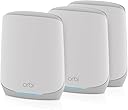
The NETGEAR Orbi RBK663 is a premium tri-band WiFi 6 mesh system featuring one router and two satellites that deliver seamless, high-speed internet coverage up to 6,600 sq. ft. Supporting up to 75 devices simultaneously, it offers combined speeds up to 3.8Gbps with dedicated backhaul for consistent performance. Equipped with 7 Gigabit Ethernet ports and advanced WPA3 security plus NETGEAR Armor by Bitdefender, it ensures fast, reliable, and secure connectivity for modern smart homes and professional setups. Setup and management are streamlined via the free Orbi app.


| ASIN | B0DJ1PSQSK |
| Antenna Location | Business, Gaming, Home |
| Antenna Type | Internal |
| Best Sellers Rank | #727 in Computers & Accessories ( See Top 100 in Computers & Accessories ) #33 in Whole Home & Mesh Wi-Fi Systems |
| Brand | NETGEAR |
| Built-In Media | One (1) 2m Ethernet cable, One (1) Orbi Router (RBR660), Quick start guide, Three (3) power adapters, Two (2) Orbi Satellites (RBS660) |
| Color | White |
| Compatible Devices | Gaming Console, Personal Computer, Security Camera, Smart Television, Smartphone |
| Connectivity Protocol | Wi-Fi, Ethernet |
| Connectivity Range | 6600 square_feet |
| Connectivity Technology | Ethernet, Wi-Fi |
| Control Method | App |
| Controller Type | App Control |
| Coverage | up to 6,600 sq. ft., extendable to 8,800 sq. ft. with additional satellites |
| Customer Reviews | 3.8 out of 5 stars 129 Reviews |
| Data Transfer Rate | 3.8 gigabits_per_second |
| Frequency | 5 GHz |
| Frequency Band Class | Tri-Band |
| LAN Port Bandwidth | 1000 Mbps |
| Manufacturer | NETGEAR |
| Maximum Upstream Data Transfer Rate | 1900 megabits_per_second |
| Mfr Part Number | RBK663-100NAS |
| Model Name | Orbi RBK663 |
| Model Number | RBK663-100NAS |
| Number of Antennas | 5 |
| Number of Items | 1 |
| Number of Packs | 3 |
| Number of Ports | 7 |
| Operating System | [Proprietary: NETGEAR Operating System] |
| Other Special Features of the Product | Internet Security |
| Router Network Type | hybrid |
| Security Protocol | WPA2-PSK, WPA3 |
| Special Feature | Internet Security |
| UPC | 606449158571 |
| Unit Count | 3 Count |
| Warranty Description | 1 Year Limited |
| Wi-Fi Generation | WiFi 6 |
| Wireless Communication Standard | 802.11ax |
| Wireless Compability | 802.11ax |
J**S
Easy to install - does everything it promises - efficient WiFi EVERYWHERE!
About six years ago, I bought a Google Mesh WiFi system - one router, and two satellites. I only have a small two level townhome - 1,600 square feet. The main router was in an upstairs corner office (not ideal), but the satellites were not too far away. In my office, next to the main router, my Spectrum internet varied (depending on time of day) from a low of about 150mps to a maximum of 410mps. In the area near my first satellite, the peak was about 140mps, but often dropped to less than 40mps - if I rebooted, it went back up to about 120 to 140mps. The final satellite, (downstairs) never achieved more than 60mps. It has been driving me nuts - when the second satellite dropped speed, my streaming of Netflix etc via AppleTV was abysmal. If I rebooted, it usually got up to a reasonable stream, but was unreliable. I decided tot take a chance on a new mesh network. After some research, I decided on the Netgear Orbi RBK660 three system - I router and two satellites. I set it up this afternoon using their app on my iPhone. If you follow the instructions to the letter, I don't think you can go wrong - super easy - but you need to be patient - took about 20 minutes. Main office is now up nearly 500mps - but the biggest surprise is that I am achieving the same speed EVERYWHERE!. It doesn't seem to drop off the further you get away from the main router. Look, it's the first day, and who knows what might change. But at the moment, I cannot believe how efficiently this works - and at a terrific value. Highly recommend!
J**Y
After 8 hours of frustration, I gave up.
Here is my experience with this router... I wasted a full day trying to get this router to work. Problems encountered were: 1) the app not recognizing default passwords on several occasions, 2) devices being dropped and unable to reconnect to the network when I did have it operating, 3) tech help was helpful, but very difficult to understand due to their thick Indian accents. I literally spoke with 7-8 different tech employees and they all had the same accent. The last guy I spoke to, I could literally hear birds chirping, a chicken clucking in the background and people opening and closing an old squeaky screen door, 4) Over the course of all my calls with Tech Support, they had me reset my router over 10 times trying to get it to work. A reset on the router required me to hold a button down for 2 mins while unplugging and plugging back in the electrical cord. Many of those attempts to reset the router failed, so Tech Support had me go through the same routine several times in a row, 5) the router's software sometimes took 10 minutes to reboot which meant Tech Support would continually ask me what color the lights were on the router, 6) when I finally got the router to work, I learned that assigning the new wifi's password could not be the same as my old network's password because my old one did not have any special characters which is required by the new router. I have over 45 devices that I would have had to individually reassign new passwords to in order to connect, 7) even though my phone would connect to the new wifi, the first device that I assigned a new password to connect would not connect. It looks like many people had positive experiences while configuring their wifi network with this router, but I apparently got a real lemon. I spent roughly 8 hours either waiting to talk to tech support on three separate calls, and my phone calls being disconnected twice while talking with tech support, and fiddling around with the router while tech support had me going through multiple iterations to get a wifi connection only to have it disconnect after I ended my call with tech support. I could go on and on about the amount of frustration I experienced, but needless to say I reached my limit after 8 hours of screwing around with the router, so I gave up and arranged for it to be returned to Amazon. Sidenote: After dropping off the router at The UPS Store this morning, I went to BestBuy and bought another manufacturer's mesh router. Went home and had my wifi network back up and operating with all of my devices online within 45-60 minutes.
K**C
Easy Setup
The NETGEAR Orbi RBK663 has been one of the easiest upgrades I’ve made for home internet. Setup was quick and straightforward using the app, and everything was up and running in a short time without any headaches. Once installed, the difference in coverage was immediate. The signal stays strong throughout the entire house, with no dead spots and no drop-offs when moving between rooms. Streaming, video calls, and everyday browsing all stay smooth, even with multiple devices connected at once. What stands out most is how consistent everything feels. Speeds remain stable whether you are close to the main unit or farther away on a satellite. It really delivers on whole-home coverage without needing constant adjustments. For something that is this easy to set up and performs this well across a full house, it’s hard not to be impressed.
M**J
Fixed Slow Internet Speed Areas
This is a great product. For the last 5 years I had three areas that had less-than-desirable internet speeds in my 2-story house. I changed Internet companies twice, and that helped. But still slow in those areas most of the time, e.g., Zoom would temporarily freeze up. I decided to try Orbi (by Netgear). I purchased the Orbi Router and two Satellites (one package). The Orbi app is great. It walked me through how to connect router and the satellites. I had all installed in 20 minutes, except to connect 3 Firesticks, printer to router, one more iPhone (mine connected automatically), security camera, PC, and laptop. I thought by naming the new WiFi and keeping the password the same, those devices would automatically accept the new router's WiFi. They did not and, therefore, this step probably took another 45 minutes as my WiFi connected printer and app for security camera gave me challenges that I figured out. (Tip: Connect the printer directly to the Router/Satellites as that works best.) My speed is GREAT. It is now 300+ Mbps i(my plan is 300 Mbps) in every area of my house. Previously it was 10-20 Mbps or often lower in some areas. The coverage is great. The Signal strength is great. Again, it was easy to setup. It also automatically checked for a firmware update, but none was needed.
K**.
Nice System, But No Single Satellite Purchase Option Available
Easy to install and get running. Knowingly, I opted for this wifi-6 system because I was replacing a very old, type-N, router. So, even this product is a great technology upgrade. The Amazon Black Friday price also made the jump to a Mesh system very affordable. My home is over 4000 sq. ft. and I also have an out-building with a buried Ethernet cable running to it. So, I need to add at least one satellite to extend the wi-fi service to it. I'm only giving it 4-stars rating because I'm disappointed that I have not been able to find a compatible satellite unit to expand the new mesh system. Its looking like I will have to purchase another complete system (router with 2-satellites) just to get the one satellite that I need. I have not been running this Mesh system very long, but the hardware is probably worthy of 5-stars though.
K**N
Bad install instructions
I was replacing my old (no longer supported) Orbi with a new one. On the install guide it says take a pic of the QR code and it will run me thru the install. Not! It sensed my old id and wanted me to log in. I did and it took me to my old router and discovered it was not there. After some maneuvering thru the App I managed to get it to realize I had a new device. After that it was clear sailing and it works just fine.
Y**O
Do not purchase! Netgear will not support their devices!
DO NOT PURCHASE THIS ITEM! Netgear support will give you the run around, both tech support and customer relations. The system is not stable, not reliable, and offers no value. First off I have a tech background and can build my own computers. The Orbi I purchased has satellites that would not work. Tech support forced me to try all sorts of issues over the course of three calls which each had to be at least 24 hours apart. They finally admitted there was actually an issue and sent me to secondary tech support. This tech support had me downloading software to test signal strength (in their defense it was legit software that I was aware of). Then they wanted me to run logs (which again I am tech savvy enough to do for them) and find another set of ethernet cables to connect them directly to each other and run logs again. They said we would just be gathering data for their tech team, which I understand and was willing to help out with. But the issue was a faulty satellite and I just wanted it replaced. After THREE hours on the phone they finally "escalated" it to Customer Relations who were the only ones who could issue a refund and they would be in contact in 24-48 hours. I had to email tech support again after 5 days and 72 business hours not hearing anything, only then did I get an email asking for "a clear photo of this device that clearly shows its serial number and proof of purchase." I sent everything as requested including pictures as requested, the invoice from Amazon, a screenshot of the order confirmation email from Amazon, and a screenshot of the delivered email from Amazon. I have now gotten an additional 4 emails from them saying they need the "Order Confirmation". I have attached it, I have embedded it in the email, and at this point it is INTENTIONAL OBSTRUCTION on the part of Netgear. They did this with their tech support with increasingly challenging asks, and now the same is true of their customer relations team. I will update if they fix themselves. DO NOT PURCHASE!
K**N
Finally…A Real Solution!
There are three buildings on our property… workshop, garage and house! For years we’ve tried to get a system that would deliver to all three buildings. We tried Ethernet cables, range extenders… you name it only to find out it was the router that wasn’t delivering! It was actually a technician that suggested this NetGear system… ORBI 660 and it did the trick! My husband and I are not tech wizards and although the instructions were straightforward we had the neighborhood teen tech wizard come by and he had it up and running in less than 30 minutes! Nice looking and unobtrusive we don’t even see it! No more router and we have a perfect connection in all three buildings! No more buffering, pixelization and screen freeze… 🥶…! It may seem a bit pricey at first but the anxiety of constant disruption when watching the news, a movie or streaming is GONE! It’ll pay for itself in about 16 months (no more router) sooooo yep… after 2 months of great reception… we couldn’t be more pleased! Also… it was delivered in lass than 24 hours!!!
Trustpilot
1 month ago
4 days ago