Buy anything from 5,000+ international stores. One checkout price. No surprise fees. Join 2M+ shoppers on Desertcart.
Desertcart purchases this item on your behalf and handles shipping, customs, and support to Slovakia.
🎨 Elevate your colour game — never settle for ‘close enough’ again!
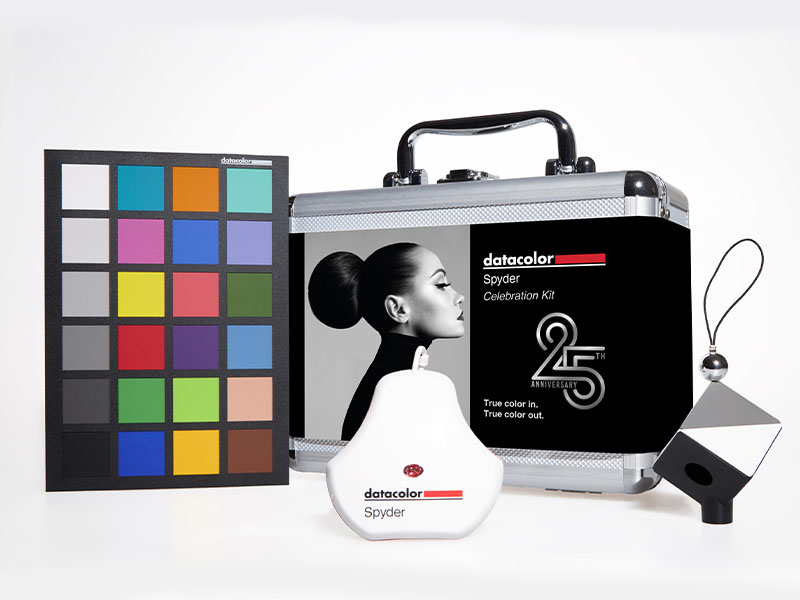
The Datacolor Spyder Celebration Kit combines the 2024 Spyder monitor calibrator, Spyder Cube, and Spyder Checkr 24 to deliver precise colour management from camera capture through to display. Designed for professionals, it ensures accurate white balance, consistent true-to-life colours, and compatibility with the latest monitor technologies including OLED and mini-LED, making it an essential toolkit for flawless photo colour accuracy.


| Best Sellers Rank | #25 in Photographic Light Meter Color Calibration Charts |
| Customer Reviews | 3.8 out of 5 stars 97 Reviews |
T**7
Wanted to throw it out the window… now my eyes can’t live without it
I bought this because I wanted my monitor to match what my paintings would look like if I ever printed them. When I first used it, I absolutely hated it. I seriously considered throwing it out the window. It made my monitor look yellow, and I didn’t realize just how far off I’d been seeing things. I also keep my monitor on full brightness, so the change was a total shock. But after sticking with it for a bit, I don’t even notice anymore. Now I actually trust my colors instead of guessing. The kit comes with the Spyder, Cube, and Checkr — honestly, I’ve mostly just used the Spyder, but it’s been worth it on its own. It takes some adjusting, but if you care about seeing the real colors on your screen, this little thing does what it’s supposed to. Just be ready to be mad at it first.
W**.
Colors corrected!
Works well, easy to set up!
M**N
Less than worthless.
This worked fine when I got it and installed version 6.3.2. Following DataColor's critical update 6.4 it has brought me nothing but many hours of frustration. The only thing that works is the notice that my recalibration is past due. The software update resulted in the installation of a generic driver which reinstalling 6.3.2 will not fix. Now it is not even good for a paper weight because it is not heavy. I wish I had never heard of DataColor or Spyder.
D**A
was hard for me to figure out at first
First off I love the case. It's a solid well made case. Had a really hard time getting it going with my Apple Computer screen but eventually figured it out. For me and being the first time using a Spider it was difficult to figure out. I do a little photography from time to time and color accuracy is important in some cases. I had my friend figure it out for me and apparently it helped my screen show more accurate colors. If you do photo work you'll want to calibrate your monitor. You can't however guarantee the person you're sending the photo to has their monitor calibrated. I was happy with the results.
E**S
True improvement
Worked great for our graphics department!
P**S
Easy Accurate Color Management
I do quite a bit of photography editing so I like to have accurate color management on my monitors. This is a great complete kit that will ensure I have accurate colors from shoot to post. Firstly, the kit comes in a very nice and solid case. The color reference card is made of good stock and it is non-reflective which makes it great for use in a variety of environments. Installing the software on my PC for color balancing was pretty straightforward and using it was fairly simple, although it does ask a few questions like the type of monitor I use and if it had brightness control on it that had me doing a little research. But once I figured that out, it ran the program and balanced the color very well. It also allowed me to install it on all of my computers under the single license. The software also installs a utility that sits in my tray where I can toggle the color management on and off, which is really nice. I previously used an old Colormunki system that would spontaneously lose the color management on my monitor, prompting me to have to restart my computer to get it back. I have not had that issue at all with this system and the utility makes it easy to turn it on if that were to happen. Overall, I'm very happy with this product. As I mentioned, it does require you to have an understanding of how to navigate your monitor settings if you want to get the most out of it, but apart from that, it is a complete set that I will get lots of use out of.
B**N
Nice option for most photographers
In this kit, you get the "Spyder Cube," the "Spyder Checkr," and the Spyder calibration interface itself. The Spyder Cube is mainly an exposure aid containing white, grey, and black faces. The black face has a "black hole" in the middle, and there's also a shiny metallic ball affixed to the top to show specular highlights. With this, you can get a white balance and an overall good starting exposure and black/white levels quickly in your editing software. The Spyder Checkr gives you levels of grey and and 50% grey card on one side, and an additional set of greys plus eighteen fully saturated colors on the other. With this, you can use a histogram to tweak color reproduction and produce a color balance preset for cameras that support this option. If you are working in the studio with consistent lighting sources, and have a camera that supports color balance presets, you can export one with the accompanying software. The 2024 Spyder itself is an update of the previous design. This kit does not come with a Spyder Pro, but really the pro is only additionally more useful if you're working with a number of monitoring options and need to calibrate them all to a common "look." In my experience with a previous version, I would say if you aren't mixing up monitor types, you really won't get any additional features you don't get on the standard. The little aluminum case is certainly nice for keeping everything together. Be sure to keep the cardboard sleeve for the Spyder Checkr, as this protects it from fading. Five Stars!!
E**E
Handy handy
The Datacolor Spyder Celebration Kit was super easy to set up and use—perfect for getting accurate color across all my monitors. It really helped me dial in consistency for editing, which has made a big difference. I also use the Spyder Cube all the time now for white balance in my photography—it’s become a go-to tool in my kit. Great all-in-one color management solution!
P**V
Control total del color en mis fotos! 🎨📸"
Cuando vi el Datacolor Spyder Print Studio Kit, sabía que me iba a facilitar la vida con el manejo del color en mi flujo de trabajo fotográfico, pero no me imaginaba lo completo y preciso que sería. El kit incluye herramientas clave: Spyder Print, SpyderPro y Spyder Cube, y viene en una elegante maleta metálica que no solo luce genial, sino que además es muy funcional para transportarlo todo de manera segura. He estado utilizando estas herramientas durante las últimas semanas y la verdad es que el control total del color que ofrece desde la captura hasta la edición y la impresión es algo que no había experimentado antes. 🤩 No es solo para profesionales, aunque siento que eleva mi trabajo a ese nivel. Ahora sí, puedo asegurarme de que los colores que veo en pantalla sean exactamente los mismos que obtengo en la impresión final. Lo que más me gustó 💡 1. Spyder Print: Esta herramienta es fantástica para crear perfiles de color para mis impresoras. Me permite calibrarlas con precisión, algo esencial para obtener resultados consistentes y evitar sorpresas desagradables cuando recibo las impresiones. 🖨️ 2. SpyderPro: Es el calibrador de monitores y me ha sido increíblemente útil. Antes de usarlo, nunca me di cuenta de cuán desajustados estaban los colores en mi pantalla. Ahora, después de calibrar con SpyderPro, los colores que veo en pantalla son exactamente los mismos que obtengo impresos. 🌈 3. Spyder Cube: Esta pequeña pero poderosa herramienta ha hecho que el manejo de la exposición y el balance de blancos en mis fotos sea mucho más sencillo. ¡Es un imprescindible en mi set de fotografía! Además, su diseño es bastante práctico y fácil de usar. 4. La maleta metálica: Es un plus que no esperaba amar tanto. Tener todas las herramientas ordenadas y bien protegidas en un solo lugar hace que el kit sea perfecto para llevar a sesiones de fotos o trabajo fuera de casa. Además, el acabado metálico le da un toque premium. ✨ Lo que podría mejorar 🤔 1. Curva de aprendizaje: Aunque el kit es increíble, no es tan fácil de usar al principio. Me llevó un tiempo entender bien cómo aprovechar al máximo cada herramienta, especialmente con Spyder Print. Algunos usuarios pueden necesitar dedicar tiempo a tutoriales o guías. 📚 2. Precio: No es un producto barato, aunque considerando la cantidad de herramientas que incluye y su calidad, lo veo como una inversión a largo plazo. Sin embargo, podría estar fuera del alcance de algunos fotógrafos aficionados. 💸 En resumen, el Datacolor Spyder Print Studio Kit ha revolucionado la forma en la que gestiono el color en mi flujo de trabajo. Si eres alguien que se toma en serio la consistencia y precisión del color en tus fotos y quieres que tus impresiones luzcan tal y como las ves en pantalla, este kit es una maravilla. Gracias por leer mi valoración. Espero que te haya sido útil si estás pensando en mejorar tu flujo de trabajo con la gestión del color. 😄 ¡Definitivamente, este kit es una inversión que vale la pena si eres un apasionado de la fotografía!
N**A
Works but not very well, not worth the price!
I can't give it 1 star since it works (somewhat), but the colour accuracy of the Datacolor Spyder Print is abyssmal, your ICC profiles will turn out significantly too warm, resulting in very innacurate colours even more then using your printers base ICC profiles, could this probably be dialed in someway? Yes but this seems to be such a significant and consistent issue I've read about their products that it seems to either be a set hardware or software related error and an aged (non renewed) X-Rite iPro2 works more wonders then this thing can, the colour detection on paper is also awful and doesn't work most of the time requiring you to do lots of manual checks and the guide rail is extremly rough and will probably scratch your paper The SpyderPro monitor calibrator has the same issue as the Spyder Print and also turns your screen way too warm, I never ended up using the White Balance accessory as I was quite simply done with the Kit, though it would probably work fine as White Balance correction tools are fairly simple
S**O
Finalmente l'ho potuto provare e che esperienza!
Da tempo ho sempre avuto il desiderio di avere lo Spyder della Datacolor, ma poi sopravvenute esigenze, o distrazioni al momento dell'acquisto, mi hanno sempre fatto desistere dall'averlo. Poi, grazie al programma di Amazon Vine, ho avuto la possibilità di testarlo gratuitamente. Quando ho aperto la spettacolare valigetta in alluminio, mi sono trovato davanti ad un kit composto non solo dallo Spyder, ma anche da Cube e Checkr: stiamo parlando di eccellenza nel comparto digitale. In sostanza con lo Spyder ho finalmente calibrato il monitor con precisione, scoprendo anche che le immagini erano completamente distorte dall'originale e dal risultato finale: adesso posso dire di avere le immagini "true type" 😂. Il collegamento è facile ed il software è abbastanza intuitivo (comunque le istruzioni ed i tutorial aiutano a perfezionarsi in merito), ma ciò che sorprende è che in poco tempo ho raggiunto lo scopo. Spyder Cube e Checkr24 aiutano nel bilanciamento del bianco e dei colori, portando al massimo il livello di elaborazione grafica digitale. Di sicuro non stiamo parlando di prodotti economici alla portata di tutti, ma se si vuole l'eccellenza, non esiste di meglio sul mercato.
Z**.
Des outils indispensables pour les photographes.
Produit gratuit testé dans le cadre du programme du club des testeurs Vine, sans rémunération pour donner une note et un avis qui sont basés sur mon utilisation au quotidien et qui n'engagent que moi. Les 3 appareils de ce petit coffret permettent de calibrer les écrans, de régler la balance des blancs et de créer un profil de couleur spécifique à l'appareil photo. L'objectif de l'ensemble : garantir la fiabilité des couleurs. Pour les écrans, c'est la sonde Spyder version 2024 qui est utilisé avec la dernière version 6.1 du logiciel Spyder Utility (à télécharger). Très pratique, le Cube est utilisé dans la 1ère photo de la session et il servira ensuite de référence pour la balance des blancs au post-traitement. Également photographié au début d'un shooting pour lequel il est important d'avoir des couleurs fidèles, le nuancier Checkr 24 va servir à créer, via le logiciel correspondant (à télécharger), le profil colorimétrique spécifique de l'appareil pour garantir la cohérence des couleurs au post-traitement. Datacolor a eu la bonne idée de regrouper ces outils dans une solide valisette pratique pour tout ranger en sécurité mais je ne prendrai pour les shootings que le cube et/ou le nuancier qui se glissent facilement dans le sac photo. Je trouve que l'étui protecteur du nuancier n'est pas très pratique, ce dernier coulisse mal et j'ai peur de l'endommager à la longue. Ce kit pour les 25 ans de la marque contient les outils Datacolor de base mais qui donnent déjà de très bons résultats. Une bonne opportunité pour améliorer la colorimétrie de ses photos.
J**J
Der beste Spyder, für alle möglichen Monitore (inkl. OLED!) + Spyder Print & Cube
Vorab: Etwas ungünstig finde ich die Namensgebung des neuen Spyder. Ich habe bereits einen Spyder 5, die beiden Vorgängermodelle hießen X und X2. Nun ohne Namenszusatz könnte man denken, die älteren Modelle wären neuer, aber sei's drum. Das Print Studio Kit enthält neben der neuen Spyder Pro (Modelljahr 2024) auch einen Spyder Print und einen Spyder Cube und begleitet somit den gewillten Fotografen durch alle Schritte von der Aufnahme des Bildes, der Bildbearbeitung, bis zum fertigen Ausdruck. Alles zusammen in einem gepolsterten Koffer zur Aufbewahrung und Transport. Den Spyder Cube kann man auf einem Stativ montieren und in eine Testaufnahme inkludieren. Entweder kann man das nutzen, um den Weißabgleich in der Kamera manuell einzustellen oder eben in der Nachbearbeitung. Auch die Einstellung des Weiß- oder Schwarzpunktes oder generell des Kontrastes kann man damit mitunter etwas einfacher einstellen. Praktisch eine bessere Version einer Graukarte. Wird sich noch zeigen, wie häufig dieser bei mir zum Einsatz kommen wird. Zur Spyder Pro (2024) sei gesagt, dass bei der neuen Generation nur noch zwischen Pro und Nicht-Pro unterschieden wird, es gibt keine Elite oder Ultra Variante. Anders als bei vorherigen Generationen ist auch NICHT mehr so, dass die Hardware identisch ist. Man kann also nicht nachträglich auf die Pro Variante upgraden und sollte sich daher vorher gut überlegen, welche der beiden es sein soll! Die Unterschiede sind auch nicht marginal, weshalb ich definitiv zur Pro Version raten würde, diese erlaubt umfassendere Einstellungen und eine zusätzliche Feineinstellung nach der Kalibration, sowie der Unterstützung besonders heller Monitore. Neu ist generell, dass auch OLED Monitore kalibriert werden können. Hierzu muss ich sagen, dass ich bei meinem LG 27GR95QE-B zwar drei Anläufe gebraucht habe bis zu einem zufriedenstellendem Ergebnis, da der Vorgang jeweils nur wenige Minuten dauert, war das nicht weiter schlimm. Das Ergebnis ist wirklich sehr gut und dass obwohl der Monitor mit RWBG ein eher komisches Subpixellayout hat. Neben dem LG habe ich auch noch einen mittlerweile schon etwas älteren BenQ Designer Monitor (PD2720U) im Einsatz, bei dem hat es auf Anhieb geklappt, hier fand ich aber die abschließende Feineinstellung sehr praktisch, um einen leichten Grünstich zu kompensieren ohne bei null starten zu müssen. Im Gegensatz zum LG habe ich hier aber auch die RGB Regler aktiviert und im Menü des Monitors beim Weißabgleich die RGB-Slider entsprechend angepasst. Zur Software: Ich war früher nie Fan der Datacolor Software und habe lieber stattdessen DisplayCAL verwendet. Ich muss sagen, dass mir die neuste Software aber wesentlich besser gefällt. Währen das Interface gelegentlich etwas hängt, ist der Kalibrationsprozess flink und die Anwendung bietet alle wichtigen Einstellungsmöglichkeiten. Beim Spyder Print finde ich schade, dass es über ein Mini-USB Kabel verbunden wird. Hier wäre schön gewesen, einen USB-C Port zu verbauen. Ansonsten habe ich diesen aktuell noch nicht in Verwendung gehabt, werde meine Rezension aber erweitern und ergänzen, wenn ich mir dazu eine Meinung bilden konnte. Aber grundsätzlich finde ich die Möglichkeit, eigene Druckerprofile zu erstellen super. Insgesamt möchte ich dennoch bereits eine vorsichtige Kaufempfehlung aussprechen. Die Spyder Pro ist ein gigantisches Upgrade gegenüber der Spyder 5, insbesondere was Gerätekompatibilität, Geschwindigkeit und Einstellungsmöglichkeiten betrifft. Ich würde zu einem Upgrade raten und auch Neueinsteiger werden die Einfachheit und Verbesserung des eigenen Workflows lieben. Der Spyder Cube ist ebenso ein praktisches Extra - alles in allem ein gelungenes Kit für ambitionierte Fotografen.
Trustpilot
2 weeks ago
1 week ago