

Desertcart purchases this item on your behalf and handles shipping, customs, and support to Slovakia.
๐ Compact power, limitless potential โ your deskโs new MVP!
The Bmax B3 Mini PC combines an 11th Gen Intel N5095 quad-core processor with 8GB LPDDR4 RAM and a 256GB SSD, delivering efficient performance for business and light entertainment. Its dual HDMI ports support dual 4K displays at 60Hz, while WiFi 5 and Bluetooth 5.0 ensure fast wireless connectivity. Designed for space-saving versatility, it includes a VESA mount and offers one-click system recovery backed by 24/7 customer support.
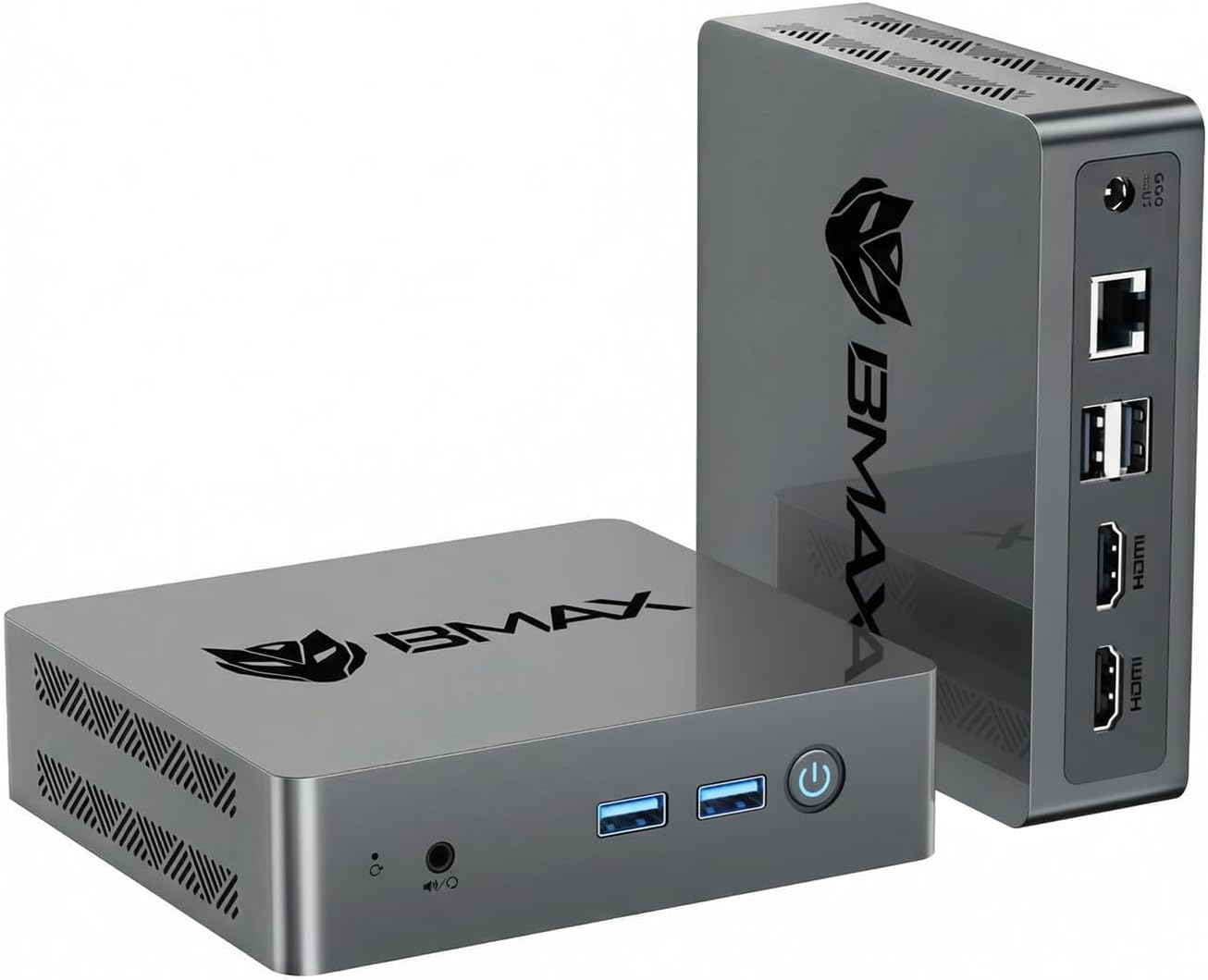


| ASIN | B0DPMS565W |
| Additional Features | Wake On LAN |
| Aspect Ratio | 16:9 |
| Best Sellers Rank | #124,132 in Computers ( See Top 100 in Computers ) #553 in Mini Desktop Computers |
| Brand | Bmax |
| Built-In Media | HDMI |
| CPU Model Number | N5095 |
| CPU Model Speed Maximum | 2.9 GHz |
| CPU model | AMD A Series |
| CPU speed | 2.9 GHz |
| Cache Memory Installed Size | 4 MB |
| Cache size | 4 MB |
| Color | Space Gray |
| Compatible Devices | Headphone, Keyboard, Monitor, Mouse, Smartphone |
| Connectivity Technology | Bluetooth, Ethernet, HDMI |
| Cooling Method | BMAX Smart Cooling Fan |
| Customer Reviews | 4.4 out of 5 stars 21 Reviews |
| Display Resolution Maximum | 3840x2160 |
| Display Type | LED |
| Graphics Card Interface | Integrated |
| Graphics Card Ram | 8 |
| Graphics Coprocessor | Intel UHD Graphics |
| Graphics Description | Integrated |
| Graphics Ram Type | DDR4 SDRAM |
| Graphics card description | Integrated |
| Hard Disk Description | SSD |
| Hard Disk Interface | Serial ATA |
| Hardware Interface | HDMI, MicroSD, USB 3.0 Type C |
| Human-Interface Input | Buttons |
| Item Weight | 0.68 Kilograms |
| Keyboard Layout | QWERTY |
| Language | English |
| Manufacturer | Bmax |
| Memory Clock Speed | 2133 MHz |
| Memory Speed | 2133 MHz |
| Memory Storage Capacity | 256 GB |
| Model Name | B3 Pro |
| Model Number | B3PRO |
| Model Year | 2026 |
| Number of Component Outputs | 2 |
| Operating System | OS |
| Operating system | OS |
| Personal Computer Design Type | Mini PC |
| Power Consumption | 12 Watts |
| Power Plug Type | Type A - 2 pin (North American & Japanese) |
| Processor Brand | Intel |
| Processor Count | 4 |
| Processor Series | AMD A Series |
| Processor Socket | BGA 413 |
| Processor Speed | 2.9 GHz |
| RAM Memory Installed | 8 GB |
| RAM Memory Technology | LPDDR4 |
| RAM Type | DDR4 SDRAM |
| Ram Memory Maximum Size | 8 GB |
| Specific Uses For Product | Business |
| Specification Met | CE, FCC, UL |
| Style Name | Minimalist |
| Total Expansion Slots Quantity | 2 |
| Total Number of HDMI Ports | 2 |
| Total Usb Ports | 4 |
| Unit Count | 1.0 Count |
| Video Output | HDMI |
| Video Output Interface | HDMI |
| Video Processor | Intel |
| Wireless Compability | 2.4 GHz Radio Frequency, 5 GHz Radio Frequency, 802.11a/b/g/n/ac, Bluetooth |
| Wireless Technology | Bluetooth |
R**T
Decent basic mini-PC at a good price point.
Lightweight mini-PC with basic functionality. I bypassed Windows 11, which was preloaded, in favor of installing Linux. The Linux install went smoothly, but the wifi module was balky. I disassembled the unit and gave the wifi card connections a little twist to ensure they were making good contact. Reassembled and everything worked as expected. There is a second NVME socket if you want to extend storage. RAM is apparently permanently attached. The N5095A processor is a little better than the N5095. A decent basic machine for light work in Windows or for Linux. I'm using mine as a headless Linux server/distributed computing unit. It comes with an HDMI cable, power supply, and a VESA mounting plate and hardware.
C**R
Good so far
- From the 8 GB RAM, preinstalled Win11 (yet without intensive using) leaves 4.5 GB free. - The ventilation outlet slots are at right. - Zero problem with HDMI and video streaming so far. - It is brand new, so I cannot say yet about hardware lifetime. (Inside the box is a simple warning on a yellow label, which I'll improve the wording of: Do not connect the mini-PC to any internet (Wi-Fi or Ethernet) before the first Windows boot. This is to prevent it from downloading updates that will slow down the initial boot process. Once the boot process is complete and you're on the desktop screen, you can then connect it to the internet normally.)
G**Y
It works like a gem
My son is an IT, and he chose this computer for me. It works great, takes up no space and I love it.
B**B
This is a nice mini PC! i do have minor problem with this one.. I like a minor challenge
Nice looking mini computer. Setup was easy but for some reason it stops booting when the PC;s logo appears on the monitor. I have to press Control/ALT/Delete then it reboots and goes into Bios. Then I again have to pree Control/Alt/Delete again the it will boot to Windows 11 with no problem It then works perfect fast ab=nd smooth. This has to be done on almost every bott up. It has booted properly only two times out of approx. 20 boot up's. I am a tech so I will figue it out. Otherwise I like this little guy very much. Works perfect once booted. I'm fairly sure its only a problem with this computer only.
J**.
Wrong Operating System
Excellent pc, simple to hookup & run. It was advertised as having a Linux OS, but came with Windows 11. My only complaint! GRRRRRRR
Trustpilot
2 weeks ago
1 month ago