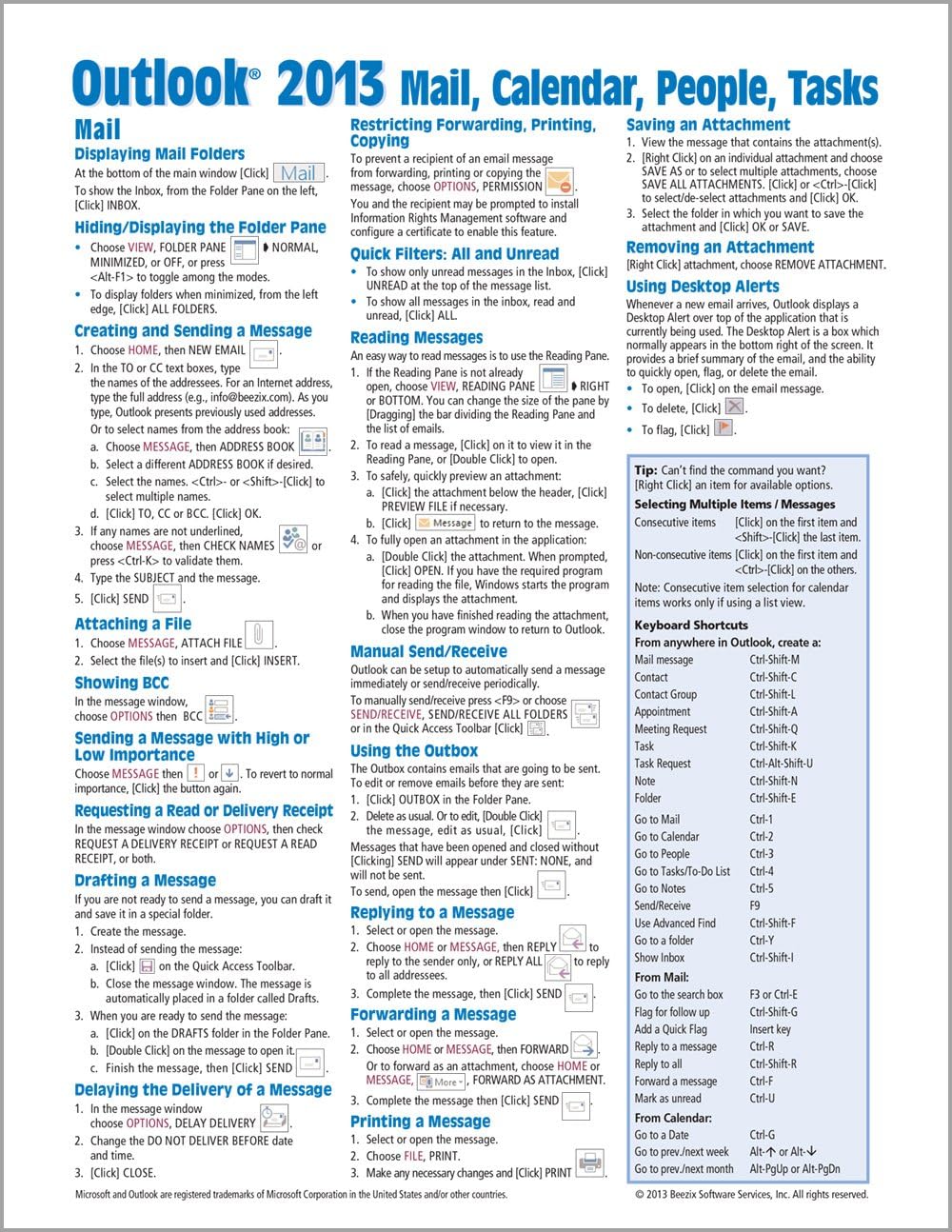

Microsoft Outlook 2013 Mail, Calendar, People, Tasks Quick Reference (Cheat Sheet of Instructions, Tips & Shortcuts - Laminated Guide)
Product ID: 717767
Buy anything from 5,000+ international stores. One checkout price. No surprise fees. Join 2M+ shoppers on Desertcart.
Desertcart purchases this item on your behalf and handles shipping, customs, and support to Slovakia.
Microsoft Outlook 2013 Mail, Calendar, People, Tasks Quick Reference (Cheat Sheet of Instructions, Tips & Shortcuts - Laminated Guide) [Beezix Inc., Beezix Inc.] on desertcart.com. *FREE* shipping on qualifying offers. Microsoft Outlook 2013 Mail, Calendar, People, Tasks Quick Reference (Cheat Sheet of Instructions, Tips & Shortcuts - Laminated Guide) Review: It's a great cheat sheet to Outlook functions in case I forget. - I like a hard copy of instructions handy when I am working. This makes it so easy to refer without having to stop what I am doing. Get It!!!! Review: Great Cheat Sheets For Outlook Users! - Great Cheat Sheets For Outlook Users! Gave me information on how to set up my Outlook and use it in a way I wasn't before. Worth the $5 I spent.
| Best Sellers Rank | #5,959,684 in Books ( See Top 100 in Books ) #144 in Microsoft Outlook Guides #267 in E-mail (Books) #364,863 in Reference (Books) |
| Customer Reviews | 4.4 4.4 out of 5 stars (102) |
| ISBN-10 | 1936220911 |
| ISBN-13 | 978-1936220915 |
| Item Weight | 1.76 ounces |
| Language | English |
| Print length | 4 pages |
| Publication date | May 6, 2013 |
| Publisher | Beezix Inc. |
G**R
It's a great cheat sheet to Outlook functions in case I forget.
I like a hard copy of instructions handy when I am working. This makes it so easy to refer without having to stop what I am doing. Get It!!!!
J**.
Great Cheat Sheets For Outlook Users!
Great Cheat Sheets For Outlook Users! Gave me information on how to set up my Outlook and use it in a way I wasn't before. Worth the $5 I spent.
F**S
Good Reference Sheet
I bought these for our office when we upgraded to Office 2013. They work well for keyboard shortcuts and the like, but a lot of our "issues" were things that involved settings, which the cheatsheet wasn't as helpful in solving. I do still have readily handy so I can look up quick shortcuts, and I have seen other co-workers referring to them.
R**.
Great for beginners and intermediate users.
Great for beginners and intermediate users. Some new stuff I learned and for the items that I already knew about it is great practice to learn where everything is at on my Surface Pro 2, using Microsoft Office 365. Going from Office 2003 and 2007 to 2013 Office 365 can be a shock for some. Because it doesn't cost that much I felt it was worth it for me. Obviously for those of you who have more experience you shouldn't even be looking at this page.
P**Y
I love these "cheat sheets" !
I've used these before, with Office 2007 and they're very useful. If you need some info you don't have to go looking through the textbook. Most of the things you need are right in there, even shortcuts. These are MOST recommended; I bought all three sheets - Excel, Outlook and Word.
P**S
I would recommend these in a minute
I am very new to using Outlook. This item has helped me tremendously. I refer back to it frequently. I have purchased many of these for using various items on my computer. I would recommend these in a minute.
J**M
So they cut lose Outlook, what do we need for guidance?
It isn't a bust, nor is it really great, but it serves the purpose of keeping the notes at a finger tip in order to find some sort of answers to this program. I have had the 2003 upgrading to the 2007 when I found out that Microsoft wanted to stretch their income by cutting lose Outlook. This means that the program had to be upgraded from that which was a characteristic of Office. I just did not want to purchase another "bible." So, this will have to suffice.
A**R
Good summary for Outlook
Covers all I need
C**E
Short cuts at your fingertips...but beware it is techie written.
J**T
Used a number of times for ref.
B**R
This card was a great help when I changed jobs and was required to use Office much more extensively than I had in my personal life. The reference sheet was very helpful with useful information but not overly in depth. It answered many wimple questions so I did not have to bother my co-workers. Sometimes the on-line help is not overly helpful.
Trustpilot
2 months ago
2 months ago