Buy anything from 5,000+ international stores. One checkout price. No surprise fees. Join 2M+ shoppers on Desertcart.
Desertcart purchases this item on your behalf and handles shipping, customs, and support to Slovakia.
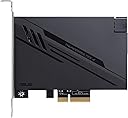
⚡ Unlock next-level speed and power with ASUS ThunderboltEX 4 — because your setup deserves the future today!
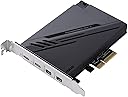
The ASUS ThunderboltEX 4 expansion card features Intel’s Thunderbolt 4 JHL 8540 controller, offering two USB Type-C ports with ultra-fast 40Gb/s bi-directional bandwidth. It supports DisplayPort 1.4 for up to 8K resolution output and delivers up to 100W fast charging, making it an essential upgrade for professionals seeking cutting-edge connectivity and power delivery in their PC setups.


| ASIN | B08ZS3D6JY |
| Amazon Bestseller | #314,603 in Computers ( See Top 100 in Computers ) #30,953 in Computer Components |
| Brand | ASUS |
| Color | Black |
| Compatible Devices | personal computer |
| Customer Reviews | 4.0 4.0 out of 5 stars (428) |
| Data Transfer Rate | 40 Gigabits Per Second |
| Hardware Interface | DisplayPort, USB Type C, VGA |
| Manufacturer | ASUS |
| Mfr Part Number | THUNDERBOLTEX 4 |
| Model Number | THUNDERBOLTEX 4 |
| Number of Ports | 4 |
| Total Usb Ports | 2 |
| UPC | 195553115254 |
お**す
USB2 のピンヘッダーを使用するので、マザーによってはピンヘッダーが枯渇します。 私の場合はピンヘッダーを増設して切り抜けました。
A**R
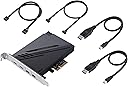
こちらの製品には ミニディスプレイポートx2個 と USB C(形) Thunderboltポートx2個が ありますが 付属品に マザー または グラフィック ボート と こちらの商品の ミニディスプレイポートを 繋ぐケーブルが2本付属しています。 説明書によると 液晶モニターへの映像出力を行う場合には このケーブルを繋いでください。とあります。 メーカー代理店に問い合わせたところ 【本製品(Thunderbolt EX4カード)にはグラフィック機能はないため、 出力信号の入力元として、マザーボードまたはグラフィックカードとの接続が必要となります。 Thunderbolt規格に対応したディスプレイ をご利用ください。】 との 回答 が 着ました。説明書どおりに繋いだら液晶モニタへの映像出力ができました。 Thunderbolt って 普通 USB C(形)のThunderboltケーブルを1本繋ぐだけで 液晶モニターへの映像出力が 出来るんじゃないの?という素朴な疑問。なんちゃって Thunderbolt 仕様なんて初めて聞きました。 (グラフィック ポート と こちらの商品の ミニディスプレイボートを繋ぐ意味が解りましたので 追記 グラフィックボード経由で映像出力するので グラフィックボードの性能を生かす為だそうです。) それと Thunderbolt関連では よくありがちなトラブルかも知れませんが 【接続端子がUSB Type-C規格のものでも、Thunderbolt規格に対応しているかはご利用の機器によって異なります。Thunderbolt規格に対応した HDDストレージをご利用ください。】とのこと USB C 3,1 Gen2 の HDDストレージをもっているのですが HDDを認識出来ませんでした。 (もしかすると USB C オス → USB A メス 変換ケーブルを使えば HDDを 認識するかも?知れません。 SONNETというMac用の周辺機器を製造しているThunderboltボードの説明では USBデバイスを 接続するにはの説明では そんな事が書いてありました。) HDDストレージはこれを使用しています。 センチュリー 独立電源スイッチ/デイジーチェーン機能搭載 USB3.1 Gen.2接続 3.5"HDDx5台ケース『裸族のカプセルマンション 5BAY』 CRCM535U31CIS https://www.amazon.co.jp/gp/product/B07FMVMXBK/ref=ppx_yo_dt_b_asin_title_o04_s00?ie=UTF8&psc=1
J**S
Al inicio me dio problemas, no reconocía lo que conectaba. Marcaba mensaje de que no estaba activado el tunel de pcie o algo parecido. Le actualicé el firmware, actualicé el bios de mi placa (ROG STRIX Z690-E GAMING WIFI), reinstalé windows 11 y nada. Luego de tanto buscar y toparme con varios usuarios con problemas similares, vi que uno dijo que lo cambió de slot y funcionó. Así que lo cambié a otro slot y ya funciona bien. Lo tenía conectado en el último slot, lo pasé al penúltimo y funcionó. Ahora trabaja de maravilla. Tengo un hub que tiene dos M.2 dentro (uno SATA y otro PCIe) y logra transferencias de 500 - 550 MB/s para el SATA y de unos 1.5 - 2.0 GB/s para el PCIe.
A**R
Great for a thunderbolt studio setup. Be sure to check your motherboard manual to see if this will actually work (some only support the USB-4 version which is not this product). Tested with a UAD x16 & AVID MTRX
J**N
Works great if you hook it up correctly! Using an ZikeDrive Model Z666 USB4 M.2 Nmve case (they claim the fastest M.2 Drive Case): and an Fanxiang S880 4TB M.2 Nmve I get the fastest speeds of 3050.32 MB/s read, 2689.04 using Crystal Disk Mark 8 speed test. Running the Orico TCM-U4 Thunderbolt4 USB4 case with an Fanxiang S880 4TB M.2 I get the speeds: 3049.98 MB/s read, 2689.04 MB/s write. The Orico TCM-U4 is cheaper, but has a cooling problem with its top installed - but works great with thermal strip and copper heat sink and no top installed - it is reliable. But the ZikeDrive Model Z666 USB4 M.2 is slightly faster, has excellent cooling so far - better heat sink metal case with plastic over it - but the ZikeDrive is not as reliable when running thru my Plugable TB4 USB4 Hub (cant boot computer with it hooked in w/o error - sometimes errors if it is plugged in after computer booted? Seems to be working ok now.) The above ZikeDrive Model Z66 with Fanxian S880 4TB when plugged into Plugable TB4 USB4 Hub to Asus ThunderboltEx4 will get 2977.65 MB/s read, 1893.94 MB/s write for anyone who is interested. This same Fanxian S880 4TB when plugged into my Asus Hyper M.2 X16 Gen 4 Card or my Asus X670E-E motherboard M.2 PCIe 5.0 slot runs at 7271.24 MB/s read, 6187.19 MB/s write. So you can see the bottle neck is not in the M.2 I am using. It is cable of this speed, but Thunderbol 3 or 4 or USB4 is not cable of that speed. (I can't wait for Thunderbolt 5! I hope it works with my motherboard!) I am running Windows 10 & Windows 11 dual boot. Tests were done in Windows 10 on a Asus X670E-E Motherboard with AMD Ryzen 7950X3D CPU and using the GPU: MSI Gaming GeForce RTX 3060 Ti 8GB OC Edition "BGB GDDRR6X". And 96 GB DDR5 RAM (GSkill) 5400Mhz. So this is a top notch AMD computer build and is quite fast. I boot from an XPG 4TB GAMMIX S70 Blade PCIe Gen4 M.2 2280 Internal Gaming SSD Up to 7,400 MB/s in the PCIe 4.0 internal M.2 slot on the Asus Motherboard. (It has 3 PCIe 5.0 M.2 slots too reserved for future Raid-0 for video recording/editing and audio, etc.) To get this to work properly you MUST plug it into the proper PCIe X4 slot, plug the included cable from the USB 2.0 port on it into the USB 2.0 header on your motherboard, and plug the included cable from Thunderbolt Header on it into the Thunderbolt Header on your motherboard. If you don't hook it up to the USB 2.0, USB Devices can work on it, but no Thunderbolt. I have an Orico TCM-U4 Thunderbolt4 USB4 case with an Fanxiang S880 4TB M.2 in it, it was running at 1063.91 MB/s read, 1057 MB/s write, when the ThunderboltEx4 was not hooked up from its USB 2.0 to the USB 2.0 header on the motherboard. But when the ThunboltEx4 was hooked up correctly (USB 2.0 on it to USB 2.0 header on motherboard) then it was running at 3049.98 MB/s read, 2689.04 MB/s write, using the Fanxiang S880 4TB M.2.
A**A
I use a Mac Pro for work but also game on PC so this allowed me to use all my peripherals like mouse, keyboard, monitor usb hub, headphone stand and sound card all be swapped between the two machines with a single cable. Before this I was using a usb 10GB hub which didn’t have enough bandwidth for all devices so was unplugging 7 cables from pc to Mac whenever I wanted to swap systems. I can even use my 5K Thunderbolt Display on my PC with this add in card. Just be sure to get the right version for your chipset. Mine is Z590 but I believe earlier chipsets use the thunderboltex tr but don’t quote me.
H**N
Ürün yeni elime ulaştı. Asus Rıg Strix x670e-e gaming wifi anakart ve Amd Ryzen 7950x işlemciden oluşan sistemime Thunderbolt 4, usb4.0 ve 100w sarj özelliğini kazandırmış oldum. Yakın zamanda, Apple thunderbolt monitör kullanıp kullanamayacağım konusunda test yapacağım
Trustpilot
1 month ago
1 day ago