Desertcart purchases this item on your behalf and handles shipping, customs, and support to Slovakia.
🔥 Elevate your game and workspace with the ultimate liquid-cooled powerhouse 💻
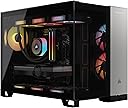
The CORSAIR Vengeance i5200 Gaming PC is a high-performance desktop built for professionals and gamers seeking next-level speed and style. Featuring an Intel Core Ultra 9 285K CPU with advanced liquid cooling, NVIDIA GeForce RTX 5090 graphics, and 64GB of Dominator Titanium RGB DDR5 memory, it delivers ultra-smooth gameplay, seamless multitasking, and stunning visuals. Its dual 2TB M.2 NVMe SSDs provide rapid storage access, while the iCUE LINK 2500X RGB dual-chamber case showcases dynamic RGB lighting and superior airflow. Equipped with Wi-Fi 7, 2.5G Ethernet, and multiple USB ports, this PC is designed for future-proof connectivity and immersive performance.


| ASIN | B0F8W8LYVT |
| Additional Features | Advanced Cooling System, High-End Memory |
| Aspect Ratio | 16:9 |
| Best Sellers Rank | #95,394 in Computers & Accessories ( See Top 100 in Computers & Accessories ) #3,455 in Tower Computers |
| Biometric Security Feature | Windows Hello |
| Brand | Corsair |
| Built-In Media | RGB Lighting, Water Cooling |
| CPU Model | Intel Core Ultra 9 |
| CPU Model Number | 285K |
| CPU Model Speed Maximum | 5.5 GHz |
| CPU Speed | 3.7 GHz |
| Cache Memory Installed Size | 36 MB |
| Cache Size | 36 MB |
| Color | Black/Silver |
| Compatible Devices | Keyboard, Mouse, Headphone, Monitor, USB Device, Wireless Device |
| Connectivity Technology | Bluetooth, Ethernet, HDMI, USB |
| Cooling Method | Air, Water |
| Customer Reviews | 4.0 out of 5 stars 1 Review |
| Display Resolution Maximum | 1920x1080 |
| Graphics Card Description | Dedicated |
| Graphics Card Interface | PCI Express |
| Graphics Card Ram | 32 GB |
| Graphics Coprocessor | NVIDIA GeForce RTX 5090 |
| Graphics Description | Dedicated |
| Graphics Ram Type | GDDR6 |
| Hard Disk Description | SSD |
| Hard Disk Interface | Solid State |
| Hardware Interface | 3.5mm Audio, DisplayPort, Ethernet, HDMI, USB 3.2 Gen 1 |
| Human-Interface Input | Buttons |
| Item Dimensions | 18.4 x 12 x 14.8 inches |
| Item Weight | 36.5 pounds |
| Keyboard Description | Full-size, Wired |
| Keyboard Layout | QWERTY |
| Manufacturer | Corsair |
| Memory Clock Speed | 6400 MHz |
| Memory Slots Available | 2 |
| Memory Speed | 6400 MHz |
| Memory Storage Capacity | 4 TB |
| Model Name | CORSAIR VENGEANCE i5200 |
| Model Number | CS-9030021-NA |
| Model Year | 2025 |
| Native Resolution | 1920 x 1080 |
| Operating System | Windows 11 Pro |
| Personal Computer Design Type | Computer Tower |
| Power Plug Type | Type A - 2 pin (North American) |
| Processor Brand | Intel |
| Processor Series | Intel Core Ultra 9 |
| Processor Socket | LGA 2011 |
| Processor Speed | 3.7 GHz |
| RAM Memory Installed | 64 GB |
| RAM Memory Technology | DDR5 |
| RAM Type | DDR5 RAM |
| Ram Memory Maximum Size | 64 GB |
| Resolution | 1920 x 1080 |
| Security Features | Secure Boot, UEFI, Windows Defender, Windows Hello |
| Specific Uses For Product | Gaming |
| Style Name | Modern |
| Total Expansion Slots Quantity | 5 |
| Total Number of HDMI Ports | 1 |
| Total Usb Ports | 3 |
| UPC | 840440498018 |
| Unit Count | 1 Count |
| Video Output | HDMI |
| Video Output Interface | HDMI |
| Video Processor | NVIDIA |
| Warranty Description | 2 Year Manufacturer |
| Wireless Compability | 802.11ax |
| Wireless Network Technology | Wi-Fi |
| Wireless Technology | Bluetooth, Wi-Fi |
B**Y
A bit fiddly with linux
Works reasonably well for what it is, but not very expandable (the RTX 5090 blocks all the PCIe slots, thought it's possible to use "riser" cables to access the other slots, and this motherboard doesn't pass Thunderbolt connections through from the CPU). The extra m.2 slot on the bottom of the motherboard is useful but you have to remove the motherboard to reach it. Getting all the ports working in top form in Linux was nontrivial, given the lack of documentation from Corsair. Easier to find manuals and specs for ports would be useful. For motherboard info and BIOS settings you have to examine the board yourself and go to MSI's site.
Trustpilot
3 weeks ago
1 month ago