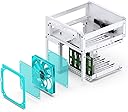
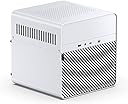
💼 Elevate your home office storage game with sleek, silent, and scalable NAS power!
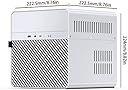
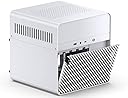
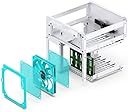
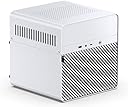
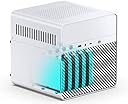
The JONSBO N2 White NAS ITX Case is a compact, aluminum chassis designed for professional-grade network storage. Featuring 5 hot-swappable 3.5” HDD bays plus 1 SSD bay, a built-in 12cm cooling fan, and support for SFX power supplies and 65mm CPU coolers, it balances high-capacity storage with efficient cooling and minimalist aesthetics. Ideal for home offices and enterprise environments, it offers flexible expansion and smart cable management to keep your data secure and your setup sleek.


| ASIN | B0BQJ6HHXJ |
| Batteries Included | No |
| Batteries Required | No |
| Brand | Jonsbo |
| Compatible Devices | CPU |
| Customer Reviews | 4.4 4.4 out of 5 stars (34) |
| Date First Available | 30 December 2022 |
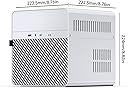
| Item Dimensions LxWxH | 22.2 x 22.2 x 22.4 Centimeters |
| Item Weight | 3 kg 860 g |
| Item model number | N2 |
| Manufacturer | Dongguan Sibositong Industrial Co., LTD |
| Model | N2 |
| Model Name | N2 WHITE |
| Product Dimensions | 22.25 x 22.25 x 22.4 cm; 3.86 kg |
G**N
Probably not necessary to give this NAS box another 5 star review, but I will. Great product. Good design. Good quality. I was migrating my NAS from a previous enclosure that kept overheating my drives with 3 fans. With the open top design, its nice to mount your ITX board, and route your cables however you like. Routing 5 SATA cables may require some thinking. Especially because most ITX motherboards don’t have 5 SATA ports. As luck would have it, I was already using a PCI-SATA card, and all my previous 90deg SATA cables worked perfectly for minimizing cable traffic, but more importantly avoiding interference zones with the rear fan and restricting airflow. All went together nicely. Couple lessons learned. Immediately replace the mesh intake and exhaust mesh plates with 120mm grills. That will increase airflow and reduce noise considerably. And, connect your fan to your motherboard so you can control it, and not have to run it at full speed. The fan cable is plenty long enough to reach your motherboard. There are several posts on replacing the fan with an exterior Noctua, even a 3D printed mod to minimize how far it sticks out. These are all good posts, but I thought I would first try the stock fan. As it turns out, running the fan at about 30% rpm yields ample cooling and is quieter than my CPU fan. No need to be quieter than your CPU fan. All-in-all. A Great Product!
M**N
Nicely thought out and good looking case. I build a brand new 12+ bay rackmount NAS, and transplanted the old NAS parts to this case to use elsewhere. The rubber screw/handle system is unusual but is a cheap way to make the drives swappable without increasing the size or cost of the unit. It's "convertible" into a 5+2; they used the same upper bar on both sides so there are two screw holes present on opposite side of the designated SSD mount too. With some squeezing I got a second SSD in there ok. The slim fan is sandwiched between two very restrictive grills. Not quite sure how to address this yet. Also, it would have been a lot better if there was some kind of temperature control for the fan. I'm going to see if my motherboard temperature readout is effective enough to manage the drive temperatures, and connect the fan to the motherboard instead of the built in fan header. Route all your cables first before you screw anything down. I had to remove the motherboard to re-cable and somehow stripped a standoff screw hole in the process.
A**W
The instructions could be a bit clearer on the case but if you are a moderately experienced builder this shouldn't be an issue. Its a bit of a tight run to get the sata cables up from the mobo to the drive plane but its workable. I would recommend NOT plugging the fan into the backplane because it will just spin at 100% all of the time, i would instead plug it into the mobo. Definitely recommend a bit longer SATA cables than normal.
M**B
Tight squeeze but great size. Quiet
C**.
Overall I like this case except for the noisy, slightly non-standard fan. Pros: - For a small case it has very good support for neat cable routing. - Most of the case is assembled with small screws so you can easily partially disassemble it to help route cables in best positions. - The power supply can be mounted with the fan facing either the louvers on the case side or inward toward the case interior. This is handy at least in my case where the power supply fan was the noisiest fan (after replacing the case fan) and orienting so it faced the interior of the case made it much quieter. Cons: - The case fan is very noisy for a case that is obviously designed to be attractive and used in an occupied room or office. And while it is a 120mm fan, it is only 15mm thick instead of the normal 25mm of standard PC case fans. This limits the options for quieter replacements. I did replace it with a Noctua fan the same size but it runs at a higher speed than their really quiet case fans and is therefor somewhat noisier. It would have been nice if they had made the case a minor 10mm deeper so it fit a standard fan. As it is, there is not enough clearance with the cables to allow a 25mm fan to fit. - A minor annoyance is that the front panel board has both USB-A and USB-C 3.0 connectors, but it seems that most low power motherboards that would likely be used in a NAS system do not have a compatible USB-C motherboard connector (some don't even have a USB-A 3.0 connector) and the heavy cables from these are difficult to route, especially hiding an unused one. Fortunately, the connectors for these are easily removed from the front panel board with two small screws each if they are not needed. As I said, a pretty nice case overall. The hot plug drives seem to fit and seat quite nicely.
Trustpilot
1 week ago
5 days ago