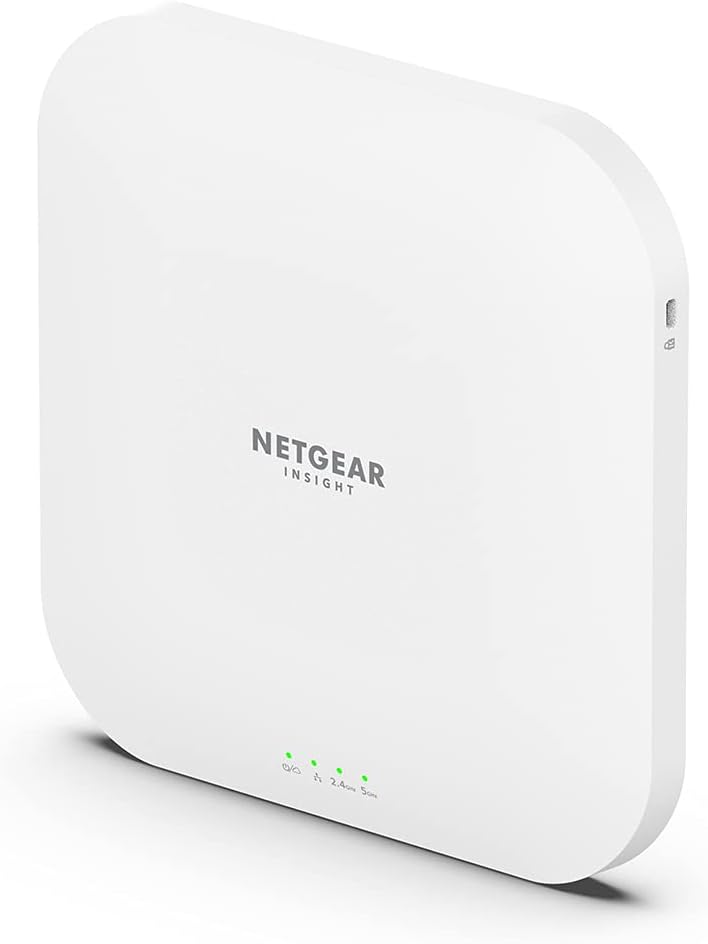


【Authentic Product】 NETGEAR Wireless LAN Access Point WiFi 6 (2402+ 1147Mbps) Cloud Management Compatible Business Multi-Giga PoE+ Power Supply Manufacturer 5-Year Warranty Insight App & Cloud WAX620
Product ID: 734993909
Buy anything from 5,000+ international stores. One checkout price. No surprise fees. Join 2M+ shoppers on Desertcart.
Desertcart purchases this item on your behalf and handles shipping, customs, and support to Slovakia.
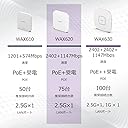
WAX620 is WiFi 6 (802.11ax) business wireless LAN access point with 2402 + 1147 Mbps WiFi Easily view and change settings from anywhere using the Insight app/web. Features: Wi-Fi 6 (802.11ax) Wi-Fi access point for business. Provides 2402+ 1147 Mbps high-speed WiFi for small offices and stores. Stand-alone operation Instant mesh compatible, can be connected to WAX610, WAX620, WAX630, WAC564, WAC540 (including some discontinued products) to build a mesh network. This allows you to easily expand the WiFi environment by simply connecting the WAX620 to a power source without having to wire a LAN cable to any room that needs Wi-Fi. Insight compatible for easy setup using mobile device app. You can check and change settings via the app anytime, anywhere. Equipped with a 1 PoE+ compatible 2.5 Gbps LAN port, so it can supply power via PoE+ charging. Power adapter sold separately (PAV12V) Mounting kit included for wall mounting or ceiling mounting ● Product warranty 5 Year Warranty (Registration required within 30 days of purchase) This product is a radio device that conforms to the standards of the Radio Act. Supported frequency bands: 5 GHz, 2.4 GHz Review: ブラウザ設定は英語で頑張ろう - 2023.2.12 追記 WAX630も追加で買ったので少し書きます。 購入後半年以上使っていますが問題無く使えています。 操作感はWAX620とほぼ変わりません。 WAX630,WAX620共に5GHzは80MHz 4ストリームなので2402Mbpsで間違いありません。 半分と考えている人は2ストリームと勘違いしているからでしょう。 値上げ前に購入しておいてよかったと思ってます。 ------- Insightは使っていません ブラウザ設定で使っていますが、自動翻訳が動くと設定出来ません。 確認やヘルプは翻訳しつつ設定する際は翻訳を止めましょう。 POEは持っていないので1Gハブ+ACアダプターで動かしています。 木の板にネジで止めています。 少し重いので補強して天井付近に付けています。 裏は放熱板なのである程度開けたほうが良さそうです。 無線設定やIP設定など再起動してるような遅さが有ります。 設定さえしてしまえば安定して動いています。 WPSとかの自動設定は有りません。 スマホ等にはPCでQRコードを作成したほうが楽だと思います。 少し困ったのは本体の正面約5m高さ50cm位下に設置していた、電波時計が受信出来ない事です。 出力を最低にすれば受信出来ましたが、意味がないので時計は移動しました。 Review: ファームウェアアップデートに注意 - 2023/12/24 追記 Insight Version 7.2.3 - Dec 23, 2023 にて以下の設定が可能になっています。 よってファームウェアアップデートを気軽に実施できます。 ----- 接続性、安定性はもんだいないのですが、他に気になる点として、 Insight で運用していますが、ローカルでしか設定できない項目について、ファームウェアアップデートを実施するとデフォルト値に戻ります。 たとえば、コンバータモード(子機)を接続するために、以下をデフォルト値から変更しています。 ARP Proxy : Enable -> Disable DHCP Offer Broadcast to Unicast: Enable -> Disable


| ASIN | B091DMB1VT |
| Amazon Bestseller | #5,254 in Computers ( See Top 100 in Computers ) #1 in Computer Networking Wireless Access Points #379 in Computer Routers |
| Antenna Location | Business |
| Antenna Type | Internal |
| Brand | NETGEAR |
| Built-In Media | Access point body, mounting kit with screws, installation guide |
| Color | mulch |
| Compatible Devices | Laptop, Personal Computer, Smart Television, Tablet |
| Connectivity Protocol | Wi-Fi, Ethernet |
| Connectivity Technology | Ethernet, Wi-Fi |
| Control Method | App, Remote |
| Coverage | Up to 250㎡ |
| Customer Reviews | 4.2 out of 5 stars 66 Your Review |
| Data Transfer Rate | 3600 Megabits Per Second |
| EU Spare Part Availability Duration | 2 Years |
| Frequency | 5 GHz |
| Frequency Band Class | Dual-Band |
| Global Trade Identification Number | 00606449154511 |
| Is Modem Compatible | No |
| Item Dimensions L x W x H | 20.6L x 3.4W x 20.6H cm |
| Item Weight | 783 Grams |
| LAN Port Bandwidth | 10/100/1000/2500Mbps |
| Manufacturer | ネットギア |
| Maximum Upstream Data Transfer Rate | 3600 Megabits Per Second |
| Mfr Part Number | WAX620-100EUS |
| Model Name | WAX620 |
| Model Number | WAX620-100EUS |
| Number of Antennas | 2 |
| Number of Ports | 1 |
| Operating System | RouterOS |
| Other Special Features of the Product | Remote Access |
| RAM Memory Installed | 256 GB |
| Security Protocol | WPA2-PSK |
| Smart Home Compatibility | Not Smart Home Compatible |
| Special Feature | Remote Access |
| UPC | 606449154511 |
| Unit Count | 1 Count |
| Voltage | 240 Volts |
| Warranty Description | 5 years from the date of purchase (a proof of date of purchase such as user registration completion and delivery form is required) |
| Wi-Fi Generation | Wi-Fi 6 |
| Wireless Communication Standard | 802.11a, 802.11ac, 802.11ax, 802.11g, 802.11n |
| Wireless Compability | 802.11a, 802.11ac, 802.11ax, 802.11g, 802.11n |
A**R
ブラウザ設定は英語で頑張ろう
2023.2.12 追記 WAX630も追加で買ったので少し書きます。 購入後半年以上使っていますが問題無く使えています。 操作感はWAX620とほぼ変わりません。 WAX630,WAX620共に5GHzは80MHz 4ストリームなので2402Mbpsで間違いありません。 半分と考えている人は2ストリームと勘違いしているからでしょう。 値上げ前に購入しておいてよかったと思ってます。 ------- Insightは使っていません ブラウザ設定で使っていますが、自動翻訳が動くと設定出来ません。 確認やヘルプは翻訳しつつ設定する際は翻訳を止めましょう。 POEは持っていないので1Gハブ+ACアダプターで動かしています。 木の板にネジで止めています。 少し重いので補強して天井付近に付けています。 裏は放熱板なのである程度開けたほうが良さそうです。 無線設定やIP設定など再起動してるような遅さが有ります。 設定さえしてしまえば安定して動いています。 WPSとかの自動設定は有りません。 スマホ等にはPCでQRコードを作成したほうが楽だと思います。 少し困ったのは本体の正面約5m高さ50cm位下に設置していた、電波時計が受信出来ない事です。 出力を最低にすれば受信出来ましたが、意味がないので時計は移動しました。
T**6
ファームウェアアップデートに注意
2023/12/24 追記 Insight Version 7.2.3 - Dec 23, 2023 にて以下の設定が可能になっています。 よってファームウェアアップデートを気軽に実施できます。 ----- 接続性、安定性はもんだいないのですが、他に気になる点として、 Insight で運用していますが、ローカルでしか設定できない項目について、ファームウェアアップデートを実施するとデフォルト値に戻ります。 たとえば、コンバータモード(子機)を接続するために、以下をデフォルト値から変更しています。 ARP Proxy : Enable -> Disable DHCP Offer Broadcast to Unicast: Enable -> Disable
S**I
160MHz幅に非対応 1202MBpsまで
ブラウザ設定で機能が絞られているらしいですが単なるWiFiアクセスポイントとして使っているので自分の使い方では問題なし。 1点勘違いしてたのは5Ghzでリンク速度が1台の機器に対しては1201MBpsまでしか出ないこと。帯域幅が80Mhz幅までしか選択できないので、160MHz幅には対応してなくて2402MBpsでません。 LANが 1GBpsしか用意できないので、まぁいいのですが。 評価の耐久性はまだ使用日数が少ないので☆4にしておきます。
A**ー
初期不良
初期不良に当たりました。 カスタマーサポートに初期不良と判断してもらうまでの手続きが面倒です ネットギアアカウントの作成 製品登録 購入証明書登録 してからでないと電話サポートは受けられません 性能などは返品してしまったのでわかりませんが、まともに動けばコスパは良いと思います。
M**N
Reliable WiFi Access Point
Now in long term use in a domestic environment. I radiate two WiFi subnets which cover my household. I supply the AP with VLAN for each subnet. Mostly devices use 2.4GHz band but 5GHz also gets used. There is a lot more capacity available if needed. The AP does take a long time to initialise - patience is required. It is also somewhat power hungry and I had to use a 90W PoE injector - but at least it only needs an ethernet feed which is good for a ceiling mount.
A**O
Potente e versatile AP
Prodotto capace di soddisfare molto bene le esigenze di distribuzione del segnale su un'ampia superficie. Facile da installare e da configurare, dispone di un'interfaccia ricca di opzioni per spingere la configurazione anche per un'audience più esperta. App semplice, consente con abbonamento di supervisionare la rete da remoto e di configurare una rete mesh molto facilmente.
F**G
Spitzengerät
Sehr stabile, wertige Bauweise. Sehr gute Feldstärke (Funkreichweite) ähnlich wie andere hochwertige Produkte. Einfache Ersteinrichtung. Viele nützliche Konfigurationsmöglichkeiten. Übersichtlich strukturierte Web-Bedienoberfläche. Lässt sich auch ohne unsichere und kostenpflichtige Cloud-Dienste komplett einrichten. Kann V-LAN-Tags handhaben. Sehr zu empfehlen und ausgezeichnetes Preis-Leistungs-Verhältnis.
P**L
De gros mensonges sur les fonctionnalités et les performances : A ne surtout pas acheter
Bonjour, Je fais ce retour parce que je ne souhaite pas que les éventuels acheteurs mettent autant d'argent sur quelque chose qui ne marche pas. Le commercial m'avait dit qu'avec cette borne, on pouvait mettre en place un portail captif afin de respecter la réglementation Hadopi. C'est du pur mensonge, car aucun technicien chez netgear n'a été capable de faire fonctionner la borne correctement. J'ai perdu mon argent (de la borne + licence insight cloud + licence portal captif) et une dizaine d'heures aux téléphones avec des techniciens qui ne savaient visiblement pas quoi faire. Je vous déconseille absolument d'acheter cette borne. Je ferai un prochain commentaire pour vous décrire exactement la mésaventure que j'ai vécu en achetant cette borne.
P**E
Came badly used, and with water damage
I got it in AWS Warehouse. It barely worked for a month. I finally found time to dissasemble it, and it is full of dust, spider webs and rush, it has been in the exterior and water has affected it. Shameful that AWS sells faulty stuff like this....
Trustpilot
1 month ago
3 weeks ago