Desertcart purchases this item on your behalf and handles shipping, customs, and support to Slovakia.
🚀 Elevate your workspace: Dual 4K power, zero compromises.
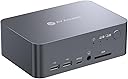
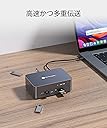
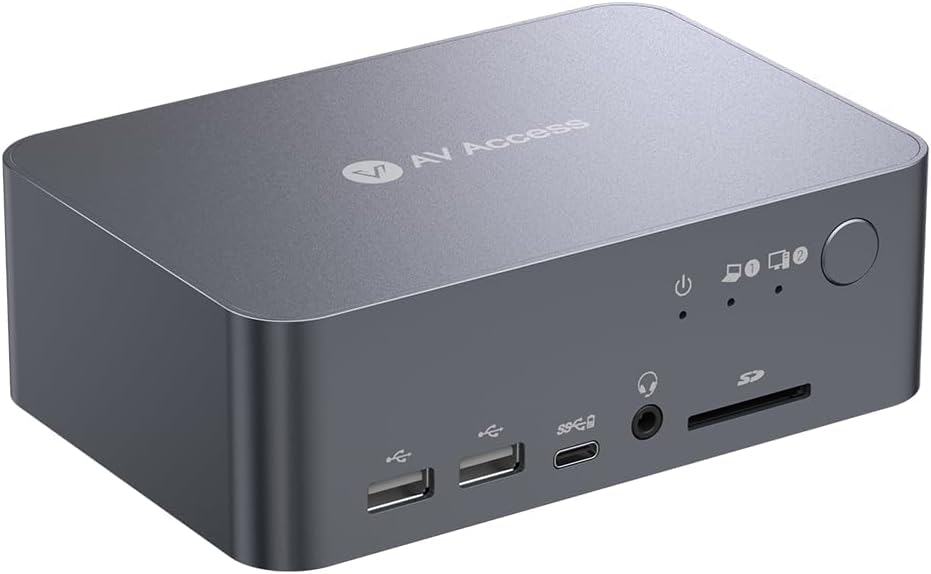
The AV Access iDock C10 is a premium 12-in-1 dual-monitor KVM docking station designed for professionals who demand seamless switching between two PCs. It supports dual 4K UHD displays at 60Hz, offers 60W USB-C charging, and features multiple USB ports, LAN, and audio outputs. Built with aircraft-grade aluminum, it ensures durability and style, while fast switching technology minimizes downtime. Ideal for home offices and multitasking pros seeking a powerful, future-ready workstation hub.


| ASIN | B0CW2JGRN4 |
| Amazon 売れ筋ランキング | パソコン・周辺機器 - 22,782位 ( パソコン・周辺機器の売れ筋ランキングを見る ) 切替器 - 105位 |
| HDMIポート数 | 2 |
| USBポートの総数 | 5 |
| USBポート数 | 5 |
| おすすめ度 | 5つ星のうち4.0 218 レビュー |
| カラー | ブラック |
| ハードウェアインタフェース | HDMI, イーサネット, ディスプレイポート |
| ハードウェアインターフェイス | HDMI, イーサネット, ディスプレイポート |
| パック数 | 1 |
| ブランド | v AV Access |
| ポート数 | 16 |
| メーカー名 | AV ACCESS |
| メーカー型番 | iDock C10-US |
| ユニット数 | 1.0 個 |
| ワット数 | 120.0 |
| 互換デバイス | Dell Latitude 7370 |
| 付属品総数 | 1 |
| 保証内容 | 2年間 |
| 入力電圧 | 20 ボルト (DC) |
| 原産国 | 中国 |
| 同梱商品 | 1. ドッキングステーション付きデュアルモニターKVMスイッチ 2.USB-CからUSB-Cケーブル (USB 3.2 Gen 2、1m) 3.USB-AからUSB-Bケーブル (USB 3.0、1.5m) 4.HDMI 2.0ケーブル (1.5m) 5.DisplayPort 1.2aケーブル (1.5m) 6.電源アダプター (20V/6A) 7.ユーザーマニュアル |
| 商品のハイライト | 1Gイーサネット、EDIDエミュレーション、USB-Aポート×5、HDMI 4K@60Hz対応 USB C KVM切替器、2モニター・2台PC対応、ノートPC最大60W給電、ホームオフィス向けワークステーション対応 |
| 型番 | iDock-C10-US |
| 対応デバイス | Dell Latitude 7370 |
| 色 | ブラック |
ポ**ポ
HDMI接続できず、、、(※訂正:できました)
PC側のhdmiが接続不能だった。一回繋がったのだが、以降ずっと駄目ですね ハズレ個体かな、、、 信頼できるメーカーから買ったつもりだったのでショックです。 問い合わせてレビューアップデートします。 ※追記 自分の使い方が間違っていました PC側のhdmi inはhdmi outの2番に繋ぐ必要がありました。 さらに、AV Accessさんから謝罪の連絡と返品手続きの案内が丁寧にきておりました。 自分の確認不足なのにすみませんでした。 その後は快適に利用できておりますため、星5に訂正します。
に**餅
.
初めてkvmスイッチ購入したけど、切り替え時のラグが少し気になるけど、こんなものかな?頻繁に切り替えるような用途で使わないなら許容範囲
M**U
Almost perfect
99% of work perfectly, but the 1% where I need to turn on/off the monitor or plug/unplug the laptop is bit annoying
M**S
LAN接続するとUSB-C接続が表示されなくなりPCもフリーズ
ようやく求めていたノートPCとディスクトップPCの切り替えが出来るKVMにたどり着いたと思い、商品が到着し早速繋げてみると最初は問題なく表示されていたので良い買い物をしたと思ってた矢先、最後にLANケーブルを接続したところUSBーC接続のノートPCがディスプレイに表示されなくなりノートPC自体もフリーズ。PCの再起動や本製品の電源抜き差しにケーブルを変えたりと色々試してみたがその後表示されることなく諦めました。電力不足でしょうか?本製品の発熱も凄くて長時間使用に耐えうるのか?と心配にもなりました。残念ながら返品処理することに。求めているKVMはいつになったら手に入るのでしょう・・・
T**L
発熱
機能的には満足。 発熱が凄い。 耐久性大丈夫か不安になる。
K**L
性能としては悪くないが…
元々C12を使っていたのですが、紆余曲折ありこの商品を購入しました。 ドッキングステーション+KVMの機能を実現している製品が少ない中で、基本的にはユーザー思っている様な形で使える製品だと思います。 ただ一つ難点としては、D-portとHDMIの入力をHDMIに出力しているのですが、1週間に1回位起動時に画面が真っ青で何も映らない時があります。この時はケーブルの抜き差しor本製品の電源抜き差しで改善するのですが、ここだけちょっと惜しいです。この不具合さえなければ★5なんですが… 追記(2026年7月29) 上記の画面が真っ青になる不具合はその後、なぜか発生しなくなりました。 しかし、この不具合よりも軽微ですが、logicoolのワイヤレスマウスが長時間使用しているとガクガクするときがあり、その際はidock側のUBSレシーバーを抜き差しすることで改善する不具合が発生しています。 ただ、値段を考えるとコスパ自体はかなり良いことに変わりはないです。 ライバル?のTESmartで同じことをやろうとすると倍位値段違いますし、概ね満足ですが、次に新しい機種を出すときはこの辺りの不具合を直してくれることを切に願います。
ほ**ん
ディスプレイは4Kまでの対応
仕事で使っているノートPCを自宅で使用する為に購入しました。 ケーブル1本で自宅のキーボード、マウス、有線LANに接続し、充電までやってくれるので便利です。 また、自宅のデスクトップPCとの切り替えもボタン1つで可能なので私のニーズにとてもあっていました。 ただ、ディスプレイには4Kまでしか対応していないので、自宅の5Kディスプレイには対応できず 結果ノートPCには2本のケールを接続して切り替えはディスプレイのボタンを使用する形になっています。 唯一ここだけが不満点となります。 5Kや8K対応の製品が発売されれば迷うことなく、また購入させていただきます。
I**O
Very good stuff
Quite expensive, but it is very good...no issue at all
A**S
Happy but I need a different ine
Amazing product - Just not suitable for me as a Mac user, I need multiple displays for work not mirrored. Looking forward to the iDock M10 soon. Massive thanks to Johnny, from AV Acess for the support. Always contact support before you attempt to refund.
J**S
⭐⭐⭐⭐⭐ Best KVM Docking Station I’ve Purchased – Seamless Switching and Excellent Connectivity
⭐⭐⭐⭐⭐ Outstanding KVM Docking Station – Exactly What I Needed The AV Access Dual Monitor KVM Docking Station has been phenomenal. This is by far one of the best KVM devices I have ever purchased. Switching between my computers is seamless. I can move from one computer to the other without any issues, and my monitors and connected peripherals transition right along with it. So far, I have not been able to bog this thing down. One of the biggest advantages for me is the number of USB ports and the flexibility they provide. I currently have a high-definition webcam, professional USB microphone, keyboard, and wireless mouse connected, and everything works flawlessly. The additional USB 3.0 connectivity means I am not forced to choose which peripherals I want to share between computers. I also still have room for expansion if I need to add more devices later. Another huge benefit is the USB-C power delivery. The KVM charges my laptops while they are connected, which eliminates additional power adapters and cables from my desk. That alone makes my workspace considerably cleaner. I also regularly switch between my work laptop and personal laptop. All I have to do is disconnect the USB-C cable from one laptop and connect it to the other. My entire setup is immediately available without having to reconnect my camera, microphone, keyboard, mouse, monitors, or other peripherals. Everything simply stays connected to the KVM and works. That is exactly what I wanted from a KVM docking station: one centralized setup that allows me to change computers without rebuilding my workstation every time. The AV Access unit has handled everything I have connected to it smoothly and reliably. It provides the USB connectivity, power delivery, peripheral sharing, and expandability that I was looking for. If you have a multi-computer workstation with dual monitors and several USB peripherals, especially a webcam and professional microphone, I highly recommend this KVM. Five stars without hesitation. Excellent product.
M**O
Fast switching between two devices, as described
It works perfectly. Exactly as described, fast switching between my usb-c laptop and my "legacy" connection desktop with two monitors.
I**T
Perfect for my needs, finally a great switch/dock/hub for my mixed OS set-up.
The AV Access iDock-C10 has been a practical solution for managing my dual-system setup. I regularly switch between an M1 MacBook for work and a Windows gaming workstation, and finding a KVM switch that supports both consistently has been challenging. After trying several other options with limited success, I had resorted to using two keyboards and mice alongside switching inputs on my main display. The real challenge always seems to be passing the EDID for the Mac through a peripheral, and this dock just hasn't had that issue, and consistently passes accurate display information to the Mac. The iDock-C10 has made a noticeable difference and freed up a lot of space on my desk. The setup was straightforward, and it works reliably with both machines. The USB-C connectivity is particularly convenient for the MacBook, allowing for video, power, and data transfer through a single cable. Even though the Apple silicon machines reintroduced an dedicated HDMI out, it's nice to just have one cable to dock it. Switching between devices is quick, and I haven’t experienced any connectivity issues or delays beyond the an expected brief moment for the keyboard and mouse to re-engage when being accessed by the alternative machine. I do appreciate the fun trick of being able to mount an external drive to one, eject it, and then have it show up on the other. A little thing that I wasn't even looking for. I will mention that I use a single display externally, and I believe this might not support two separate displays (from my mac at least) from the documentation. So keep this in mind. My set-up actually calls for a duplicated display because I send it to a projector to do video/media work in my home studio. So, the way this outputs from the mac is a feature for me, not a limitation! I really appreciate the compact design, which keeps my workspace organized, and the device handles peripherals like my keyboard and mouse without issue. I really prefer a full mechanical keyboard, and this has allowed me to keep only one out... with a little special key remapping on my Mac, I use the one I got with my tower. While no device is perfect for everyone, the iDock-C10 has been a solid addition to my setup and has streamlined my workflow significantly. It’s definitely worth considering if you’re looking for a reliable KVM switch for a mixed Mac and Windows environment. For me it's been a five-star experience, and a real relief to have found something that does what I need without a lot of consternation. Would get again.
Trustpilot
5 days ago
1 day ago