Desertcart purchases this item on your behalf and handles shipping, customs, and support to Slovakia.
⌨️📡 Fly through your media universe with the ultimate mini air mouse remote!
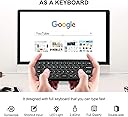
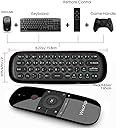
The WeChip Mini Air Fly Mouse Remote combines a full backlit QWERTY keyboard with a 6-axis motion-sensing air mouse, leveraging 2.4G wireless technology for up to 10 meters of interference-free control. Designed for Android TV boxes, PCs, and smart TVs, it offers plug-and-play convenience, rechargeable lithium polymer battery, and intelligent anti-shake cursor stability—perfect for professionals seeking compact, versatile media navigation.


| ASIN | B07F8SXHJV |
| Battery Types | Mixing of lithium metal batteries, lithium polymer AA and lithium-ion batteries |
| Best Sellers Rank | 4,742 in Computers & Accessories ( See Top 100 in Computers & Accessories ) 68 in Computer Keyboard & Mouse Combos |
| Brand | WeChip |
| Brand Name | WeChip |
| Button Quantity | 57 |
| Colour | black |
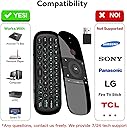
| Compatible Devices | Television, android tv boxes |
| Compatible Streaming Media Player Models | NVIDIA SHIELD TV |
| Compatible devices | Television, android tv boxes |
| Connectivity technology | Wireless |
| Controller Type | Button Control |
| Country of Origin | China |
| Customer Reviews | 4.1 out of 5 stars 3,980 Reviews |
| Manufacturer | WeChip |
| Manufacturer Part Number | sb-sss-sser |
| Max number of supported devices | 1 |
| Maximum Number of Supported Devices | 1 |
| Maximum Range | 5 miles |
| Model Name | W1 |
| Model Number | sb-sss-sser |
| Network Connectivity Technology | Wireless |
| Number of Batteries | 1 Lithium Polymer batteries required. (included) |
| Number of Items | 1 |
| Number of Packs | 1 |
| Product Features | Rechargeable |
| Special feature | Rechargeable |
| UPC | 732173936762 |
B**T
Works out of the box in Libreelec Kodi.
I wanted to use a remote for a Libreelec build I had (Kodi as an OS) but also needed basic keyboard as well. I had an MX-3 remote once but like others it suffers from the burnt out 2.4ghz reciever. So I decided to try another one. This works out of the box flawlessly. I can only assume the Libreelec team has ported the keymap into the build. no setup was needed and it is plug and play. Key notes: -the keyboard does disable and only enables when you flip it. -the power button does talk to the 2.4ghz receiver - this was the only button that has different behaviour -everything was supplied -other users report the metal shroud on the usb plug of the dongle coming apart, not happened yet to me but I have used a small usb extension cable to overcome this. keymap the keymap in Libreelec kodi is as follows: Home = Kodi Home (send you to the homescreen) Hamburger (three lines button) = short press is context menu in library, long press is side bar, during playback shows controls Back = does same as pressing backspace and sends you to the previous screen you were in Vol+/- = controls Kodi's Volume up/down/left/right = navigate while in library etc, during playback left and right act as skip (10s to jump through,) up and down also skip (jumps to halfway) OK = short press is the same as enter, long press in library brings up context menu, during playback shows up controls Power = does nothing while the PC is ON, however if you 'sleep' the PC and press it, it sends a power on command and the PC wakes up. some sort of special command. I'll have to see if I can get it to sleep the box. the keyboard uses the US keymap, so I had to change this in Kodi. Additionally there is another blue LED on the side visible when using the keyboard, this lights up when FN is pressed to indicate FN is on. it should be noted that FN is a lock key and not a press to hold. Airmouse was jittery for me, but I expected that in Libreelec. I don't use that anyway. remote buttons are clicky type, rather than soft rubber but in my opinion don't feel cheap and aren't loud either. Decent for the price, chargin cable included. Cons: only issue is the location of the back button, it's not intuitive to have it bottom right. this is ok if you are left handed but not for right handed. needs more buttons, mute, basic playback, and an info button. mouse button could (and should) be moved to a mini button much lower down so you don't accidentally activate it.
G**E
Compact remote with solid air mouse and full keyboard—snappy, lightweight, and plug-and-play ready.
Grabbed this for an Android TV box and occasional PC control—wanted something compact that didn’t need a full keyboard and mouse setup. The air mouse works spot-on once you get the hang of it—responsive, no lag, and tracks clean across the screen. Great for media browsing, YouTube, and app navigation. Keyboard’s small but usable—ideal for quick searches or login entries. Backlit keys help in low light, and the layout’s logical once you get used to the thumb typing. Plugged in the USB dongle and it paired instantly—no drivers, no faff. Used it in the van for media control and at home for a tucked-away HTPC setup. Battery life’s solid, and it charges via micro-USB—quick top-up and back in action. 👍 Pros ✅ Responsive air mouse—tracks clean, no lag ✅ Full QWERTY keyboard—handy for searches ✅ Backlit keys—usable in low light ✅ Plug-and-play—no setup needed ✅ Lightweight and compact—easy to stash 👎 Cons ❌ Small keys—thumb typing only ❌ No volume rocker—media keys are basic ❌ Micro-USB charging—not USB-C ❌ Needs line-of-sight for best signal 🧭 Personal Review If you want a compact remote that handles media, typing, and motion control without the bulk, the WeChip Mini earns its spot. I’ve used it across Android boxes, PC setups, and van media kits—no drama, just clean control and solid build. Proper stash-ready gear for anyone who wants their screen sorted without dragging out a full keyboard.
S**A
Good, but could be better
I bought this gyro remote/keyboard for my HTPC in the living room. I have used other gyro remotes/keyboards in the past, and I must say that the gyro/precision on this one is similar to older models, which isn't great, as I expected an improvement for newer model. It's not as smooth & responsive as my LG TV remote and can be a bit fiddly at times. The design and key layout are pretty good. The front panel looks clean and straightforward without any unnecessary clutter. On the backside, there's a full qwerty keyboard with double symbols accessible through the FN key. However, my gripe is that the front buttons cover the edge of the remote, making it a bit tricky to use the backside keyboard without accidentally pressing the front buttons. It's quite annoying, to be honest. There's a cursor disable key on the front panel, which helps a bit when typing, but the big back button can't be locked, and it messed me up several times. Also, there's no backlight, which is a shame. It would've been a simple yet helpful addition, especially considering that the second row is in dark blue, making it nearly invisible in poor lighting conditions, like in the evening. When it comes to the connection and dongle, I faced some initial issues when using it with my Windows 11 PC. If you plug it into the front panel USB, after a PC restart, it might not work correctly. The easy fix is to use a rear USB port, or you can tweak the USB power settings in Windows to enable them by default on Windows startup. I didn't encounter such issues with my previous Logitech media keyboard, or other devices for that matter, so it's something to keep in mind. Red power button- works well when PC is set to sleep mode, it wakes up and is another great addition, no need to send your kid to turn on the PC manually. Overall, I'm satisfied with this keyboard. Although I wish it had better precision and a backlight, I can't complain much considering the price. Besides, there aren't many alternatives out there, making this a good purchase in my humble opinion.
S**P
This is awesome on my X96 Max Andriod box. Works really well.
This Air Mouse is awesome on my X96 Max Android box. It really dos work well. I have a Rii+ backlit keyboard and a Q5 Air mouse. But this WeChip is awesome love the fact you can move your hand around and the mouse cursor follows you around the screen. You can slow the mouse cursor down or speed it up but I dont think you will need to speed it up tho. I love the look of it and the feel of it too. And you have a built in keyboard underneath. I just wish you had some kind of cover to proctect your keyboard as that's where you place it down. It looks alot dearer than it costs. Great bit of kit. It turns my Android box on and off. It has learning capabilities as well. It is much better than my other Q5 Airmouse which doesn't move with your hand. It's a great bit of kit. Great price too. Also works on the Shield and Firestick but you will need a OTG cable for the Firestick tho but you can buy the OTC cable on Amazon. Update ********* I liked it so much I have brought another one for my other X96 Max Box while it's on offer.
T**Y
You pointing at me, are you pointing at me? if yes i am over the other side of the room.
The keyboard is ok, But its hard to see which button you pressed. I wanted a + and got a = all because of the worst pointer i have ever used. i was trying to move the pointer and it was like i was playing twister. The case feels nice but if you sweat it will not last long. There no support for HDMI-CEC on the mini PC from what i saw i could be wrong but my smart TV does not support the remote that comes with the mini PC. its setups great and its windows 11. the videos i viewed on YouTube seemed to run great but at the end when i came back i could not get any YouTube videos to start. But lets be honest YouTube is full of problems so its problem them. its nice and small and the pointer even so its terror able its got good range. I never saw no backlight but i only tested it so i may have to press something.
W**E
False advertisement
It was a disappointment, if I could! I would give a zero star, but the Shiny look and design deserves a one star. What made me not rating this controller more than one star is because it is advertised with 10 metres signal while I was 2 metres away and the controller was lagging as hell, and if you have a tiny obstacle between the usb dongle and the controller, nothing works!
S**A
Excellent control for PC. Works flawlessly.
Excellent little controller. Bought it for my pc where I sit a distance away and wanted to use it with netflix. Let's just say it exceeds at that job in every way. Works in VLC and so on. Fully functioning mouse even in games. Only reason is doesnt get 5 is that sadly it womt work on my samsung 4k tv but in its defence it does list is has issues and my Samsung doesnt like third party accessories anyway. If the battery life is good the it will get 5 stars. Charged in less than 30 mins on a high speed wall charger. Great build quality too for 15 British bounds. Fantastic. Would have bought another and will do for my other media build. EDIT: Aug 2020. Still working flawlessly and it dont even need charging that often. Completely plug and play on PC. I have multiple PCs and was going to buy one more but all you do it plug in the dongle and it works instant!! Top notch and now 5 stars!!
G**T
Amazing addition to my little android TV Box
Great price, therefore i can‘t complain about it! The good: - very handy, - pretty good size for a normal sized hand - price - works with pretty much anything i tried it with (Android Tablet, Android TV, Windows Laptop) The bad: - the battery life could be improved - there is no physical switch for on/off of the remote, only the button so if you transport it the battery will mostly be empty since it will always power on - the keyboard is really for emergency only, i am sometimes faster using it as an air mouse and type with the virtual keyboard on screen!
E**G
Très satisfait
Je l'utilise sur un Rapsberry PI3 sous le système multimedia Kodi, et cette télécommande est parfaite pour cet usage : facile d'utilisation et instinctive, j'ai pu programmer sans problème le bouton/marche arrêt pour commander la télévision... Le clavier a l'air fonctionnel, même si je n'ai pas encore eu l'occasion de m'en servir. Et la finition est très correct, on n'a pas l'impression d'avoir de la camelote en main. J'ai 3 petits points mineurs : - la documentation est très mal traduite... C'est un peu plus compréhensible en anglais - je n'ai pas trouvé si la fonction bouton droit de la souris était disponible - je n'ai pas trouvé la touche TAB En ce qui concerne la souris, ce n'est évidemment pas d'une précision absolue, mais c'est inhérent à ce principe de commande : j'ai le même problème avec la télécommande de ma freebox A part ces petits points, je suis vraiment très satisfait de cet achat
S**I
Todo en uno, simplemente genial
Lo más importante: Funciona AL INSTANTE (no como mi mier-da de mando por defecto de la Nvidia Shield). Una cosa curiosa... Los botones de volumen son FÍSICOS, nada de táctiles, que ya temía que los tocara sin querer como el mando de la Nvidia. El Air Mouse es lo que es... Al principio te tiembla el pulso, pero al moverlo ya no te tiembla y haces lo que te da la gana. Luego, al pulsar en alguna tecla/icono de la pantalla, no hay que esperar mucho para que no te vuelva a temblar el pulso. ¡Pero me he quedado sorprendido, es súper útil! El teclado va algo duro pero no demasiado. Tiene que ser así para que no pulsemos alguna tecla sin querer, y no le veo problema por ningún lado (bueno, sí, que no tiene la ñ, pero se pulsa la n y se busca por donde haga falta hasta que encontremos lo que queremos). Casi todos los caracteres adicionales los ejecutaremos con la tecla Fn (al estilo portátil). Hay que tener cuidado porque por defecto a mí ya me venía el Fn puesto... Lo he pulsado/desactivado y sin problema. No le veo problema a pulsar el Fn cada vez que tengamos que utilizar algún carácter "de esos azules". No es exactamente como un teclado de PC pero tampoco lía tanto. He probado de cargarlo por el USB y se me ha encendido una luz roja... No sé si eso significa que ya no se puede cargar más o tiene que salir una luz azul o de otro color cuando la carga está a tope. Pero creo que la carga viene a la mitad y es más que suficiente hasta que indique de alguna manera que le falta batería. Para mí, que venía de la birria de mando de la Nvidia Shield 2017, ha sido un cambio brutal.
A**Y
Perfect
Love this remote, I use it in combination with a Raspberry Pi with LibreElec on it. All knobs and function I need are on this.
P**R
Bra fjärrkontroll med smart design
Fjärrkontrollen fungerar riktigt bra och ligger skönt i handen. Tangentbordet på baksidan är ett stort plus. Perfekt för smart-TV eller mediadator.
A**R
Kolaylık
Usb tv ye taktıgımda tüm fonksiyonlar otomatik tanındı, sadece açma kapama düğmesi ilk aşamada olmadı onu da öğrenme fonksiyony ile tanıttım. Tüm tuşlar akrif çalışıyor (tv: philips oled708). Genel anlamda mouse ve klavye kullanımından ve malzeme kalitesinden memnun kaldım, başarılı bir ürün.
Trustpilot
2 weeks ago
2 weeks ago