Desertcart purchases this item on your behalf and handles shipping, customs, and support to Slovakia.
🚀 Elevate your home network to WiFi 7 speed and security—because buffering is so last decade.
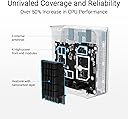
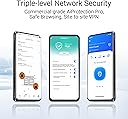
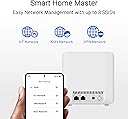
The ASUS ZenWiFi BD4 (3-Pack) is a cutting-edge dual-band WiFi 7 mesh system delivering up to 3600 Mbps speeds and expansive 6500 sq.ft coverage. Featuring ASUS AiMesh technology for seamless whole-home connectivity, dual 2.5G Ethernet ports, advanced security with AiProtection Pro, and smart parental controls, it’s designed to future-proof your smart home with powerful hardware and easy IoT management.


| ASIN | B0DHWCCL6C |
| Antenna Location | Business, Gaming, Home |
| Antenna Type | Internal |
| Box Contents | Power adapter, Quick start guide, RJ45 cable, Warranty card, ZenWiFi BD4 x 3 pack |
| Brand Name | ASUS |
| Colour | WHITE |
| Compatible Devices | Personal Computer, Smartphone, Tablet |
| Connectivity Protocol | WiFi, Ethernet |
| Connectivity Range | 6500 Square Feet |
| Connectivity Technology | Bluetooth, Wi-Fi |
| Control Method | Touch |
| Controller Type | App Control |
| Country of Origin | China |
| Coverage | 6500 sq.ft. |
| Customer Reviews | 3.7 3.7 out of 5 stars (70) |
| Data Transfer Rate | 3600 Megabits Per Second |
| Frequency | 60 Hz |
| Frequency Band Class | Dual-Band |
| Has Internet Connectivity | Yes |
| Has Security Updates | Yes |
| Is Modem Compatible | No |
| Item Dimensions L x W x H | 14L x 7.1W x 14H centimetres |
| Item Weight | 544 g |
| LAN Port Bandwidth | 2500 Mbps |
| Manufacturer | ASUS |
| Manufacturer Part Number | BD4 (W-3-PK) |
| Maximum Upstream Data Transfer Rate | 3600 Megabits Per Second |
| Model Name | BD4 (W-3-PK) |
| Model Number | BD4 (W-3-PK) |
| Number of Antennas | 4 |
| Number of Items | 3 |
| Number of Packs | 3 |
| Number of Ports | 2 |
| Operating System | ASUSWRT |
| Other Special Features of the Product | 3-Step Easy Setup, Alexa Compatible, Feature-Packed Smart Home Master SSIDs, Internet Security, Networking standard: WiFi 4 (802.11n) WiFi 5 (802.11ac) WiFi 6 (802.11ax) WiFi 7 (802.11be), WiFi 7 Powering AiMesh |
| Router Firewall Security Level | Advanced |
| Router Network Type | hybrid |
| Security Protocol | WPA/WPA2/WPA3-Personal, WPA/WPA2-Enterprise |
| UPC | 197105580893 197105643826 |
| Unit Count | 3.0 count |
| Wi-Fi Generation | Wi-Fi 7 |
| Wireless Compability | 802.11.be, 802.11ac, 802.11ax, 802.11n |
A**R
Don't ignore because of low reviews, especially from people who don't know
Setup may require some patience, research, or knowing what you’re doing. For example, you might need to configure a separate IoT network for older devices or cameras that won’t work well on a Wi-Fi 7 network. I had one unit stop working, and I struggled to reset it. I ended up spending an hour troubleshooting before it worked again. However, no other device in this price range could check all of my boxes. Once I figured everything out, I’m extremely happy with it.
L**O
Extremadamente complicado de configurar
Mi peor experiencia, jamás se logró configurar completo el producto. Muchas fallas, perdí mi tiempo y dinero con él. Si pueden busquen más opciones antes de optar por este sistema mesh. 🙁
A**6
Awesome with no subscriptions and a three year warranty and WIFI7 ready!
I was looking for a good router with satellites ever since my Netgear Orbi RBK50 bricked itself during an update. Great job, Netgear... NOT! And being out of warranty, they delicately showed me the finger. Well, I decided to return the favor. I digress, but I had bought that Netgear with 2 satellites because it had a dedicated backhaul, 2.4 and 5GHz bands and that it is a reputable brand. What I didn't realize is that they nickel and dimed me for full 3+ years for their Netdefender subscription of almost $100 annually! So on top of paying top dollar ($450+ to be exact), I was paying $100 after the first year. That is an average of about $225+ annual cost. Back to this product, Asus is an equally great brand. I was looking for something that allowed me to create multiple SSIDs. For some reason the general market routers do not allow creation of VLANs (or am not aware of. I am not a Networking certified person), so multiple SSIDs was what I needed. I was looking for an SSID for personal use (PCs, laptops, phones), another SSID for my security devices, another for all my IoTs that I enriched Amazon and Alexa ecosystem with and finally one for my guests that I can turn on and off as needed. Another need was that I could control it from anywhere I wanted, not just logging into the network. The pros of this product: - Three pack, great to spread accessibility - Mesh network, apparently it helps have lossless connectivity and though I have no tool to test, I have not seen any disconnect moving between rooms and such - Wifi 7. I have currently only wifi5 or wifi6 devices, but hey am ready for the next gen. - High speed ethernet ports for backhaul and/or wired networking - Great mobile app on Android - Allowed me the SSIDs I needed to set up - Share WiFi with a QR Code (Great for Guests when your password is super strong as it should be) - Automatic Quality of Service (QoS) control if you designate the device in a QoS priority category. - Auto wireless backhaul with optional wired one if you set it up that way - Small size - NO SUBSCRIPTION BS like Netgear. Comes with great protection and a VPN app for phone. HOW AWESOME IS THAT!? Thank you Asus. - Comes with a Three Year Warranty! You hear that, Netgear? CONS: Yes, it does have some. Ok, I will be honest, no it doesn't but they are my wish list. - Only two ports in the back, so you need a switch no matter what if you have more than two devices to attach or use a backhaul. - The switch has to be 2.5GHz capable to use the best throughput, else a 1GHz will not be bad, just if you are moving things thru the network, you will be bottlenecked by that limitation - Wish there is a way to mount it higher on the wall with power cord extensions. I may have to juggle something on my own. - Wish it had PoE to power and backhaul the extenders. I have that set up but cannot use it because of the power requirement to come from an electrical outlet. Sigh. - Ability to create VLANs. That would be so awesome to set up one SSID instead of 4 with a separate password deciding which one is for what. I had created a setup once with Ubiquiti extenders and they have spoilt me bad.
W**Y
Had Some Trouble with Setup but Got it Working and Works with Ring
Works well in 2200 sq ft, 2 story house. Got this since it has WPA3 security, ability to update firmware, and not having to have a subscription Instructions were so-so and had to ask Google AI to help troubleshoot initial setup for the mesh and Ring devices which is the reason for the 4 stars. 1) Main router could not find the 2 node routers. Ended up being a poor connection on the LAN cable from main router to modem - although it snapped into both terminals, had to disconnect and reconnect them. I suppose that’s operator error to a degree but Asus troubleshooting didn’t make that obvious. 2) Main router had trouble finding one of the node routers and it was well within the initial pairing distance of 1-3 meters. Here the Asus troubleshooting said connect a LAN cord between the node router and main router. Luckily, had a cord from our old mesh router and it paired up within a minute. 3) Biggest hassle was that the 2.4G IoT network it sets up with quick start was useless for pairing the Ring devices. After a lot of frustration, Google AI recommended setting up a 2.4G guest network with WPA2 encryption. Had to go into admin mode to set up and that finally worked in conjunction with the Ring app to reset/pair the devices with new network. Re the Asus GUI to run admin functions, it was easy to get into and navigate. Gives more options than the phone app. Be sure and set the admin (and record names/passwords) when you set up the system. (Note, for security, you have to be using your router/system to get into the router as admin. I’ve read you have an option to sign up for remote access). Update Nov 14, 2026: Looks like a firmware update came in overnight and system didn’t reboot and couldn’t be rebooted. So . . . had to reset the routers and go thru setup again. Used all the previous network info so took about 20 mins. (To be fair, I recall the instructions said to update the firmware right away). Used the admin function to turn off auto firmware updates. Everything is working again BUT if the system goes down again within the Amazon 30 day return period, it’s going back. Still keeping it at 4 stars bc it does work well. Will update periodically.
R**N
Quick easy Setup, I highly recommend!
This was the easiest most hassle free wifi 7 meet router to install. It had just arrived and had it setup and running in less than 30 minutes. Just as a caveat; what made it easy is I already had an ASUS RT-BE92U wifi 7 router with AI mesh capability. This is not necessary to setup as I would have had to configure the first router anyway. I used the Asus router app on IOS. Unlike the previous wifi router I had to return, (starts with T, end with k) total garbage, this router setup did not depend on having a cell phone connection, and did not ask me for any personal info to set it up the app. It does take some time for the mesh to bind between the three devices. Times may vary but following g the quick setup, it took me 20 minutes, to set up completely. The app functionality is good, for someone that wants to setup the wifi and go, and its easy, but if you want to add features or functionality, then you will have to get into advanced settings which this router has the capability, but those settings are not in the app. This is the only issue I have with the app. The signal strength has greatly improved over not having the mesh router. The parental control settings are an easy toggle, while providing more capability for advanced users. I would say it is an excellent value for the price. There are a couple other model ASUS routers of this type that cost twice as much. But after installing this, I believe those would have been a bit excessive for my needs and I would not recieve any value out of it. I performed a speedtest and it has made a great improvment So I am happy with this purchase for now, and only time will tell. I highly recommend this mesh router over any router.
Trustpilot
2 weeks ago
1 week ago