


๐จ๏ธ Elevate your workspace with pro-level prints and wireless freedom!
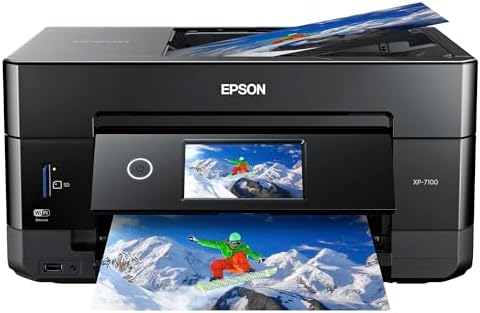
The Epson Expression Premium XP-7100 is a versatile all-in-one wireless inkjet printer designed for creative professionals and busy households. It delivers superior photo quality with 5-color Claria Premium inks at a sharp 5760 x 1440 dpi resolution, supports fast 15 ppm printing, and features a 30-page Auto Document Feeder plus auto duplexing. Its 4.3" touchscreen and multiple connectivity options including USB, SD card, and mobile devices make printing, scanning, and copying seamless and efficient.




| ASIN | B07FN93WW7 |
| Additional Printer Functions | All In One |
| B&W Pages per Minute | 15.8 ppm |
| Box Contents | 5 Claria Premium ink cartridges, Power cord, Setup and instruction manuals, CD-ROM containing software and drivers |
| Brand | Epson |
| Brand Name | Epson |
| Color Depth | 24 bpp |
| Color Pages per Minute | 1 ppm |
| Colour | black |
| Compatible Devices | Smartphones, Tablets |
| Connectivity Technology | USB |
| Control Method | App |
| Controller Type | Android |
| Customer Reviews | 4.1 out of 5 stars 3,518 Reviews |
| Display Type | LCD or LED |
| Dual-sided printing | Yes |
| Duplex | auto |
| Global Trade Identification Number | 00010343922693, 00010343937697, 00010343942622, 00010343943674 |
| Hardware Interface | Ethernet, Secure Digital Card, USB |
| Ink Color | Color |
| Item Weight | 21.5 Pounds |
| Manufacturer | Epson |
| Max PrintResolution Color | 5760 x 1440 dpi |
| Max PrintSpeed BlackWhite | 5760 x 1440 dpi |
| Maximum Copies Per Run | 30 |
| Maximum Copy Resolution Black and White | 5760 x 1440 dpi |
| Maximum Copy Resolution Color | 5760 x 1440 dpi |
| Maximum Copy Speed Black and White | 15.8 ppm |
| Maximum Media Size | 8.5 x 11 inches |
| Maximum Sheet Capacity | 30 |
| Model Name | Premium XP-7100 |
| Model Number | C11CH03201 |
| Model Series | Expression |
| Network Connectivity Technology | USB |
| Number Of Trays | 1 |
| Number of Drivers | 1 |
| Other Special Features of the Product | Wireless |
| Output sheet capacity | 30 |
| Paper Size | 8 inches |
| Power Consumption | 150 Watts |
| Printer Output Type | Colour |
| Printer Type | Inkjet |
| Printing Media Type | Paper (plain) |
| Printing Technology | Inkjet |
| Resolution | 5760 x 1440 |
| Scanner Type | Sheetfed |
| Series Number | 11 |
| Special Feature | Wireless |
| Total USB Ports | 1 |
| UPC | 010343937697 010343943674 010343922693 010343942622 |
| Wattage | 13 Watts |
A**R
๐ Great printer with an even better price.
I just happened to stumble across the Epson XP-7100 while looking for a small photo printer capable of using Letter size paper. The store did not have print samples and I knew nothing about it so I put off the purchase to do some more research. I came across a PC Magazine article titled The Best Photo Printers for 2019. The XP-7100 was listed a one of seven listed as an Editors' Choice, but the 7100 was the only Legal size printer with 2 others not fitting the bill and the remaining 4 being large formats costing 2-10 times as much. With a price of $129, I decided to take a chance. The XP-7100 arrived well packaged and heavier than expected (usually a good sign). It is a elegant contemporary design which takes up very little space and looks good anywhere. No ADF or trays sticking out. Setup was easy and straight forward with the quick setup sheet. The 4.3 inch control screen is a delight with its intuitive interface and bright touch screen. Once the ink cartridges are installed, just push the power button (the only button) and the control panels automatically tilts outward for a better viewing angle. After printing a few test sheets for printer head alignment, it was time to set up WiFi (unless you go with USB). WiFi setup was easy. Just select your network and enter its password (if secured). Last step is to install the software and driver on the computer. The CD did not auto run as it was supposed to so I manually opened the CD in File Explorer. At the root level are two app files. EPWizard.exe and Setup.exe. I ran the EPWizard.exe and everything installed fine. WiFi tried to locate the printer and it failed. This was resolved with a simple Restart of the computer. My first few prints were to test different papers and quality setting. The printer has 2 trays supporting cards, photos, envelops and basically anything A4 or Letter size and smaller. It even includes a CD tray to print on CDs. A motorized output tray retracts back into the printer (along with the control panel) when you power off. As far as construction, the port for the power cable is a little wobbly. I do not know what that is about. Some reviewers wrote the printer is flimsy. The trays do not have rollers or bearing, so yes they are a little flimsy to reduce friction, but tighten into place once fully extended. This is common among printers and helps keep cost down. As for the body, it does have thin panels (available in different colors) which are simply not acceptable for a laptop. Oh wait, this is a non-portable printer meant to, at most, be moved from place to place a few times. Remove from box and place on desk. I purchased the printer mainly for its photographic printing abilities. My first real print was a Student of the Month article (about my daughter) from the website of the local newspaper. The photo and text would be a great test of the printers capabilities so I imported the article at 300 dpi with vector text. I printed it with high quality settings and used Epson Ultra-Premium Glossy Photo Paper. The results were phenomenal. The color photo was vibrant and the blending of the 4 photo colors was seamless. Text (some of it 5pt in size) was very crisp and could rival laser printers. The printer is fast for an inkjet on high settings. I estimate around 35 seconds for the 8.5 x 11 print. Iโll add a follow up on the scanner, ADF, and media ports but for now the 7100 is a very impressive photo printer which can be had as low as $99. Of course they will make up for the losses, and then some, with ink and paper sales.
J**E
Amazing and easy to use
Works great. Easy to use
L**S
Great printer!
This is the perfect printer! Like how the tray automatically comes out when you submit a print, no more papers all over the floor
L**Z
Definite Recommend
Had this for about a month now and ZERO regrets.Takes a bit to learn all the different trays and settings but, it was well worth the money. I've printed on over 100 CD and the quality is amazing, and I still have a lot of ink left. Printed many sheets as well. I printed shipping labels. The multiple trays on here lets you do just about anything you need. Had a few bad prints, but it was because I had to calibrate the printer. Love this printer!
P**S
Does the job & has duplex printing from ADF. Liked better than comparison Canon
Looking to replace a Canon Pixma 922, I've now compared this Epson with 2 Canon printers (TS9521C & MB5120) both of which had their issues. Like the MB5120, this Epson (at 1/2 the cost and 2/3 the size of the 5120) can duplex scan from a lay flat top document feeder. (vs. the vertical fan feeder of the TS9521C.) Automatic duplex scanning was a must-have feature for me. I've so far scanned 50 page dual size documents on the Epson, no problem. It's fast. For more pages I'd do in 2 batches - the Epson allows you to add to a scanned pdf. Canon - no. With Canon, once scanned, you'd have to add pages to the pdf using Adobe. The Epson also lets you skip blank pages, and choose grayscale, something Canon doesn't have. Scanning quality is fine and has better unadjusted tone than Canon's although you wouldn't notice without side by side comparison. I just had to learn that the "top" of the platen is on a different end from the Canon's where I'm used to it. No wonder initial scans got cut off (duh!) The one negative for this Epson: while scanning using the utility on the laptop is easy and affords lots of adjustments, the Scan function on the printer itself just would NOT work for me. Clearly not everyone encounters this issue but I simply cannot fix it. In other words, the printer can't find a computer to scan to, even though they are obviously on the same network because it prints & scans fine, laptop to printer. But printer to laptop = a solid no. After trying every possible fix I could find on the internet, I called Epson. Epson's tech support consisted of someone reading a script and asking the same questions over and over, then saying someone else would call me back which never happened. I almost returned the printer at that point. The "tech support" was truly abysmal. But I decided the size, cost and scanning features of the Epson outweigh the occasional inconvenience of not being able to scan from the printer. The paper tray is flimsy, very inconvenient to reach crap but it's even worse on the Canon. (For comparison the Canon 5120 offers only 1 tray, a super awkward and breakable paper size adjustment, and won't fully close if using regular letter size paper.) Both printers can handle 80# stock which is pretty much just thick paper, I don't know about heavier card stock. Neither has a very good output catch tray. Both print fine if you can handle the Canon disconnecting from the network everytime it or the computer power down and having to rerun a utility program to reconnect. I was spoiled by the now defunct, solidly built Canon pixma 922 (which also had the same disconnect issue - I just kept a shortcut to the utility app handy). The 922 doesn't really have an equivalent replacement, but for me, the Epson comes closest.
Trustpilot
1 month ago
2 weeks ago