Desertcart purchases this item on your behalf and handles shipping, customs, and support to Slovakia.
๐ See everything, miss nothing โ security that works as hard as you do.
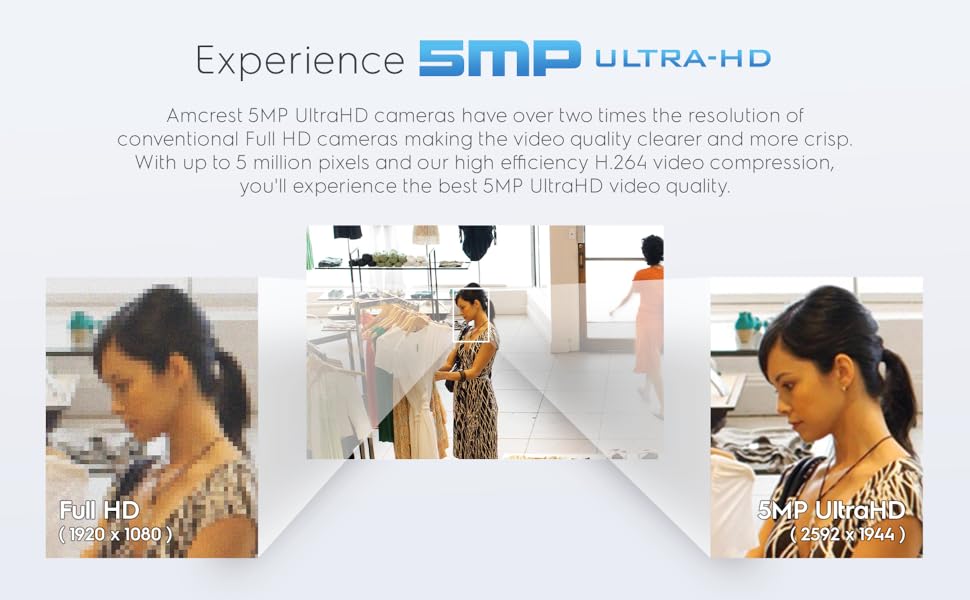
The Amcrest 5MP Turret POE Camera delivers stunning UltraHD 5MP video with a 132ยฐ wide-angle lens and powerful 98ft night vision. Designed for outdoor durability with IP67 weatherproofing, it features easy Power over Ethernet installation and built-in mic for one-way audio. Stay connected with smart motion alerts via the Amcrest View Pro app and secure your footage locally on a MicroSD card (up to 256GB) or through optional cloud storage. Ideal for professionals demanding reliable, high-resolution surveillance that integrates seamlessly into modern smart security setups.


| Alert Type | Audio and Motion |
| Antenna Location | Indoor Security, Outdoor Security |
| Asin | B083G9KT4C |
| Best Sellers Rank | #78 in Bullet Surveillance Cameras |
| Brand | Amcrest |
| Built In Media | Item |
| Color | White |
| Compatible Devices | Desktop, Smartphone |
| Connectivity Protocol | Ethernet |
| Connectivity Technology | Wired |
| Control Method | App |
| Controller Type | Iris |
| Customer Reviews | 4.3 4.3 out of 5 stars (3,025) 4.3 out of 5 stars |
| Effective Still Resolution | 5 mp |
| Effective Video Resolution | 5 mp |
| Enclosure Material | Metal, Plastic |
| Field Of View | 103 degrees |
| Form Factor | Turret |
| Frame Rate | 20 fps |
| Global Trade Identification Number | 00850011990124, 05391539420014 |
| Indoor Outdoor Usage | Outdoor |
| Item Dimensions | 3.7 x 3.7 x 3.2 inches |
| Item Weight | 14.4 ounces |
| Light Source | Infrared |
| Manufacturer | Amcrest |
| Memory Storage Capacity | 256 GB |
| Mfr Part Number | IP5M-T1179EW-28MM |
| Model Name | IP5M-T1179EW |
| Model Number | IP5M-T1179EW-28MM |
| Mount Type | Ceiling Mount |
| Night Vision | Starlight |
| Night Vision Range | 98 feet |
| Number Of Channels | 1 |
| Number Of Ir Leds | 1 |
| Number Of Items | 1 |
| Other Special Features Of The Product | Built In Light, HD Resolution, Local Recording, Motion Sensor, Night Vision |
| Photo Sensor Resolution | 5 mp |
| Photo Sensor Technology | CMOS |
| Power Source | Power Over Ethernet |
| Room Type | Classroom, Kitchen, Living Room, Office |
| Screen Size | 2.7 inches |
| Specific Uses For Product | Surveillance |
| Unit Count | 1 Count |
| Upc | 850011990124 |
| Video Capture Format | H.264 |
| Video Capture Resolution | 5 MP |
| Viewing Angle | 132 degrees |
| Voltage | 12 volts |
| Waterproof Rating | IP67 |
| Wattage | 5 watts |
| Wireless Technology | Wi-Fi |
| Zoom Type | Digital Zoom |
User
Price and Performance are top notch, follow up 12-20-2020)
I purchased this camera to replace an older Reolink that cover my Deck. The 2.8MM sensor in this camera has a great field of view. I`m able to capture the entire deck and a portion of the back steps. I`m running it connected to Milestone via its ONVIF feed. Picture out of the box is great, I did not have to make any tweaks. Night vision is far superior compared to my old camera as well. The microphone needed a small adjust of the gain so it didnโt pick up the noise from my heat pump. I would imagine not having the heat pump nearby I could have left it as it. I would give this camera a 5 out of 5 rating. Great performance for a great price. Oh yea, the Amcrest app on iOS is also free. I plan on putting an SD card in it as a backup of my recordings as well.Follow Up 12-17-2020:This is a follow up review to my prior purchase. I`ve since bought another one and have converted all my cameras over to Amcrest. For $50 you can go wrong. The 2.8mm lens has a very wide field of view and actually replaced the 2 Reolinks I had for the same area. Night vision is much better than the Reolinks and the microphone can pick up a conversation from over 50 feet away. I now have all 5 of my Amcrest cameras (two 8MP 4K and 3 5MP) recording 24/7 to Milestone via the ONVIF feed. The H265 compression is a must if you are hosting your own recording server. I dropped the frame rates down to 10FPS for recording but have them maxed out for live view. Itโs a top-notch product and their customer service is great. I have been eyeing their WiFi doorbell (currently $80 here on amazon). Reviews looks good and that will be my next purchase. its great to have all my cameras the same brand now. I use their iOS app for live view, its flawless and the quality in real time is fantastic. I would not hesitate to purchase more products from them. Also, they routinely do firmware updates and security patches. A huge plus! Bottom line, donโt hesitate, canโt go wrong for the price!!!
User
Very impressed with it!
Let me start by saying the camera price is awesome!!To be 5mp camera, the quality is great! I use them in conjunction with Home Assistant, and the motion detection is very good to trigger automations. Also would like to mention the night vision is good, not great but good, you can see the faces without any issues but the license plate from a car that park in the driveway is imposible to see it, in the other hand the day light picture it is great, any car that parks in my driveway, I can perfectly see the license plate.The installation was very simple, network cable, 3 screws and that's it!!!!The configuration was pretty straight forward too, it picks up an IP from your network (please reserve the ip so it won't change in the future), login to the camera, put your own username and password, mad you are ready to go! You can view the cameras on the browser or on their app, which it is very good and easy to use!One more thing I'd like to add is the fact that you can store the videos locally in a sd card, or like me, it gives you other options, I use NAS and also Blue Iris. I love that you are not tied up to just the cloud.Over all, positive experience and I will buy more! At this price point you can't go wrong! Bad if you get them on sale, it is even better!!
User
Overall Great Camera for Price, Lackluster Mobile Experience
The Camera itself is great for its price. It has several features that a guy who has his own homelab like me would appreciate, and the quality of the camera is pretty nice considering the price.However, I don't like using app integrations with things that should be restricted to my home only. So, I don't. The WebUI for viewing the camera feed and saved recordings works very well and is straightforward to navigate, until you try to do it on your phone.The WebUI for the cameras was not designed with mobile in mind. My assumption is, they just want you to use their app. When you immediately log on you're greeted with the live stream view, and there's a separate tab to view saved recordings called Playback. It's fairly straightforward, there's a calendar, select the day you'd like to view, click file list, and you're off to the races, just double-click the video you'd like to watch. Works exactly like you'd expect on PC.When trying to "double-click" a file to view on my phone, my browser simply zooms in to the text and the video does not begin to play. Once the video is selected (highlighted yellow), hitting the play button does not start the video. You can only start the video by double-clicking it (highlighting it blue). The scrubber for playback videos is also a little difficult to wrangle, you'd think that with years of video streaming history to draw from that a video scrubber wouldn't be all that difficult to get right.In an attempt to get around the issue with viewing the WebUI on mobile, I tried downloading their app (there's 2 of them) and tried to find the playback area. After a bit of confusing navigation I was able to finally find it, but the controls are interesting to say the least. Instead of individual video files that you click to view, they're all arranged on this massive timeline that represents the entire day, and the files are places along that and you're expected to just scrub to the section you want to watch. Both the old and new app use this method, and while I was able to view the saved videos through it, it was a subpar experience at best, and a headache that I'd rather not deal with again.As someone who likes to use my computer for everything, I don't have much of an issue with it, but my wife who is mainly on her phone finds it annoying that she can't see the stored videos efficiently, especially when we get notified of motion through Home Assistant. The workaround is obviously to setup a NAS or something similar, but I feel like the WebUI still shouldn't provide an issue that I have to work around to begin with.
User
Awesome camera at a great price!
The first thing I noticed when opening my package from Amazon was how economically packaged the camera was. Amcrest doesn't pass the cost of fancy packaging onto its customers. With that said, the packaging was more than sufficient to protect the camera and the other contents for shipping.The camera itself appears to be contained in an aluminum or some other lightweight metal. The base itself (the part with the Amcrest logo) itself is a hardy plastic. All mounting hardware you need is included.Only the Quick Start guide is included in the box, but the actual manual details all of the UI settings. I wish tooltips or a digital manual were included in the UI as opposed to having to look up the information in a PDF.I initially ran my setup via IP on the web browser but found that remote performance with the Amcrest View Pro app was troublesome. I didn't want to go through the trouble of manual port forwarding in my router just to get remote viewing on the app, so I reran the setup in the app using the P2P mode. This made the camera available from both home and remote with ease. If you already have access to the web interface, you can access the QR code from the browser to set up your app.I mounted mine up high (10 feet maybe) on one side of the garage door. The video quality is fantastic as is the large viewing angle. There is a slight fisheye effect which is to be expected with wide-angle lenses, but it is not so extreme as to be distracting. Low light performance is amazing, especially in BLC mode. I found that this mode provided the best low light results of all the options.I have basic motion detection set up in the app to send push notifications for motion. You can specify motion zones so that passing cars or blowing flags don't trigger notifications.The only problem I have with this camera is that System -> Upgrade -> Check Version doesn't appear to function. I have not investigated this much, but it has been this way since installation. I checked Amcrest's website for firmware, but this model wasn't listed at the time of this review.I can't speak to recording or playback just yet as I have not NVR or SD card for this camera but will be investigating one or both in the future.In conclusion, a great camera. I will most definitely be looking into some additional cameras as well as a PoE switch to supply them.
User
Great camera for the price.
The T1779 camera is a pretty solid camera at this price point. Overall field of view, and image clarity is excellent, night vision capabilities are acceptable as well. I currently run a 7 camera blue iris system (4 of which are the T1779) , and it is a breeze to setup these cameras. Just point Blue Iris at the right IP address and username/password and let it auto inspect.See attached images for the old camera's field of view, and this camera (snow in picture)Overall for my use case, the extended field of vision greatly outweighs the slight distortion that can be seen in the images.Night vision on this camera is fairly standard in night mode. I would recommend adjusting the strength of the IR lights depending on your situation. I found in my situation that the default setting would blow out the image and degrade the quality when there was actually someone in view. I cut the setting down by about half and had much better results with night images.I have one of these cameras setup in a VERY challenging position. It picks up both my neighbors very bright garage lights as well as my own. Normally, the camera will switch over to night vision mode even with all the light, but as I found after the first real snowfall this year, the snow light reflection was enough to keep this camera in color mode at night, and the image quality is excellent. (See night image)Overall I think this is a great camera for the price, and I wouldnโt hesitate to recommend it to anyone looking for a lower priced system. Paired with Blue Iris, the value of these cameras is excellent.
User
Camera repeatedly loses connection and requires major intervention to restore connection.
I really wanted to like this camera. It was the only one I found that allowed me to view the feed in a web browser without a custom app which was necessary for my desired use. The initial setup was relatively straight-forward. The only installation challenge was that the weather seal cover for the ethernet cable is unusable unless you are planning to terminate the ethernet cable yourself. The weather seal cover needs to be put on the cable before it is terminated because it won't fit over the jack once it is on the cable.The reason I gave this device 1 star is because it continually loses its network connection. Unplugging the power (from the PoE) doesn't appear to reset it. The only way I've found to get the device to reset is to climb up a ladder, remove the device from its mount, unscrew the cover over the microSD card slot and reset button, and push the reset button. Sometimes the device loses connection again even before I get the cover back on and the camera back into its mount. I just went through that above sequence 6 times in 10 minutes before I was finally able to get the camera mounted again with its network connection working. I've had the camera for a bit over a month now and the longest it has maintained a connection is about 4 days. That makes it virtually useless. I plan to contact the manufacturer to see if I can get a remedy but, from what I've found on the internet, there are many other people that have had the same issue and the manufacturer has simply told them to reset the device. That is not a solution. I may have to eat the cost and try to find a camera from another manufacturer that meets my needs.
User
Excellent Product
This product was excellent and provided the clarity in our surveillance requirements. My client is also very happy with the resolution and specifications. Thank you.
User
Awesome Camera! Great value! Tons of options for installation, viewing & recording!
Great camera! Easy Install and setup! Great picture quality! I bought the Amcrest 5MP UltraHD (IP5M-T1179EW-28MM) and I am extremely impressed with the performance of this Amcrest camera considering that it cost less than $50. There was a recent theft in my neighborhood and some kids ringing doorbells and running off at night (frightening my wife when Iโm at work). My existing cameras captured a very poor and brief image of the criminalโs vehicle so I decided it was time to up my game. I really liked how I can use this one camera without committing to a large multiple camera NVR system and installation. There are so many different ways to view the live feed and recordings even when I am out of the house and get an alert/snapshot.Unboxing: My initial impression is that the camera is extremely well built, and it seems quite durable. The plastic housing is hard. The lens angle adjusts easily along multiple axis, and stays exactly where I point it. There are instructions in the box, a mounting template with hardware and plenty of guidance on the Amcrest site. The connections and the cover for the reset and MicroSD card slot are well protected and sealed up tight. I have no concerns about water getting inside.Mounting/Wiring: Even though it can be mounted fine without it, I opted to mount it on an Amcrest AMCPFB203W wall mount bracket. I have brick and new vinyl siding so running a ton of wires with large connectors was not something I wanted to do. I put the connectors inside the wall mount, and connected the mount to a wooden corner bracket I made and stained to blend in with the brick. I then attached it all with one screw/molly. I mounted it near a gutter so I could hide the cable behind and along the downspout. I ran the cable along the foundation under some decorative rocks, into the house near the dryer vent and connected it to my network. I really appreciate the flexibility that the ONVIF/RTSP compatible cameras allows for installation and operation.PoE is AWESOME!: The camera can be connected/powered using Power over Ethernet (PoE) with a PoE injector or switch, or regular Ethernet with a separate power cord. With PoE, I was able drill one tiny hole for the Cat6 cable and then crimp the RJ45 Ethernet connector on myself and have power and data all in one network cable. You shouldnโt have to turn your home into Swiss cheese in order to feel safe and secure. PoE allows you to install cameras without destroying your home! I highly suggest getting a crimping tool for anyone running Ethernet cables. The RJ45 connector requires at least a 5/8 inch (16mm) hole. If you can put your own connector on after you run the wire through something, you can drill less than a ยผ inch (6mm) hole. You can get a spool of cable and make your cables any length you want. Since it is always powered with PoE, it can capture recorded video before the motion starts and I don't have to get on the ladder to change batteries like I do with my other cameras.Setup: The camera can be auto detected by most software. There is also a QR code or serial number (be aware that the QR and S/N are on the tag attached to the cord and not the camera body itself). The Amcrest View Pro software was simple to configure on my android phone. I also tried a demo version of Blue Iris I installed on a Windows 10 PC. It also works with my Synology NAS home cloud server using Surveillance Station software providing tons of capacity for file storage. I was able to set the camera to alert on motion easily. At first, I was getting some motion activated recordings due to wind in the trees and squirrels, but it was simple to set the motion detection to ignore some areas of the frame and minimize false alarms. There are tons of features included in the software that Iโm still trying out.Picture quality: This camera has incredible picture quality for such a low price point. I can zoom in on people walking and driving by without losing much quality at all. My Arlo Pro 2 cameras are only 2MP so this 5MP camera really blows them away with the increased the range, clarity and definition. I usually have some ambient light from the streetlights and the neighbors, but the night vision illuminator lights up dark areas in front of my home for about 100 feet. My spouse was really impressed with how clear the picture is.Audio: The microphone is incredible. I have audio triggered recordings turned off because there is highway noise behind me. Even with the highway noise behind me, the mic can often pick up the voices of people talking as they walk down the street.Flexibility: I really love how versatile this inexpensive camera is. I can put up to a 256GB MicroSD card in it to store the recordings or connect it to my Windows 10 PC, or even to my Synology NAS personal cloud server. I can access the camera through the web, through the Amcrest app on my phone, through Blue Iris or my Synology Surveillance Station software. Iโm also not locked into any proprietary camera system because it is compatible with multiple platforms or no platform at all. All you need is the camera, a way to connect it to your network, and then you can use the app.Overall: I am thrilled with this purchase (I am a computer/electronics/gadget/smart home enthusiast). This camera is absolutely phenomenal especially considering this price point. Iโm already considering where I can place and connect additional cameras. The next time there is a thief in the neighborhood, Iโll be able to pull up a clear image of the people/vehicle when it drives by or be alerted if someone comes near my home. I highly recommend this camera.
User
ู ุดุงูู ูุซูุฑุฉ
ู ุดุงูู ู ุชูุฑุฑุฉ ูู ุงูุงุชุตุงู ุฏุงุฆู ุง ู ุง ุชุนุทููู ุฎุทุฃ ููุง ุชุนู ูุงูุญูููุฉ ู ุชุนุจุฉ ุฌุฏุง ูุบูุฑ ุนู ููุฉ ุนูู ุงูุงุทูุงู
User
Easy set up with other amcrest gear
Great sight width and picture
User
AI-V3 model
I have a few amcrest cameras now, I wanted another for the side garden where the kids play and we can't see them from inside.The quality is excellent, night vision is good at a decent range, it does H264 as well as H265 so it works perfectly with Frigate, also support RTMP and ONVIF for those that might need those features.It has a load of extra features too for detection etc, FTP upload and the usual privacy masks etc, I don't use any of those features as I have it connected to frigate so I've turned them off.Note, the posting said it was the 28MM model but what I actually received is the AI-V3 model. I think they're the same hardware, or at least appear to be, but the AI-V3 is newer. Powered by PoE or also has a barrel jack, no power supply included.A feature I found in the firmware on this model that some of my older models didn't ship with, but later got on updates is WDR (wide dynamic range), which makes it even better for outdoor areas where there is a lot of sunlight that might cause parts of the image to be blown out and top bright.Paid about ยฃ65 for this which is half the price of other models I've bought from amcreat, such as the 8MP bullet camera which is a bargain price for the quality.The sphere part (eyeball) is heavy and made from metal, has a screw closed door with a gasket for water proofing, on it for an microSD which I don't use, the housing (eye socket) is plastic but nice quality with good mounting hardware.Web UI is the typical amcrest one which is perfectly functional but I find very little need to use beyond initial setup since I use a "NVR" (Frigate) to connect to the video atreams.
User
Cnacel item and indicate is customer problem
Product ok, but beware of seller. They cance lorder and said it is customer request for refunf.
User
Great camera
Arrived very fast. Great little camera. Works perfect. Easy to install
Trustpilot
1 month ago
1 month ago