Desertcart purchases this item on your behalf and handles shipping, customs, and support to Slovakia.
💡 Elevate your lighting game — smart, sleek, and always in control.
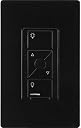
The Lutron Caseta ELV Smart Dimmer Switch delivers professional-grade smart dimming for ELV, LED, incandescent, and halogen lighting. Designed for easy 15-minute installation with a required neutral wire, it supports up to 500W loads and integrates with major smart home ecosystems via the Caseta Smart Hub. Featuring programmable favorite light levels, wireless Pico remote compatibility, and robust multi-location control, it’s the premium choice for millennial professionals seeking seamless, flicker-free lighting with voice and app control.


| ASIN | B01MF5KULO |
| Actuator Type | N.A |
| Best Sellers Rank | #38,519 in Tools & Home Improvement ( See Top 100 in Tools & Home Improvement ) #220 in Dimmer Switches |
| Brand | Lutron |
| Brand Name | Lutron |
| Circuit Type | 3-way |
| Color | Black |
| Compatible Devices | Amazon Alexa, Apple Home, Google Assistant, Ring, Serena shades, Sonos |
| Connectivity Protocol | N.A |
| Connector Type | Screw |
| Contact Material | Brass |
| Contact Type | Normally Closed |
| Control Method | Voice |
| Control Type | Dimming, On/Off, Scheduling |
| Controller Type | Amazon Alexa w/Lutron Smart Hub |
| Current Rating | 1.25 A |
| Customer Reviews | 4.7 out of 5 stars 697 Reviews |
| Global Trade Identification Number | 00784276217729 |
| Included Components | (1) dimmer- no wallplate |
| International Protection Rating | UL |
| Item Dimensions | 1.44 x 2.94 x 4.69 inches |
| Item Type Name | Caseta Wireless Electronic Low Voltage In-Wall Dimmer |
| Item Weight | 18.14 g |
| Lower Temperature Rating | 32 °F |
| Manufacturer | Lutron |
| Material Type | Metal, Plastic |
| Model | PD-5NE-BL |
| Mounting Type | Wall Mount |
| Number of Items | 1 |
| Number of Positions | 1 |
| Operating Voltage | 120 volts |
| Operation Mode | ON-OFF |
| Part Number | PD-5NE-BL |
| Specification Met | cULus |
| Switch Type | Dimmer Switch |
| Terminal | N.a. |
| UPC | 784276217729 |
| Unit Count | 1 Count |
| Upper Temperature Rating | 104 °F |
| Wattage | 250 watts |
T**T
Works well, corrects problems I had with other brand dimmers.
I am trying to update some of my recessed lighting controls to add dimming from ordinary switches while also adding some ability to control it remotely. I had gone through 2 different brands of zwave dimmers and 4 different led bulbs before arriving at these. The first dimmer I tried didn't have a low end adjustment so the led bulbs would not light or turn on at the lowest dim setting. The second switch either flickered or buzzed depending on the type of LED. This dimmer worked very well with multiple brands of LED bulbs. I do not have flickering or humming with the LED bulbs I tried (Phillips, Cree). The low end is adjustable, but I did not have to since the lowest dim level was above the LED threshold. The center button is programmable to a favorite dim level. I also like the ability to always turn on to full brightness even if the dimmer was shut off at a lower dim level. This dimmer has 18 gauge wire coming off the switch which you can connect with your current wiring with a wire nut or similar. It also requires a neutral. It does not have screw terminals on the dimmer itself to connect wiring to. I also was able to easily use the Lutron app to control my lights remotely and add a programming schedule. You will need the Caseta Bridge or compatible hub to to control these through the internet/remotely. The dimmer uses Lutron's own propriety wireless protocol which I believe only a few systems support, personally I use the Bridge. Since this is technically not a fully incandescent dimmer, the wattage limit is lower for incandescent bulbs than other dimmers, but there are plenty of other options (even from Lutron) if you are using incandescent bulbs. I chose this unit specifically for LED bulb compatibility. Edit 2017/06/08: Everything is still going strong and I haven't had any issues with my previous install. Recently I installed another as a 3 way with a Pico reomte. These do not support the standard 3 way install with a traveler wire, but instead you wire it as if it is a single switch (you bypass the other switches) and you use a Pico wireless remote to control the main switch. So far it works fine. The only thing I wish the Pico remote had is an indicator like the main switch with the current dim level. I still plan on getting a few more since these work so well.
J**F
The PD-5NE-xx is the BEST CASETA DIMMER period. Excels at everything the cheaper PD-6WCL-xx doesnt
The ELV PD-5NE-xx dimmer is pricy, requires a white ‘nuetral’ wire, but it’s also the switch to get. It resolves all of the weaknesses of the cheaper Caseta dimmer (PD-6WCL-xx). I don’t know why the CNET type reviewers don’t hit on the weaknesses of the PD-6WCL-xx, the Amazon verified customers sure notice. In this review I reference the less expensive switch, but the truth is both Caseta switches are pricey. Lutron Caseta ELV PD-5NE-xx dimmer pros and cons: PROS: - Allows setting favorite or default dim lvl at switch, just as on the pico remote (not available on Caseta PD-6WCL-xx switch) - Uses white neutral wire which creates a more stable platform. Bulbs shut off without an after glow (Caseta PD-6WCL-xx has no neutral wire) - Supports a wide range of bulbs all work perfectly without flicker or hum. The bulbs I’ve tested and use include many of the vintage type dimmable LED bulbs branded and distributed by smaller companies, and I haven’t had any issues (the cheaper Caseta PD-6WCL-xx had problems with many bulbs including the vintage filament LEDs and the popular GE Reveal LEDs (note, these bulbs weren’t on Caseta’s compatible bulb list. This said, many of my bulbs not on their list have worked flawlessly for years on other dimmers using a white neutral wire). - Flawlessly dims 8 LED kitchen tube lights (Toggle model d416 direct wire )’. The Toggle LED tubes replace 4ft fluorescents using existing receptacles (bypassing ballast). WORKS PERFECTLY (did not even try the other dimmer as the manufacture recommend the upgraded dimmer) - Works with dimmable ELV, LED, MLV, incandescent and halogen bulbs - has switch to support MLV (not supported with Caseta PD-6WCL-x) - Supports the pico remotes, but must be purchased separately. - Supports 29 8.5 watt led bulbs (Caseta PD-6WCL-x supports 17 - very respectable) CONS: - Priced higher than other dimmers, and it doesn’t include a Pico remote LEDs are terrible at matching equivalent wattage and they’re usually brighter. The nice thing about dimmers and led lighting is you can purchase really bright bulbs for those times when you need something really bright, but use a dimmer so you only get the blinding light when requested. This, more expensive dimmer, supports this concept. The cheaper Caseta does not, it turns on at the switch at max brightness, and this is the main problem people have with the less expensive switch. Before buying Caseta look into the differences and consider spending the extra on the PD-5NE-xx switch. If it’s too much, you may want to research other products. I’ve read about people who purchased 20 of the cheaper switches, based on smart switch reviews, and ended up switching them out for the pricier model. The price is an obstacle, but the performance excels. I hope this helps you in your purchase.
B**N
Lutron's Best Caseta Dimmer!
I installed the PD-5NE and WOW! What a great switch! Simple to install and cured my ghost light problem I had in the kitchen with my LED recessed lights!! When I first started installing the Caseta switches in my home, I had an issue using the Caseta 6WCL "base" dimmer where when you turn it off, the lights dim to about 5% - not completely off. With the PD-5NE, they turn off all the way - and no buzzing or flickering. Didn't need to use a shunt capacitor either (LUT-MLC). My kitchen lights are on a three way circuit, so I took one of my extra Picos lying around (with a Pico wall mount) and installed it in the 2nd switch location. I did call Lutron once to ensure the wiring I did was accurate (great customer support) - took extra precaution as this was a bit of a pricier switch. What I love about these switches are their versatility! Meaning, when I spoke with the Lutron rep, they mentioned that typically in a 3-way setup, you want to install the main switch (5NE) in the location where the power is coming in - he said this is usually the switch closer to the breaker box. I already had the switch wired up and he said "no worries, if this configuration is incorrect (blinking green lights on the front of the switch) then all you need to do is reverse the wires that the switch is being connected to in the wall (traveler wire v. hot wire)." Very smart! [granted - other switch manufacturers may be this way too... just haven't worked with them]. I highly recommend these switches in general and in particular the 5NE if you have some tricky lighting configurations and want to use a smart dimmer/switch. Their support team is great and is very knowledgable about many different configurations and electrical setups.
P**K
Good - with some over caveats about dimmable LED bulbs
Lutron makes a couple of models of Wi-Fi enabled switches. The ones they sell at Home Depot are similar to these but are lacking a center memory switch to “remember” your brightness setting. Also, according to tech support, these are a more robust switch when it comes to compatibility issues using dimmable LED’s. Installing might be easy for some but depending on your house’s wiring, you may run into issues like I did. Apparently I had ground arc fault breakers and this the switches required a neutral lead to be used even though the manual for the switches never mentioned this. Also, if you have more than one switch in a panel, the wiring can get kind of messy and if you aren’t experienced, it may be confusing. In the end, it was more expensive, but I hired an electrician to install the switches. A note about dimmable LED’s: the bulbs can be kind of picky - I had to try 2-3 different makes in order to get ones that worked without flickering. Also, the different level of switches may have contributed to some difficulty. Overall, the switches, once installed can be used either in the lutron app or with one of the smart speakers made by Amazon, Google, Apple. I’ve been using with an Apple speaker and have experienced few issues other than some mild quirks when setting up scenes. Overall, the switches work well but the install was much trickier than the manual made them appear and some dimmable LED bulbs are very sensitive and may not play nice with the switches leading to flickering and blinking. The online bulb compatibility guide was no help has the bulbs listed were all discontinued and impossible to find. Trial and error was the best way to go.
M**T
Best Caseta dimmer but pricy
The ELV PD-5NE-xx dimmer is pricey, requires a white ‘neutral’ wire, but it’s also the switch to get. It resolves all of the weaknesses of the cheaper Caseta dimmer (PD-6WCL-xx). Lutron Caseta ELV PD-5NE-xx dimmer pros and cons: PROS: - Allows setting favorite or default dim lvl at switch, just as on the pico remote - Uses white neutral wire which creates a more stable platform. Bulbs shut off without an after glow - Supports a wide range of bulbs all work perfectly without flicker or hum. - Supports the pico remotes, but must be purchased separately. CONS: -Due to the four attached cables I couldn't get it to work as I could not find the neutral at once, called my electrical man used the one from the power outlet and it worked immediately. - Priced higher than other dimmers, and it doesn’t include a Pico remote - Even on Ebay this one is expensive It works you get what you paid for & is never on sale. Lutron just need to include the pico for now on.
E**U
Tips to work around this switch's firmware bugs that were confirmed to me by Lutron on 3/31/2017
These are outstanding dimmers, but only for homes with a neutral wire (usually a cluster of white wires in the very back of the junction box, found in newer homes built since the 80s). There is also firmware bug in these switches that I confirmed with Lutron tech support on 3/31/2017 that prevents you from setting accurate trim levels. The work-around to the firmware bug is explained here. The first thing you need to know about this switch is that your LEDs may still buzz with it unless you switch the phasing from forward to reverse. The instructions in the Advanced Caseta Installation guide are incorrect or at least unclear. The correct way to switch the phasing from MLV (Magnetic Low Voltage) to ELV (Electronic Low Voltage -- the type of phasing preferred by LED bulbs) is to: 1. Pull out the tiny hidden tab at the bottom of the switch for 3 seconds. Push the tab back in then. 2. Simultaneously hold down the On and Off buttons for about 10 seconds 3. The top and bottom LEDs either light or flash. If the top LED flashes, the switch is operating in MLV mode. If the bottom LED flashes, the switch is operating in ELV mode. To toggle modes, press the Favorite button until the correct LED flashes. If you are using LED lights, use the bottom ELV mode. 4. Commit the phase change by holding Off for about 6 seconds. The above actions eliminate the buzz in LED lights. The second thing you need to know is this switch has an upper and lower trim function so that you can create a linear dimming range. This is especially helpful for LED bulbs which cannot usually dim as low as incandescents. All Caseta dimmers have an upper and lower trim function, but the firmware implementation on the PD-5NE is buggy and the trim functions aren't working accurately unless you follow these instructions. 1. Set the lower trim first. Hold down On and the Down arrow for 10 seconds until the LED blinks to show the lower trim level. 2. Set the lower trim level to the dimmest (or just above the dimmest) that your lights can go. Most LEDs cannot get as dim as incandescents. 3. Commit the lower trim setting by holding Off for 6 seconds. Then turn the light off. 4. VERY IMPORTANT: The microprocessor is running buggy firmware. You must now pull the hidden tab at the bottom of the switch for three seconds to kill the power to the microprocessor. Then push it back in. This act effectively reboots the internal microprocessor and is needed to ensure the high trim function doesn't overwrite or otherwise mess-up your low trim setting. 5. Now set the high trim to the highest that you want your lights to go. A lot of LEDs reach their maximum brightness well before the high trim mark is reached. For a truly linear dimming experience, set the high trim to the maximum brightness level your eyes can perceive. This will make the dimming appear smooth and linear for a better user experience. Set the high trim by holding down On and the Up arrow for 10 seconds until the LED blinks to show the upper trim level. 6. Set the upper trim level to the brightest (or just below the brightest) that your lights can go. Most LEDs reach maximum brightness well before the high trim mark. 7. Commit the upper trim setting by holding Off for 6 seconds. Then turn the light off. 8. VERY IMPORTANT: Because of the buggy firmware, pull the pin on the switch to cut the power for three seconds to reset the microprocessor. Push the pin back in. Then verify that the low trim is accurate by pressing the up arrow once. The dimness of the light should be precisely what you specified in steps 2-3. Verify the high trim setting is accurate by turning the light on full power. The brightness should be what you specified in steps 6-7. 9. Verify the phasing is still set correctly. There should be no buzzing throughout the dimming range. My own user experience suggests that setting the trim can, in certain scenarios, cause the switch to forget whether you specified forward or reverse phasing (ELV vs. MLV). You may need to repeat the phasing setting to ensure there's no buzzing. Lutron tells me they will investigate this firmware bug and the switch ought to be software updatable they claim. I imagine any update would be issued through the Smart Bridge 2. I await their investigation. In the meantime, this work around enables you to establish accurate upper and lower trim functions that stick (or are remembered) correctly.
L**H
Incurred an issue, but Lutron support was great and resolved problem
Given the expense, I have been replacing my standard "dumb" switches with these smart ones a few at a time, and overall I have been very happy with their operation. They perform beautifully with only an occasional hiccup due to Siri. I've never had something fail to operate using the Lutron app for iOS or Apple's Home app. Following my recent purchase of a few more PD-5NE's, however, I did run into a problem with one load. The fixture, driven by a 12V/300W magnetic low voltage (MLV) transformer, consists of three incandescent bi-pin halogens of 50W each. When I installed the PD-5NE to switch this load, the lights on the fixture oscillated off and on, and some of the LEDs on the PD-5NE flashed repeatedly. I toggled the PD-5NE's default mode from reverse phase (for ELV loads) to forward phase for MLV, but the fixture still did not behave and I felt the PD-5NE start to get hot quickly. Secondly, later the PD-5NE blew its internal fuse. I contacted Lutron's tech support and they sent me a replacement PD-5NE, thinking possibly that the original one was faulty. The new PD-5NE arrived fairly quickly and upon installing it, I did not see its LEDs flashing as I did on the previous one nor did it heat up. However, as soon as I toggled the new PD-5NE to forward phase, it immediately blew its internal fuse as well. I placed another call to Lutron and the tech support guy recommended we try a PD-10NXD PRO switch instead. Unfortunately, that switch lacks the "favorite" button that the PD-5NE has, but I was willing to give it a try. Lutron quickly got the PD-10NXD PRO to me and I reviewed some details with tech support before installing it. You see, the PD-10NXD per the specs can operate without a neutral (though I have the neutral in the switch box). However, the specs do say that neutral is required for MLV loads. Lutron tech support suggested I first just try it without the neutral, stating that the switch would flash LEDs if it absolutely required the neutral. I installed it without the neutral and the switch did not flash its LEDs; i.e. it's operating fine, controlling the MLV without neutral, and seems to have no trouble at all unlike the PD-5NE it replaced. Score! Lutron stated that the max load rating for the PD-NXD is quite higher than the PD-5NE, though my transformer should have, per its specs, still functioned properly with the lower rated PD-5NE. I'm just happy that ultimately I got a workable solution.
E**H
Perfect smart dimmer for LEDs
Exactly what I needed to dim my led bulbs. I was previously using the Maestro CL dimmer and my dimmable led bulbs would buzz at any dim level, even full brightness. I did some research and discovered that most leds actually need an elv dimmer that requires a neutral wire to get the most led compatibility and best performance. Also, I have been setting up SmartThings in my home, including Z-wave light switches, and there just weren't any Z-wave dimmers on the market today that appealed to me. I like the way the switch looks and how it functions - the dedicated on and off buttons, bigger dimming up and down buttons rather than a thin slider or bar and the favorite button is very useful. It really seems to be a quality dimmer and installation/setup was fast and easy. Even better - Lutron integrates with SmartThings, so that's great for my already established smart home setup. The only con is that the dimmer is quite expensive.
J**K
The best Caseta series dimmer
Dimmer is controlling 8 x 9W 4" LEDs. They're the cheaper AC voltage series, so no dedicated driver for them. The lights I expect to get 3-5 years before problems start cropping up, but the dimmer should last forever. I originally had the standard Caseta dimmer, the one without the neutral line requirement and it caused a buzzing sound from the lights at any dim level. Upgrading to this model got rid of the buzzing issue. The level of dim control is about the same, with the lights going to about 40% output and then dropping to zero. Whether that is the function of the lights I've chosen or the dimmer, I cannot say. My experience with Lutron RA2 is far, far more granularity with dimming control but for $300+ CAD a switch, it's expected. SOMEWHAT ODDLY HOWEVER, when the lights turn from the large top button they appear to almost go to 100% brightness and then quickly drop to 95% brightness. It's subtle, but not so subtle that it isn't noticed.
R**Y
Buy it!
Great product , saves you from wiring 3ways circuits
G**K
Control LED Tracklighting with NO FLICKER
Yes, it was more expensive than many other competing lines. However, this dimmer allowed me to dim 10 LED lights on 2 ceiling tracks correctly with NO Flicker. I could not do the same with Meross or other Homekit dimming lights that I tried. Highly recommended!
B**4
New, OEM
Quick shipping, switch as advertised
J**H
Works great, far better than the Leviton switch I bought, way too expensive
I initially bought Leviton dimmer switches to use in my room with two LED lights on their own circuit, but the switch couldn't dim them very much and it caused the lights to flicker greatly when dimming. Research told me that the problem was I need a ELV switch if the load is extremely low voltage (ELV), which my circuit is with only the two lights on it. So I bought a Leviton ELV switch. Same dang issue, barely dims and lights flicker. Fed up, I decided to buy the most expensive ELV switch in the Amazon warehouse deals, that was this one. $65 CAD for an open-box warehouse unit (I do not know who is paying $130 for a light switch) and to its credit this switch almost works great. It can dim my LEDs to a passable level, though I do wish it could go a fair bit dimmer still, and it does not cause my lights to flicker nearly as much—interestingly they don't flicker at all when at lower dim levels but they do rapidly (much faster than the Leviton switches so it's not as noticeable/annoying) flicker at brighter levels. It's hard to describe but the Leviton switches are like a 30hz monitor and the Lutron is a 60hz. The lights with a Lutron switch are not ideal to look at, you want a a monitor with a smooth 144hz image, a solid light, but I can settle with 60hz when the alternative is 30. Another problem is it does cause one of my lights to have ununiform lighting where the LEDs at one end of the light are brighter than the rest, the dimmer the setting the more noticeable the issue. Both my lights are the exact same so I have no idea why it only happens with the one. See the picture for the issue and how bright they are at the dimmest switch setting. It might be a problem with the light, it wasn't an issue with the other switches, but I don't really look up while at my desk so I don't mind too much and don't hold it against the switch. In conclusion: +5 stars for working better than the competition -.5 for being expensive without being flawless -.5 for not dimming as much as I'd like Solid 4 stars; buy it when it is half off.
Trustpilot
2 months ago
3 weeks ago