🔐 Elevate your desk game with security and style — because your workspace deserves the best.
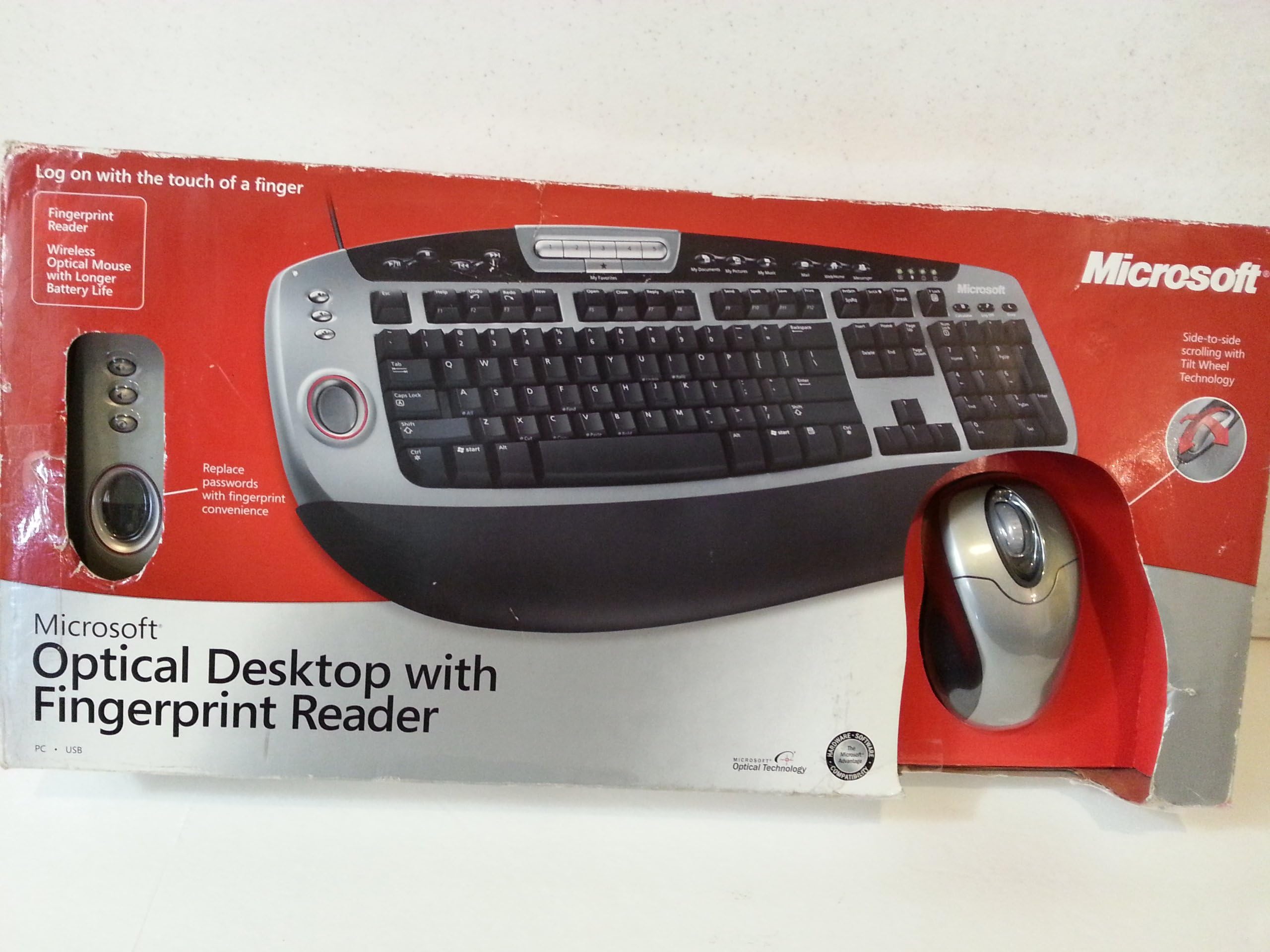
The Microsoft Optical Desktop Keyboard and Mouse Combo (BZ5-00002) features an ergonomic wired keyboard with customizable function keys and one-touch media controls, paired with a wireless optical mouse equipped with a versatile tilt wheel. Its standout feature is the integrated fingerprint reader, enabling secure, password-free login on compatible Windows XP systems. Designed for durability and precision, this combo balances wired reliability with wireless convenience, backed by a 3-year warranty.
| ASIN | B0002ZHBIM |
| Best Sellers Rank | #3,398 in Computer Keyboard & Mouse Combos |
| Customer Reviews | 3.8 3.8 out of 5 stars (52) |
| Date First Available | July 2, 2004 |
| Is Discontinued By Manufacturer | No |
| Item Weight | 4 pounds |
| Item model number | BZ5-00002 |
| Manufacturer | Microsoft |
| Package Dimensions | 21.2 x 10.2 x 3.9 inches |
S**.
Mad Nice
I couldnt be happier with this keyboard mouse combo. The keyboard is loaded with features including quick access buttons for everything you could ever need, helpful labels, volume control, media play/pause/stop/next/previous and the best yet, fingerprint identification! I was little skeptical about this particular feature, but it works flawlessly. If you configure it to every finger on one hand and then try to log in with your other hand, it doesnt allow it. Only the exact finger prints it has registered are allowed to access it. I made sure it worked by having a bunch of different people try it with no luck. Also I can use it for every login imaginable! Loging into windows is crazy easy, you just put your finger on the little circle and your in. Its fantastic. This keyboard is sleek and stylish with a black/silver contrast and the mouse matches just as nicely. The keys are soft and fairly silent. They arent hard and clacky like most keyboards and have a smooth soft feel about them. The mouse is supposed to have a long battery life, and well, I havent had to change them yet. No problems with the mouse whatsoever. I remember with my brothers optical mouse the cursor would sometimes lag across the screen or skip around or seem to "catch" on certain parts of the screen for a few seconds. I am happy to report I have encountered none of that. This mouse runs smoothly and has a neat scroller that scrolls side to side as well as up and down. I have used this mouse and keyboard combination for gaming with absolutley no problems. I have to say that this is a fantastic product that is perfect for everything, including gaming. I highly recomend this product.
J**S
Very good keyboard and mouse set for 32 bit Windows Systems.
I bought this keyboard and mouse for my Windows Vista 64 bit machine. I was a little disappointed when I found out Microsoft does not support Windows Vista 64 bit with a driver or software to drive the biometric portion of the keyboard. So, I hooked it up to my wifes Windows XP 32 bit system and she is happy as can be with that fingerprint reader. Everthing works great and she can just swipe her finger to log in. No long delays in IE 7 as some reviews report. I'll find a different biometric solution for my Windows Vista 64 bit system. Overall I like this keyboard because it is NOT wireless. I've had problems with my current wireless keyboard being recognized by the USB receiver sometimes. My wife doesn't have to worry about it with this keyboard. The important thing to she and I is that the mouse is wireless. That chord hanging up on things really bugs us when scrolling around. Four thumbs up from us.
X**S
fine with me
this keyboard and mouse works perfectly with my computer...only after i bought the thing i realized id be upgrading to vista soon but i read a rewiew that says that the keyboard is compatible w/ new drivers...that was my only issue and it seems to be solved, the fingerprint reader is a dream and works within seconds. my hands are small so the keys are placed perfectly (although my boyfriend who of course has bigger hands had a slight discomfort)even the programable and shortcut keys worked just fine...i was disappoineted when i recieved a wired keyboard beung that its titled wireless but i have gotten over it, for the price i probably should be happy...all in all good product, great price for $21.90, easy as a breeze would definitely reccomend to others!!!
D**H
Does NOT work with IE7
When I say "does not work", I mean the web site login process takes 15-20 seconds to complete, which totally 100% defeats the purpose of using a fingerprint reader if your goal is to save time. I actually called Microsoft and they confirmed it is an issue, and said something about all the extra IE7 security getting in the way of the program, blah blah blah. Really, the problem is with the DigitalPersona third-party software Microsoft puts their name on. There IS a 2.0 updater, which I installed of course, but still took almost 20 seconds from the time I swiped my finger to the time the info was transmitted to the site. It's not just my computer. Google it, you will find lots of complaints. It's too bad, because I really like this keyboard. But I'm returning it because waiting 20 seconds defeats the purpose. By the way, the fingerprint reader built into my new Dell laptop works instantly with IE7. The software is from a different company than DigitalPersona. If you need a fingerprint reader for strictly security reasons (and not speed) then this keyboard is probably fine. But there are warnings all over the place that the fingerprint reader is really not a "high security" feature. It's just for convenience.
D**Y
love the producr BUT
I love my new fingerprint reader keyboard, but I am having problems with the mouse. it keeps locking up on me and I have to unplug it from my computer and replug to get it to work. I have uninstalled and re-installed it. I have went to HP help center and no one can help me fix this problem
E**.
Nice but has compatibility issue with Dell laptops
After installing the lap top software to enable the shortcut keys, my laptop exhibited some bad behavior. If I remove it from the docking station and carry it to a conference room to plug into a projector, when I hit Func-F8 to switch the display mode, the screen blinks and flashes, and maximizes the magnification such that I cannot even display powerpoint. This may be my company's firewall and other security stuff, but removing the keyboard software fixed it. Also the fingerprint reader response is very, very slow. 20sec or so between putting my finger on the spot and getting the logged in screen.
Trustpilot
2 months ago
1 week ago