Desertcart purchases this item on your behalf and handles shipping, customs, and support to Slovakia.
🖥️ Elevate your workspace with precision and power — the keyboard that works as hard as you do.
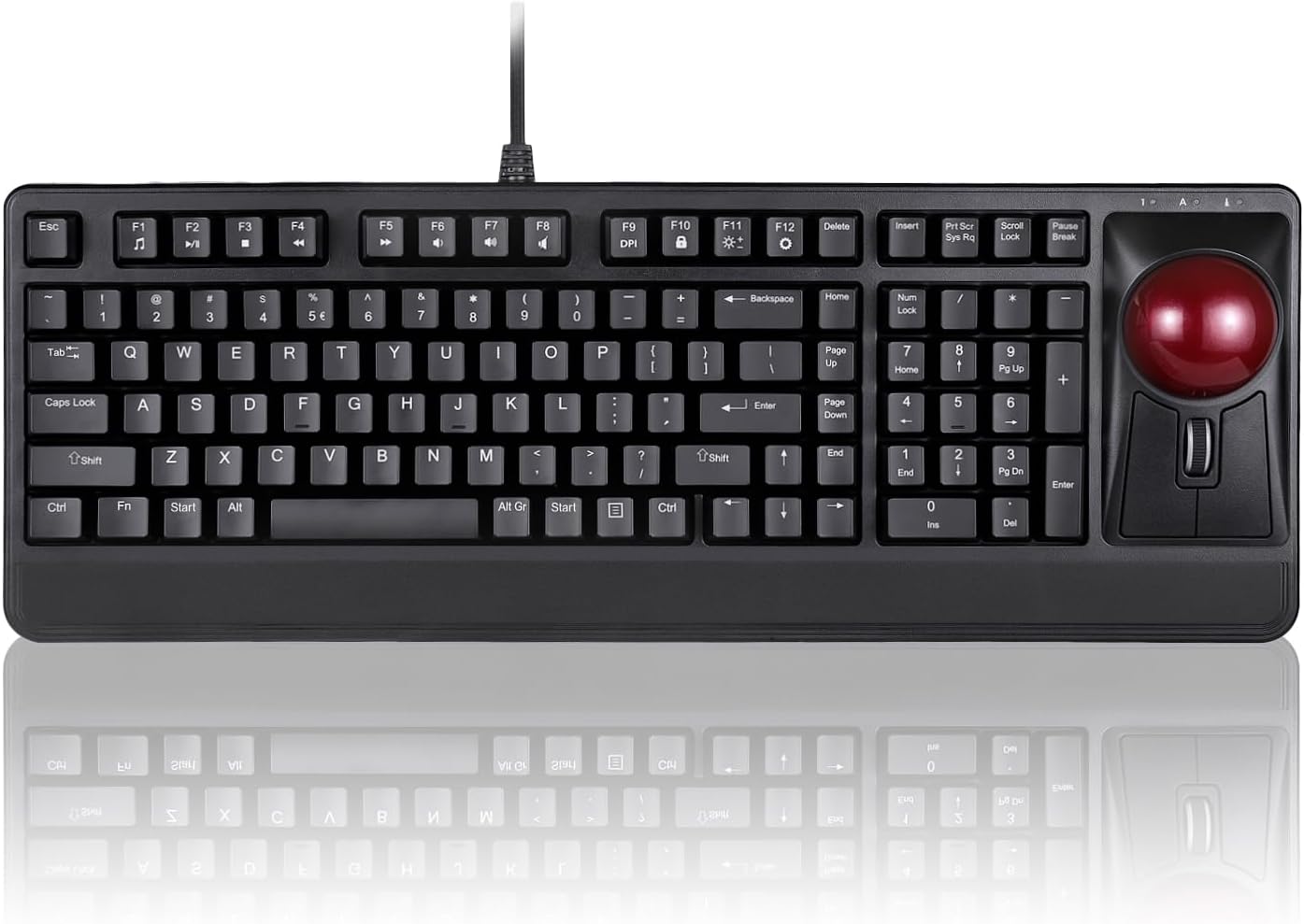
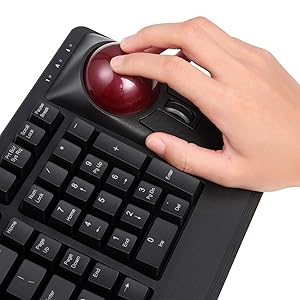
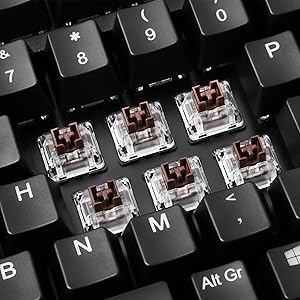
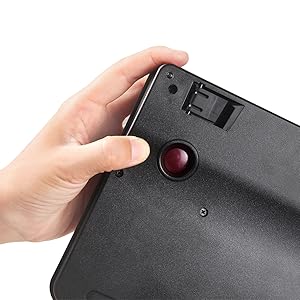
The Perixx Periboard-522 is a wired mechanical keyboard featuring a large 2.17-inch built-in trackball and a tilting scroll wheel with adjustable sensitivity. Designed for Windows 7 and above, it combines tactile Brown switches with a durable 3.2-pound metal frame, 9 advanced multimedia keys, and an ergonomic layout. Ideal for professionals managing multiple screens or detailed editing tasks, it offers easy trackball maintenance and a solid, premium feel.


| ASIN | B07F17YLLM |
| Additional Features | Trackball |
| Antenna Location | Business, Multimedia, Personal |
| Best Sellers Rank | #50 in Computer Trackballs |
| Brand | Perixx |
| Built-In Media | Keyboard |
| Button Quantity | 9 |
| Color | black |
| Compatible Devices | PC |
| Compatible Operating System Family | Windows |
| Compatible Tablet Computer Models | AAUB P30 |
| Connectivity Technology | USB-A |
| Customer Reviews | 3.8 out of 5 stars 264 Reviews |
| Enclosure Material | Metal |
| Global Trade Identification Number | 04049571002286 |
| Hand Orientation | Ambidextrous |
| Item Dimensions L x W x H | 18.49"L x 6.59"W x 2.65"H |
| Item Type Name | Perixx Periboard-522 Mechanical Trackball Keyboard - 2.17 Inch Large Trackball - Tilt Scrolling Wheel - Wired USB |
| Item Weight | 3.2 pounds |
| Keyboard Description | Ergonomic |
| Keyboard Layout | QWERTY |
| Manufacturer | Perixx Computer GmbH |
| Mechanical Keyboard Switch Model | Brown |
| Mfr Part Number | 11578 |
| Minimum Required Operating System Version | Windows 7 |
| Model Name | PERIBOARD-522 US |
| Model Number | 11578 |
| Number of Keys | 104 |
| Power Source | Corded Electric |
| Recommended Uses For Product | Business, Multimedia, Personal |
| Special Feature | Trackball |
| Style Name | Wired USB only |
| Switch Type | Tactile |
| Unit Count | 1 Count |
| Warranty Description | 1 Year Limited Warranty |
R**N
Great all in one keyboard
The scroll wheel takes your thumb or index and middle finger used to, no more wrist motion or pulling and dragging, because the scroll mouse is integrated next to the keyboard you can set it on your lap when you need a rest from the up high keyboard tray or desk setup. I purposely was looking for a scroll wheel instead of a keyboard with laptop style touch pad because i need the scroll wheel for editing, i like to “grab” a drawing by pressing the scroll wheel then moving items with the trackbal or zooming in and out to navigate within a drawing. I find it useful for editing and speed. Also wanted it for my keyboard tray and be able to place it on my lap. I have the mouse right next to the keyboard so less knocking down the mouse out of the tray. The LED light was another reason I bought this not because of all the blinking features wich I don’t care for I just used the solid light on keyboard feature but as some reviews say the top numbers are not lit and that’s true, I’ll attach a picture. but atleast the side number keys are lit. I didn’t have any issues with the trackball being jumpy or issues or it being too fast as some review say, mine came ready to go out of the box, really accurate, I draw electrical boxes and schematics for a living and it’s working for me great, it captures the smallest motions, hope it doesnt wear out as I need these sensitive motions when I draw curves and fine details. I like the scroll wheel, this has side clicking as well for scrolling sideways, pretty cool I didn’t know it had that. Overall all I love it doesn’t feel cheap like some say. It feels like any other keyboard material out there. The price? I didn’t like the price at first but since I’m enjoying using it I don’t think of the 150 anymore. It’s actually worth the price for a great large tract ball, LED light up keys. But it’s great for anyone really not just specific for editing or drafting. Only thing that people like on it that I do not, is the clanky noise the keys make. I’m used to my laptop soft key sounds and my dell and accer desk top keyboard that are soft key presses. These keys are high profile, there’s buffer in between the press of the key, which to me is fine it’s not noticeable until you start comparing. my laptop keyboard has no buffer you press and it types. This one you have to let the weight of your finger down just a bit into it but it’s two or three hairs less sensitive as a laptop keyboard.
J**S
A waste! Didn't work correctly out of the box
I was so excited to get this. I. A studio setting these style keyboards are great, and even makes working with a DAW and severe carpal tunnel easier. Hooked it up, and none of the keys would light up. The track ball is nice but the mouse buttons have only worked half the time, and then it's sketchy. Tried it on my work PC (which it was bought for), my personal gaming PC, work laptop, and my personal gaming laptop. Same with every single device.
P**R
Great keyboard, slightly weird layout
I bought this keyboard as a backup keyboard when I'm sitting in a recliner. My normal setup is a Kensington SlimBlade trackball and a top-shelf mechanical keyboard. This is a great replacement, especially when I'm traveling but still want a full keyboard/trackball. The trackball itself is trapped in the keyboard (you can push it out with some pressure for cleaning), which is really nice so it doesn't go bouncing across the room! The keyboard has a bit of an unusual layout, because it's narrower than other 101 key keyboards. Some things are in weird places, particularly the Home/Delete/etc keys, but that also brings in the trackball to be close to the (normal layout) numeric keypad. Overall, it took me just a few hours to get used to this layout, and I'm very picky about things like that. (I got the US version with the pipe/backslash keyboard over the Enter key, where it belongs!) The Delete key is in a strange place, compared to most laptop keyboards, but at least I won't accidentally hit it. The keys themselves have a nice travel and click, but not overly obnoxious or even loud like an IBM Model M keyboard. They're probably about the same volume as Cherry Brown switches, but not quite as satisfying to press. However, I can type pretty quickly with this keyboard and the keys are nicely shaped, except that the keys are pretty smooth and not quite enough texture (so your fingers slightly slip, but if that bothers you you can add grip stickers). Note that these keys are basically about the same as nearly all mid-range keyboards sold on Amazon, and even some high-end ones, so that's really not too bad. The cable is great - long, fabric covered, and with two sturdy looking plugs. I would have preferred to see a bit more strain relief at the keyboard end, because it arrives bent into the box and I don't want it to get damaged, but it's really a very nice cable. The entire keyboard is plastic-covered, which I prefer because it won't bother me if I'm wearing shorts and metal doesn't really add anything here (the keyboard is very stiff and doesn't flex even when I bang very hard.) If plastic-covered was good enough for the IBM Model M, it's good enough for anything. Given how extremely unusual it is to even find a keyboard with a built-in trackball (let alone such a great trackball -- it's very good, even if it's not quite as good as a Kensington Slim Blade which costs about as much as this keyboard by itself, or my Das Keyboard which also cost as much as this keyboard!) and given the quality of the keyboard itself and the great price, I'm definitely giving this my highest recommendation. Once I got used to the layout and realized that I might even be MORE productive with this slightly compressed layout, I might even ditch my other fancier equipment. If this is Perixx's first try at a trackball-keyboard combo, it's a stunning debut... I'm a huge fan!
J**T
I love the keyboard, but it probably isn't for everyone (I just bought a second one)
This keyboard is a beast. It is heavy. The keys are stiff. It is what I like, but I can see it is not for everyone. I am surprised that I use the trackball as much as I do. I have always had a separate mouse alongside my keyboard. I have a 4-screen system, and I thought I would probably use the trackball just to quickly hop between the screens. But I have found that I hardly ever use my mouse since I have gotten used to this keyboard. Some other reviewers have said they don't like the placement of the buttons and scroll wheel. They seem fine to me. My objection is the USB cable (or rather, cables). In my experience, cables do go bad. It is nice to be able to swap out a bad cable and keep using the keyboard. That won't be possible with this keyboard. The cable does look beefy and it seems to have good strain relief. So hopefully it will last a long time. UPDATE: As I first predicted, the cable went bad. It isn't replaceable, but I love this keyboard so I ordered the same model. I use it nonstop. The keyboard lasted over two years, and I can live with that. The cable failed just beyond the strain relief at the keyboard. For the new keyboard I have ordered a cable wrap to extend the range of the strain relief. In addition, I am going to do surgery on the old keyboard to see if I can fix the cable. That will give me a spare. There are two USB ports on the keyboard. But the keyboard cable is actually a double cable that requires 2 USB ports. So you really are only getting one extra USB port. But I suppose if your computer is out of reach you get two UBS-2 ports in a handy location. UPDATE: I discovered the USB ports on my first keyboard did not work. I have tested them both on the new keyboard, and they do work. I have already used them a couple of times when I needed to dump some files to a USB. Also, I have grown to appreciate the lighted keyboard. I had thought that LED keyboards were just for gamers and were silly. However, I have grown to appreciate the lighted keyboard in an office environment. Others have noted that the keyboard is almost invisible. They need to turn on the lights. Put the white or blue light on at a low level and it will still look professional. Additional note. My second one died after about 18 months. I don't think the cable broke this time. I had bought a cable shield and put around this cable as strain relief. So now I have a decision. I love the keyboard. But I am paying about $10 a month if I look at the lifespan of the two keyboards and their current cost.
R**K
What is NOT in the instructions
I have been using a PERIBOARD 522 keyboard because it has a built in trackball. I had wanted to get the 322 (with backlighting) but they were out of stock. I went looking again for the 322. Lo and behold, they were back in stock so I ordered one. It arrived quickly, safe and sound. I went t hook it up and found that it had 2 USB plugs. Do I need to connect both? Can I use a powered HUB? One has a GREEN insulator. The other plug has an ORANGE insulator. I plugged both into my powered HUB that I use with my Raspberry Pi-5. Keys worked great, track ball worked great. No backlight. I tried everything that the instructions said to do. No luck. I unplugged the keyboard from the powered HUB. I then tried them one at a time, plugging them directly into the Pi-5. With just the GREEN one plugged in, the keyboard did not work at all. With just the ORANGE one plugged in, the keyboard and track ball worked great! But, still no backlight. I decided to search on the Internet to see if somene else had this problem. Not much luck. Then I thought I would check the keyboard reviews here on Amazon. I finally found on that said that you have to push the Fn+End keys to enable the backlight. I did that and it worked! I have also found out that the GREEN plug apparently only connects to the two USB sockets that are on the back of the keyboard. I then tried the keyboard with my powered USB HUB and it worked fine. So, here is what is NOT in the instructions (perhaps they get lost in the translation): 1) You only need to plug in the ORANGE USB plug to have the keyboard work. 2) The GREEN USB plug connects to two USB sockets on the back of the keyboard. 3) Yes, it will work with a powered USB HUB. 4) Yes, it will work with a Linux distribution such as Raspberry Pi OS. My RPi-5 recognized the keyboard and trackball as soon as the keyboard was plugged in. 5) You MUST push Fn+END to enable the backlight! I wish Perixx made a similar model that did NOT have the numeric keypad. I don't use it and it would result in a trackball keyboard that took up less space. All in all, I think it is a great keyboard!
W**S
Interesting keyboard, but it's not ergonomic or that comfortable...
Because I am such a fan of Trackball type mouse for PC, I was trying to see if they did make a combo that had both keyboard and trackball function. This is about as close as I got to finding one. First off, this is nothing really special, the keyboard itself is no more better than if you got a $15 basic lightup keyboard. I actually have an awesome Fiodio basic lightup keyboard and it feels a lot better and not even as noisy as this keyboard. The keys stick up about as high as when they made keyboards for Windows 98. The only added benefit is that this has a trackball. The trackball itself works pretty well, although the left and right buttons on it are not exactly positioned in the right place and feels very out of place. The mouse buttons need to be moved above the trackball, as that is where most regular trackball buttons are located. I am not really sure what they were thinking when they put this contraption together. The feel of the keyboard is not comfortable at all and the placing of the mouse buttons is really off. (My understanding was the keyboard completely lit up, however, only my mouse wheel was the only thing that lit up. Hoping it's just a USB glitch, and if not, may have to return it.) Plus, the $100+ price-tag is not worth it. You are better off getting a $20 lightup keyboard and a $30 trackball and still get the same (If not better) result. To the company that made this, next time you plan to make this again, put the mouse buttons and mouse wheel above the trackball, not below. (Possibly put the mouse buttons on the sides of the trackball for better use with thumb and fingers, just a suggestion. Seriously, not sure what you where thinking) Overall, it's not a completely bad idea, but this is clearly more of a beta-test model/style. There's no reason for paying over $100 for something like this. It's not even ergonomically correct/designed.
R**.
Purchased for the integrated trackball - Instructions are extra
This keyboard delivers on all its claims once you figure out a few things. If the instructions were clothing worn in public, they would be considered scanty if not indecent. For example, the instructions tell you how change the backlit colors but not how to turn the backlight on. Yes, going back to my analogy, I spent a lot of time in the change room trying different combinations until I found a show-and-tell by Kevin Hart on Kevin's tips. Informative but not the funny one. Shout out: https://www.amazon.com/shop/kevinhart?ccs_id=7e33964b-41fb-4240-96cf-1ae122706833 Without the backlit it's more like the emperor's new clothes, using a lot of imagination and memory work if you are a hunt-and-peck (swipe right, backspace, swipe left) typist like me! Finally, it will take a bit getting accustomed to this trackball. I love the tactile clicks of the keyboard but the left and right buttons a placed differently from other standalone trackballs. I change mouse and keyboards every 3 months just for improved brain function, dexterity and to get a fix on my see-it-buy-it addiction so it's part of the process! Surprised there are not more of these integrated keyboards....hint hint! Rocky By the way, to turn on the backlit hold [Fn] [End] Also, my keyboard has two USB cords which is fine with a docking station but might be an issue with a laptop alone and their even scantier input slots.
M**K
Overall: **NOT** worth the money for a professional
I bought this keyboard to make it easier to work while my arm is in a sling after surgery. My overall impression is that it is solid and well-built with good tactile sensitivity. When I received the box it rattled, and on opening it discovered that four keys had come off in shipping. Not a good sign but I was able to snap them back into place (with one arm) and went ahead and installed it. There are three indicator LEDs above the trackball for NumLock, CapsLock and ScrollLock. Turns out the Caps Lock LED did not work on this one, which led to my returning it and I replaced it with the same model. This was through Amazon and not through the manufacturer. The replacement was fine out of the box and went right to work. After 1-2 days of working with it I discovered I was struggling to see some of the key overlays, and I realized this was because there is not enough contrast in the key labels: they are gray over black, instead of white over black. Also, as it turns out, this keyboard is not directly compatible with the IoGear GCS1462 KVM switch I use to flip my keyboard/monitors from my workstation to my laptop (I lose the keyboard hot-swap capability, so I have to switch by pressing a button on the KVM; a bit of a nuisance). I then returned that one citing the incompatibility with my KVM and ordered the backlit version (Periboard-322), which is another $50. I've never spent this much for a keyboard/trackball combo, but I use this professionally and need the built-in trackball for about 6 more weeks. The backlighting took care of the squinting issues, and I believe this will be a solid keyboard for many years. Note: I don't use any of the multimedia-key features, and I set the backlight effects to 'on' and 'white'. There are a lot of options for crazy wavelike and sweeping or raindrop effects that probably appeal to teen-agers (I guess). My 2-star ERGO rating is for the non-backlit version, which to me is hard to see under some lighting conditions because of the lack of contrast. PROS: - Solid feel, substantial weight - Excellent tactile feedback and response of keys without being too noisy - Simple clean installation with no associated drivers to install CONS: - Documentation is a bit light - there are two USB cables on the backlit version and no instructions as to which one to use; IT DOES MAKE A DIFFERENCE. - It would be nice if you could program the wheel button for something else, like double-click. Again, no documentation here. - Clustering/arrangement of Home,Delete, PgUp, PgDn and other control keys are a little odd and take some getting used to, but this is not a show-stopper. Overall: unless/until something breaks, this is a solid keyboard for someone who uses a workstation in a coding environment (non-gaming) for 8 or so hours per day. It's a bit on the pricey side but there are not a lot of keyboard/trackball options out there, and that's what I need for now. **UPDATE 2/23/2020: Something actually did break: after about two weeks, the backlighting no longer works. Returning this keyboard, and dropped the rating accordingly. I am all done with this one.
L**R
Tasti molto comodi e trackball sensibilissima
La tastiera soddisfa egregiamente il suo compito. La pressione dei singoli tasti è davvero soft e reattiva ed il trackball è comodo da utilizzare e sensibile sin dai minimi spostamenti (i tasti destro e sinistro sono perfettamente posizionati sotto la sfera e la rotella di scroll è tarata con il giusto scatto di scorrimento) Il prezzo però mi sembra un po' altino
A**R
Sehr gut
Es ist die beste Tastatur, die ich je hatte, wirklich gute Qualität, der Preis ist auch gut, kann ich empfehlen
F**O
Perixx PERIBOARD-322-tastiera-pesante-meccanica-illuminata-trackball
La Perixx PERIBOARD-322 è decisamente una tastiera "pesante", lo dico in caso facciate come mè e la usiate appoggiata sulle gambe. Il feeling è quello di una tastiera meccanica io non ho mai usato una tastiera retroilluminata non saprei descrivere la cosa unico appunto è la non retroilluminazione dei numeri nella parte alta mà solo quelli del tastierino, la tastiera ha nazionalizzata "usa" sto per mettere degli adesivi per farla italiana ovviamente perdendo la retroilluminazione dei tasti che andrò a modificare, ho già in uso dei trackball e avrei preferito i 2 tasti più grandi, Considerando che l'azienda fà prodotti per uso industriale mi aspetto che sia affidabile per lungo tempo
D**S
Un clavier de qualité avec un vrai Trackball pour un encombrement réduit, c'est TOP !
Clavier vraiment pratique !.. Belle qualité !.. Le Tackball est top, l'intensité du rétro-éclairage des touches est réglable et peut être carrément désactivé, appréciable !.. Les touches ne sont pas silencieuses mais le " bruit " est modéré. Ce clavier avec son Trackball intégré est vraiment un bel ensemble fonctionnel : clavier agréable, vrai Trackball de qualité !
P**O
Pésimo
Es el segundo que compro. El primero no funcionaba la retroiluminación y en el segundo tampoco, además de que el botón derecho del ratón no funciona en este último.
Trustpilot
5 days ago
1 day ago