Buy anything from 5,000+ international stores. One checkout price. No surprise fees. Join 2M+ shoppers on Desertcart.
Desertcart purchases this item on your behalf and handles shipping, customs, and support to Slovakia.
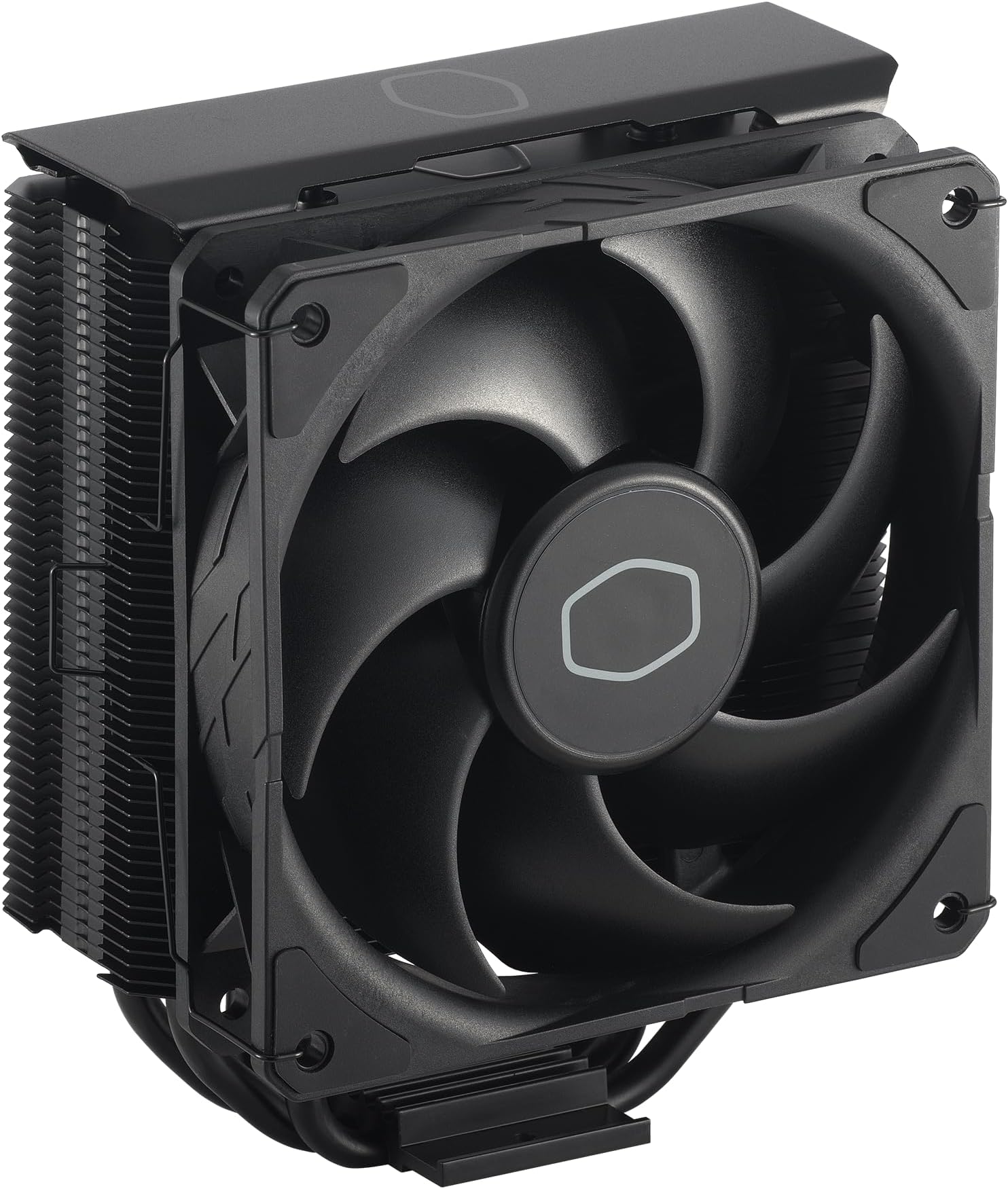
❄️ Stay cool, stay ahead — the Hyper 212 Black keeps your rig chill and your game hotter!
The Cooler Master Hyper 212 Black CPU Air Cooler combines four high-efficiency copper heat pipes with a 120mm PWM fan capable of speeds from 690 to 2500 RPM, delivering powerful yet quiet cooling. Its sleek black aluminum top cover and nickel-plated fins not only look premium but improve thermal performance. Designed for easy installation on modern AMD AM5 and Intel LGA 1851/1700 sockets, it fits most chassis with a 152mm height. Operating at just 26 dB noise, it’s the perfect balance of performance, style, and silence for professional-grade desktop builds.


| ASIN | B07H25DYM3 |
| Air Flow Capacity | 42 Cubic Feet Per Minute |
| Best Sellers Rank | #2 in Computer CPU Cooling Fans |
| Brand | Cooler Master |
| Brand Name | Cooler Master |
| Compatible Devices | Desktop |
| Cooling Method | Fan |
| Customer Reviews | 4.7 out of 5 stars 8,126 Reviews |
| EU Spare Part Availability Duration | 2 Years |
| Global Trade Identification Number | 00884102048654 |
| Included Components | Hyper 212 Black, Install Kit |
| Item Dimensions L x W x H | 4.84"L x 3.03"W x 6.25"H |
| Item Weight | 1.5 Pounds |
| Manufacturer | Cooler Master |
| Material Type | Aluminum, Copper |
| Maximum Rotational Speed | 2500 RPM |
| Model | RR-S4KK-25SN-R1 |
| Noise Level | 26 Decibels |
| Number of Items | 1 |
| Part Number | RR-S4KK-25SN-R1 |
| Power Connector Type | 4-Pin |
| Product Dimensions | 4.84"L x 3.03"W x 6.25"H |
| UPC | 884102048654 |
| Unit Count | 1.0 Count |
| Voltage | 12 Volts |
| Warranty Description | 2 Years |
| Wattage | 2.4 watts |
S**B
Saved My Build — Finally Working Perfectly!
I was seriously starting to regret my entire build. I have an i9-12900KS and couldn't even get into the BIOS — just black screens and endless frustration. Tried reseating the CPU, swapping RAM, checking cables, you name it. Eventually realized the issue might be thermal-related, so I picked up the Hyper 212 Black after seeing solid reviews. Installation was smooth, especially for an air cooler this size. The mounting brackets for LGA 1700 worked without any fuss. Once it was on, temps dropped dramatically — like, instantly noticeable. And best of all? My system booted right up. BIOS, Windows, everything. The SickleFlow fan is surprisingly quiet, and the all-black design with the aluminum top gives it a premium look that blends nicely into my case. Honestly can’t believe this solved the issue, but I’m glad it did. If you're building with a high-end CPU like the 12900KS and running into weird stability or boot issues, don’t overlook cooling. This thing just works.
T**A
Much quieter than a stock AMD cooler but it took some work to install it.
I like this product. Here's my day 1 experience... First you need to be ok with potentially removing the mother board, clearing thermal paste and reapplying thermal paste. If that is too much for you then find another solution! My stock AMD fan was driving me CRAZY! It was so loud that I didn't want to use the system for more time than necessary. I was not sure which fan was making all the noise but with a tooth pick narrowed it to the CPU fan. At that point I looked for a solution and here's my experience: Good: + Price to me was fair and Amazon arrived the same day! + Very Quiet (compared to my stock fan) + Keeping my cpu between 38 - 60C + Comes with thermal paste! + fits Intel/AMD (mine is AMD) + able to add a second fan but not included + directions with basic steps Not as good: - Installation took me about 90 minutes (I don't do this daily... so I am a bit slow) - If you're reapplying thermal paste you need 99% alcohol to clean the old paste (not included) - Installation required removing my system board- not a huge deal but takes time (case didn't allow access to under the system board) So this could be because I have an older case. Be ready. - If you have a small case it may not fit... check the case size, it's tall. Mine is full size Lian-Li and fit nicely. - second fan not included but can be added. - second fan may be tight against the memory on your system board. - split cable to power the first fan and add a second fan made my cpu fan speed unreadable. I added it so that the cable would be there for a future second fan. All in all, I like this solution. It's very quiet, inexpensive and working nicely. Happy Computing!
S**E
10/10 would recommend for the price
Really impressed with quality and performance for this price point. I moved my Noctua Dh-15 to a new build and put this cooler, which costs a fraction the price, on my old build. It's rock solid on temps though not quite as good as the dh-15.
D**S
There's a reason for the ridiculous rating.
As of writing this review (12.24.25) It has a 4.7/5 star rating with well over 18,000 votes. That should tell you something. This baby is inexpensive, and it just works. If you're not running a super hot processor, this thing will absolutely do it's job and then some. I'm running just the single provided 120mm fan pushing air through it and exhausting out the back. It's a Ryzen 5 5500 inside a Thermaltake Versa H18 case. 3x120s up front sucking freshness in, with a matching 120 on the back farting the hot stuff out. I could sit here and ramble on, "blah blah this temp under load" "yada yada whatever on idle" but every system is completely different. As long as you're not trying to ice down a 14900K or R9 9950X3D, you'll be fine. Mine came with a syringe of generic thermal paste, but I had a stick of Arctic MX5 on hand, so I used it. I got the B550 motherboard, processor and Hyper 212 all at the same time, and when I got it all fired up and Windows 11 installed, I ran Prime95 for a couple hours to "break in" everything. No overheating, no thermal throttle. I forget the actual temp numbers, but they're irrelevant anyway. If you're reading so deep into the reviews that you find this one, you're already convinced to spend thirty bucks and snag this puppy. Just do it, dude.
R**Y
Decent CPU Cooler for the Price (for Folding at Home)
Before I got this Cooler I used the stock cooler that came with my Ryzen 3600. I didn't apply any overclock so in games it worked well. When the COVID-19 Pandemic began, I learned I could donate my computer's power to the Folding@home project, who would use computing resources for COVID-19 research. Unfortunately, the stock AMD cooler was not up to the task of cooling my CPU when this program was running. Even when I set the folding program to only use "light" resources, my CPU was between 90 - 100 Celcius, even with all the fans set to maximum. Unfortunately, my case does not support water cooling and I don't think the Noctua D15 could have fit. I decided to go with the Cooler Master Hyper 212 Black Edition since it had four heat pipes and cost less than $40 US dollars. Overall the installation isn't too bad until you get to mounting fans to the heatsink. It's very easy to drop those fan brackets into your case because the holes on the fans are way bigger than the mounting bracket diameter. Getting the fan brackets to line up with the groves on the heatsink was also a struggle, especially when you are working in a cramped computer case. Once the fans were on the heatsink, everything fit. There is plenty to clearance for the ram on my motherboard and case but this may turn out differently for you. I also appreciated that the included fan cable included a fan header splitter for an optional second fan, which I took advantage of since I had a 2nd 120mm fan laying around. By the way, you don't have to use cooler master fans if you don't want to. I used an Arctic fan for the 2nd fan because that's what I had laying around and it works fine. Once I had the cooler installed I fired up Folding@home and was pleased by the temperatures I was getting now. Even when telling the program to use full power, this CoolerMaster cooler was able to keep the CPU between 70-80 C. I had the program running for over 30 mins and the highest temperature I'm getting is 77 C. I did not enable overclocking in the BIOS but the CPU is turboing to 3.9 GHz. I also have the CPU and Case fans set to maximum, but this CPU cooler is still very quiet. To summarize, this is a great value CPU cooler for its price and size, but don't expect installation to be easy.
D**N
Very Nice!
I purchased the Hyper 212 Black edition because the standard Evo clashed with the darker theme of the case. For starters, shipping was quick. I was home so I was able to receive my stuff as soon as the delivery person dropped it off. I ordered this particular cooler because I kept seeing great reviews about it. I was running the Corsair H60 sealed water cooling system but it was a few years old and I started to get a bit concerned with it leaking on my 1080ti and giving me a very expensive paperweight. I’ve included photos of how it looks, and my CPU temp during a game of Rocket League at 4K resolution. It was even if not better than my water cooler. Installation was pretty cut and dry, my system uses an AM3+ socket and I had no issues mounting the radiator stack. The only problem I had was my screw driver wasn’t the right kind to reach the screws so it took longer than it should have to get them threaded in. Mounting the fan was a bit of a pain but had I removed my upper exhaust fan it would have been much easier. I ended up removing it to connect the fan to my CPU fan header later on. As far as system specs, AMD FX-8350 processor ASRock 980de3 motherboard 16GB DDR3 ram, Hyper X Fury(I had no issues with clearance involving the ram) MSI Armor GeForce 1080ti video card All crammed into the very poorly designed Gamdias Talos M1 RGB case. The airflow in this case is totally dog poop so the fact that my temps are very reasonable is great. I did not use the supplied thermal paste, I opted for Arctic Silver 5, I have heard the supplied Cooler Master paste is not very good and will cause issues later on. Also, because of the cutout on the motherboard mounting surface, I didn’t have to remove the motherboard to put the X bracket on the back. Overall, I definitely recommend this cooler if you want a budget air cooler and you can support the size of radiator.
B**N
If you have an i5-12400 do yourself a favor and get this!
The i5-12400 stock cooler is so loud when gaming I couldn't take it anymore. It was as loud as my wife's hair dryer! I removed the stock cooler, cleaned off the old CPU paste, and installed this one using the included thermal paste. My PC is now quiet even during heavy gaming sessions and the temps are 22c lower across the board. I really wish I would have switched to this sooner.
J**E
Great Budget CPU Cooler
Works so well, I've recommended this cooler to all my friends looking for better cooling on a budget. The cooler is fairly large but cools really well! I saw about a 20-degree Celsius difference in temps under load since I started using it. You never hear it, it's super silent! They include all kinds of brackets, so it fits a variety of different boards. Overall, the build quality isn't bad; it's lasted several months with no difference in performance compared to the old one.
K**O
It is silent, but not as much as i wanted
The cooler is in fact quiet, but on heavy program it might be making a little bit of noise. Of course using headphones will prevent this, but if you are sharing a room with a roommate, or wife whatever, they might hear and say something tho, but overall is pretty decent cooler! About cooling, my CPU is a Ryzen 7 5700x, and as far I saw the temps, around 67~68, if you are using fans on the case (not my case) if might even go lower, prolly ~60. recommended for people that want a very good cooling system, and silent (without people on the same room)
H**N
Sleek and stylish cooler
This is an amazing air cooler. Easy to install and keeps my CPU cool. Although keep in mind that I did swap the fan for rgb fans in order to match the look of the build. I also bought this cooler as refurbished which was at a lower price.
A**Z
Un muy buen disipador de calor :D
Buen disipador y bonito diseño, incluye una pasta térmica y de buena calidad obviamente de cooler master, es de 15cm yo tengo un gabinete mid tower y entra perfectamente, maneja bien la temperatura, tengo un i5 10400F y es muy eficiente, no hace tanto ruido, si juegas con audífonos no vas a percibir ningún sonido, pero de igual forma no produce un ruido muy llamativo. En conclusión si la recomiendo y mas si es para sustituir el disipador que viene de fabrica con el procesador :D
Y**Z
Ça fonctionne bien
Parfait et ne fait aucun bruit mais le reçu on dirait qu’il a été déjà utilisé
S**R
As good as I hoped it would be
Running with a Ryzen 5 3600 and only a single fan on the cooler, I'm getting an average temp. drop of 15C when compared to the stock cooler. Installation was easy, and the fan is pretty quiet. It's a good, cheap, cooler.
Trustpilot
1 week ago
1 month ago