
DOWNLOAD THE APP


Customer Services
Copyright © 2025 Desertcart Holdings Limited
DOWNLOAD THE APP

🔒 Elevate your space with pro-grade security that’s always a step ahead.
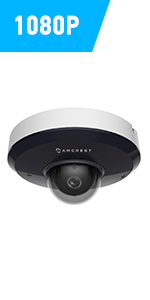
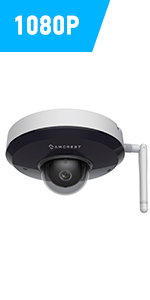
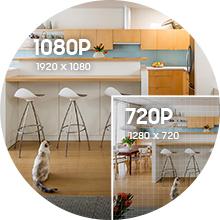
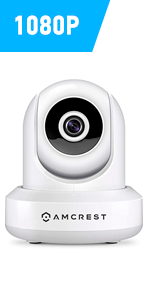
The Amcrest ProHD 1080P WiFi Indoor Pan/Tilt IP Camera delivers professional-grade surveillance with 2MP resolution, 30fps smooth video, and a 90° wide-angle lens. Featuring advanced night vision up to 32 feet, remote pan/tilt control, and seamless integration with Alexa and Amcrest Cloud, it ensures comprehensive coverage and smart alerts. Designed for easy setup and secure connectivity, this UL-listed camera offers encrypted wireless communication, multiple storage options, and lifetime support, making it the ultimate choice for modern indoor security.





| ASIN | B0145OQTPG |
| Alert Type | Motion Only |
| Batteries Required? | No |
| Best Sellers Rank | #208 in Dome Surveillance Cameras |
| Color | Black |
| Compatible Devices | Smartphone |
| Connectivity Protocol | Ethernet, Wi-Fi |
| Control Method | Voice |
| Controller Type | Amazon Alexa, Vera |
| Customer Reviews | 4.1 4.1 out of 5 stars (17,242) |
| Date First Available | August 19, 2015 |
| Effective Video Resolution | 1080 Pixels |
| Field Of View | 360 Degrees |
| Form Factor | Dome |
| Frame Rate | 30 fps |
| Global Trade Identification Number | 00859888005535 |
| Included Components | 1080p Wi-fi Ip Pan/tilt 2-way Camera With Cloud Recording (black) |
| Indoor/Outdoor Usage | Indoor |
| International Protection Rating | IP67 |
| Is Discontinued By Manufacturer | No |
| Item Weight | 8 ounces |
| Item dimensions L x W x H | 8 x 12 x 10 inches |
| Item model number | IP2M-841B |
| Low light technology | Night Color |
| Manufacturer | AMCREST |
| Maximum Webcam Image Resolution | 2 MP |
| Mounting Type | Ceiling Mount |
| Night Vision Range | 32 Feet |
| Number of Channels | 2 |
| Number of Items | 1 |
| Photo Sensor Technology | CMOS |
| Power Source | Corded Electric |
| Product Dimensions | 8 x 12 x 10 inches |
| Room Type | Bedroom, Classroom, Hallway, Kitchen, Living Room, Office, Study Room |
| Specific Uses For Product | Surveillance |
| UPC | 659424885887 661094063489 859888005535 659424885115 798068901307 647971367208 662187376387 601420008104 |
| Unit Count | 1.0 Count |
| Video Capture Format | ASF |
| Video Capture Resolution | 1080p, Security System with Motion Detection, Nightvision |
| Viewing Angle | 90 Degrees |
| Voltage | 5 Volts |
| Wattage | 7.5 watts |
| Wireless Communication Technology | Wi-Fi |
| Zoom Type | Digital Zoom |
K**N
Brilliant & Smart Looking Little Camera
I received my Amcrest ProHD 1080P WiFi Wireless IP Security Camera on October 20th, and set it up for the 1st time on October 22nd. Been using the Foscam FI8910W since February 2014 and that has not missed a beat. Works everyday like a true soldier. But needed an upgrade as the Foscam FI8910W was 1st released in November 2011 (way back when) so it's not that user friendly unless you are a mid level techy and I wanted more recent features. So when Foscam sent me an email on the new Amcrest ProHD 1080P WiFi Wireless IP Security Camera, I jumped on it. I bought it because it had all the festures of the FI8910W but more friendlier (the biggest difference, setting up Port Forwarding so you can stream your camera live anywhere in the world from your Amcrest App). So here goes: Pros: - it truly is a 30 second set up (including port forwarding). The App does everything for you. Currently I am at work and I can tap into my Amcrest App and view my Live feed. - HD Quality is great - The camera is very responsive when you change the Pan & Tilt from your phone app...even if you are miles away - It looks great. Does not stand out like the Foscam FI8910W Cons - Wi-Fi Connectivity (as someone else mentioned): I am still testing this one but the range doesn't seem to be that wide. I moved the camera from being 5 ft away from the router to 20 ft away inside my TV stand on the bottom shelf and it had problems. Would not connect. Which is very disappointing because that is the spot my Foscam FI8910W has been in for the past year and a half. But the FI8910W does come with an antenna on the back which will help with range. The Amcrest does not have an antenna. - Going Deep in the Set Up: Ok, it is 30 seconds to set up....if you stick to the basics (install app, scan QR code, and you have Live Feed with Port Forwarding). However, if you want to go deeper and set up email forward on motion alerts, etc, that does take sometime and you will probably have to email Armcrest for support as this will involve using their web interface which you can access by using the camera's IP address in your browser. The instructions on using the web interface so far are non existent, but again, i've only opened the box last night so maybe the instructions are somewhere on their website. Will investigate this further. UPDATE: 03/11/2015 After having the Amcrest ProHD Camera for roughly 2 weeks now, it is truly an amazing camera with surprising features for a DIY system Pros: - The online User Interface is very extensive. Unfortunately there is no instruction manual on how to navigate the Amcrest web browser UI, but once you have figured it out, you will be quickly impressed. - Motion Detection settings are very detailed. Within the cameras field of vision, you can set up detection zones for the camera to focus on and focus on only. It does this by dividing the field of view into little squares and you can activate/de-activate each square - Motion Detection Sensitivity & Motion Graph: Saw a review where a customer complained the camera was too sensitive. This is not the case in my situation. You can get very detailed again with the settings here. They are two settings: Sensitivity and Threshold. 1st, you can set how sensitive you want the camera to be for motion, which is then transposed onto a motion graph shown on the web browser UI, and then you can set the threshold. Continuous motion caused the graph to rise and once the graph as risen above your set threshold value on the vertical axis, the alarm is triggered (whether this alarm is email or audio if you have a siren hooked up to it) Ethernet Connection: Having some issue with WiFi connectivity, so set mines up via Ethernet. Works absolutely brilliant using the Amcrest Android App when connected by Ethernet....and this is regardless of whether you are at home and miles away. I can open my app anytime, anywhere and be guaranteed it will log into the camera. Remote Pan, Tilt & Zoom: Again, this review is based on connecting the camera via Ethernet. The remote pan, zoom & tilt from the app is very response. If you are miles away and want to pan,zoom or tilt the camera via the android app, there is little to no delay. Cons: Still, WiFi range is my only issue. I took the camera by a friend and it did not even pick up her router that was 5 ft away (that was odd)....but she is using the ISP basic router. As with any WiFi product, your router and all other wifi devices in your home will play a big role in each device performance Bottom Line: Brilliant Camera, but gets 4 stars from me as the WiFi range is not impressive, in my set up. Remember this can is dependent on your router & number of wifi devices in your home. UPDATE: 16/11/2015 Purchased a 2nd one of these cameras lately. Showed a friend who was so in love with it that she took my original one and so I purchased this replacement. With this one, the Wi Fi on it works like a dream. It's only been two days, but I have not experienced any WiFi issues with it like I did with the 1st Amcrest. And I have tested it both while at home connected to the same network and when away from connected to the local cell phone network. Ethernet Connection is still faster....but the wifi connection only has a very small delay....less than 1 second, which is pretty good. The Ethernet connection is instant....even if away from home. What I must say though is I need to go back and check the Firmware version on the 1st Amcrest. This time for sure I updated the firmware from the .5.R which the camera came with, to the 2.420.AC00.8.R which is available for download at http://amcrest.com/firmware . So maybe if the Firmware on the previous is out of date, perhaps that maybe what caused the poor WiFi performance issues. So, I am changing my review from a 4 star to a 5 star because thus far, with the 2.420.AC00.8.R Firmware, the WiFi performance on this 2nd Amcrest it outstanding.
P**L
The best 1080p dome-style camera I've used.
I've gone through more of these cameras than I like to admit. I'd been using a Foscam FI9821P for a while, and not been happy with it. Focus is poor, and the color at night under house lighting is a dingy orange (see picture!). I'd already exchanged one, but the replacement was no better, so I just gave up. Given the above, the chance to review the Amcrest ProHD couldn't have come at a better time. However, the setup procedure wasn't quite as smooth as I'd have liked it to be. If it had been just a LITTLE clearer, I'd have been happier. But let's start at the beginning.. First, the box it comes in is excellent. Well-packaged, feels high-end, and overall is a positive unboxing experience. Unlike some other dome-camera systems, the wifi antenna is built in. There's no external antenna to connect, and in my experience checking signals in the desktop browser app, it hasn't needed it. I plugged the power cord in to the camera/wall, and then the included ethernet cable from the camera to my Apple Airport Time Capsule ac model. I'm an iPhone user, and setting up with my iPhone 6s Plus in iOS 9 was a little more confusing than I'd like. The setup card included in the box directed me to download the Amcrest Viewer (the free one is all you need if you're not needing push notifications etc). No issue, - downloaded in seconds.. Adding the camera was very simple by scanning the QR code at the bottom of the camera itself. At this point, it asked me to input my WiFi SSID and password to connect to the network. But... but... I don't want to use WiFi, because I connected the camera via an ethernet cable! Turns out, you don't need to worry. I entered in a network SSID the camera couldn't see (my 5Ghz network, for example, or you could use an entirely made-up network. Either way, the camera is not 5Ghz compatible). Type in a fake password, and hit connect. Voila, it will say "Done," but really it's just using wired ethernet at this time because it didn't connect to WiFi. It's a bit odd you can't just pick wired and skip WiFi setup, but there you go.., you're done! For reference, more fine-tuning of things (like adding day/date stamps to your video or adjusting hue/contrast/night vision) can be done in the desktop browser, so log in to the camera and make changes there. This is pretty simple, following the setup card instructions. You can also completely disable the WiFi chip from the browser app on your computer, which I did. No need to even have it on if you're using a wired connection. This worked on my iMac running El Capitan, in the Safari browser, - no issues. At this point, on my iPhone and via the desktop browser, - I was very impressed with the image quality. It absolutely DESTROYS the Foscam FI9821P (see comparison picture). For one, the orange cast to the image under regular house lights is now gone. Second, the image is much wider, fitting more of the room into the image. Unfortunately, there is some barrel distortion on the edges, but this is to be expected at such a wide angle. The center of the image looks great, with very little distortion. To "solve" this, you can always zoom in just a hair in the app. Yes, it's digitally zoomed, but it makes very little image-quality difference, and does remove the barrel distortion on the edges. Moving the camera left/right/up/down is also very simple, and VERY smooth in the iPhone app, over both WiFi and LTE. One unfortunate thing, though, is that there's no native iPhone 6/6s support (including Plus models). I'm hoping Amcrest updates their app to properly support these devices. The app works fine in iOS 9 on those iPhones, but you can tell it's not optimized for their resolutions. The app is definitely a bit of a letdown, but it's not too far off the mark. It does the job, though, and is free. I'm very impressed with the camera quality. It's the best I've used. The colors, especially under house lighting at night, are surprisingly accurate. The room the camera is located in actually looks like this in real life in comparison to the video feed. Automatic switching to night vision works great, and the resultant image is also excellent. While out this evening, I was able to do a test run over LTE, enabling the speaker/microphone in the Amcrest Viewer app and having a conversation with my wife. It worked just great. Overall, this is a superb camera. With a few tweaks, the app could be great, which is my only minor complaint. 4.75 out of 5. A gold-standard dome camera. *Sample received for objective review*
A**O
He pedido varias de estas camaras sin problemas, es el caso que esta llego con los sellos del fabricante rotos, instructivos por fuera y en la parte inferior de la camara que deberia traer la calca del numero de serie, llego sin esta y con pegamento como si se la hubieran arrancado. Tengo que preparar devolucion ya que no acepta cambios y si quiero ordenar la misma camara ya esta a un mayor precio.
S**I
Amazing product with amazing customer service Highly recommended
A**X
Nie zostało wyraźnie powiedziane, że zasilacz jest standardem amerykańskim i że w zestawie nie ma adaptera. Tak więc w zasadzie musisz kupić adapter.
M**D
Great camera, connected it to my nasserver and works very good, delivery took a little bit long but correct seller.
E**D
Funktioniert gut. Nicht einfach zu programmieren
Trustpilot
3 weeks ago
2 months ago