
DOWNLOAD THE APP


Customer Services
Copyright © 2025 Desertcart Holdings Limited
DOWNLOAD THE APP
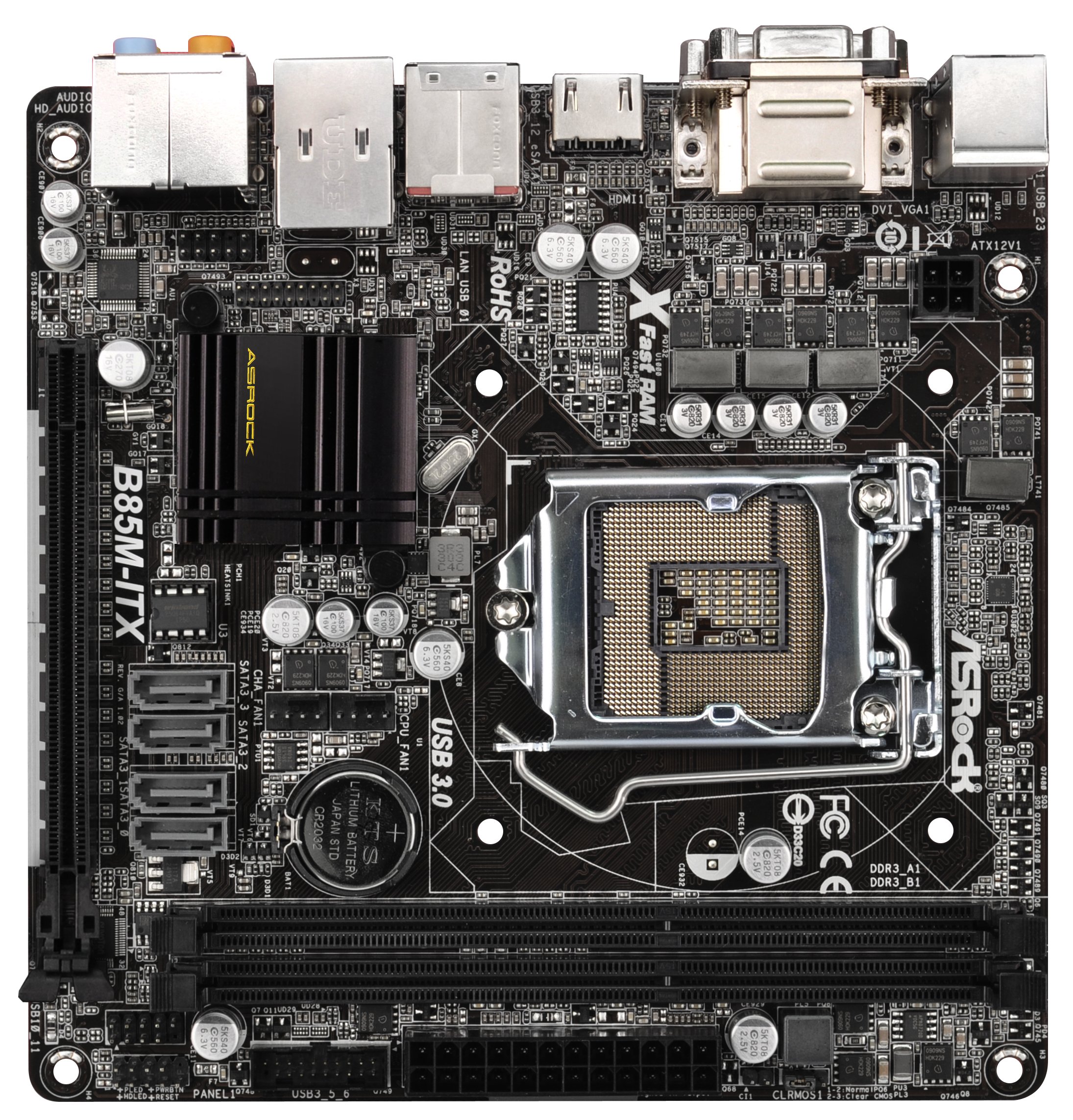
🚀 Elevate Your Build with ASRock's B85M-ITX!
The ASRock B85M-ITX is a compact Mini ITX motherboard designed for LGA 1150 CPUs, supporting dual-channel DDR3 memory up to 16GB, and featuring a robust array of connectivity options including 4 USB 3.0 ports and 4 SATA3 ports, making it an ideal choice for powerful yet space-efficient builds.
| RAM | 16384 MB DDR3 |
| Memory Speed | 1333 MHz |
| Number of USB 2.0 Ports | 4 |
| Brand | ASRock |
| Item model number | B85M-ITX |
| Operating System | - Microsoft Windows 10 64-bit / 8.1 32-bit / 8.1 64-bit / 8 32-bit / 8 64-bit / 7 32-bit / 7 64-bit |
| Item Weight | 1.54 pounds |
| Product Dimensions | 10.8 x 8.3 x 2.3 inches |
| Item Dimensions LxWxH | 10.8 x 8.3 x 2.3 inches |
| Computer Memory Type | DDR3 SDRAM |
| Batteries | 1 Lithium Ion batteries required. |
| Manufacturer | ASRock |
| ASIN | B00D3IMXTC |
| Is Discontinued By Manufacturer | No |
| Date First Available | June 1, 2013 |
S**N
Great Motherboard to install Windows 8
I installed an Intel Core i5-4570S Haswell 2.9GHz on this Asrock B85M-Itx - LGA1150 motherboard with 4g of memory. The computer has an intake case fan operating at very low fan speed of 490. The cpu fan is running around 1100. The computer is very quiet even when streaming a HD movie.The install of the motherboard and of windows 8 were very straight forward as I did not encounter any problems. After the installation of Windows 8, I then loaded all of the motherboard drivers and utilities. The installation of the drivers and utilities from the provided disk by Asrock went without any issue. The computer must have restarted three or four times before all the drivers and utilities were installed.After windows 8 initial updates were installed, I took a reading of the cpu temperature and it was at 37 C. I had the cpu on Normal Mode if the Asrock A-Tuning software. Using the power saving mode, the temperature of the cpu dropped by 2 C. No big deal here so I reset it back to Normal Mode. I am only using the CPU built in graphics 4600. On my i3 Sandy Bridge processor, I was able to play Diablo 3 to my satisfaction. With the Haswell, playing Diablo 3 on this cpu would take much less of a resource of the current cpu than the Sandy Bridge processor. I am very satisfied with the motherboard, Haswell and Windows 8; seems like they are very well matched together. This system operates on little energy with little heat and noise, my exact goal for this computer.I noticed the cpu had a little problem waking up from sleep. The screen of monitor did light up normally, but the cursor was lagging somewhat for ten-fifteen seconds or so.After a second windows update, I noticed an Intel Smart Connect Technology software began running in the back ground. The software is designed to wake the cpu from sleep every so often and the time of wake up is adjustable. I set the system to wake up every 20 minutes. So far I have not experience another cursor lagging upon waking up from sleep mode.I am using the cpu for web browsing, email, light writing, music and movies. The internet browser responds very well, pages just pop up. My monitor is Acer t272, a touchscreen led monitor. My router is NetGear ac1750 with a NetGear wireless adapter A6200.My future plan is transfer the motherboard to a mini itx case and mount it to the wall next to my monitor.Edit 8/17/2013:The motherboard is still operating without any issues at all. The temperatures of the cpu, motherboard and room are as follows: 91f, 87f and 72f during browsing and watching videos. I am still very satisfied with the motherboard and the installed cpu. The combination is nice upgrade from the Sandy Bridge set up.
S**.
Beware IR receiver users. Does not properly power USB devices while in sleep. EDIT: Might have been power supply
This motherboard will not correctly power your USB devices while in sleep, including low power devices such as a USB IR receiver. I know this because my receiver will not show a red light when I press the power button on my remote while the computer is in S3 sleep. If I plug the receiver into a dumb cell phone charger, the red light will display. It works normally while the computer is on, and the USB hub reports that it only draws 100mA of current.I have spent about 6 hours troubleshooting this issue and after MANY troubleshooting steps, including making sure that the power saving options are off in Windows 7, BIOS settings allow waking, etc, I have determined that the motherboard is at fault. This receiver previously worked on my crummy old Dell tower and I am now finding that it does not work on this new motherboard. Its a huge disappointment considering that mITX motherboards are commonly used in HTPC applications where a receiver is required.My wireless USB keyboard, wired usb keyboard, and wireless mouse can all wake the computer just fine while in sleep. But, like I say, the light on the receiver will not even activate when I push a remote button while in sleep. So the only likely issue is that the motherboard is not supplying enough power.Frustrating to go on the ASRock website and see that they have all kinds of garbage XFAST USB software that supposedly speeds up USB by a few percent, but they are not supporting basic USB functions like the one I need.Edit: I also found that the ill-conceived "render standby" feature which is automatically enabled in BIOS causes wicked stutters in Windows Media Center when trying to play back live tv. I want back the 6 hours of my life that it took me to figure that out.EDIT 12/28/2013:I tried a new power supply on this computer. The stuttering problem isn't fixed, but the USB can now wake the computer. Not sure what the deal was with the old power supply, it was from a Dell prebuilt machine.
F**O
Perfetta per utilizzo Home Server HTpc
L'ho acquistata dopo aver letto diverse recensioni su quanto in abbinamento ad un processore Pentium (G3220) mantenesse consumi al di sotto dei 20W, e per chi la utilizza come Server vuol dire un bel risparmio sulla bolletta. Dispone inoltre di 4 porte sata, per la gestione di 4 dischi.Per quanto riguarda l'utilizzo come HTPC, permette di avere, quando necessario, la potenza di elaborazione adatta a riprodurre filmati H265 fluidamente. Ha inoltre un uscita ottica per il collegamento a sistemi HIFI Dolby Surround.Acquisto oltre le mie aspettative!
K**Y
Una maravilla de placa
Compré esta placa para un procesador Pentium G3258 Edición 20 aniversario (multiplicador desbloqueado), con intención de hacerle un OC a 4GHz sin tocar voltajes, sólo metiendo mano al multiplicador, y no puedo estar más contento: aunque el chip no sea "ocero" (Z97 o similares), permite dejarlo a 4GHz sin ningún problema.Mi mayor temor al comprar esta placa es que no fuera compatible con el G3258 de fábrica (me pasó con una ITX asus Z87, la placa no arrancaba ni con este ni con un 4790k), pero arranca y funciona perfectamente para, por lo menos, actualizar la UEFI a la última versión (me venía de serie con la versión 1.90).La tengo montada con el G3258 con OC a 4GHz, 4GB de ram (2x2 de los más baratos) y un Samsung 840 EVO. Con una instalación limpia de Windows, después de una horita de actualizaciones (8.1 de por medio) y la instalación de lo básico (códecs, reproductor de video, drivers...), se apaga en 4 segundos y arranca en 8.Además tiene conectividad bastante completa: puerto USB 3.0 frontal, HDMI, VGA, DVI, 4 USBs 2.0 traseros y un conector USB 2.0 interno.Como principal pega, el shocket se encuentra poco centrado, lo que puede suponer un problema si se quiere poner un disipador de ciertas dimensiones. En mi caso quería poner un disipador de torre apuntando hacia atrás (expulsando el aire por la parte trasera de la torre) en una caja Cooltek U2. Un disipador de 12cm de ancho se sale de los límites de la placa y pega en la fuente (ver foto adjunta), quedando forzado, así que no me queda otra que poner uno con ventilador de 9cm.
J**9
Gutes Board für kleinen PC (z.B: HTPC)
Ich habe mir das Mainboard für die Zusammenstellung eines neuen HTPC's gekauft.Weitere Komponenten waren u.a.:MS CI-70/120W Gehäusei3 4130 CPUNH-L9i CPU-Kühler8 GB DDR3 1866 Kit von G.SkillSamsung 840 EVO SSD Festplatte mit 256GBIch bin grundsätzlich sehr zufrieden mit dem Board, da es eine für mich ausreichende Anzahl an internen und externen Anschlüssen bietet (wichtig waren mir u.a. die internen USB-Anschlüsse). Das BIOS (UEFI) ist sehr übersichtlich und sogar in Deutsch einstellbar.Einziger Kritikpunkt (auch an mich selbst) ist die Tatsache, dass das Board "nur" DDR3-1600 unterstützt. Das habe ich in meiner Recherche vorab nicht sauber herausgearbeitet (liegt am Chipsatz B85). Ich schwankte seinerzeit zwischen dem Z87E-ITX und diesem hier und habe mich des Preises wegen für dieses hier entschieden (Geiz ist eben nicht immer geil).Gerade im Verbund mit der internen Grafik des i3 (HD 4000) sollte man schon auf schnellen Speicher achten.Ungeachtet dessen bin ich aber sehr zufrieden, den mein System läuft sehr schnell und flüssig.Keinen Punktabzug, denn das Thema Arbeitsspeicher kreide ich mir zu 100% selbst an.
M**Y
Great little Mobo, overclockable (for now...)
Great little motherboard, packed with lots of features for such a small size.New generation means loads of USB3 and SATA3 (6Gb/s) connectors/PErfect for my Mini-ITX gaming PC.WIth ASRock's new bios update I managed to easily get a stable 4.2Ghz OC with my i5 4760k!Really like it, only slight dissapointment was only having one fan power connecter, the other had to use a molex from the PSU, not really a big deal.
S**O
If you are not too fuss on Bluetooth, WiFi and Overclock
Not the best motherboard out there but definitely worth the price.I have used this MB with an Haswell i3 for a gaming PC on a bit of a budget for a family member and despite not being in par with higher model (as you would expect) it does the job and so far I have never heard any complain of the computer crashing or being unstable.If you are not too fuss on Bluetooth, WiFi and Overclock then this MB would be a good option.
Trustpilot
3 weeks ago
2 weeks ago