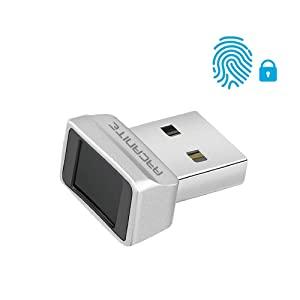
🔒 Unlock your digital world in a flash—security that keeps up with you!
The ARCANITE USB Fingerprint Reader is a compact, ultra-fast biometric security device designed exclusively for Windows 10 and 11 Hello. Featuring 360-degree fingerprint detection and the ability to store up to 10 fingerprints, it delivers lightning-fast authentication in just 0.05 seconds. Its plug-and-play setup and multi-language support make it the perfect upgrade for professionals seeking seamless, next-level login security.


| Brand | ARCANITE |
| Series | AKFSD-07 |
| Item model number | AKFSD-07 |
| Item Weight | 0.352 ounces |
| Product Dimensions | 0.83 x 0.67 x 0.47 inches |
| Item Dimensions LxWxH | 0.83 x 0.67 x 0.47 inches |
| Manufacturer | ARCANITE |
| ASIN | B07VK71TST |
| Date First Available | August 23, 2019 |
G**N
Nice fingerprint reader upgrade for PC desktops and laptops without a reader
I'm using it with my Alienware M15 R6 laptop with Windows 11 Pro and it is working flawless with Windows's Hello. It even works better that the integrated fingerprint reader in my HP Envy 15 360 work laptop. It is plug and play and not drivers needed, Windows recognize it and let enable the Fingerprint recognition feature. I love that it is compact and that it doesn't interfere with the connection of the near USB port. I believe that the $30 that I pay are worth for giving my gaming lay and upgrade, comparing othe fingerprint reader around.
R**Y
Works surprisingly well
Having previously purchased Kensington products that cost 3x as much for the same functionality, I was worried about how well this might work. But the truth is - it's great. Integrates directly with Windows Hello, does not require additional software, accurate fingerprint scanning, excellent price. If you have a front-facing port on your desktop, or a side-facing port on your laptop, this will absolutely speed-up your Windows login.
R**Y
For Win11 Pro 25H2, buy this fingerprint reader
I purchased in July '25. After the Win11 25H2 update, which changed the fingerprint reader window graphic just a bit, whether or not it makes any sense, this Fingerprint Reader works much better than before the update. Initially it required an extremely soft touch, and *never* worked on the first try, yet almost *always* worked on the second try. I've got no idea if the driver changed at that time, or if Windows changed around it, or if it's all coincidence, but regardless the number of attempts dropped overall by about one attempt per login. After 25H2, it works on the first try almost every time. It is now a product I would recommend and would purchase again if I need another. I've given it 4 stars b/c IMO 5 stars would be a fingerprint reader that works as well as the versions on phones, and I've never seen a reader on a laptop or PC that worked that well. BTW, I'm an IT professional, but installation was just plug-and-play the way we all expect USB devices to be. Finally, I don't recommend setting it up on one PC, and then plugging it in to another and trying to just use your FP to log in, even without an account, and then putting the reader back into the original PC. All three devices end up very confused at some point in the process.
M**3
WORTHLESS & Waste of Money
I added a TEC brand reader to my main laptop a few years ago and it has worked flawlessly. Purchased a new laptop for just our financial stuff and purchased this reader to go with it and it rarely works. Plugged it in, mapped two different fingerprints, works fine the first couple of times then quits working. I map two fingers because I have a tendency to not wear gloves and get cuts on my fingers preventing a successful scan. Whenever it would not scan on the new laptop I would scan the same finger using the TEC reader on my main laptop and it would work fine. Then I used the TEC scanner on the new laptop and it worked fine so it wasn't the laptop or my fingers. I ended up throwing this away and getting another TEC reader and again, works flawlessly on the new laptop. Don't waste your money on this one as it is truly worthless.
D**D
Good fingerprint reader.
So far working good. Just plugged it in and that's it. Working with win 11. No problems.
S**N
Works as intended.
Works as intended.
D**R
Worked, but soon it Didn't.
This isn't the first fingerprint reader I've bought, but it is the first to work so poorly. I've got a custom Windows 11 professional workstation using an MSI Creator motherboard which probably has more USB ports, and broader compatibility than any typical PC/laptop. It's also kept up to date in terms of drivers and OS updates on a weekly, so whatever the issues I had were almost certainly the device, not the PC. In any case, it seemed odd that it didn't immediately self-install. It was plugged into a port directly to the computer, not a hub. Anyway, I found the driver on the manufacturers web page and setup, including adding my fingerprint, went ahead without any problem. I tested it by locking the PC and then unlocking it via the reader... All good, or so it seemed. But then the next day when I wanted to log in: no dice. OK so I used my pass code, thinking it was a one-time issue. No, several more times during the day, using different relevant applications and each time the reader failed. I may well have just gotten a bad unit. Obviously many others are happy with theirs, but running into issues so soon didn't bode well so I requested a Return/Refund.
R**R
Log into Windows using a finger tap. You choose the finger(s)! ; )
Amazing product. Solid, fast, dependable. Easy Windows Hello login using fingerprints, in an actual snap.
タ**長
Windows11 Proで使用。 私の環境では刺すだけで認識し、何の問題もなく設定も完了しました。 指紋の認識精度も良好で、1~2度タッチで認識してくれます。
G**R
Ürün yurtdışından gelmesine rağmen hızlı bir şekilde elime ulaştı. Ama paketlemesi pek iyi değildi. Windows 11 otomatik olarak tanımadı fakat ürünün resmi sitesinden gerekli driveri indirip kurunca hemen tanıdı. 10 parmak izi ekleme özelliği var. Parmağınızı hemen algılıyor ve Windows açılıyor. Facebook,youtube vs gibi daha bir çok site için de yine kendi resmi sitesinden indireceğiniz smart-id yazılımı ile parmak izi ile oturum açma özelliği var. Bu sitelerde oturum açma bilgilerini saklayıp her sistem kurduğunuzda smart-id programına import ederek kullanabiliyorsunuz. Şu an için bir sorun yaşamadan kullanıyorum. Bilgisayarı her açtığımda şifre girme derdinden kurtuldum. Alacak kişilere kesinlikle tavsiye ederim...
A**Y
Cómodo, rapido y funcional.
V**1
Tellement bien que j'en ai racheté ! Pratique pour se connecter à son ordinateur sans code pin ou mot de passe, pour éviter les yeux baladeurs...fonctionne très bien !
E**M
J'ai jeté mon dévolu sur ce modèle de lecteur d'empreintes pour ne pas avoir à taper mon mot de passe Windows. Il suffit de le brancher et il est directement reconnu. Ensuite il suffit d'aller dans les paramètres Windows pour créer une connexion via Windows Hello et on vous demande d'ajouter une empreinte. A partir de là, il faut suivre les indications pour que votre empreinte soit bien sauvegarder selon divers positions de votre doigt. Une fois sur la page de connexion Windows, il vous suffit de poser votre doigt pour accéder à votre compte. Globalement ça fonctionne bien. Parfois en fonction de comment on pose son doigt, il arrive que le premier essai ne soit pas validé. Alors je bouge un peu mon doigt et la détection se fait. J'avais peur des avis négatifs qui disaient que ça ne fonctionnait pas ou bien que taper son mot de passe ça allait plus vite. Perso je pense que ces gens là ne savent pas s'en servir et/ou sont trop exigences (dans le sens où si ça ne répond pas immédiatement à la première pose du doigt, c'est que c'est nul). Chez moi ça fonctionne bien. Dernier point : en fonction des applications ou des sites internes, vous pouvez également utiliser le dongle. Par exemple ma banque accepte d'ajouter une connexion via ce genre d'outil. Je l'ai donc ajouté dans mes connexions sécurisées et je me connecte au site internet via le dongle. Pareil pour vos comptes Outlook par exemple.
Trustpilot
1 month ago
3 days ago