
DOWNLOAD THE APP


Customer Services
Copyright © 2025 Desertcart Holdings Limited
DOWNLOAD THE APP

⚡ Upgrade your desktop’s brainpower — don’t get left behind!
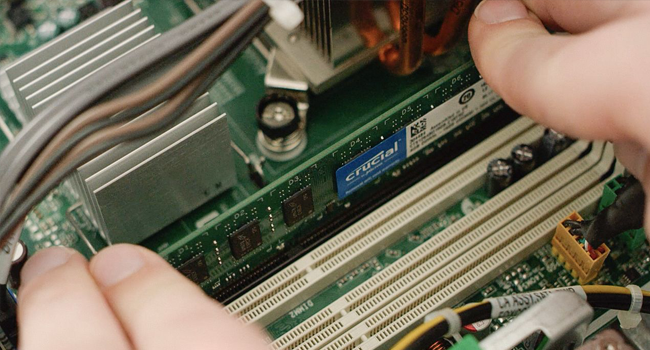
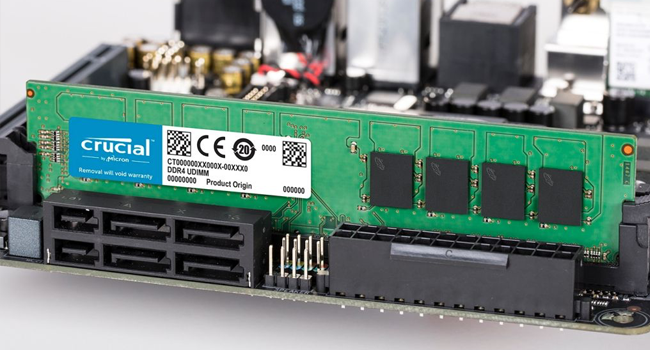
The Crucial 16GB (2x8GB) DDR3 1600 MHz CL11 Desktop Memory Kit delivers a powerful speed boost and reliable performance with dual voltage support and a standard 240-pin UDIMM form factor. Trusted Micron quality ensures compatibility and stability, making it the perfect upgrade to supercharge multitasking and responsiveness on your desktop.







| ASIN | B0091LG13O |
| Best Sellers Rank | #90 in Computer Memory |
| Brand | Micron |
| Column Address Strobe Latency | 11 |
| Compatible Devices | Desktop |
| Computer Memory Size | 16 GB |
| Customer Reviews | 4.7 out of 5 stars 8,501 Reviews |
| Data Transfer Rate | 1600 MHz |
| Form Factor | DIMM |
| Global Trade Identification Number | 00649528762245 |
| Item Weight | 1.12 Ounces |
| Manufacturer | CRUCIAL TECHNOLOGY |
| Memory Speed | 1600 MHz |
| Model Name | 2-8GB DDR3-1600 UDIMM 1.35V CL=11 |
| Number of Pins | 240 |
| RAM Memory Technology | DDR3 |
| RAM Size | 16 GB |
| UPC | 649528762245 |
| Voltage | 1.35 Volts |
| Warranty Description | Limited lifetime warranty |
S**S
Work great and they are plenty fast.
Very good, Keeps those old PC's just a hopping.
C**R
More than Doubled System Memory and Video Memory Performance of a Cheap Dell Inspiron 3250 i3 per Windows Benchmark
In short, this 16GB memory kit works very well in a Dell Inspiron 3250 i3 desktop computer. With the memory used in combination with a Crucial SSD drive, that cheap Inspiron 3250 is twice as fast at some operations and more than 300 times faster at other operations. I bought a Crucial 16GB Kit (8GBx2) memory kit for an inexpensive Dell Inspiron 3250 i3 Windows 10 Pro desktop computer that I had on order through Dell's Outlet. I also bought a pair of Crucial MX300 525GB SSD (and a pair of Western Digital Blue 1TB drives) for the Inspiron 3250 (these two Crucial upgrades cost more than the price of the Outlet computer). Prior to swapping the single 4GB memory card and the stock 1TB Western Digital Blue hard drive for the two 8GB Crucial memory cards and a Crucial SSD, I used the Windows built-in benchmarking tool (this tool is built into Windows 7 and Windows 10 - Windows System Assessment Tool) to help determine the performance change due to the Crucial replacement parts. I repeated the test with both Windows 7 Pro and Windows 10 Pro. In short, the Crucial memory alone more than doubled both the computer's memory performance (2.13 times faster) and the integrated video memory throughput due to the computer now being able to use dual channel memory access with slightly higher clocked memory in both Windows 10 Pro and Windows 7 Pro. The Crucial SSD drive was 3.65 times faster at sequential read access than the WD Blue hard drive, and 340.68 times faster at random read than the WD Blue hard drive in Windows 10 Pro (only 316.53 times faster in Windows 7 Pro). So, the Crucial upgrades, even though they more than doubled the value of the Dell Inspiron 3250 i3 computer, significantly increased the potential performance of the computer. Summary details of the testing: From an administrator Windows command line I executed a command similar to the following to run the Windows System Assessment Tool's benchmark for each test: winsat formal -restart -v -xml c:\winstatresultsWindows10-4GB.xml Original single Hynix 4GB 12800U-11-13-A1 memory card and WD Blue hard drive (Win 10 Pro): System memory shared as video memory: 1999.76MB Memory Performance 10658.95 MB/s Video Memory Throughput 2993.58 MB/s Disk Sequential 64.0 Read 135.49 MB/s 7.0 Disk Random 16.0 Read 2.05 MB/s 4.2 (this appears to be a fluke, see below) Crucial 16GB Kit (8GBx2) memory kit and WD Blue hard drive (Win 10 Pro): System memory shared as video memory: 8143.76MB Memory Performance 22783.16 MB/s Video Memory Throughput 6355.53 MB/s Disk Sequential 64.0 Read 136.20 MB/s 7.0 Disk Random 16.0 Read 1.28 MB/s 3.6 Crucial 16GB Kit (8GBx2) memory kit and Crucial SSD (cloned HD to SSD, Win 10 Pro): System memory shared as video memory: 8143.76MB Memory Performance 22635.85 MB/s Video Memory Throughput 6392.51 MB/s Disk Sequential 64.0 Read 497.43 MB/s 8.1 Disk Random 16.0 Read 436.07 MB/s 8.2 Crucial 16GB Kit (8GBx2) memory kit and new WD Blue 1TB hard drive (cloned SSD to new WD HD, Win 10 Pro): System memory shared as video memory: 8143.76MB Memory Performance 21998.35 MB/s Video Memory Throughput 5329.78 MB/s Disk Sequential 64.0 Read 142.87 MB/s 7.1 Disk Random 16.0 Read 1.45 MB/s 3.9 --- Original single Hynix 4GB 12800U-11-13-A1 memory card and new WD Blue hard drive (Win 7 Pro): System memory shared as video memory: 1632MB Memory Performance 11141.00 MB/s Video Memory Throughput 4613.53 MB/s Disk Sequential 64.0 Read 139.70 MB/s 7.1 Disk Random 16.0 Read 1.52 MB/s 4.0 Crucial 16GB Kit (8GBx2) memory kit and new WD Blue 1TB hard drive (fresh install of Win 7 Pro): System memory shared as video memory: 1632MB Memory Performance 23564.36 MB/s Video Memory Throughput 9988.00 MB/s Disk Sequential 64.0 Read 139.15 MB/s 7.1 Disk Random 16.0 Read 1.47 MB/s 3.9 Crucial 16GB Kit (8GBx2) memory kit and Crucial SSD (cloned HD to SSD, Win 7 Pro): System memory shared as video memory: 1632MB Memory Performance 23140.27 MB/s Video Memory Throughput 9807.77 MB/s Disk Sequential 64.0 Read 501.99 MB/s 7.9 Disk Random 16.0 Read 465.30 MB/s 7.9
L**N
Pay teh Extar for Name Brand! Worth it!
Pulled the 4 GB sticks out and popped these 8 GB sticks into the MB memory slots (make sure you get slot 0 and 1 when using only 2 sticks) to upgrade an older Win 10 machine. No fuss, no muss. Windows just whined at me that I had upgraded the memory when I powered up. HINT: Pay a few extra bucks for the Crucial RAM. Some of the horror reviews I read about generic RAM made me really glad I went with Crucial! FYI They have been sabotaging Win 10 to force people onto Win 11 upgrades, subscriptions, etc. When I bought this PC 4 GB ran great. Then it got horribly slow booting and loading Apps. So I went to 8 GB (salvaged from another PC I was upgrading) which lasted about 1 year before it got slow again. Maxed at 16GB now. No clue how long that will keep the PC running smooth. If you are running 4GB, bite the bullet and go direct to 16GB. Apps are becoming real memory hogs. Firefox Mozilla (as with most browsers) consumes 6 GB all by itself. FYI - Opera wastes much less memory. When RAM is full windows starts spooling data and code to Hard Disk which is horribly slow!
D**C
More RAM for an old system
Have not purchased DDR3 in a long time, but wanted to extend the life of a secondary computer that only had 8Gigs (2x4Gigs) of RAM. Ran across some 8Gig sticks of Crucial on Amazon that did not say it was used so decided to order two fully expecting to receive used memory sticks. Documents with my order stated the RAM sticks are NEW! Dropped the new sticks in and everything has fired up and been running great. Very pleased. I did not see any evidence that theses stick were previously used (no scrapes on the contacts, etc). Finally, the price was very good. Cost per Gig was less than half of what I paid when I built the PC. Very happy with this purchase.
#**L
My computer is faster Yeah!!!
Exactly as described. Working great in my old old Dell Optiplex 780 pc. With only 8mb ram, Linux(Zorin), a new SSL hard drive, my old computer is much faster. I can really tell the difference. TY
D**!
This is DDR3L (1.35v), NOT DDR3 (1.5v).
While this will work in both 1.35v and 1.5v motherboards the product page isn't exactly clear on the fact that this is DDR3L (Low Voltage, 1.35v). I think the product description should be more clear. I'm currently testing my replacement set. The first kit I got worked great for about 3 days, and even passed 4 passes of memtest86. Then after waking from sleep 10 minutes before I was going to return the PC to it's owner, it did nothing but blue screen. Another quick Memtest86 run just turned the screen red with thousands of errors within seconds. UPDATE: After 2 days of running memtest86, Prime95, several sleep cycles, and reboots, I'm pretty confident that the replacement RAM is OK. This isn't the first time I've had problems with Crucial RAM, but these things can happen with RAM from any manufacturer. These went into a Dell Inspiron 660s, which unfortunately only supports running them at 1333MHz even though the original RAM was also 1600MHz. I went with the low density (chips on both sides) version because I read that there would be less potential compatibility issues and better performance.
M**S
Now my PC work faster with Artworld! Awesome!
Been creating concept artwork and painting for 7 years with an old computer running with 8GB ram on Adobe Photoshop and Adobe Illustrator. Throughout the years, the 8GB memory ram started to struggling to speed up the process, because the new Adobe new releases for Windows 10 I’ve upgraded from 8.1 after my Windows XP 2000 died on me. For years, I never thought about upgrading a memory rams because I always saving money for new computer to run each Adobe new release to try out with new painting brushes. Until then I decided to do some research for get a right ram to speed up my 7 years old computer from 8GB ram to 16GB ram on a H16M-HVS motherboard. So I can finish my art faster for the clients. This rams is not only make me happy, but my clients are happy to received their portrait painting within days! At first I was worried about buying a wrong rams from Crucial, because I don’t know much about PC. So I used the Amazon recommendation information about my motherboard and it show me this rams will fits this old PC. And it’s work after it arrived to my place! Installing the rams isn’t that hard after I did some researched on YouTube on how to install a rams and CPU cooler fans. I was very happy with this rams. And it’s make it PC run faster with art programs I’ve always enjoy creating art painting! Thank you so much Crucial for the amazing rams! Will definitely looking forward to buy more from them again in the future!
B**L
Crucial makes great products
This is a good price for Crucial RAM. I installed it and have had zero problems.
Trustpilot
5 days ago
3 weeks ago