Desert Online General Trading LLC
Dubai, United Arab Emirates
Desert Online General Trading LLC
Dubai, United Arab Emirates
☁️ Control your network like a boss—anytime, anywhere!
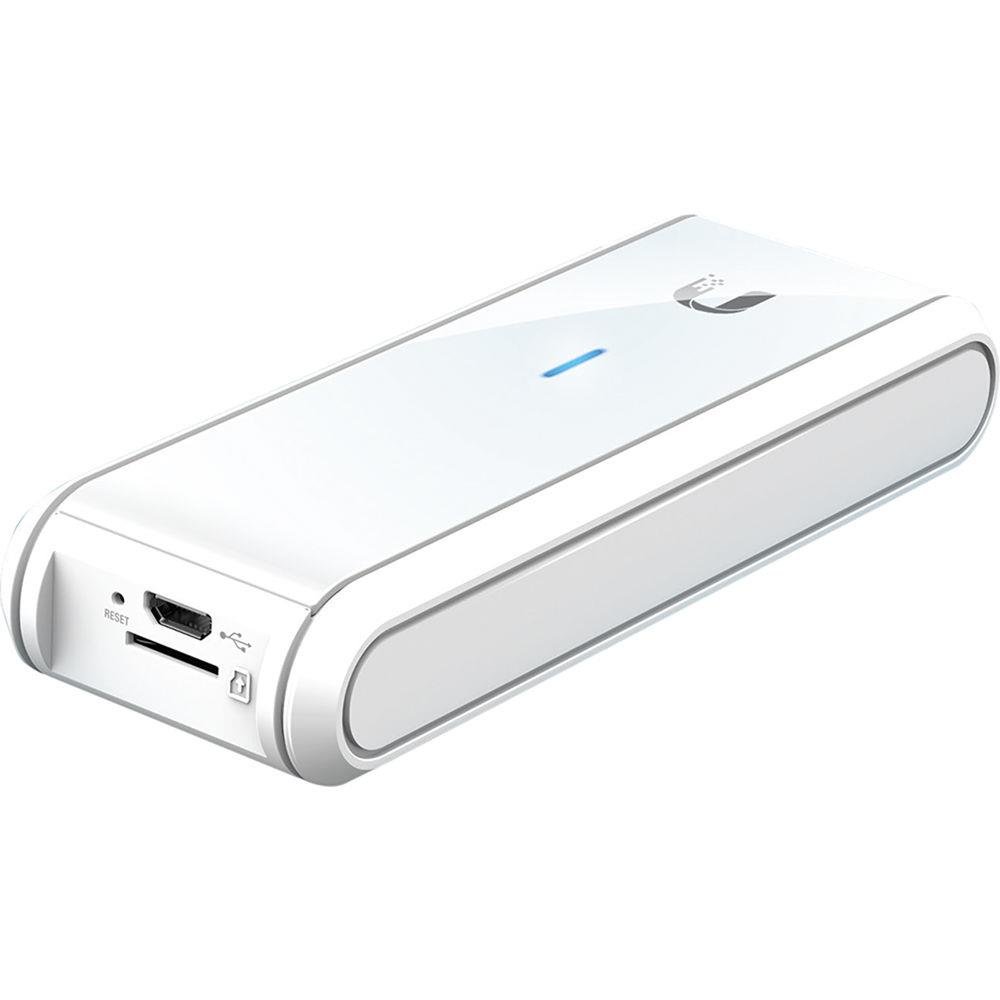
The Ubiquiti UniFi Cloud Key (UC-CK) is a compact, standalone UniFi Controller device featuring a powerful quad-core processor and 2GB RAM. It leverages Hybrid Cloud technology for secure remote access via cloud Single Sign-On, enabling seamless network management from anywhere. With ultra-low 5W power consumption and a sleek white design, it integrates effortlessly into professional environments, delivering enterprise-grade control without bulk.


| Standing screen display size | 1 |
| RAM | 2048 GB |
| Wireless Type | 802.11a, 802.11ac, 802.11n |
| Brand | Ubiquiti Networks |
| Series | UC-CK |
| Item model number | UC-CK |
| Hardware Platform | CONSUMER_ELECTRONICS |
| Item Weight | 6.2 ounces |
| Product Dimensions | 0.85 x 1.71 x 4.8 inches |
| Item Dimensions LxWxH | 0.85 x 1.71 x 4.8 inches |
| Color | White |
| Number of Processors | 4 |
| Voltage | 5 Volts |
| Manufacturer | Ubiquiti |
| ASIN | B017T2QB22 |
| Is Discontinued By Manufacturer | No |
| Date First Available | November 10, 2015 |
S**N
Essential For Unifi Networks, Management Heart Of A Unifi Deployment. Outstanding User Interface
The cloud key is the central part of the Ubiquiti Unifi managed network system. Ubiquiti offers a cloud version of the Cloud Key, but I guess I'm old school and want to keep my management mostly in-house. I have used this with 2 clients.One was a couple of unifi switches and half a dozen access points spread across 2 networks connected via VPN. Setup was easy after actually reading instructions and watching a few YouTube videos.The next client was a 2 building wifi infrastructure setup. It had 24 unifi AC Pro access points, a 5 16 port unifi PoE switches and a 24 port unifi switch spread across 2 3 story buildings adjacent to each other. Setup was super easy after the first one and each access point was configured within minutes of setup.The cloud key is brilliant. It's PoE powered (or optionally via a AC adapter) and has a microSD slot which came with a card (for backups). The web interface and remote access capability facilitate management off-site. Device discovery works great and makes deployment so quick and easy. Monitoring lets you ID problems and overloaded access points. It's been a great troubleshooting tool. The cloud key is the management beating heart of a unifi network.One thing to be aware of: make a backup of your cloud key!!! I found that on 2 occasions cloud keys required a reset and restore after nasty power failures. It doesn't take a long time, so do and It could save your proverbial bacon. Oh yes, when you make changes make another backup.Going from more old-school network management to the beautifully integrated Unifi system was a bit of an adjustment and learning curve. Once I "got it" it's my first choice for installation with more than a couple of access points.
Q**T
LOVE IT
DISCLAIMER: Ubiquiti sent me a Cloud Key free of charge if I agreed to write a review.I’ve been using the Cloud Key for a few days now. My impression of it so far is very positive. As expected from the UniFi line, it pairs nicely with my Unifi Security Gateway, PoE+ switch, and AP PRO. As of this writing (07-09-2016) my only minor issue with the Cloud Key is the lack of advanced options in the controller UI, though that is more of the controller firmware than the Cloud Key itself. Most of the advanced options are already available in the controller beta firmware so I’m confident Ubiquiti will really flesh out the capabilities of the Cloud Key and their whole UniFi line.For those that don’t know, the Cloud Key is a small SoC (system-on-chip) that can run the UniFi controller software. It’s a GREAT alternative for those that don’t have a server racked or don’t really have a need for one. For those that do, just run the UniFi controller on the server. The GUI runs smooth, provides a lot of nice stats for your LAN/WAN, and makes basic management of your other UniFi devices a breeze. It even comes with a MicroSD card for those that are comfortable with the CLI and would like to save configs/other miscellaneous things to it. Speaking of which, if you are familiar with Linux you will feel at home on the CLI since almost all of the UniFi devices are running a Debian derivative (at least from what I can tell).TL;DR – Do I recommend the Cloud Key? If you don’t have a server racked, 100% without question. It’s a great little tool for the price (<$100). I’ve had no issues with the device and it’s made this network engineer very happy. I love when things are simple, cheap (in price, not quality), and just work.
M**R
Especially Great And Great To Have From the Get Go.
You can manage your Unify devices with the same interface using free software on your computer, or you can use a stand alone Unix box, or you can use a cloud server or use the Ubiquity cloud server -- but many folks do eventually install this -- so if you are starting out and want to do best practices and save some future transition steps (and redundant set up time) just go with this from the get go.In some cases, running this controller instead of on your shared computer or via cloud just has its advantages -- would you prefer to access this remotely rather than need to leave another device running 24/7?And sometimes, the speed of response (for example, accessing a cloud server or waiting for you computer to wake up) can impact such things as "guest access screens".This plugs in anywhere handy on your ethernet network (it is the size of a slim remote control) and then it is constantly standing ready, for local or remote access commands.You can power it with a spare USB power cube & standard USB male A (from power cube) to USB male mini (into the cloud key) cord like you'd use to charge bluetooth headphones.Your devices can run (once set up) without the continuous need of any kind of controller, but when a firmware upgrade comes along, or you want to make changes (whether you have 3 or 300 Unify devices), the Cloud Key "controller" has the pieces to make it happen, with nothing else required.Even if not mandatory, this is a tool most Unify folks take advantage of and use without a second thought about getting, as if it were required -- and for homeowners who want to check from work or from errands, and pro installers who want to be able to troubleshoot multiple locations, it might as well be simply required.
Trustpilot
1 month ago
2 months ago