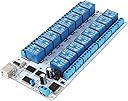
⚡ Command Your Smart Space with 16 Channels of Power!
The SainSmart 16-Channel USB Relay Module is a professional-grade, opto-isolated relay board featuring 16 SPDT relays controllable via USB. It supports a wide DC power range (9-36V) and can handle loads up to 10A/250V, making it perfect for advanced home automation, robotics, and electrical switching projects. Each relay has an LED indicator for real-time status, ensuring reliable and intuitive control.
| ASIN | B0793MZH2B |
| Best Sellers Rank | #88,481 in Computers ( See Top 100 in Computers ) #785 in Motherboards |
| Manufacturer | SainSmart |
| Manufacturer reference | USB Relay Module |
| Package Dimensions | 29.21 x 12.29 x 3.71 cm; 240 g |
T**C
Seems to work. Haven't connected anything to the relays or used the external power supply yet. Only got as far as writing a LabVIEW vi to control it.
S**Y
As another has noted, do use the external power supply port and pull the jumper. It had issues just running off the usb power. I was also able to confirm the other report that sometimes if you go too fast a relay can miss a command, but I saw that more often on usb bus power. A good power supply makes it reliable and faster to respond. In my case I have hundreds of amps available. I wrote my own linux driver that waits for the reply to echo back before considering it applied. I can run this in fast process-level parallel and the reply messages can interleave. So I have a random-delay-then-retry logic to make sure it gets a correct acknowledgement. Seems to be reliable enough when I do that. See serial on then off, then parallel (don't wait for reply) on then off. That being said the rest of the world is at 115200 baud for usb serial. Why default to 9600? The ch340 family can go that fast if they changed one line of code. I also found that it's decently reliable if I close and reopen for write after every command while not waiting for a reply (about half as fast). Even though it's not perceptably any slower (at 9600 baud). That must mean the wait time before resending is clearly almost imperceptible. This means their microcontroller code is a little broken to not be handling these requests with pointer queues to a ring buffer, but they are actually doing work while they have listening turned off. I tried adding characters to pad space in time predictably. It didn't work. It's just oddly buggy when you go fast. Other then these notes, it appears to work decently enough. I'll be rewiring my van to use this to control all my 12v appliances. The LED indicator lights work well,
G**G
Funcional y robusta
A**R
Updated review: the board uses "Modbus ASCII" protocol. Knowing that makes the commands far less cryptic. The supplied documentaton (PDF and XLS) has errors in the checksums for channel 15-off, 16-on, 16-off. I got lucky and found the source code for Sainsmart's Windows app, and can confirm the device supports more Modbus functions than documented: 1 (read coils), 2 (read discrete inputs), 5 (write single coil), and 15 (write multiple coils).
B**N
To control this in python, convert their spreadsheet values from hex to decimal. Excel and office libre has a built in function hex2dec. Put the corresponding row of decimal values separated by commas into a bytearray, then send to serial. Upgraded to 5 star. Been using this thing for a few years to control a semi automatic homebrew system. Once I figured out how to code for it, it was super simple to use. I like that I can control it over usb, was the big selling point. Got it connected to a raspberry pi on a touch screen.
Trustpilot
5 days ago
3 days ago