We remain fully operational. Our teams are working around the clock to ensure your deliveries continue safely.

DOWNLOAD THE APP


Customer Services
Copyright © 2025 Desertcart Holdings Limited
DOWNLOAD THE APP
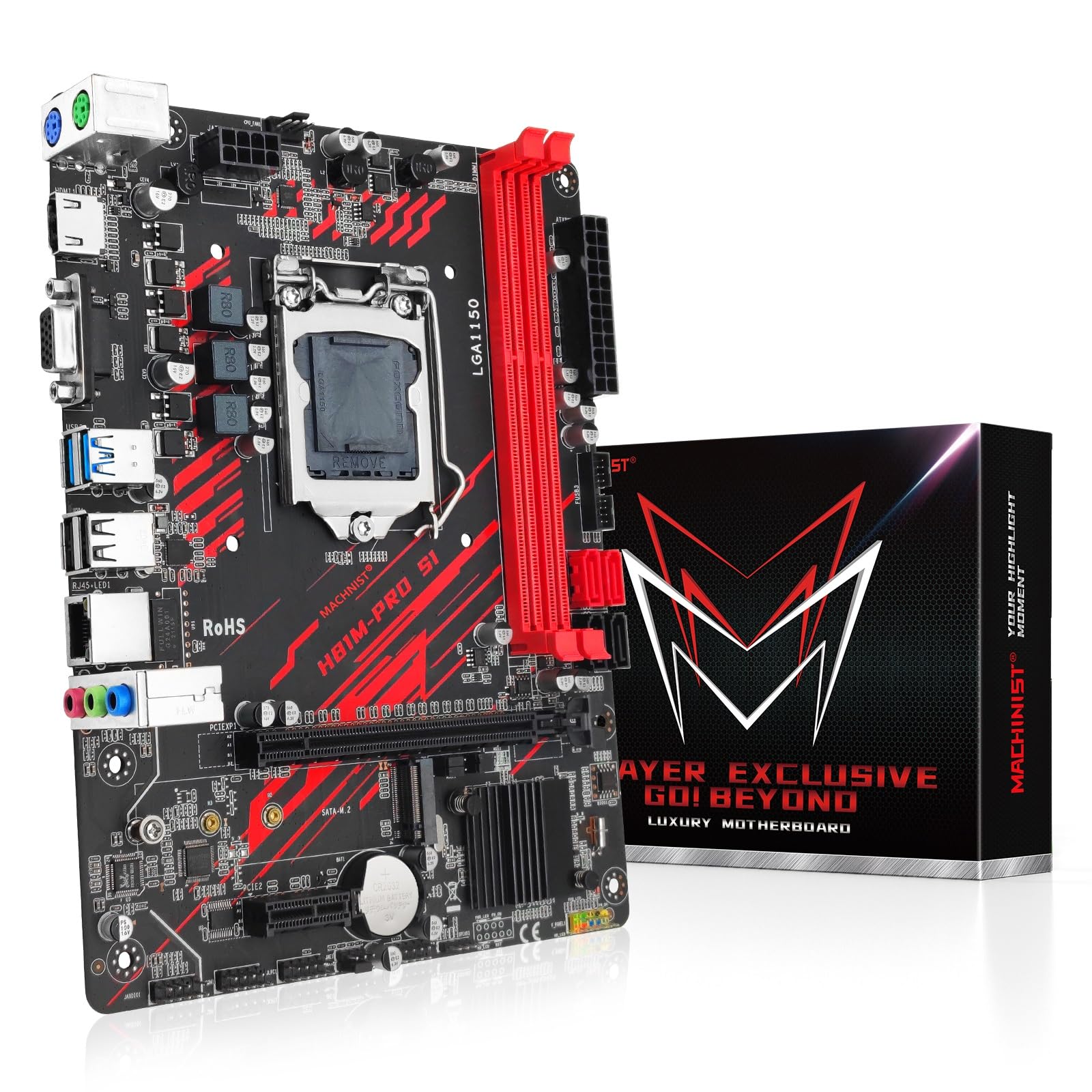
🖥️ Power your legacy build with next-level speed and versatility!
The MACHINIST H81M-PRO is a Micro ATX motherboard designed for Intel 4th Gen processors with LGA 1150 socket compatibility. It supports dual-channel DDR3 memory up to 16GB at 1600MHz, features an NGFF M.2 slot for NVMe SSDs alongside SATA 3 ports, and offers VGA plus HDMI outputs. Ideal for gamers and professionals seeking a reliable, budget-friendly platform with solid connectivity and upgrade paths.


| ASIN | B09DVCV3LT |
| Are Batteries Included | No |
| Batteries | 1 CR2032 batteries required. |
| Brand | MACHINIST |
| Color | red |
| Computer Memory Type | DDR3 SDRAM |
| Connectivity Type | Wi-Fi |
| Customer Reviews | 3.8 3.8 out of 5 stars (97) |
| Date First Available | 23 November 2021 |
| Form Factor | Micro ATX |
| Graphics Card Interface | Integrated, PCI Express |
| Item Weight | 608 g |
| Item model number | H81 pro |
| Lithium Battery Energy Content | 240 Milliamp Hours (mAh) |
| Lithium Battery Packaging | Batteries contained in equipment |
| Lithium Battery Weight | 3 Grams |
| Manufacturer | MACHINIST |
| Maximum Memory Supported | 32 GB |
| Memory Clock Speed | 1833 MHz |
| Memory Technology | DDR3 |
| Number of Ethernet Ports | 1 |
| Number of HDMI Ports | 1 |
| Number of Lithium Metal Cells | 1 |
| Number of USB 2.0 Ports | 2 |
| Power Source | DC |
| Processor Count | 1 |
| Processor Socket | LGA 1150 |
| Processor Type | Core i7-4810HQ |
| Product Dimensions | 22 x 17 x 4 cm; 608 g |
| RAM Size | 32 GB |
| Series | H81M-PRO |
L**I
Works great for what I need it! Made a i5 4590 and gt 1030 Linux system. Despite all the bad reviews, this product worked well with me. Though the Bios is kinda barebones but that’s okay. Great value for what it is.
S**L
The only thing I disliked about it was there was no instruction manual or anything which would have been helpful since I'm new to building computers.
E**N
I am frustrated that I had no paperwork to go off of. Luckily I had experience building computers before and was able to get everything plugged in. HDMI port doesn’t work, VGA port doesn't work, 2 of the 4 SATA. ports are not functional. All around bad motherboard and I would just recommend that you look elsewhere for motherboards. This was just a temporary fix for an issue I had with my old motherboard and it still works (with limited storage) but the headache of getting this set up over 3 hours is not worth it and made me want to pull my hair out. Stay away!
M**O
This board has no, nada, ZERO documentation and the manufacturer website is horrible. No help at all. Luckily the Microsoft drivers work. Board has a decent BIOS and ok connectivity and ports. Not a lot of USB ports but supports an M.2 drive. This seems like a machine controller board more than a gamer board. It does what I needed it for after searching for hours for documentation and finding ZERO. If you are tech savvy you will be fine, not for the beginner. After all is said and done it works great with a flexible BIOS to play with. Only 2 memory slots but it is a small board.
J**T
My son's venerable i7 MB died. In its 2015 heyday, this was a top of the line i7PC. I thought it would be a waste to dump the CPU and RAM because technology waits for no one. I saw this MB and despite what the negative reviews said, I and decided to give it a shot, if it is bad, I can always return it. Put it all back together, and it booted fine. However, I noticed in the the 16GB (8x8) RAM was only reading 4GB and it did not recognize the sata III hard drive. I swapped the 16GB DDR3 ram with another set from another manufacturer I had laying from another dead computer , tried again and this time the MB recognized the full 16GB of Ram. Ok, so there is a RAMM compatibility issue. I swapped the SSD port to port 2 and then it recognized the drive. Hmmm, bad IDE 3.0 port? No. There are four jumpers on the MB that configure the MB to use the M.2 SSD slot, but you lose one of the SATA 3 ports in doing so. The MB comes factory configured for one M.2 SSD and one regular SATA III drive. Yes, you can download the user manual from the link on the amazon item, but it sucks because the user manual does not mention anything about the SATA configuration. The configuring information is actually spelled out at the bottom of the Amazon item description Amazon, where all the manufacturer's marketing hype is usually posted. Very stupid place for it I may add. Aside from the lousy documentation, the MB appears to be solid has given this PC a new life on a budget. We'll see how it holds up in the next few months.
Trustpilot
4 days ago
1 month ago