We remain fully operational. Our teams are working around the clock to ensure your deliveries continue safely.

DOWNLOAD THE APP


Customer Services
Copyright © 2025 Desertcart Holdings Limited
DOWNLOAD THE APP

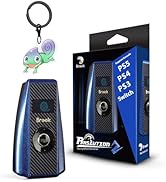
🏁 Race smarter, not harder — one converter to rule them all!
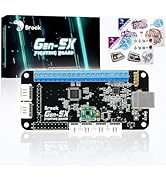
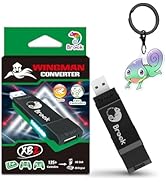
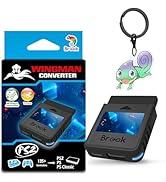
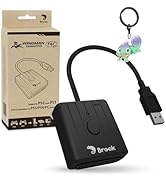
The Brook Ras1ution 2 is a cutting-edge racing wheel converter designed for PS3, PS4, PS5, and Nintendo Switch consoles. It enables gamers to use their preferred racing wheels across multiple platforms with full force feedback support and an OLED Heads-Up Display for real-time status. Featuring a durable braided Type-C cable and customizable settings via a mobile app, it’s the ultimate solution for professional and enthusiast racers seeking seamless multi-console compatibility without the hassle of multiple wheels.











| ASIN | B09W9W79CW |
| Best Sellers Rank | #5,675 in Video Games ( See Top 100 in Video Games ) #533 in PlayStation 5 Accessories |
| Customer Reviews | 4.0 4.0 out of 5 stars (692) |
| Date First Available | March 27, 2022 |
| Item Weight | 2.11 ounces |
| Item model number | ZPP0053 |
| Language | English |
| Manufacturer | Brook |
| Product Dimensions | 3.74 x 2.17 x 0.79 inches |
I**S
Works with Logitech Force feedback Pro (circa 2005)
Took some trial and error to get it to work on PS5 but it works with a wheel that was designed for PS2/PS3. Even the force feedback works flawlessly without any input or feedback lag. The plug n play didn't work intially so tried it on Nintendo switch with Mario Kart to check if my old wheel still worked and it did. Ras1ution 2 doesn't automatically detect what system it is connected to, you just need to select it at power up. Because my wheel lacks a Home/PS button, <Select+Start> is substituted for it. So went back to connecting the wheel to PS5, pressed <Select+Start> to log in wheel and the D-Pad became responsive in Gran Turismo Sport. A spinning tire on the small oled screen confirms the wheel is connected successfully. The device simply emulates the most popular wheel for each platform via it's translation interface/software. Example: on PS5 it's the Logitech G29, etc. Recommend going to Brook Accessory website to check for your wheel's compatibility and button map list so you wouldn't be perplexed as I got at first. P.S. If you're going to upgrade the firmware, connect it to PC instead as the mobile app is too slow and would glitch (thankfully no harm done). Conclusion, though the device is initially expensive for what it does it beats buying racing wheels for all your consoles. The bonus is that force feedback not just vibration works for my PS2 wheel. There's about a $40 gap between the R1 and R2 with the only notable difference being the R2 adds PS5 support.
M**H
It's Amazing!
If you're looking for a way to use your racing wheel setup across all PS5, XSX|XSS, and Switch, look no further. Thanks to this converter, I got my Logitech G920 wheel working across my PS5, XSX, and Switch. And it did so much better than I was expecting. Obviously the force feedback and shifter still doesn't work with the Switch even with this converter but one really good thing to note is with this adapter, I got racing games that didn't work with the official Mario Kart Hori Wheel to work with my Logitech G920. On top of this, I was able to use the button remapping within the Switch itself to remap the buttons on my G920 using this converter. It worked perfectly with my PS5 and XSX as well and retained the settings I set in the Logitech software on PC for the wheel range. Needless to say, I absolutely recommend any multi platform gamer who doesn't want to invest in a wheel for each system to pick up this converter. It's well worth the money and works incredibly well.
A**H
Sadly I cannot recommend this product
I just bought the Ras1lution 2 racing wheel converter to use my Xbox Wheel on the PS5. Sim Racing is a MONEY PIT!!! First of all the product does not work as advertised it only half works. I have spent 5 hours trying to get Force Feedback working I make 26 bucks an hour at my job so it's literally like paying twice for this product and it still doesn't work. Yes you get steering pedals and paddle shifters working just fine but the one thing you need is force feedback.
C**S
Great Product
Using this to play an XBOX steering wheel setup on my PS4, no issues.
T**J
Works with Moza R5, PS4 and PS3 with some issues.
Yes, Moza R5 is working with this product. To get R5 to work you need to update the device firmware. At the time I write this review, the latest version is 1.2.0. I have GT6 on PS3 and GT7 on PS4. The R5 is not officially supported by GT. But the R5 will work with both titles. Both titles consider R5 as a regular controller. With trial and error, I learn, that the d-pad works, and the XYAB will map to Sq-Tr-O-X. The pedal's throttle and break map to R3 and L1 (I think), and the wheel turning maps to L3. For PS4, I set the device to PS5/PS4 wheel. For PS3, I set the device to PS3 controller (the PS3 wheel doesn't work!). If there have a user guide or at least a mapping guide would be nice. For PS4 and GT7, the FFB seems to work ok. Wheel turning seems to be a bit weak, but you can set up the strain in the device to compensate. I am pretty happy with it. For PS3 and GT6, the FFB is ok, but not as detailed. Wheel turning is very weak. I turn the strain up to +10, I still have a hard time turning the car. It is a bit disappointing. I wish the next update firmware would fixed this issue.
A**S
Perfect!
This is smaller than I expected - slightly larger than an external webcam. That does not mean it's a bad thing; it just caught me off guard. I have an Xbox S and a G920 Wheel setup. My son has PS5 and Switch. Originally, I bought the wheel setup and intended to use it for Forza Motorsport, and for that, the wheel is fantastic - but would not work with GT7 on PS5. I've heard nothing but great things from the Logitech G29 + GT7 combo for sim racing (same wheel, but PS version). Rather than getting different wheels for Xbox and PS5, I thought I would try this. Setup was a BREEZE. Almost plug-and-play compatibility. There is no lag during game play, so if you're concerned about responsiveness, don't be! A few tips I learned... 1. Power on the console before you plug in the adapter and wheel. 2. To connect with PS5, select the correct console profile and use the Xbox button on the G920 after the wheel power sequence is complete and follow the screen prompts. 3. To connect with Switch, select the correct console profile. You have to set it up as a pro controller on the Switch. 4. Make sure you download the app for your phone for either Android or AppStore. This is the easiest way to toggle between gaming system button profiles. 5. The button config was preset correctly for PS5 but use on the Switch and Mario Kart requires that you need to use the app to re-map some of the buttons (and yes, you can save profile presets in the app - whatever works best for you). Obviously, Forza Motorsport and the G920 are fantastic. GT7 and the G920 is a complete game changer. I'm able to control driving so much more. Mario Kart and the G920 is just an absolute blast! This was an unexpected big added bonus. I don't know if I'll ever Mario Kart the same when I'm at home. Holy smokes, it is just plain fun. For my use, this is worth every penny.
A**H
👎👎👎👎👎
M**A
it is working 100% I can play car race in Xboxone smoothly with no issues
M**E
Fonctionne très bien depuis 1 an. Pas de problème rencontré
A**様
PS5を購入しましたが、ハンコンまで新調するのは効率が悪いので、PS2時代のLogicool GT Force Proが何とか使えないかと調べたところこの商品に行きつきました。 使用してみたところ、問題なく使えました。すばらしい製品です。
N**N
With the new Ras1ution 2, I tried to update the firmware via the Android app but was experiencing Bluetooth drop out many times. In the end, I went to the Brook website and upgrade the firmware via PC without problem. However, the communication via the bluetooth is very unstable. It still dropped very often after the firmware upgrade. The Apps did not allow setting to be saved. Changing the mode to Xbox One via the App states that the "firmware is too low" and cannot be done via the Apps. The only way to do so is physically change it on the device itself. I can feel the feedback on my G25 wheel when I am playing the Forza Horizon 5 but the car does not go straight and keeps tilting a little to the side. And it is very sensitive to making a small turn on the wheel. I guess if the device bluetooth keeps dropping and the firmware does not improve the driving experience, I will have to return the device.
Trustpilot
3 days ago
2 months ago