
DOWNLOAD THE APP


Customer Services
Copyright © 2025 Desertcart Holdings Limited
DOWNLOAD THE APP

🎮 Dominate your game with precision and style — see every detail, feel every frame!
The AOC 27 Inch QHD 2K Gaming Monitor (Q27G2S) features a 27-inch IPS panel with 2560x1440 resolution, 165Hz refresh rate (overclockable to 170Hz), and 1ms response time for ultra-smooth, responsive gameplay. G-SYNC compatibility ensures tear-free visuals, while 95% DCI-P3 color gamut and DisplayHDR 400 provide vibrant, immersive imagery. Its ergonomic adjustable stand and flicker-free, low blue light technology support comfortable long gaming sessions. Designed for both PC and console gamers, it offers versatile connectivity and a robust 3-year warranty with zero-bright-dot guarantee.


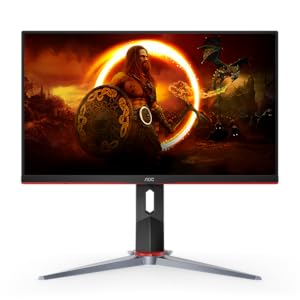


| Brand | AOC |
| Product Dimensions | 22.73 x 61.19 x 52.83 cm; 8.05 kg |
| Item model number | Q27G2S |
| Manufacturer | AOC |
| Series | Gaming Monitor Flat |
| Color | Black |
| Standing screen display size | 27 Inches |
| Screen Resolution | 2560x1440 |
| Resolution | 2560 x 1440 Pixels |
| Number of USB 2.0 Ports | 1 |
| Number of HDMI Ports | 2 |
| Voltage | 240 Volts |
| Are Batteries Included | No |
| Item Weight | 8.05 Kilograms |
D**.
Good
A**E
This is an amazing monitor for my Mac mini m1 (34 inch IPS AOC U34G3X). First it comes with both a HDMI and DP cable. I used the HDMI cable to hook to my m1 mini and it goes up to 100hz refresh rate which is great, I tried 3 others cables to see if it was possible to get to any higher and none of them worked higher than 100hz. If you are going to use this with HDMI just stick with the included cable or one you already have. I also bought a USB-C to DisplayPort cable that gets me to 144hz just fine. Not ideal having to take one thunderbolt port away doing this, but the included usb-c connectors on the monitor partially make up for this. I love the fact that it has 4 USB ports, 2 are labeled as quick charge. I found that I could plug in two unpowered USB hubs into the quick charge ports and they work fine for low power devices like my keyboard, mouse, webcam, security keys etc.. haven’t tried something like a hard drive plugged into them. The two additional ports seem to be faster than the quick charge ones, I ended up plugging in my 1TB SSD drive that goes to around 9XX MB/s read and write when connected via USB-C to my thunderbolt. When plugged in the monitor it gets around 38X MB/s read and write which is respectable though not as fast as the thunderbolt. When I tried the quick charge ports for the SSD it’s so slow not to be useable so I’ll stick to using those for devices that don’t require speed. My other ports on my computer are all occupied and at best I could plug it into a USB hub plugged into a USB-A port but that makes the drive about 250 MB/s write and 200 read, so plugging it in the monitor was the best choice. Even removing the hub as a test and plugging the drive directly to a Mac USB-A gets the same speed, so oddly enough through my monitor makes is run faster compared to the Mac USB-A. The stand is amazing the amount of degrees of freedom it allows to move the monitor and switched to using it despite having an arm that works with this monitor. The picture quality is amazing though colors in certain situations with HDR mode on look off, but in general I appreciate how this mode colors everything compared to normal. I use an app called BetterDisplay to tweak the monitor settings further than MacOS X allows including custom HIDPI modes that scale everything to an ideal size that isn’t too small or too big. It also comes with monitor quality speakers which as usual are of low quality, but at least are loud enough to not worry about being too quiet.
I**A
Antes de que lean esta review Este monitor AOC G2S 27 pulgadas, lo compré por el video que subió el youtuber yanpol, su video "EL MEJOR MONITOR GAMER DE GAMA MEDIA BARATO" Bueno ya esta es mi review : Excelente monitor, muy bueno, y además este modelo el AOC G2S, se puede girar verticalmente como para ver el chat de Twitch, me encantó. Me dejo de doler el cuello, porque se ajusta a la altura qué quieres, y con el tilt, el paneo, todo muy bien. Excelente calidad de imagen y video, colores y todo. Y aunque leí que se quejaban del menú, a mi no me molesta para nada, es de paciencia y de sentir los botones de la parte de abajo, está de todo excelente.
R**O
Colores muy buenos y los Hz tal como indica en la descripción, si trabajar diseño de imagen y juegas te sirve muy bien pues yo lo ocupo para trabajo y jugar en la PS5. Tiene fuga de luz muy tenue típico de los paneles IPS pero nada que afecte o haga ver mal la imagen.
A**R
It's a very good monitor for the price. The cheaper ones will probably be worse in one way or another. For example I had an HP one that was pretty much identical but hadn't had an adjustable mount allowing it to ascend and descend and tilt like this one does. Actually, the tilting feature is very comfortable for me. I use it all the time, I rotate it to share the screen with my girlfriend or just adjust the tilt to try sitting more comfortable/fix my posture. 144hz feels very nice and I am not sure I'll be able to go go back to 60 anymore :) The only shortcoming on this monitor is it's brightness. It doesn't work well when sun shines onto it, I can barely see anything and I use it in a sunroom. Other issue I had with it was that the monitor actually has an audio jack on it. The audio passes to it through the HDMI/dp port. Windows might switch your audio device to the monitor and you'll have to put your headphones into it. Which is fine. However if you're just sitting nearby and youre listening to some music and the display shuts down from inactivity your music cuts off as well, which shouldn't happen to be honest. It isn't an issue for me anymore because I use the jack on my case instead, but be aware if this is important to you. The actual color quality is pretty shit as well but it is to be expected for the budget version. See video for distorted blacks and other colors.
Trustpilot
5 days ago
1 day ago