🚀 Elevate Your 3D Printing Game!
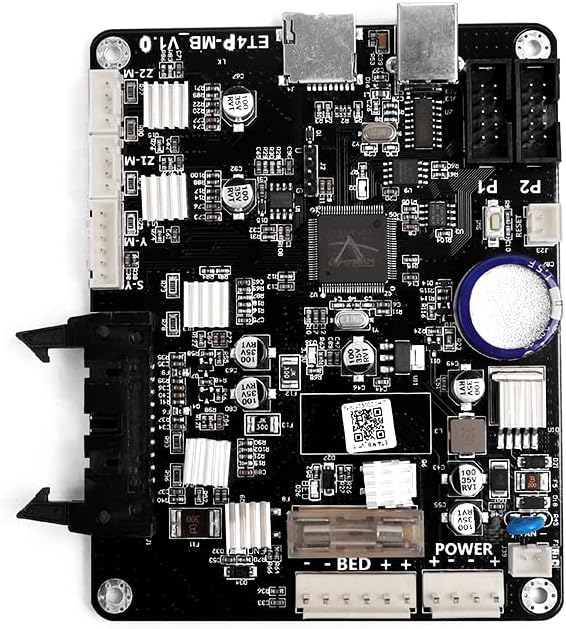
The Anet 3D Printers Motherboard is a highly-integrated control board designed for various Anet 3D printers, including the ET4 PRO. It features a 12V power supply input, USB connectivity, and an upgraded circuit design for enhanced stability and performance, making it an essential upgrade for serious 3D printing enthusiasts.
C**E
This comes with ANET's firmware which has a bad reputation. Flashing this to Marlin is doable but ...
This comes with ANET's firmware which has a bad reputation. Flashing this to Marlin is doable but unlike with the v1.0 board, you will need to flash the bootloader via the J3 header before you can flash Marlin via USB. You will need a 10 pin USBasp and a 10 to 6 pin convertor to flash the bootloader.* Download the Arduino IDE.* Download Marlin.* Configure Marlin in the Arduino IDE with your settings.* Plug in the board-side of the USBasp using an adapter in to the middle of J3 (SCK faces the notch - you should google for diagrams).* Plug in the second board-to-computer USB cable at the top of the board.* Plug in the ANET A8 Power.* Plug in the computer side of the USBasp.PLEASE NOTE: many tutorials say you don't need power to your board to flash it. However, if you have other things plugged into the board, such as fans, they could potentially try to start after rebooting from the flash, which will draw power from your USBasp and burn it out. I was able to flash my board just fine with it plugged into my ANET power supply.* Install the USBasp drivers (I used zadig and selected the libusbK v3.0.7.0 driver).* In the IDE, go to tools and then select "ANET v1.0 (optiboot)", you may have to download this separately.* Select tools, programmer, USBASP.* Select tools, burn bootloader.* You will see "Cannot set sck" errors. Ignore these.* The IDE will tell you that it's finished (in very small print at the bottom).* Select Sketch, then Upload to install your custom Marlin configuration.* Unplug USB and serial.* Power down your ANET 3d printer.Upon reboot you should see the Marlin firmware splash screen on your printer's LCD.
B**E
It works as a replacement for the non-autolevel if you dont mind the excess head movement....
UPDATE: Avoid... This board was installed and a couple of prints run on it back in April 2018, the printer sat until Feb 2019 (This is a backup printer), ran 3 prints today, about 11 hours, turned the fan on high to cool the last part and the fan quit running after 10 minutes. Fan is good as it works in the fan2 port - this is the printers 3rd board ....-----------------------------------------------------------------------------------------------This was purchased after my original board died (non-auto-level), I asked if it would work as a replacement and the response was it wouldn't but all in all it does work. The only complaint is the constant auto-level code kicking in every time you home it - auto-level isn't required for homing.
D**E
Works great.
Had to replace my mother board due to fan port died. This one has been working great since a put ot in. Just having issues trying to update the boot file. I'm sure it is something I am doing. Other than that it works great.
L**L
Easy replacement! Firmware was pre-installed!
After buying a few replacement ANET3D boards from vendors that lied about having the firmware pre-installed, finally this product delivered! Super-easy to get my old RepRap printer from 2015 up and running again with this board. Note, my printer has a heated bed but is NOT self-leveling, and this board (v1.7) worked great right out of the box. I was printing again 10 minutes after the package was delivered.
C**L
Works very good
It was my mistake not read correctly A8-L (Original A8 Leveling) is very complicated to change or update firmware if you don't use autoleveling, but with help from Arduino I can change firmware
C**S
Received a V1.7 board instead of V1.5
My original Anet came with a V1.7 board; however, I ran into issues with this board and my instructor gave me his V1.5 board. As part of that deal I told him I would order him a new V1.5 board. When I received my package it was labeled as a V1.5 board but inside was a V1.7 board. Thankfully this board worked but is not what I ordered. When people order something specific they should get what the ordered regardless if it was technically a "upgrade".
J**Z
Cannot load FW via USB. Using Port: COM3 ...
Cannot load FW via USB.Using Port : COM3Using Programmer : arduinoOverriding Baud Rate : 115200Setting bit clk period : 1000.0avrdude.exe: Send: 0 [30] [20]avrdude.exe: Send: 0 [30] [20]avrdude.exe: Send: 0 [30] [20]avrdude.exe: Recv: I [49]avrdude.exe: stk500_getsync() attempt 1 of 10: not in sync: resp=0x49avrdude.exe: Send: 0 [30] [20]avrdude.exe: Recv: n [6e]avrdude.exe: stk500_getsync() attempt 2 of 10: not in sync: resp=0x6eavrdude.exe: Send: 0 [30] [20]avrdude.exe: Recv: f [66]avrdude.exe: stk500_getsync() attempt 3 of 10: not in sync: resp=0x66avrdude.exe: Send: 0 [30] [20]avrdude.exe: Recv: o [6f]avrdude.exe: stk500_getsync() attempt 4 of 10: not in sync: resp=0x6favrdude.exe: Send: 0 [30] [20]avrdude.exe: Recv: : [3a]avrdude.exe: stk500_getsync() attempt 5 of 10: not in sync: resp=0x3aavrdude.exe: Send: 0 [30] [20]avrdude.exe: Recv: E [45]avrdude.exe: stk500_getsync() attempt 6 of 10: not in sync: resp=0x45avrdude.exe: Send: 0 [30] [20]avrdude.exe: Recv: x [78]avrdude.exe: stk500_getsync() attempt 7 of 10: not in sync: resp=0x78avrdude.exe: Send: 0 [30] [20]avrdude.exe: Recv: t [74]avrdude.exe: stk500_getsync() attempt 8 of 10: not in sync: resp=0x74avrdude.exe: Send: 0 [30] [20]avrdude.exe: Recv: e [65]avrdude.exe: stk500_getsync() attempt 9 of 10: not in sync: resp=0x65avrdude.exe: Send: 0 [30] [20]avrdude.exe: Recv: r [72]avrdude.exe: stk500_getsync() attempt 10 of 10: not in sync: resp=0x72avrdude.exe done. Thank you.
L**N
Not what was advertised but works well
Board is version 1.7 you will have to splice the wires to the hot end of the extruder the rest of the connections just match backup. The only difference I noticed in performance was that when you set under Quick Settings home all it does this back and forth to align itself to the hotbed but works fine.
Trustpilot
1 week ago
1 month ago