
DOWNLOAD THE APP


Customer Services
Copyright © 2025 Desertcart Holdings Limited
DOWNLOAD THE APP
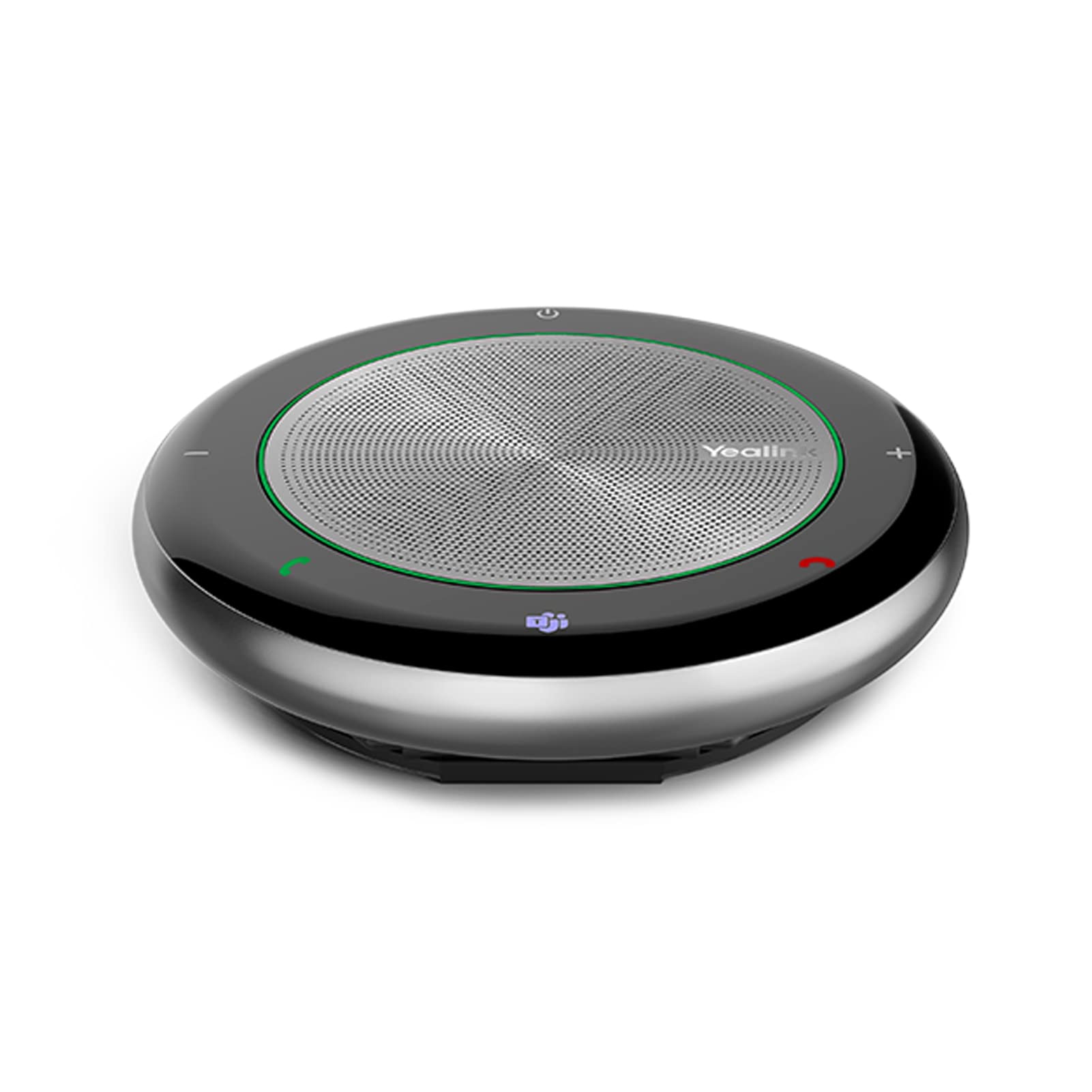
🎙️ Elevate every meeting—because your voice deserves the spotlight.
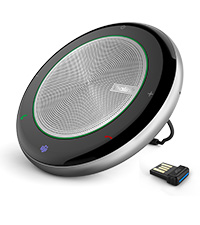
The Yealink CP700 is a portable, Microsoft Teams-certified conference speakerphone designed for small rooms of 4-5 people. Featuring 360° omnidirectional dual noise-canceling microphones, 5W stereo output, and up to 9 hours of battery life, it offers crystal-clear, full-duplex audio. Connect effortlessly via USB-A or Bluetooth with a 10-meter range, and enjoy intuitive mute controls and a compact carrying case for on-the-go professionalism.





| ASIN | B0B58B6DX7 |
| Additional Features | 360-degree voice pickup, noise-canceling microphones |
| Age Range Description | All ages |
| Antenna Location | For Computers |
| Audio Driver Type | Dynamic Driver |
| Audio Output Mode | Stereo or Mono |
| Battery Average Life | 9 Hours |
| Best Sellers Rank | #3,946 in Portable Bluetooth Speakers #28,175 in MP3 & MP4 Player Accessories |
| Bluetooth Range | 10 Meters |
| Brand | Yealink |
| Built-In Media | 1 Pc CP700 speakerphone, 1 Pc collecting zipper bag, 1 Pce user manual, 1 USB Dongle |
| Compatible Devices | Desktop, Laptop, Smartphone, Tablet |
| Connectivity Protocol | Bluetooth, USB |
| Connectivity Technology | Bluetooth, USB |
| Control Method | Voice |
| Controller Type | Button, Voice Control |
| Customer Package Type | FFP |
| Customer Reviews | 3.9 out of 5 stars 27 Reviews |
| Enclosure Material | Plastic |
| Is Waterproof | FALSE |
| Item Weight | 220 Grams |
| MP3 player | No |
| Manufacturer | Yealink |
| Material | Plastic |
| Maximum Range | 10 Meters |
| Model Name | CP700 |
| Model Number | CP700 |
| Mounting Type | Flush Mount |
| Number Of Circuits | 1 |
| Number of Audio Channels | 2.0 or 2.1 |
| Number of Microphones | 2 |
| Number of Power Levels | 1 |
| Power Source | Corded Electric |
| Series Number | 700 |
| Speaker Maximum Output Power | 5 Watts |
| Speaker Type | Computer |
| Subwoofer Connectivity Technology | Wireless |
| Warranty Type | Lifetime |
| Wireless Technology | Bluetooth |
A**R
Perfect conference addition
Everyone in our office uses these. We mainly use them with “teams” to conference call. Sound quality is great, very easy to use.
O**N
Better than PC speaker for meetings and videos but wired and Bluetooth connections work differently
This speakerphone requires a USB port available if you do not use Bluetooth. The device turns off when unplugged, even when fully charged. You can hold the power button on the speaker to turn off if it is on. For the initial test I used the 31-inch long hard wired USB hookup. The wire is permanent on the device, but comes wrapped in it's own circular slot on the speaker phone, which is a nice compact feature. For a Teams meeting, this device recognizes that and you can control the mic mute using your Teams mic icon. When doing so, the speaker turns it's mic red so you are aware if it is on (very important for those side remarks). The Bluetooth pairing shows up as "Yealink CP700" after holding down the Bluetooth symbol on the device for a few seconds. An English voice tells you that it is in pairing mode and when paired. I hosted a Teams meeting via PC built-in Bluetooth and it looked like that the device functions differently than the wired connection. When muting the mic in the Teams app, the speakerphone did not reflect that and did NOT turn the mic on the device red nor the lighted ring red like the wired connection. Although, it did appear that you were muted when talking. The Teams light was not lighted either despite being connected to a Teams meeting via Bluetooth. The instructions indicate it should work the same. I plugged the USB cord back in and only then did the mic & ring show red and the Teams light up on the speakerphone. Keep this in mind. I docked a star due to this connection difference. The sound quality is nice and you can control it by tapping on the "+/-" on the speakerphone. Power save mode is invoked after about 90 seconds of inactivity. The battery is supposed to last up to 9 hours. Nice round zippered case for portability. An optional Bluetooth dongle (BT50) is referenced in the manual, but not included. I am not sure if the Bluetooth will work the same as wired USB connection if you used this dongle. This speakerphone is made in China.
J**Y
Excellent portable speakerphone that really shines with multiple people using it
Yealink might not be a household name, but they've got a solid rep among remote workers and similar types for making high quality, full featured audio devices sold at a decent price point. In particular, they make great headsets--arguably the best value in the market. They've now got a very broad catalog that includes earbuds, headphones, headsets--and speakerphones--among other things. I have to tell you that I was very resistant Initially to these speakerphone 'pucks'. Actually, I hated the very idea of them. I had a Bluetooth headset for the computer, a Bluetooth earpiece for other situations and speakerphone connectivity in my car. I do my best to avoid meetings and when I can't avoid them I'm typically the only person on my end. I've got other devices for music so I didn't really see much need for the speakerphone devices. Historically, speakerphones in general have been awful to deal with. Until recently, the call quality was so bad that it was considered downright rude to make a call on a speakerphone. Even so, there were blowhards that considered it a 'power move' to do so. If you were on the other end of a call like this it was brutal--you got to listen to the aforementioned blowhard's echo ridden bloviation. If you managed to get a word in edgewise, invariably you couldn't be heard clearly and it wouldn't be long before Mr. Blowhard was cutting you off and talking over you. Fast forward to a couple of years ago--someone gave me a speakerphone puck made by a well regarded brand as a gift. I told they guy I would try it out and to my surprise it was extremely useful. Call quality was excellent on both ends of the conversation. It interfaced nicely with the various desktop assistants and was a decent option for music. I started to view it as the 'Swiss Army Knife' of remote working audio. It could handle just about anything. Now I won't leave home--or even walk into my office--without this type of device. In fact, this Yealink CP700 now my dedicated office 'puck'. It can stand 'toe to toe' in terms of quality with any similar device on the market. Where this device *really* shines is when you have multiple call participants in your office with you. It has 360 degree voice pickup and a full duplex microphone. Two omnidirectional microphones miss very little from anyone involved in the call. I've tried more of this type of device that I can count and this might very well be the best available for multiple voice/conference call situations. You can connect this speaker via USB-A or Bluetooth and connected to just about any device imaginable. I've used it with a few different cellphones, my desktop computer and my laptop computer. The interface is really simple yet highly functional with sleek touch sensor buttons that let you control all of the relevant functions. It looks as good as it performs. All the better--the device is surprisingly small and weighs less than a pound. Just an excellent speakerphone for multiple use cases. Highly recommended!
J**Y
Great for working at home!!!
This is a great speaker to have if you work from home!!! I love this speaker. It has exceeded all of my expectations. This is a great way to be in your zoom, teams, and conference meetings, the sound is great and they can hear you just like you are all in the same room. It has a noise cancelling button which is great, I can have my music on in the background and they cannot hear it. Now you cant have it blasting but I have mine just for a background in between calls or when no one is talking during a meeting. The Mute button works great. You can plug it in to your tower, or it can also be used with the dongle so that you can move it with you, in case you need to move away from the computer. You can still hear what is going on. I have mine plugged in so I am not sure how it is moving around, I don't have much time to leave my desk so that option has not been used by me. This is great for taking calls!!! This was my biggest test. I work in customer service and I wanted to make sure that I could also use this during those calls. YES I can and it is great!! I searched around to see if there was any information for this conference speaker in regards to taking calls from an AVAYA phone system and I could not find anything. I was worried, but I used it and it is great. Yes you can use this instead of headphones to receive calls from a customer service phone system. I was so excited. If you don't want to wear headphones for hours at a time while you are taking calls, this is a great option. You are still able to hear the customer and the customer can hear you with no issues. You have the freedom to stand up, stretch, take a few steps, and still continue to do your job. This is a must have for any office, especially work from home!!!
D**2
Great sound quality,
The sound is great on this, It's small and easy to move around. It's definitely over priced, packaging was good
E**N
Easy to use speaker
I used this speaker hooked up to my computer thru the USB plug and it was great for detecting our voices when on a Zoom call. We struggled with my computer microphone only picking up our voices if we sat right in front of the computer so this speaker has solved that problem. I also used bluetooth and connected it with my phone while we did a facetime call as a group. It was a bit fuzzy at first and would pick up all the small background noises and amplify them. Some of the voices were not as loud or clear as others on the call but it does go a little louder than my phone speaker which was nice.
M**S
Just what I needed.
I work in an environment where I use a VOIP softphone all day long. I normally use a headset, but I find sometimes I don't want to have anything on my head. I got this speakerphone so that I could be able to take calls without a headset. It has worked wonderfully for my needs and made my work day more comfortable. I use this via the USB connection. You just connect the speakerphone, turn it on, and then you are ready to go. Of course, you should go to the Yealink website and download the desktop software to get firmware updates (I believe there is one available right away). After that, go to the Sound Settings on your computer and make sure that the speaker is set to be the default speaker and mic. After that, everything works as you would expect. You can also connect this to your computer via Bluetooth. It does have rechargeable battery built-in. I find that wired connections work better in general so I default to those. I also have and use Microsoft Teams with this speaker, and I find Teams works well with this speakerphone in one-one-calls, but for group meetings sometimes the speaker does not like to be selected. Restarting Teams or your computer usually fixes this. I have only had that issue come up twice, but it was a little annoying. The speaker works fine otherwise. It has a built-in volume control, and also indication via a blue, green, or red ring of Bluetooth, volume up and down, and mute respectively. This speakerphone is a little on the pricey side, but given that you are getting wireless and wired connectivity and a built-in microphone, it is along what you would pay for other speakerphones, especially from companies like Jabra. You get the noise filtering and other features you would expect and also native support for teams. For what I needed, this is the perfect option to save my head from discomfort caused from wearing a headset all day. Sound is clear and crisp, and others hear me just fine. I would recommend this speakerphone to anyone looking to have true hands and head-free calling.
T**E
An impressive speakerphone
In the age of telecommuting and conference calls, having good audio is key. In my hybrid work setup, this is the best solution I've used. I spend my working days at home or in the office, and when I'm in the office I frequently take calls in conference rooms where there isn't a phone/audio setup. I use this for all my calls, and I love it. First, this is not cheaply made. It has some heft and is a solid unit. Second, the audio is clear on both ends. The mic picks up voices cleanly and the speaker is clear, though I wish it was louder (more on that later). The controls are really nice - they're touch screen type, not physical buttons, which took some getting used to, but I like it. Other notes are that it's nice it has a battery to use as a portable Bluetooth speakerphone, and the stand that pops out the back is a real nice touch - it's sturdy and doesn't show signs of breaking. Last note, this is plug-and-play. No drivers needed to install, and it works right out the gate. A couple things I think could be better: 1. as I mentioned the speaker could be louder. Many times, people on calls will be very quiet and are hard to hear and I find myself cranking it up to the loudest setting. 2. (This one is very nitpicky) the battery indicator light doesn't turn off (or I haven't figured out how to make it go away). This is a green light that is always on and will either flash showing it's charging or be steady when fully charged. I'd go with a pin-hole light on the side to show the battery and keep that green light off. These couple items aren't enough to keep me from using this on a daily basis. I very much recommend.
Trustpilot
1 day ago
3 days ago