
DOWNLOAD THE APP


Customer Support

Desert Online General Trading LLC
Warehouse # 7, 4th Street, Umm Ramool, Dubai, 30183, Dubai
DOWNLOAD THE APP
Customer Support
Desert Online General Trading LLC
Warehouse # 7, 4th Street, Umm Ramool, Dubai, 30183, Dubai


🔗 Connect More, Work Smarter, Look Sharper
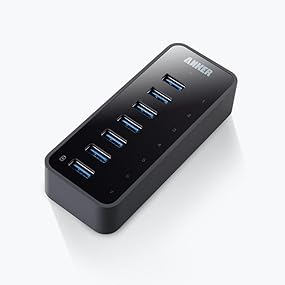
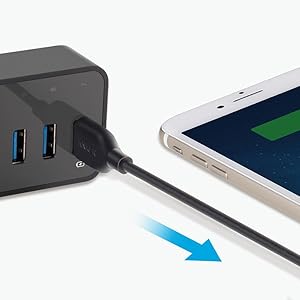
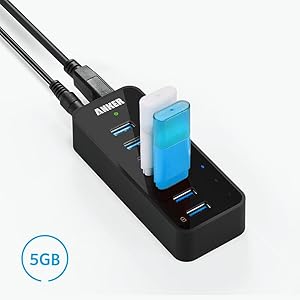
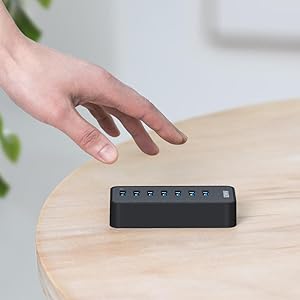
The Anker USB 3.0 Style Hub offers 6 high-speed USB 3.0 ports plus 1 dedicated fast charging port, all housed in a sleek blue-black design. Perfect for professionals seeking to expand their device connectivity with style and efficiency.


| Brand | Anker |
| Series | AK-A7505112 |
| Item model number | AK-68ANHUB-BV7A-0004 |
| Operating System | Mac |
| Item Weight | 11.4 ounces |
| Product Dimensions | 4.3 x 1.7 x 0.9 inches |
| Item Dimensions LxWxH | 4.3 x 1.7 x 0.9 inches |
| Color | Black |
| Voltage | 12 Volts |
| Manufacturer | Anker |
| ASIN | B014ZQ07NE |
| Country of Origin | China |
| Is Discontinued By Manufacturer | No |
| Date First Available | January 30, 2014 |
J**K
This is a perfect solution if you use a laptop in the office. The 7th USB port is the dedicated "charging port". With a quick test on my Samsung Galaxy Note8 the 7th port does NOT provide "Fast Charging" per say (it simply says "Charging"), However, the charging speed's are noticeably faster than traditional laptop USB hub charging. For example: Within about 10-20 Minutes of charging my Note8 went from 83% to 98%. While charging quickly in the 7th USB hub the Note8 still connects to my laptop and I am able to transfer files like normal or even use SideSync to use the phone while working on my monitors. The build quality is good, it has a nice matte texture/finish on the sides and bottom (a more rubbery feel) which ensures that this Hub will not slide around your desk or set up. The usb line is good enough for a laptop office set up but may be a bit on the short side for others. The power cable that is included as well is nice and long. Total of 7 USB ports (7th being a charging port combo) is perfect for my needs. Thank's to the Hubs dedicated power outlet plug I don't need to rely on my laptop's power. I work on a lot of media content: blogging, write ups, video edits via Adobe PP/AE,and also Photoshop. My razerblade laptop become's quite hot during these sessions and so to have individually powered hubs helps me connect USB fan's and laptop coolers that help with temperatures as well as connecting a USB Ethernet adapter, my USB SD Card reader, and to quickly charge my phone all at the same time. I highly recommend this product.
R**F
Very high-quality unit. Powered hub so you get full power on each port (for charging). Non-powered hubs draw their power from a single port on the computer so you're limited to 1 amp of power split between all the devices you have plugged in. Did some basic testing with a USB power meter and EACH port allowed 1A of draw. Only managed to get 1.6A out of the charging port but I think that's all my nearly-dead iPhone 6S wanted. I don't think I have any devices that would take the full power the charging port delivers. The charging port also allows data transfers, so its not charge-only but a fully functional USB3 port. Did some throughput testing as well and measured transfer rates approaching the maximums for whatever devices I had plugged in, so no noticeable slowdown over just a bare USB3 port on my PC. All in all, a very nicely built powered hub. The only con I can think of is that there aren't any rubber feet included. Its bare metal so it'll slide around a little on a smooth surface, and it'll shift due to tension on cables etc. I threw some little rubber feet on the bottom to keep it from shifting and it did the trick, but it seems something pretty minor that Anker could've included.
T**N
I have had this unit since July 2017. While it works, I have problems from time to time where it just drops the connection - not helpful and frustrating during back ups or transferring large files to it. I have to disconnect the power to the unit, wait a couple seconds and plug it back in to regain the connection (or restart the computer with the unit on). Disconnecting the USB cable and plugging it back in doesn't help. When I plug the unit back in, I sometimes notice a spark - still works though. Also not happy that even though the computer is shut off, ALL of the USB ports still get power. I have a couple external drives connected to it but when the computer is off, they keep running. I would have thought that the only port that needs this power is the charging port. All in all, the unit works and when it is working, I have no issues with the transfer rates, printing or charging from the charging port. The unit is small enough that it sits on my desk and I have gotten into the habit of disconnecting the power adapter when I shut the computer off. I have a separate unit for USB charging so this is not an essential unit to have on all the time. Having said that, I am currently looking into a unit that I can turn the power on and off for each port, this way I can just turn off the external drives when I want and leave the printers and charging ports working. Ariel from Anker contacted me and I have to say that I was quite impressed with their Customer Service. She arranged for me to get a replacement unit within a couple of days and the replacement has been working fine since I received the unit. She followed up with me throughout the process in making sure that I got the unit and that the replacement was working without problems. I upgraded them to 4 stars because of their Customer Service. I would have given them 5 stars but I still would prefer to have the ability to turn off the different ports so that my external devices did not run all the time.
B**T
If you happen to be a streamer who uses OBS/SLOBS on a laptop this product is great for adding additional usb 3.0 slots with ability to power the devices connected. Since buying this I have my elgato facecam, elgato stream deck, hyper X quad cast microphone and a mouse all plugged into this device. All are working normally. For the most part it’s plug and play, although i did have to reset my mic and facecam in SLOBS. I will update this review if needed.
N**F
OK, This MIGHT NOT be a fair review, since I purchased this device 8 years ago to assist my docked laptop workspace at my job. I am a 20+ year veteran sysadmin for a Public School in Upstate NY, and I utilize allot of USB flashdrives. As of this week. I noted the device began to get HOT to the touch. Since then, this hub only consistently recognizes devices attached to ports 1-3. Unfortunately ports 4-7 have become hit-or-miss. All 7 ports continue to deliver power. I have tested the AC Power adapter with a multimeter, and it is still working fine. I have swapped the USB 3.0 cable for 2 known-good cables and re-tested the hub against multiple desktops/laptop computers, and found the problem follows the device. Context: This hub is normally connected directly to a free USB 3.0 port on my laptop. And it is my nature to be very careful with all my devices to ensure I get a good return on my investment. This hub has been resting comfortably on a flat piece of aluminum (for heat dissipation) on my desk. And at the end of each work day, I turn off the switch on the surge suppressor which supplies power to all the devices at my workspace. That said: A powered USB hub of this size not a terribly complex piece of equipment. And I would expect that it would last practically forever, if cared for. Is it possible I accidentally killed it from a static discharge, or potentially one of my peers tried to plug a USB-C device into it without looking, and killed it? Sure. This is possible. I guess I have to say, that for the 8 years this device has served me well. I am disappointed that it suddenly it started acting strange. I need a new one, but I am hesitant to purchase this same device considering the premium price I paid for it initially, and the fact that it eventually failed. Is this a fair review? I don't know. But it is an accurate description of my experience. THAT SAID: I do want to leave some positive feedback: While this hub was healthy, it was fast and reliable. And I have to say, I very much like that Anker decided to incorporate a USB 3.0 uplink port on this hub, rather than incorporating a "hard wired" USB 3.0 up-link cable. This enables you to utilize a shorter (or longer) uplink cable if your workspace requires it, and in the event the cable gets damaged, you can easily replace it and keep going. That design choice is a welcome one, and it actually helped simplify my troubleshoot, when it started to fail. So when I go shopping for a replacement for this device, I will make sure to purchase another hub with a removable/replicable uplink cable. I consider it a MUST-HAVE feature, and my kudos to Anker for designing this hub with that option.
Trustpilot
2 weeks ago
3 weeks ago