
🎉 Level Up Your Gaming Experience!
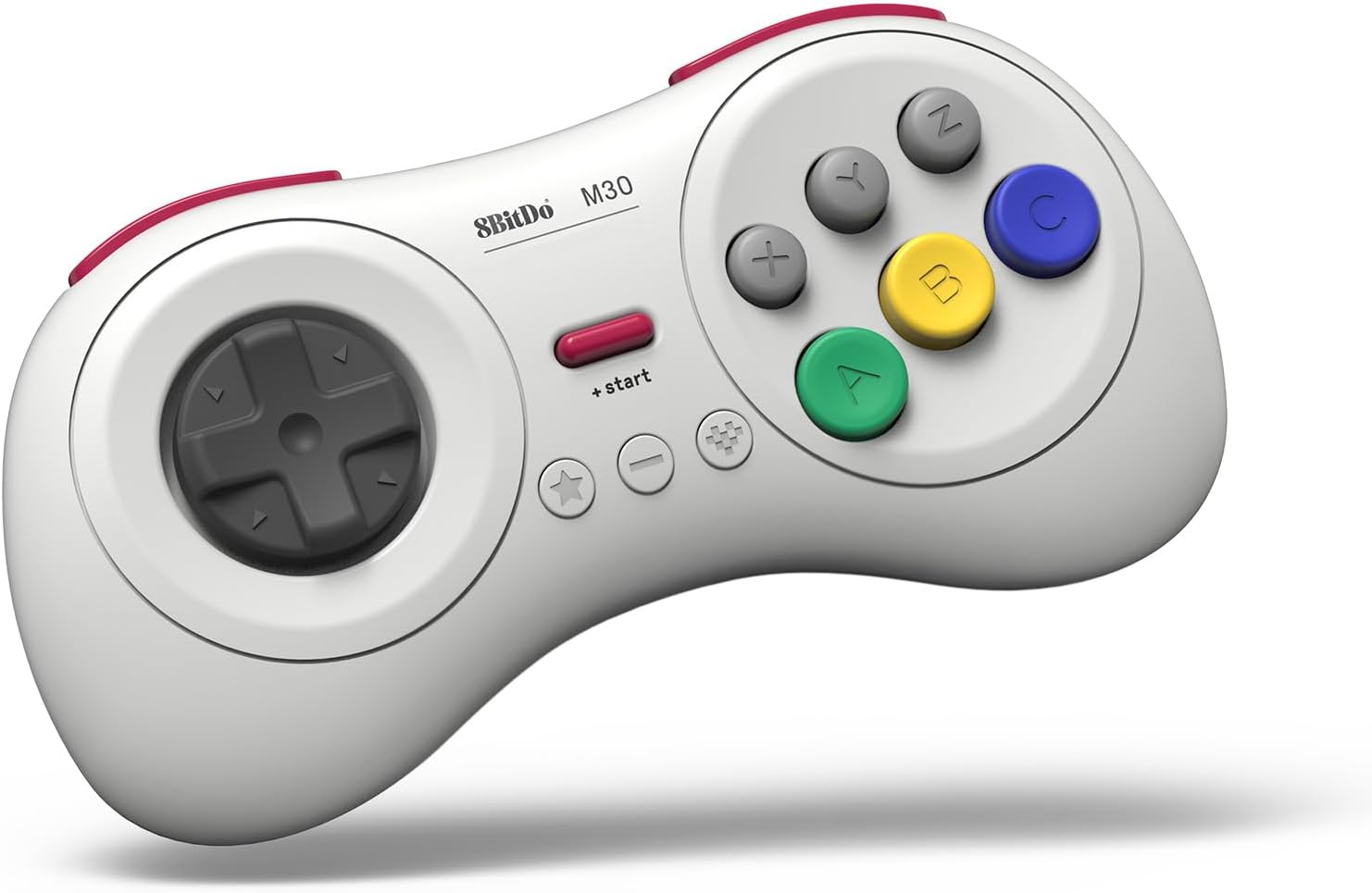
The 8Bitdo M30 Bluetooth Controller is a versatile gamepad designed for retro gaming enthusiasts. With a classic 6-button layout, it seamlessly connects to multiple platforms including Switch, Windows 10 or above, Android, and Raspberry Pi. Enjoy the freedom of wireless gaming with Bluetooth connectivity and a rechargeable battery, while the turbo function enhances your gameplay. Plus, keep your controller up-to-date with upgradeable firmware.


| Button Quantity | 6 |
| Additional Features | Wireless (Bluetooth) |
| Power Source | Battery Powered |
| Hardware Platform | Android |
| Controller Type | Gamepad |
| Connectivity Technology | Bluetooth |
| Compatible Devices | Switch, Windows 10 or above, Android, Raspberry Pi |
| Package Quantity | 1 |
| Color | White |
S**M
A must have for shoot-em-ups on the Nintendo Switch.
So from what I've been reading, a vintage Japanese Sega Saturn controller is considered the ultimate gamepad for shoot-em-ups. Some people prefer the arcade stick, but I think the Saturn controller is more popular in the SHMUP community. It's also considered the best gamepad for retro fighting games, though an arcade stick is favored over the traditional gamepad for fighting games. However, there aren't any adapters that will let you use a real Saturn controller on the Nintendo Switch, so I decided to give this a try. Well, my SHMUP skills shot through the roof as soon as I tried out this pad. I never got seriously into the genre, but I'm now starting to since I have the proper equipment for it. I found modern analog sticks terrible for SHMUPS. There are many instances where you'll need to slowly move in one direction with the bullet patterns(or in some games like Radiant Silvergun or Ikaruga, to get through tight corridors), and this can only be accomplished on an analog stick by tapping the stick to one side over and over again, which works horribly because it's an analog stick, not a button. The Sony/Microsoft/Nintendo d-pads work for moving slowl, but they're still bad for SHMUPS since it's hard to move diagonally or in a circle. However, the 8-direction Sega-style d-pad is perfect. You can move slowly to one side by clicking the d-pad repeatedly and easily move in 8 directions. I wish I could compare this to a vintage Saturn controller or the officially licensed Retro-bit Saturn controller for Switch, but I haven't used either. I can't say if those are better or worse than those. All I know is that this blows away trying to play SHMUPS on a a DS4, Xbox One controller, or Switch Joy-cons(some people do actually like the DS2 for SHMUPS though, try if if you want :Þ). Games I've tested on it include Radiant Silvergun in Retroarch, DoDonPachi Dai-Ou-Jou in Retroarch, Ikaruga on PC, Touhou 16 on PC, Danmaku Unlimited 3 on Switch, Gunbird 2 on Switch, and Aero Fighters 2 on Switch. All controlled beautifully. A few things to note. For Retroarch I had to put it into Android mode(start+B). Windows mode(start+X) had a glitch where the R-button was just a duplicate of the Z-button and L wasn't recognized at all. For Touhou I had to put it into Windows mode and to use Joy2Key, since Joy2Key would not recognize Android mode. Both Android and Windows mode work with Steam, however, in Windows mode LB is mapped to L on the gamepad, LT to R, RB to Z, and RT to C. With Android mode it's mapped like it is on the Switch where L is LB and R is RB, which makes way more sense. But the bottom line is, if Windows mode is not working right on PC then use Android mode, Windows will recognize either(note that I do not know if Android mode works in wired mode, I tested with bluetooth mode). Apparently one is Xinput and one is Dinput, hence the different compatibility. And of course, Joy2Key is always an option for games that refuse to recognize the gamepad like Touhou. I had no issues with it on Switch since the Switch let's you remap controls now. However, the manual doesn't tell you how to change the D-pad from emulating the left analog stick to emulating the D-pad, even though it does have that feature. It's so typical of retro stuff to put features in and not tell you they exist. The pad also worked great in the Sega Genesis classic collection on Switch with Sonic 2 and Streets of Rage 3, and it worked well with Sonic Mania. I'll have to try it with Streets of Rage 4 soon. So bottom line, I can't compare it to the officially licensed Retro-bit controllers for the Nintendo Switch, I just know this a really good gamepad on it's own. And of course a vintage Saturn controller and an adapter is probably superior if you're serious about PC SHMUPS, but they won't work on Switch and will cost you more than this gamepad and lack bluetooth and the extra buttons. Also, while Retroarch, Steam, Joy2Key, and Switch all worked perfectly with this gamepad in the end, it did take some trial and error(that is the norm for anything other than Xbox controller/Windows and pro controller/Switch). I'll just say if you want a gamepad for PC and Switch that's great for SHMUPS and fighting games and classic Sega games, this works great.
B**7
Fantastic Controller for a Sega fix.
I primarily bought this controller for the Sega Ages games coming for and on the Nintendo Switch. It pairs and works on different things like android, PC, Switch, and Steam similar to most of 8bitdo's products. The build of the controller is as solid as I expected it to be, light but doesn't feel cheap. The buttons feel great, similar to the 6 button Genesis controller and the same can be said about the D-Pad (which is a major plus). This D-pad is fantastic imo, a HUGE improvement from the other controllers I have from them (the SN30Pro), barely any misread inputs from left or right going up or down instead. One main caveat for using this on the Switch is that it follows the Nintendo button layout (so A on this controller is B and X on this controller is Y, and the Z and C buttons are mapped to L and R while the L and R buttons on the controller are mapped to ZL and ZR). Plus the D-Pad is apparently detected as an analouge stick instead of a D-Pad/the 4 directional buttons so that might cause some problems with some games. This isn't a huge problem for the Sega Ages games since you can remap the buttons if need be but if you plan to use this controller for a game that doesn't let you remap your buttons then it could be a problem. (And the Z and C buttons are mapped to L and R while the L and R buttons on the controller are mapped to ZL and ZR) Using this controller on Steam works pretty great using X-input (and Big Picture Mode) too. Overall, this is probably 8bitdo's best controller so far. I know that Retro-Bit are also releasing original cased wireless Sega Genesis and Saturn controllers in the future (who knows when) that will also work with the Switch, but for $30 this is hard to beat and is a great for all the Sega Ages games that are planned for the Nintendo Switch and Sonic Mania.
T**4
The best retro controller on the market
This controller is, far and away, the absolute best retro controller on the market. Based on the Sega Genesis 6-button controller with inspirations from the Sega Saturn Model 2 controller, this works extremely well with retro games, and has a number of handy features to make the entire experience enjoyable. The ergonomics are great, and dare I say, better than the 6-button Genesis pad by a long shot. It just fits well in the hands. 6 face buttons, 2 shoulder buttons, and 2 extra buttons that function as a select and home button, all come together to make for a controller that works well with just about any retro game out there. It also has a turbo button. The d-pad is every bit as good as the original d-pad (so far...time will tell how durable it is). It is very accurate, and doesn't feel at all uncomfortable to use. I had no issues pulling off various combos and specials in fighting games with this. The buttons are all responsive, as well. The top row of face buttons do have a slight wiggle, but it is so slight, it is never noticeable while playing. The shoulder buttons also are very comfortable to use, and give the controller extra buttons to work with, making it a versatile controller that can work well with SNES, Saturn, and PlayStation games. As described, the controller has Bluetooth connectivity, though you can plug in a USB Type-C cable to play with a wired connection (I'd suggest getting a longer cable, as the included one isn't very long). Wired or wireless, latency is not an issue at all, and I had no problem connecting it to any Bluetooth device. The connection is also very stable. While I haven't tested battery life, 8BitDo advertises 18 hours of continuous play. Having used their SF30 Pro controller, I don't doubt that's accurate, as that gave me roughly 14 hours. The controller works on a nice assortment of consoles, with modes you can toggle by holding a button while turning the controller on. It will connect in XInput, DInput, Mac, and Switch modes. Yep, this works on Switch. With a bit of a caveat. For those wanting to use this with the Genesis Collection, unfortunately, the controls are layed out in a way that is inaccurate to the original Genesis controls, and there isn't an option to remap. That's not a fault of the controller, but the collection itself, though. And the controller is designed in conjunction with the Retro Receiver, and even properly maps the buttons to the Sega Genesis controls, with the L and R buttons mapping themselves to act as extra Z and C buttons, respectively. But all in all, this controller is easily worth the purchase. For those looking for a good controller to use with RetroPie, Lakka, RetroArch, etc, this is perfect. If you were on the fence, I can assure you to climb over. It's a great controller.
R**N
Great Alternative for the Original Genesis Controller
As someone who grew up playing Sega Genesis and have used the SN30 Pro controller on a Nintendo Switch, I was very interested in getting this controller. To keep things short and sweet, if you plan on using this on the Genesis, this controller is a great alternative to the original Genesis controllers. I had no problems with latency, disconnections, or anything with it connected to my Model 2 Genesis, and the fact that 8bitdo went with the 6 button layout is great for playing fighting games with. The only real gripe I have is that Switch controls are switched (really keeping up with the name there), meaning that B is A, A is B, X is Y, and Y is X. That's like me going from playing with a Switch Pro controller to playing with a Xbox controller. Also, don't expect this to be a miracle on Android, as the apps on that OS have spotty controller support. However, for the console it was designed for, that being the Genesis, it works out beautifully. Just remember to get the reciever with this version, or just the cheaper 2.4 GHz version with an included reciever. As far as design, this is a well designed controller. It has a few more curves than the original controllers, making it more comfortable in my opinion, and like it's Super Nintendo with sticks counterpart, it's built like a tank. The d-pad also works well, and the buttons don't feel too shabby either. So, if you're looking for a new controller for the Sega Genesis, or maybe you ordered an Analogue Mega SG system, you can't go wrong with this controller. If you get this Bluetooth version, though, remember to get the Retro Reciever for the Genesis, or if you're just getting this for Genesis and that's it, just get the 2.4 GHz version.
K**R
Very Solid Controller, but Not Perfect
First off, I want to start by saying that the 8BitDo M30 Bluetooth Gamepad feels great and performs very well. If you want a solid alternative to an actual Sega controller, and you want an excellent d-pad for fighting games and/or retro games, then consider this your go-to controller in that regard. Expect some problems along the way, though. First, I tested this game on Switch. I love the built-in menu for testing controllers on Switch, so I went that route first, due to how accurately you can assess the quality of a d-pad with that menu. Alas, none of the d-pad presses registered in the test menu, leading me to believe that the d-pad emulates the left analog stick, instead. Next, I wanted to test it with some fighting games, so I tried both Samurai Shodown and King of Fighters 2003, and the d-pad performed admirably on both tests, with any botched move commands likely the fault of myself (as I'm not used to the stricter input requirements typical of SNK games). I decided to perform one final test on Switch, mostly to confirm my assumption about the d-pad emulating the left analog stick, rather than the directional buttons on other Switch controllers. I chose Tetris 99 for this task, since you control tetrominos with the directional buttons on other Switch controllers and use the left analog stick to target specific opponents. Alas, as I assumed would happen, the d-pad on the 8BitDo M30 did nothing more than target opponents, leaving me unable to control the placement or descent speed of my tetrominos. I wish 8BitDo would consider doing what Hori does with its Fighting Commander controllers by including switches that allow players to change whether the d-pad emulates an actual d-pad or the left analog stick, as I can't imagine such functionality drastically increasing the price of production. That said, given how many indie developers seem to insist on mapping character movement in 2D platformers to the left analog stick on modern controllers, I can see why 8BitDo chose to have the d-pad emulate the left analog stick if that choice had to be made. UPDATE: Apparently, you can change the d-pad's function! Thanks to Anita L. (whose review appears on this page) for this info! By holding the - (Minus) button and Up, Left or Right on the d-pad for five seconds, you can change what the d-pad does. Up make the d-pad act as a d-pad, while Left and Right make the d-pad act as a left or right analog stick. This means that Tetris 99 is at least playable with this controller, even if you can't easily target opponents anymore. WHY WASN'T THIS IN THE MANUAL?! People more familiar with Nintendo's controller layouts should consider the fact that Sega's controllers' button layouts tend to clash with those of Nintendo's controllers. As such, you should expect some confusion surrounding the button labels and their actual functions. For example, A and B on the 8BitDo M30 act as the respective B and A buttons on other Switch controllers, with X and Y similarly reversed. C and Z act as R and L, with L and R acting as ZL and RL. The + Start and - (Minus) buttons at least match their Switch controller counterparts, with the Star and Heart buttons acting as Capture and Home respectively. UPDATE: Similar to the above d-pad trick, you can change the functions of the A/B/X/Y buttons to match their Switch counterparts by holding the - (Minus) button and Down on the d-pad for five seconds. To change it back, just do it again. As I mentioned before, I'm not so great at SNK fighting games, so I decided to test the 8BitDo M30 with Ultra Street Fighter IV on PC via Steam. I couldn't begin to imagine the difficulty I'd have in getting this controller to work. For some reason, Microsoft seems to have recently 'implemented' mouse cursor control in XInput controllers, toggled on and off by pressing the Start button on whatever XInput controller you happen to be using. I use the word 'implemented' loosely, as I suspect that the manner in which I experienced this 'feature' was unintended. Basically, I found that the 8BitDo M30's d-pad would occasionally move my mouse pointer around. Eventually, I came to the realization that the 8BitDo M30's Start button was toggling this 'feature' on and off. Terrible. I seem to have found a fix for this issue. Note that I'd previously made sure that the desktop controller configuration through Steam was properly dealt with, which led me to realize that this was, in fact, a Windows 10 issue. To fix this issue, try doing the following: 1) Go to Device Manager. (You can access it by right-clicking the Start menu in Windows 10 and choosing 'Device Manager' from the context menu that appears, or by simply typing 'Device Manager' in the Start menu and selecting it from the search results.) 2) In Device Manager, expand the Human Interface Devices section by clicking on the > symbol to the left of that section. 3) Locate a device called 'Bluetooth XINPUT compatible input device' in the Human Interface Devices section. 4) Make sure your 8BitDo M30 is turned on and connected to your PC via Bluetooth. 5) Right-click on 'Bluetooth XINPUT compatible input device' and choose 'Disable device' to disable it. 6) Since the 8BitDo M30 is turned on and connected to your PC via Bluetooth, you'll be prompted to restart your PC, so restart your PC as prompted. 7) Once your computer has restarted and you're logged into Windows 10, go to Device Manager again, then to the Human Interfaces Device to locate the 'Bluetooth XINPUT compatible input device' one more time. Right-click it and choose 'Enable device' to re-enable it. 8) Turn on your 8BitDo M30 (as it likely turned off automatically when you restarted your PC). You should notice that the Start button on your 8BitDo M30 no longer toggles mouse control on and off. Anyway... So, I tested the controller with Ultra Street Fighter IV, and it performed beautifully. Not a single botched move command. I couldn't be more pleased. Overall, I highly recommend the 8BitDo M30 for people who prefer Sega controller layouts or just want a solid controller with six action buttons on the face of the controller. It's a bit of a shame that the experience falls so short of perfection when other controllers manage to offer a more streamlined experience, but it's worth the extra work, in my opinion.
P**N
The best Wireless Mega Drive/Genesis/Saturn controller for emulators
EDIT 3/13/2019 - Information was incorrect, left for clarity but noted with a disclaimer. Remember to always read the manual closely kids. This this is a real blast from the past. I preferred the 3 button controller myself, but for maximum compatibility this was the correct choice. The D-pad feels as good as I remember (so it's probably better than it really was to use), the buttons are very responsive, and the overall feel is quality plastic and a modern USB Type C connection. The included cable feels like an upgrade of sturdier quality, and is black to match the controller with a rounded cable instead of flat. Works great for PC (bluetooth and wired) and android (Bluetooth) emulators in my testing, and will likely be my go to for the foreseeable future. Switch specific things of note: -EDIT: 3/13/2019: Inaccurate information, see seller comment below- The official Genesis collection for switch is my primary reason for purchasing this, however there is no remapping for controls in this version, sadly making it a mostly frustrating affair to play for certain titles. Many games are playable with only one or two buttons as the primary input, but for this game stick to the PC version if you plan to use this controller. - This works for Smash Bros Ultimate, and surprisingly competent at that. The DPad can be mapped as the left stick, though you lose fine control and will be dashing and smashing everything without tilt controls, for basic fun it's more than capable as a second controller. -EDIT: 3/13/2019: Inaccurate information, see seller comment below- The left stick mapping means that games like Tetris 99 will not function. -EDIT: 3/13/2019: Inaccurate information, see seller comment below - Additionally, while the D-input and X-input match the main face buttons to the Xbox layout, with C and Z mapping RB and LB respectively, and shoulders mapped to the triggers, the switch configuration matches the Nintendo layout physically, so A=B and X=Y which requires a little muscle memory. - Sega Ages games are the real dream for this, allowing mappable controls and are quite usable in Sonic and Phantasy Star at the very least.
B**N
Perfect for Sega and Other Devices
Best game pad from 8Bitdo if you ask me. It feels premium and the buttons are perfect. The D pad is the classic Sega pad which honestly is the best one ever made with the round button form factor. The controller connected right away to my Genesis adapter too, so no issues.
K**E
Insane bindings, no software support, unusable in most emulators
I honestly have no idea how this controller is so well reviewed. While the construction is top notch, and this is maybe the most gorgeous and comfortable controller I've ever held in my life, everything about the usability of this product is well below average. Bafflingly, the M30 is entirely unsupported by the 8bitdo Ultimate Software, and instead comes with a number of bindings that allow you to switch it between Switch, Android, and Xbox/Windows modes, as well as the ability to switch whether the d-pad is emulating the d-pad or the stick of the respective controller it's mimicking. However, none of this alleviates the biggest issue with the controller: the C/Z buttons are bound to L2/R2 by default in every mode, the multitude of buttons in the center of the controller are bound to things like the share or guide buttons with no option to reconfigure or rebind them, and one of the buttons is a dedicated turbo button which can be registered and recognized within games, but which will always function as a turbo toggle at the hardware level. This means that while you could theoretically bind some of these buttons to L3/R3 within an emulator, a game, or even through Steam input, the controller will still toggle Turbo on the next input when the respective button is pressed. Oh yeah, and if you hold the Start button for too long, it shuts the controller off. Several games I tried to play with this thing required you to hold start for various functions. You can probably guess how that went, and as you know by this point in the review, this is another functionality that can't be rebound or disabled, just like the Turbo button. Even worse, many extremely common emulators (bsnes, Azahar, Duckstation, PCSX2, every Saturn emulator you can think of) faced a baffling issue that I never managed to solve, wherein the d-pad's inputs would be either stuck (constant input in one direction) or scrambled in the emulator's configuration tools (left/right and up/down being swapped), sometimes both! Checking the input in the Windows Game Controllers properties, it wasn't registering any input on the d-pad, and when I tested it, everything was polling correctly (up is up, down is down, etc), so I can't even begin to imagine why the hell so many different programs were experiencing this exact same issue. Now, I need you to really trust me when I say that I tried *everything* to troubleshoot this particular issue, but it persisted in all available modes, in both wired and bluetooth, and regardless of whether the hardware d-pad was emulating a d-pad or stick input. I even went looking for some sort of firmware update, but there were none to be had. Awful experience, top to bottom. Lovely controller, though.
Trustpilot
1 week ago
1 month ago